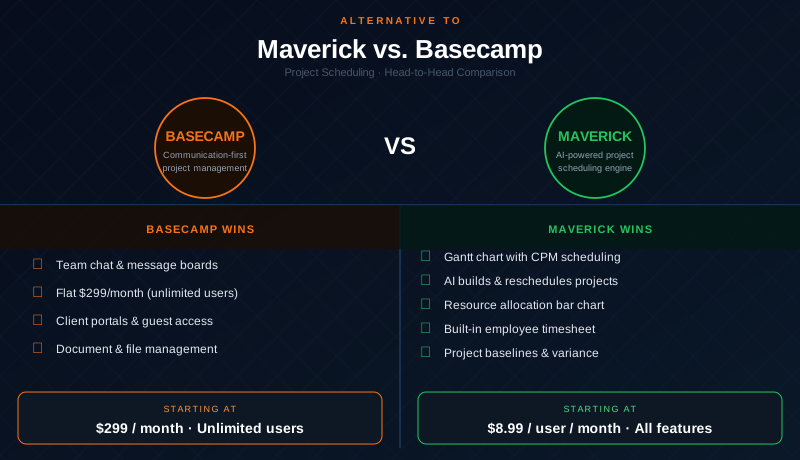
Basecamp has earned its place as one of the most respected names in team software. Its message boards, campfire chat, and straightforward to-do lists genuinely help remote teams stay organized and communicating. For agencies, creative studios, and service teams that need a shared workspace, Basecamp works well and has a flat-rate pricing model that becomes attractive as teams grow.
But Basecamp is not a project scheduling tool. There is no Gantt chart. There is no critical path engine. There are no task dependencies, no resource allocation, and no built-in timesheet. If your job is to deliver projects with defined timelines, dependent tasks, constrained resources, and executive accountability, Basecamp will leave you managing those things in spreadsheets alongside it. This comparison looks honestly at both platforms and identifies exactly where each one wins.
Quick Verdict
Basecamp is an excellent team workspace for communication, file sharing, and lightweight task coordination. It works well for teams whose primary challenge is staying aligned and communicating, not calculating delivery dates or managing resource constraints. For project managers who need to answer questions like "what is the critical path?" or "which resources are overloaded?" — Basecamp cannot help.
Maverick Project Scheduler is the right tool for teams that need to plan, schedule, and deliver projects with accountable dates. If your work involves task dependencies, resource loading, AI-assisted planning, and baseline variance tracking, Maverick is the stronger alternative to Basecamp.
Quick-Reference Comparison Table
The comparison above, summarized as a plain data table.
| Feature | Maverick | Basecamp |
|---|---|---|
| True Gantt chart with scheduling engine | ✓ | ✗ |
| Critical path calculation (CPM) | ✓ | ✗ |
| Task dependencies (FS, FF, SS, SF) with lag | ✓ | ✗ |
| Human, machine & materials resource types | ✓ | ✗ |
| Resource allocation bar chart | ✓ | ✗ |
| Built-in employee timesheet | ✓ | ✗ |
| AI builds and updates the project schedule | ✓ | AI writing only |
| Project baselines & variance tracking | ✓ | ✗ |
| Team chat, message boards & docs | Task comments | ✓ |
| Client portals & external guest access | ✗ | ✓ |
| Starting price per user / month | $8.99 (all features) | $299 flat / unlimited |
Feature Comparison at a Glance
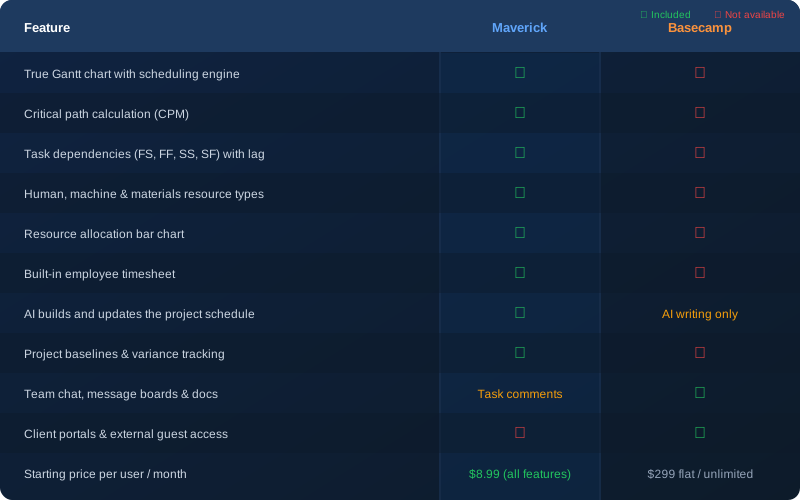
The table above tells the story clearly. Basecamp wins on team communication and client access. Maverick wins on every dimension of project scheduling — Gantt charts, critical path, resource management, timesheets, AI scheduling, and baseline tracking. The tools are built for different jobs.
Gantt Chart and Scheduling Engine
Maverick wins decisively here. Maverick's Gantt chart is connected to a real scheduling engine. When you build a project in Maverick, you define task durations, link tasks with dependency relationships, and assign resources. When one task changes, every dependent task shifts automatically. The plan stays internally consistent without manual intervention.
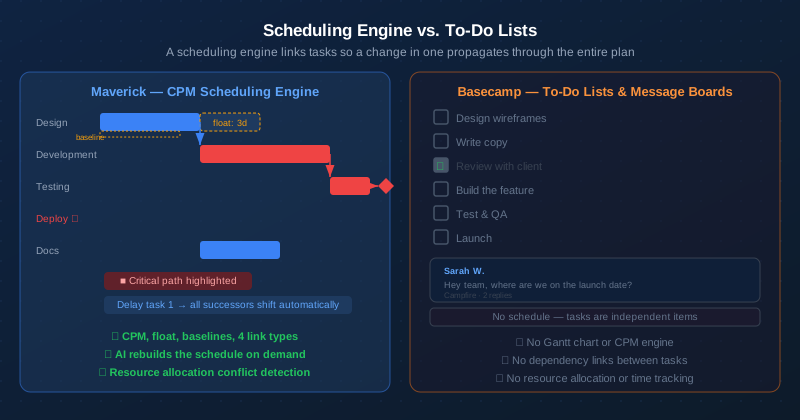
Basecamp does not have a Gantt chart. Its "Schedule" feature shows milestones plotted on a calendar, but it is not a scheduling engine in any meaningful sense. There are no task bars, no duration calculations, and no dependency relationships between to-do items. If a task slips, you update it manually. There is no cascade, no ripple effect, and no automatic recalculation of what comes next.
For a small team managing a handful of loosely related tasks, a to-do list works fine. For a team managing a software launch, a construction milestone, or a product rollout with 30 or 60 tasks that depend on each other — Basecamp's to-do approach requires constant manual coordination that a scheduling engine eliminates.
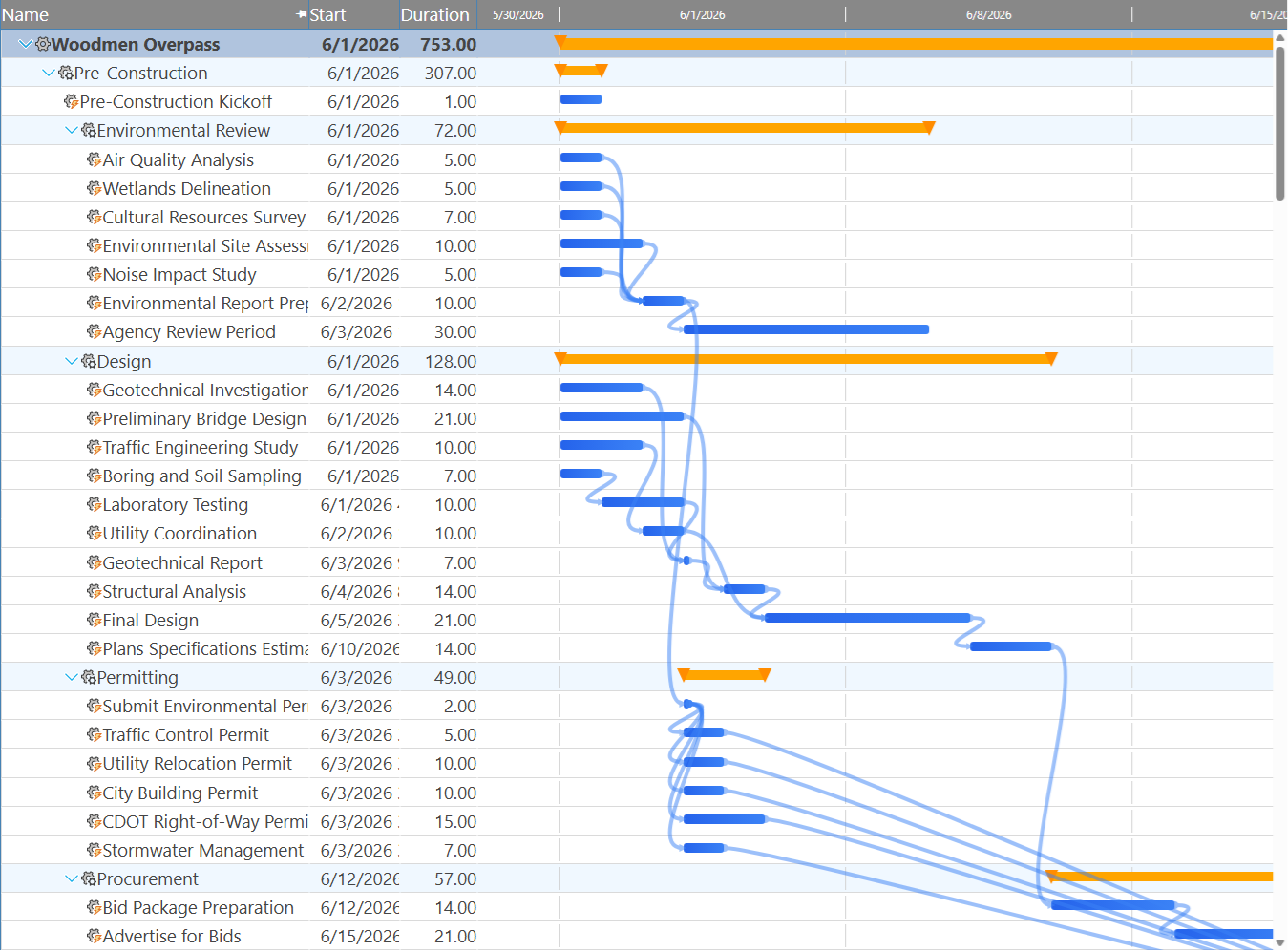
Maverick also supports four dependency link types — Finish-to-Start, Finish-to-Finish, Start-to-Start, and Start-to-Finish — with configurable lag days on every relationship. No other tool at Maverick's price point offers this level of scheduling fidelity.
Critical Path Analysis
Maverick wins. Basecamp does not offer this feature.
The critical path is the chain of tasks that determines when your project ends. Any delay to a critical task delays the entire project. Maverick calculates the critical path automatically using the Critical Path Method (CPM), highlights critical tasks in red on the Gantt chart, and displays total float for every non-critical task so you know exactly how much scheduling flexibility each task has.
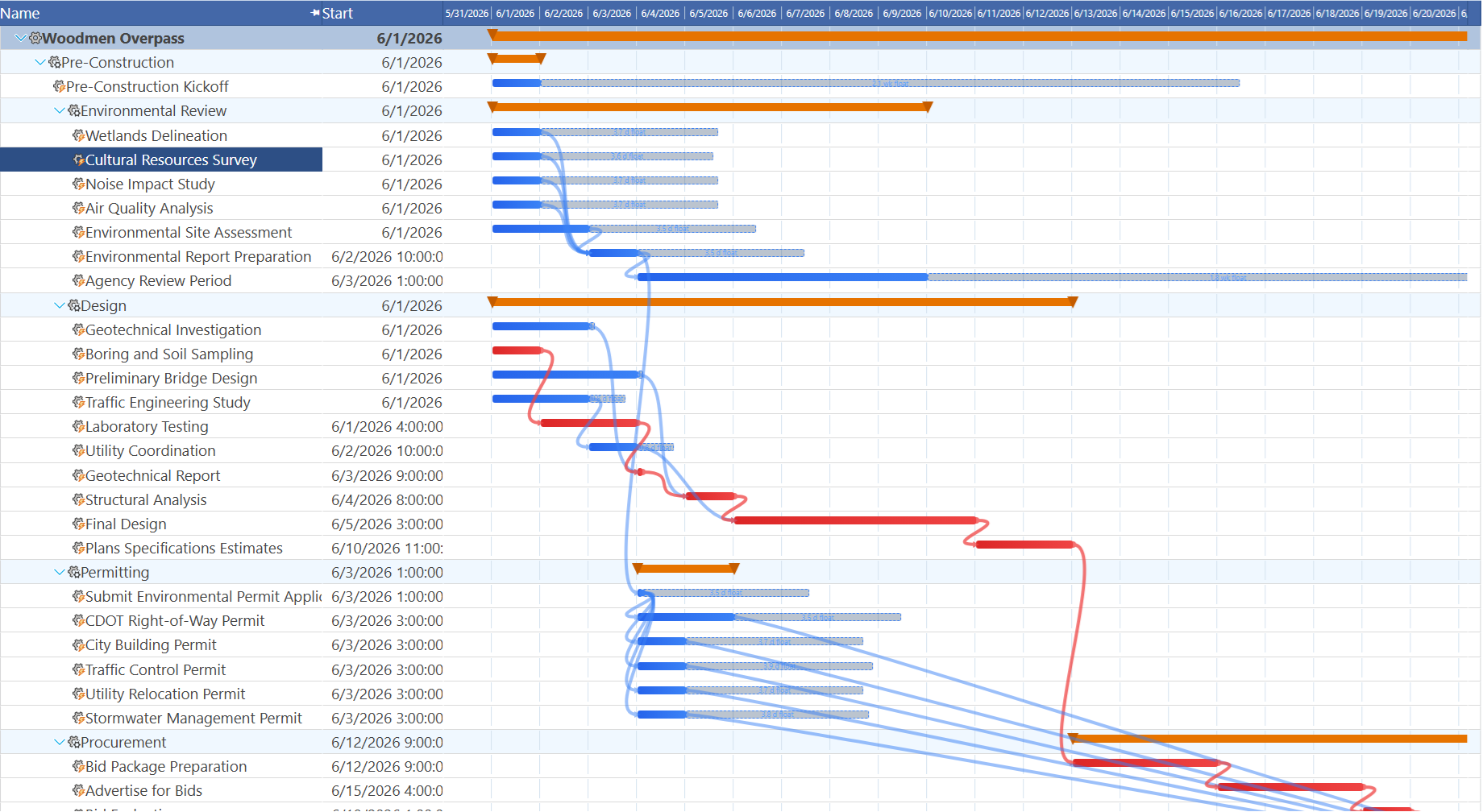
Basecamp has no concept of a critical path. There is no way to identify which tasks control the end date, no float calculation, and no automatic impact analysis when a task slips. Project managers who need to tell stakeholders "we are at risk of missing the deadline because this specific task is running late" cannot get that answer from Basecamp without doing the analysis themselves in a separate tool.
Resource Management
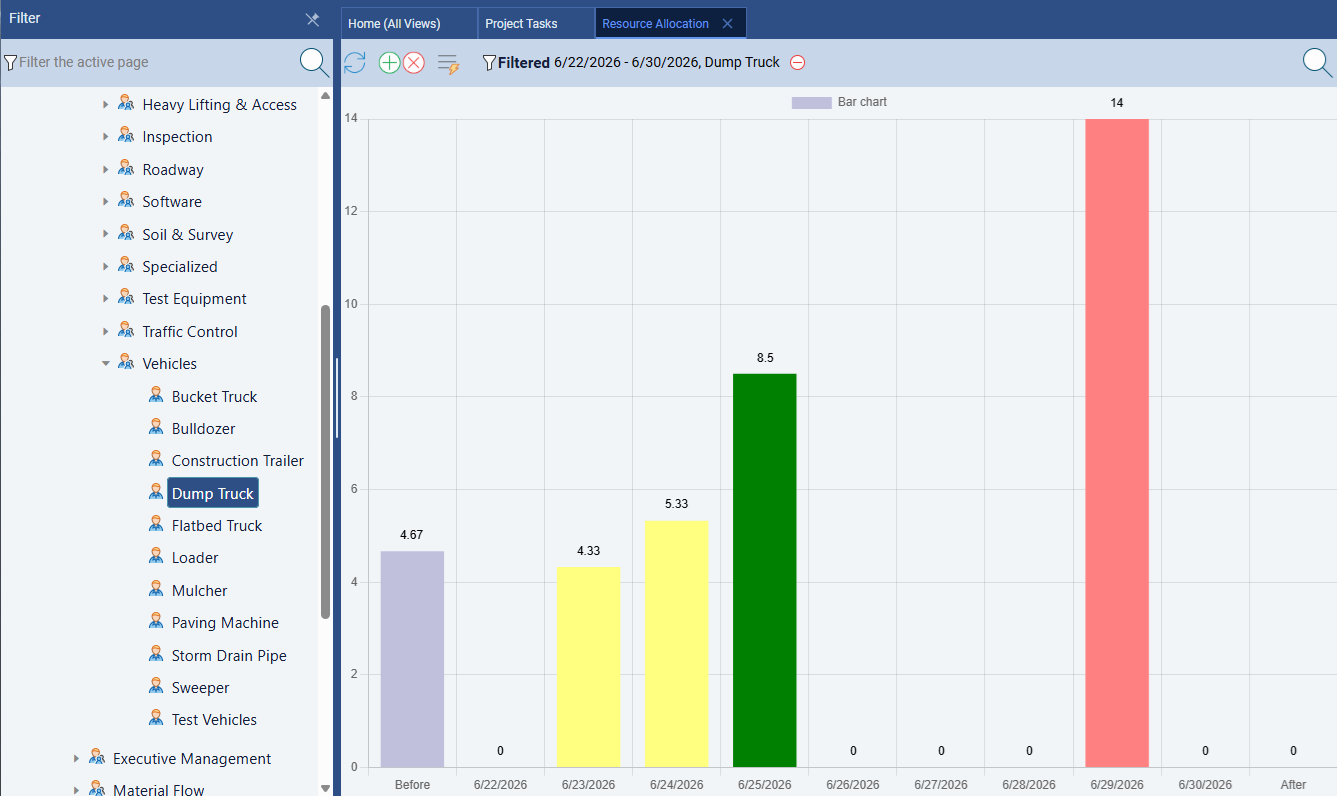
Maverick wins significantly. Maverick treats resource management as a first-class scheduling discipline. You define human, machine, and materials resources — each with their own working schedule, availability percentage, and billing rate. When you assign resources to tasks, Maverick tracks utilization across the project and surfaces conflicts before they become problems.
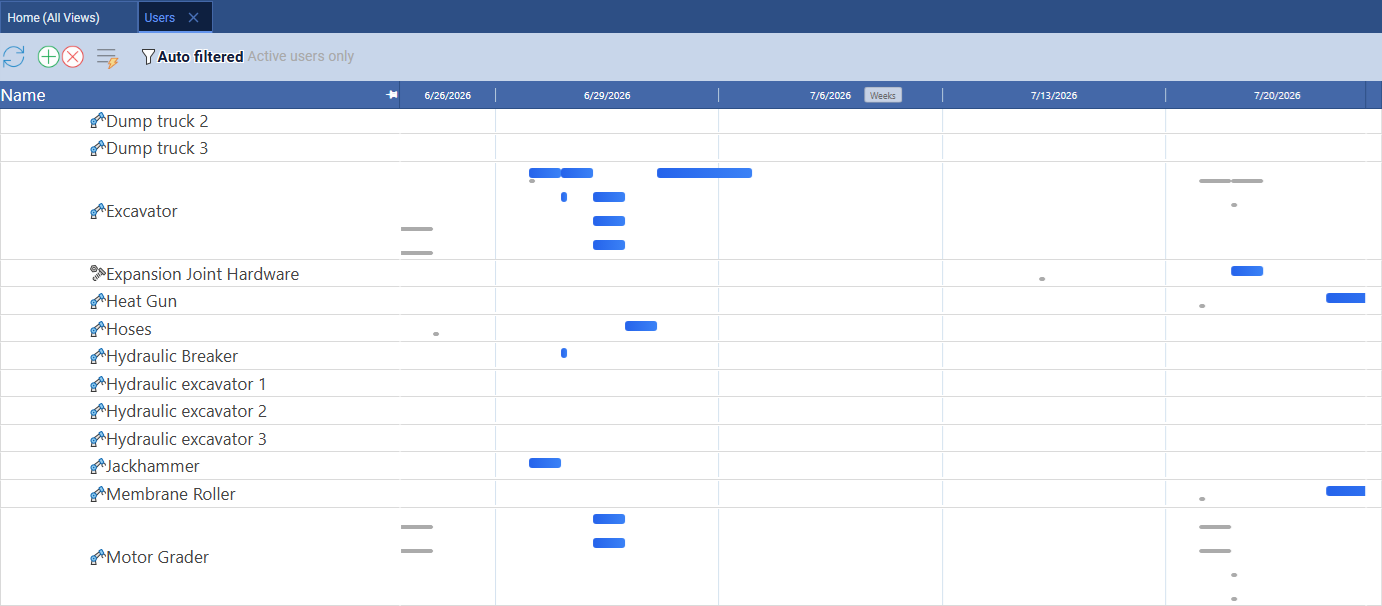
Maverick also provides a resource-centric Gantt on the Users page, where rows represent individual resources and each bar is a task assigned to that resource on a timeline. You can filter to equipment only and immediately see which machines are double-booked in the same week. This is a second angle on resource loading — timeline-based rather than percentage-based — that complements the allocation bar chart. Basecamp has no resource management of any kind, let alone a timeline view of resource assignments.
The resource allocation bar chart shows every resource's utilization by day, week, or month — color coded for correct allocation, over-allocation, and under-allocation. When a resource is overloaded, you see it immediately and can adjust assignments without guessing.
Basecamp has no resource management features. You can assign to-do items to people, and you can see what a person is assigned to, but there is no concept of utilization, no working hour schedules, no over-allocation detection, and no allocation bar chart. For teams where knowing who is overloaded matters — which is most project teams — this gap is significant.
AI Features
Maverick wins on project scheduling AI. Basecamp wins on AI writing assistance.
Basecamp includes AI-powered writing assistance in its message boards and to-do lists. You can ask Basecamp AI to summarize a thread, draft a message, or generate a to-do list from a prompt. For teams that spend a lot of time writing internal communications, this is a genuine productivity feature.
Maverick's AI operates at a different level. Instead of generating text, Maverick's AI reads your project — its tasks, dependencies, resources, and constraints — and builds or restructures the schedule in response to plain-language instructions. Tell the AI to reschedule everything after a delay, assign unassigned tasks to available resources, or build a new project from a description. The AI acts as a scheduling assistant, not a writing tool.
Maverick also supports per-employee AI provider and model configuration. A senior project manager can work with a premium model while other team members use a cost-effective one. Basecamp's AI is a single shared feature with no configuration at the user level.
Time Tracking and Timesheets
Maverick wins. Basecamp does not include time tracking.
Maverick includes a full employee timesheet as a built-in feature. Team members log hours against specific tasks and projects. Managers can filter timesheets by user, project, and date range to understand exactly where time is going. Actual hours feed back into cost calculations automatically, so your budget tracking stays current without extra data entry.
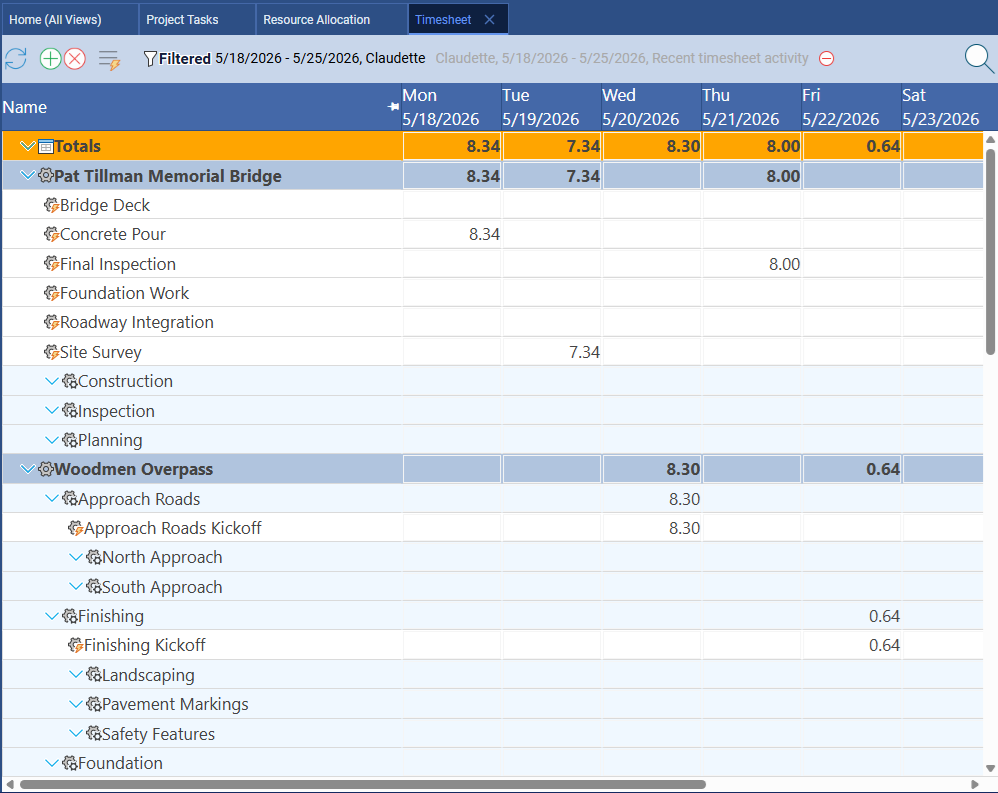
Basecamp does not include time tracking in any form. If you need to track hours against projects — for client billing, project cost management, or simple team visibility — you need a separate tool. The most commonly recommended Basecamp add-on for time tracking is Harvest, which adds subscription cost and requires your team to work across two separate systems.
Team Communication and Collaboration
Basecamp wins this category.
Basecamp was built around communication, and it shows. Message boards provide a structured alternative to email threads, with topics, reactions, and threaded replies. Campfire is a real-time group chat that keeps the whole team in one place. Automatic check-ins prompt team members with recurring questions ("What are you working on today?") on a schedule you define. Docs and files give teams a shared writing and storage space that everyone can access.
The sum of these features creates a genuinely pleasant remote team experience. Basecamp is opinionated about simplicity in a way that reduces tool sprawl. Many teams find that Basecamp's communication tools alone justify the subscription.
Maverick is focused on scheduling, not communication. Teams using Maverick for project scheduling typically also use Slack, Teams, or email for day-to-day communication. If your team's primary pain point is fragmented communication rather than scheduling discipline, Basecamp is the right tool. If you need both, the typical combination is a communication platform plus a scheduling tool — and Maverick fills the scheduling role that Basecamp cannot.
Client Access and Guest Portals
Basecamp wins this category.
Basecamp's Clientside feature is a standout: you can create a dedicated client-facing view where your clients see only what you want them to see — updates, files, feedback requests — without access to internal conversations. It is polished, easy to set up, and clients appreciate the professional presentation. For agencies and consulting firms that regularly involve clients in project updates, this is a genuine advantage.
Maverick does not offer a comparable client portal feature. External stakeholder access in Maverick is limited. If client-facing project communication is a core part of your workflow, Basecamp's Clientside feature is something Maverick does not match.
Pricing
Basecamp wins for larger teams. Maverick wins for smaller teams — and includes more for the price.
Basecamp charges $299 per month regardless of team size. That flat rate becomes a genuine value proposition as teams grow. A team of 50 people pays $299 per month on Basecamp versus $449.50 per month on Maverick at $8.99 per user. A team of 100 pays $299 versus $899. For organizations where a large proportion of staff only needs access to communication features, the math favors Basecamp.
For smaller teams — say, under 33 people — Maverick's per-user pricing comes out lower than Basecamp's flat rate. And every Maverick subscription includes AI scheduling, resource management, Gantt charts with CPM, timesheets, and baselines. Basecamp's $299 covers communication tools. The scheduling features Maverick includes would require multiple separate tools to replicate in a Basecamp-based workflow.
The real pricing question is not just dollars per seat. It is what you would need to buy alongside Basecamp to get the project scheduling features that Maverick includes natively — a Gantt and CPM tool, a resource management tool, a timesheet, a baseline tracker. When you add those costs, Maverick's all-in price is typically lower for project-focused teams regardless of size.
Final Verdict: Which Tool Should You Choose?
Basecamp is a well-designed team workspace. Its message boards, client portals, flat pricing, and straightforward to-do system make it a reasonable choice for agencies, creative teams, and remote-first organizations whose primary need is keeping people connected and communicating. If your team's work is mostly exploratory, collaborative, and communication-driven — and you rarely need to answer questions about deadlines, dependencies, or resource loading — Basecamp is a defensible choice.
But project scheduling is not what Basecamp was built for. If your team ships products on a timeline, manages contractors with specific availability, tracks budget actuals against estimates, or needs to tell a client when delivery will happen and why — Basecamp cannot give you those answers. You will end up maintaining a separate tool for the scheduling work Basecamp cannot do.
Maverick Project Scheduler was built specifically for this discipline. The CPM engine, resource allocation bar chart, AI scheduling assistant, built-in timesheet, and project baselines work together as a coherent system for managing and delivering projects. The result is a tool that answers the questions project managers actually need to answer — not just where the team is talking, but what is due, who is accountable, and whether you are on track.