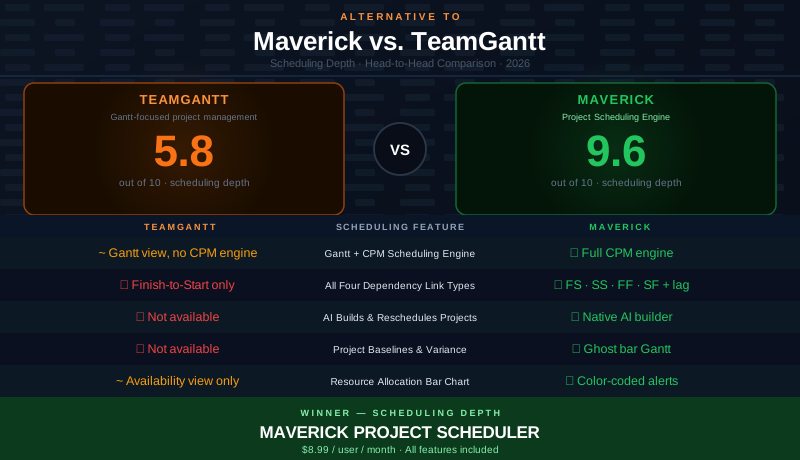
TeamGantt occupies an unusual position in the project management market. Unlike tools such as Asana, monday.com, or Basecamp — which added Gantt views to general-purpose work management platforms — TeamGantt was built specifically around the Gantt chart. Founded in 2009 with a deliberate focus on simplicity and visual project planning, it has earned a genuine following among project managers who want a clean, approachable Gantt tool without the complexity of enterprise scheduling software.
That shared focus on Gantt charts makes this comparison more nuanced than most. Both Maverick and TeamGantt put the Gantt chart at the center of the experience. The question is what sits behind the chart. A Gantt chart is a display mechanism. The scheduling depth — the dependency model, the analytical engine, the resource accounting — determines whether the chart is a living plan or a picture. This comparison examines that depth honestly, gives TeamGantt credit where it earns it, and lays out where Maverick's scheduling engine goes further.
Quick Verdict
TeamGantt is a genuinely well-made Gantt tool with an excellent user experience, smooth onboarding, and solid collaboration features. For small teams or individuals who need a friendly visual planning tool with basic task dependencies, it delivers well within its design intent.
But TeamGantt's Gantt chart is not backed by a scheduling engine. There is no Critical Path Method calculation, no critical path highlighting, no float analysis, and no support for three of the four standard dependency link types. There is no AI scheduling. There are no project baselines. For project managers who need more than a visual calendar — who need a plan that responds analytically to changes, identifies schedule risk, and accounts for resource constraints — those gaps are significant.
If your work demands that level of scheduling discipline, Maverick is the stronger TeamGantt alternative for project scheduling.
Quick-Reference Comparison Table
The comparison above, summarized as a plain data table.
| Feature | Maverick | TeamGantt |
|---|---|---|
| Gantt + CPM Scheduling Engine | ✓ Full CPM engine | ~ Gantt view — no CPM engine |
| All Four Dependency Link Types | ✓ FS · SS · FF · SF + configurable lag | ✗ FS only · no lag |
| Critical Path Method (CPM) | ✓ Auto-calculated · float per task | ✗ Not available |
| AI Builds & Reschedules Projects | ✓ Native AI builder | ✗ No AI features |
| Resource Allocation Bar Chart | ✓ Color-coded utilization | ~ Availability view only |
| Project Baselines & Variance Tracking | ✓ Ghost bar Gantt | ✗ Not available |
| Built-in Employee Timesheet | ✓ Full reporting, all plans | ~ Basic time logging only |
| Ease of Use & Onboarding | ~ Purpose-built for PM discipline | ✓ Intuitive, fast onboarding |
Feature Comparison at a Glance
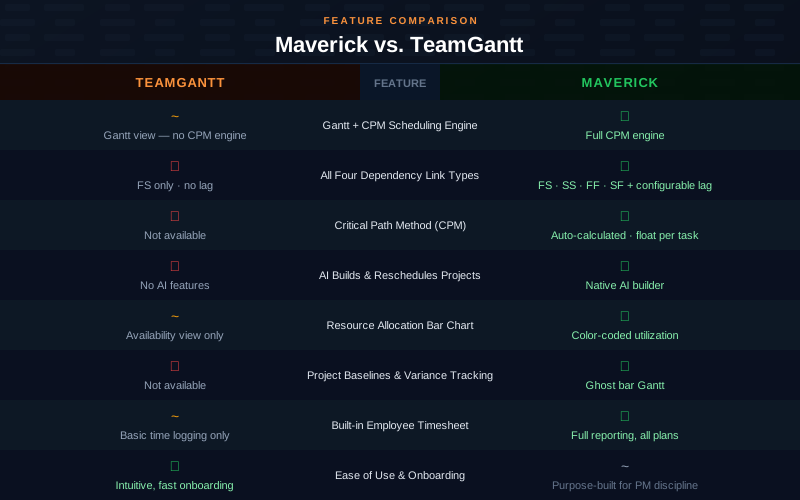
The pattern that emerges from the table is consistent with what separates the two tools at a fundamental level. TeamGantt wins on ease of use and onboarding — it is a genuinely approachable tool and earns that recognition. Maverick wins every scheduling-specific category: CPM, dependency depth, critical path analysis, AI scheduling, resource allocation, baselines, and integrated timesheets. These are not minor feature gaps; they reflect a difference in what the two tools were designed to do.
Gantt Chart and Scheduling Engine
Maverick wins clearly here. TeamGantt's Gantt chart is clean, well-designed, and pleasant to work with. Drag-and-drop task management is smooth. The visual presentation is among the clearest in the Gantt tool market. But the chart is not connected to a scheduling engine in the way that professional project scheduling requires.
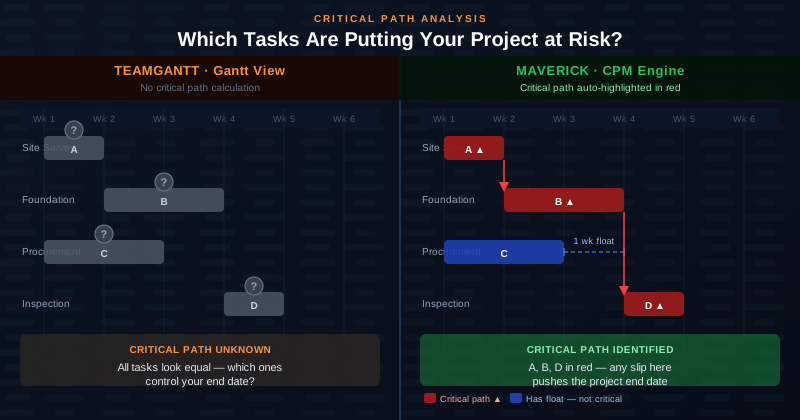
The critical distinction is what the chart can tell you analytically. TeamGantt shows you where tasks are scheduled. It cannot tell you which tasks, if delayed by even a single day, will push your project end date. It cannot calculate float — the scheduling slack that tells you how much each non-critical task can slip before it becomes critical. It cannot automatically identify the chain of tasks that controls your delivery date.
Maverick's Gantt chart is backed by the Critical Path Method, the same scheduling discipline used in construction, aerospace, and engineering project management for decades. The CPM engine runs continuously behind every task bar. When you look at the Gantt chart in Maverick, critical tasks are highlighted in red automatically. Non-critical tasks show their float. You always know where your schedule risk is — not because you calculated it manually, but because the engine calculated it for you.
Dependency Types: Four vs. One
Maverick wins decisively. This is the sharpest technical differentiator between the two tools.
TeamGantt supports one dependency type: Finish-to-Start. Task B cannot start until Task A finishes. For many simple projects, Finish-to-Start is sufficient. But real-world projects frequently require relationships that FS cannot model: two tasks that must start at the same time, two tasks that must finish together, or the rare but legitimate case where a successor must finish before a predecessor begins. TeamGantt cannot express any of these relationships, and it does not support lag days on the dependency it does have.
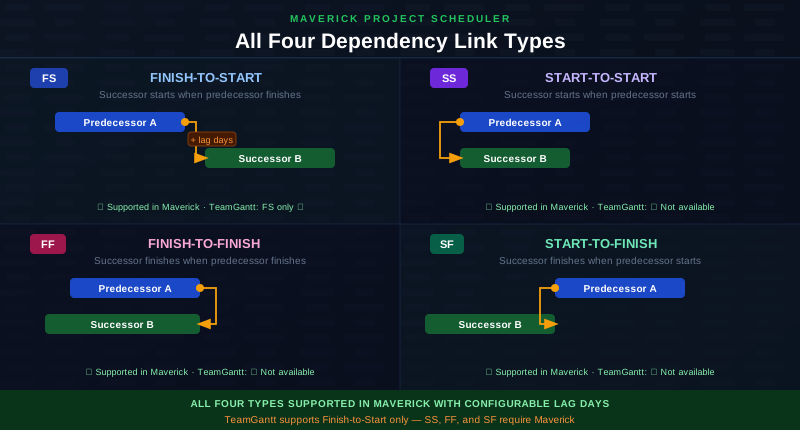
Maverick supports all four standard dependency types — Finish-to-Start, Start-to-Start, Finish-to-Finish, and Start-to-Finish — with configurable lag days on every relationship. The difference is not academic. A construction project where concrete pours and curing must overlap requires Start-to-Start. A regulatory review that must finish before a parallel documentation task closes requires Finish-to-Finish. Maverick can model these constraints precisely; TeamGantt cannot.
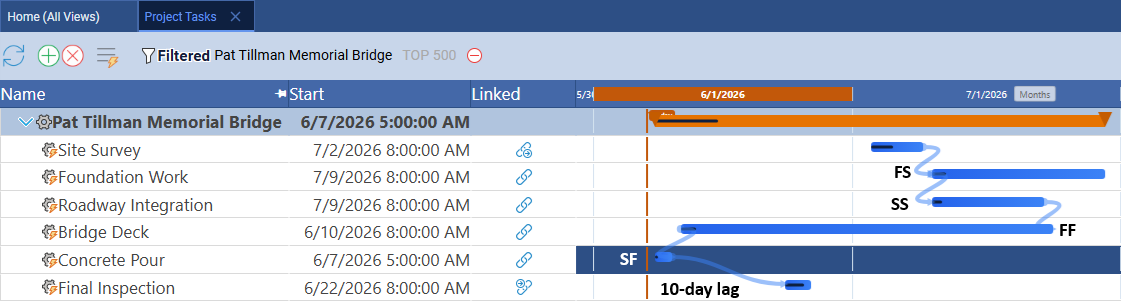
The screenshot above shows all four link types in a live Maverick project — each relationship clearly labeled, with a 10-day lag applied to the Start-to-Finish dependency on the Final Inspection task. TeamGantt's dependency model ends where Maverick's begins.
Critical Path Analysis
Maverick wins. TeamGantt does not offer this feature.
The critical path is the sequence of tasks that determines when your project ends. Any task on the critical path, if delayed, delays the entire project. Tasks not on the critical path have float — a buffer of scheduling flexibility before they become critical. Knowing which tasks are critical and how much float each non-critical task has is fundamental to managing project risk and prioritizing attention.
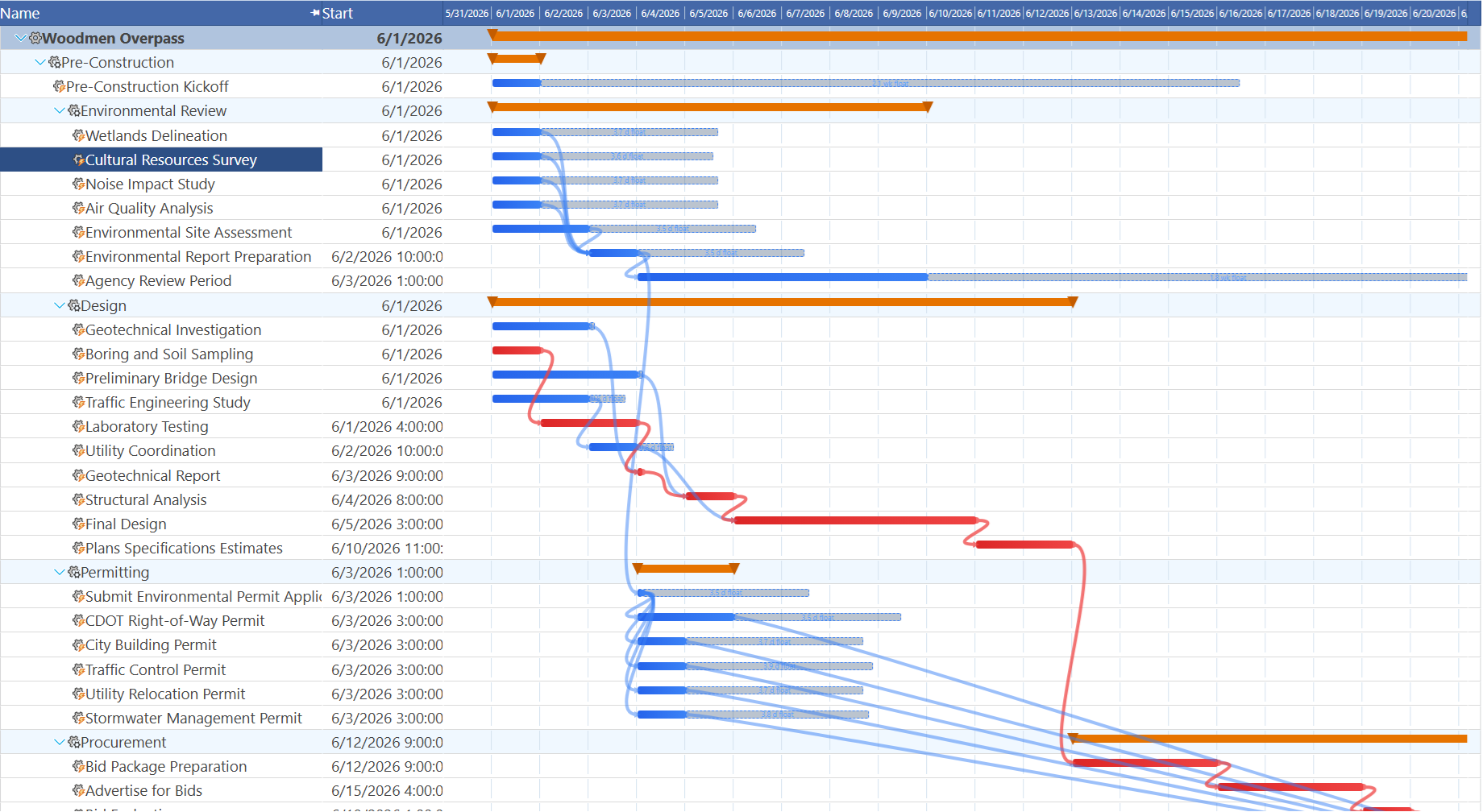
Maverick calculates the critical path continuously and displays it automatically on the Gantt chart. Critical tasks turn red. Float values appear alongside non-critical tasks. You can answer immediately — without any manual calculation — which tasks cannot slip, which ones have a week's flexibility, and where to focus when a problem emerges.
TeamGantt shows task bars on a calendar. It does not calculate the critical path, does not display float, and provides no automated analysis of where schedule risk lives. For project managers who are accountable for delivering on time and need to explain schedule risk to stakeholders, this is a meaningful gap. Maverick provides that analysis as a standard feature on every plan.
Resource Management
Maverick wins significantly. TeamGantt includes a workload view that shows tasks assigned per person over a time range. It is useful for spotting obvious overload at a glance and can help prevent assigning a team member to ten tasks in the same week. For teams with straightforward workloads and a single resource type, it provides a functional overview.
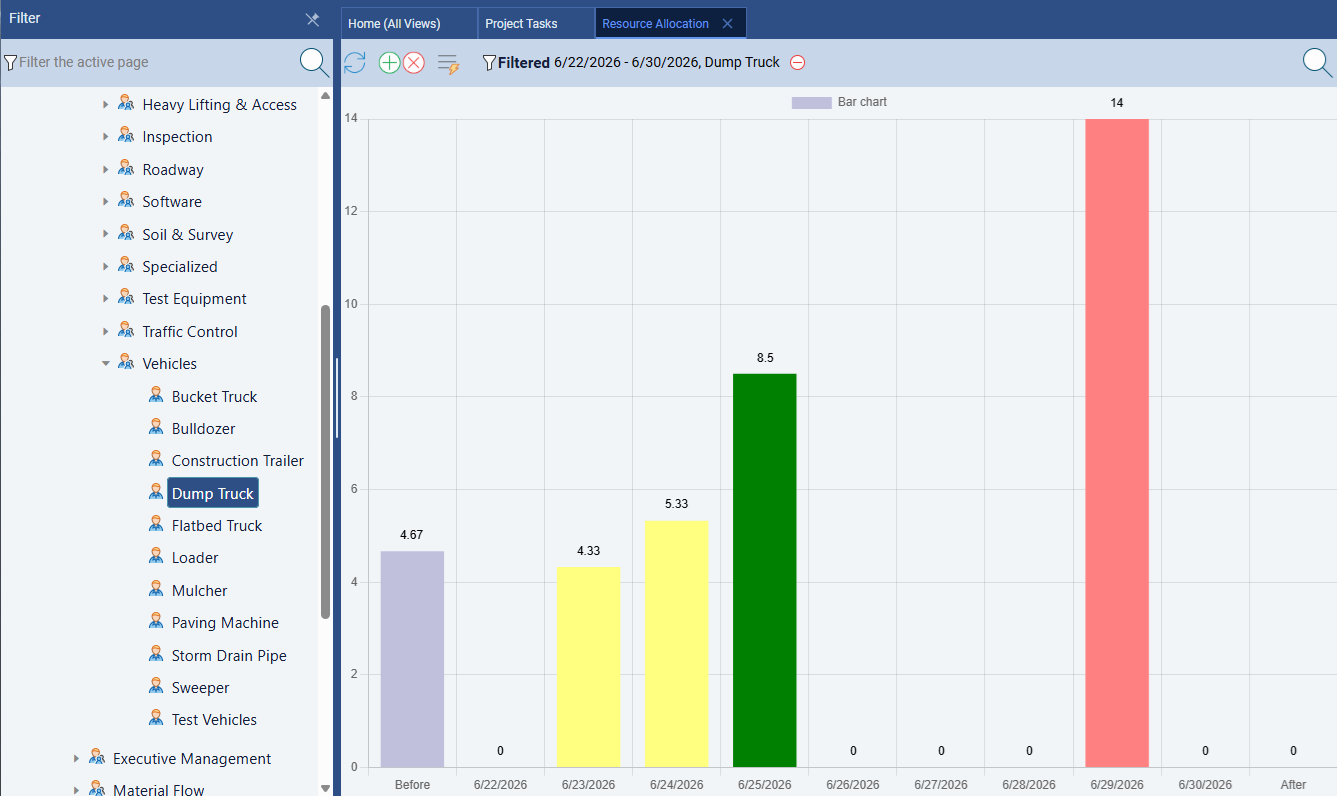
Maverick also provides a second Gantt view called the resource-centric Gantt. On the Users page, rows represent resources rather than project tasks — every task assigned to a resource appears as a bar on that resource's timeline row. Filtering to equipment only reveals which machines are double-booked and which are sitting idle. An overloaded dump truck with two overlapping tasks in the same week shows up as overlapping bars, confirming the conflict before it becomes a field problem. TeamGantt has no equivalent view and does not support non-human resources at all.
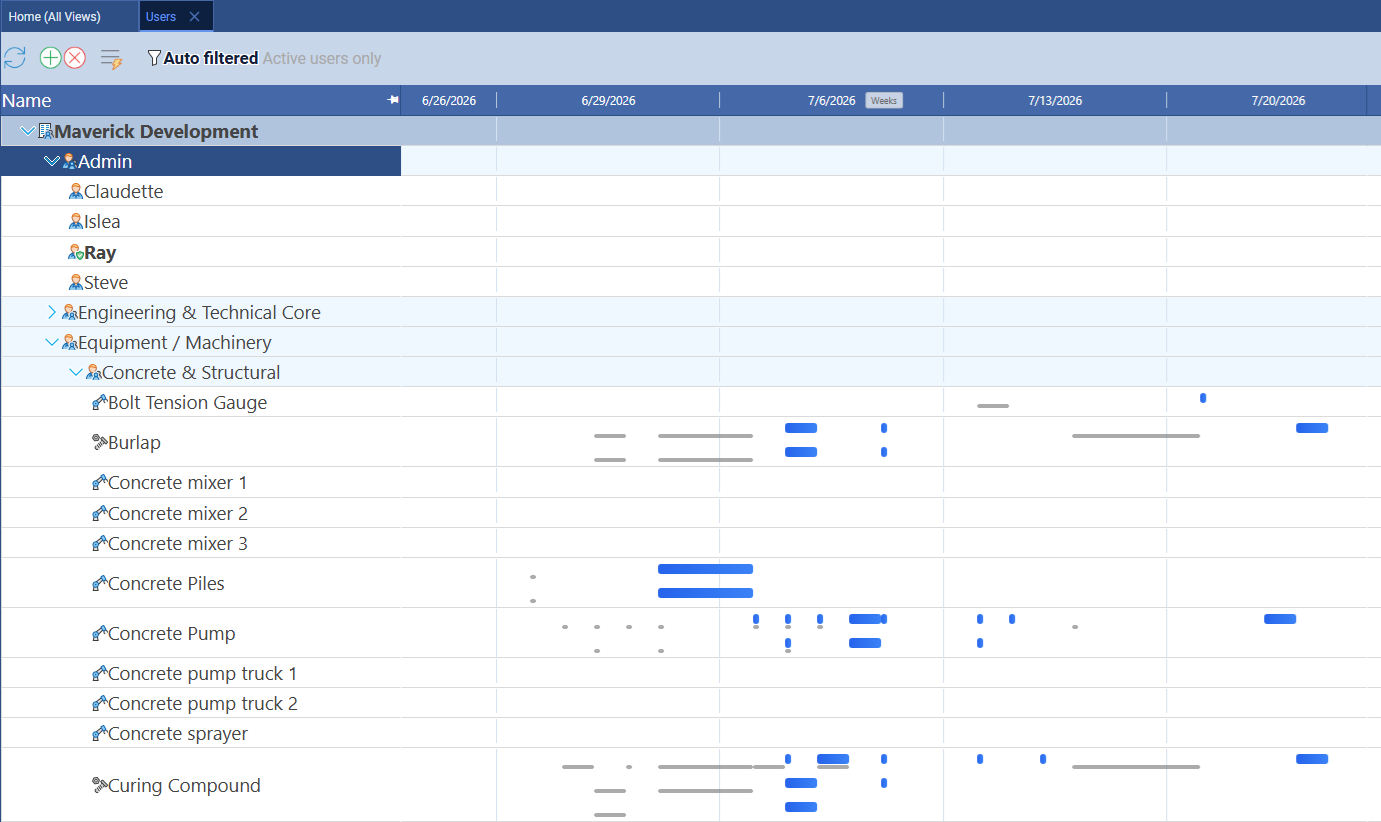
Maverick's resource management operates at a different level of precision. Every resource — human, machine, or materials — has a defined schedule and working hour profile. Task assignments carry utilization percentages or hours-per-day values. The resource allocation bar chart uses color-coded columns to show the state of every resource across any time range: green for correctly loaded, amber for under-allocated, red for over-allocated. You can see at a glance whether your team is available, stretched, or sitting idle.
TeamGantt does not support non-human resources, does not model resource-specific working schedules, and does not calculate utilization percentages by hours. Maverick's resource allocation chart gives project managers the quantitative visibility that TeamGantt's workload view cannot match. For projects where equipment, materials, or part-time contractors need to be tracked alongside staff, the gap is especially significant.
AI Scheduling
Maverick wins. TeamGantt has no AI features.
TeamGantt does not offer AI capabilities of any kind — no AI-assisted scheduling, no plan generation from natural language, no risk analysis. This is not a criticism of TeamGantt's design philosophy; the tool was built for simplicity and visual clarity, and AI scheduling is a genuinely recent capability. But for project managers evaluating tools in 2026, the absence is worth noting.
Maverick's AI reads your project — its tasks, dependencies, resource assignments, and constraints — and acts as a scheduling assistant that can build or restructure the plan in response to plain-English instructions. You can describe a new project and have a structured schedule with dependencies and resource assignments generated in seconds. You can ask the AI to reschedule everything after a delay, identify tasks that have no resource assigned, or analyze the current plan for risks. The AI produces scheduling decisions, not summaries of decisions you already made.
Maverick also supports per-employee AI model assignment, so organizations can give power users access to a premium model while the broader team uses a cost-efficient one. This flexibility is not available in tools that treat AI as a single centralized capability.
Project Baselines and Variance Tracking
Maverick wins. TeamGantt does not offer project baselines.
A project baseline is a snapshot of the approved plan at kickoff — the dates, durations, and resource assignments as agreed before work begins. As the project progresses, you compare actual performance against the baseline to understand schedule variance: how far ahead or behind are you, and why? Baseline comparison is a standard requirement for stakeholder reporting in construction, IT delivery, product development, and professional services.
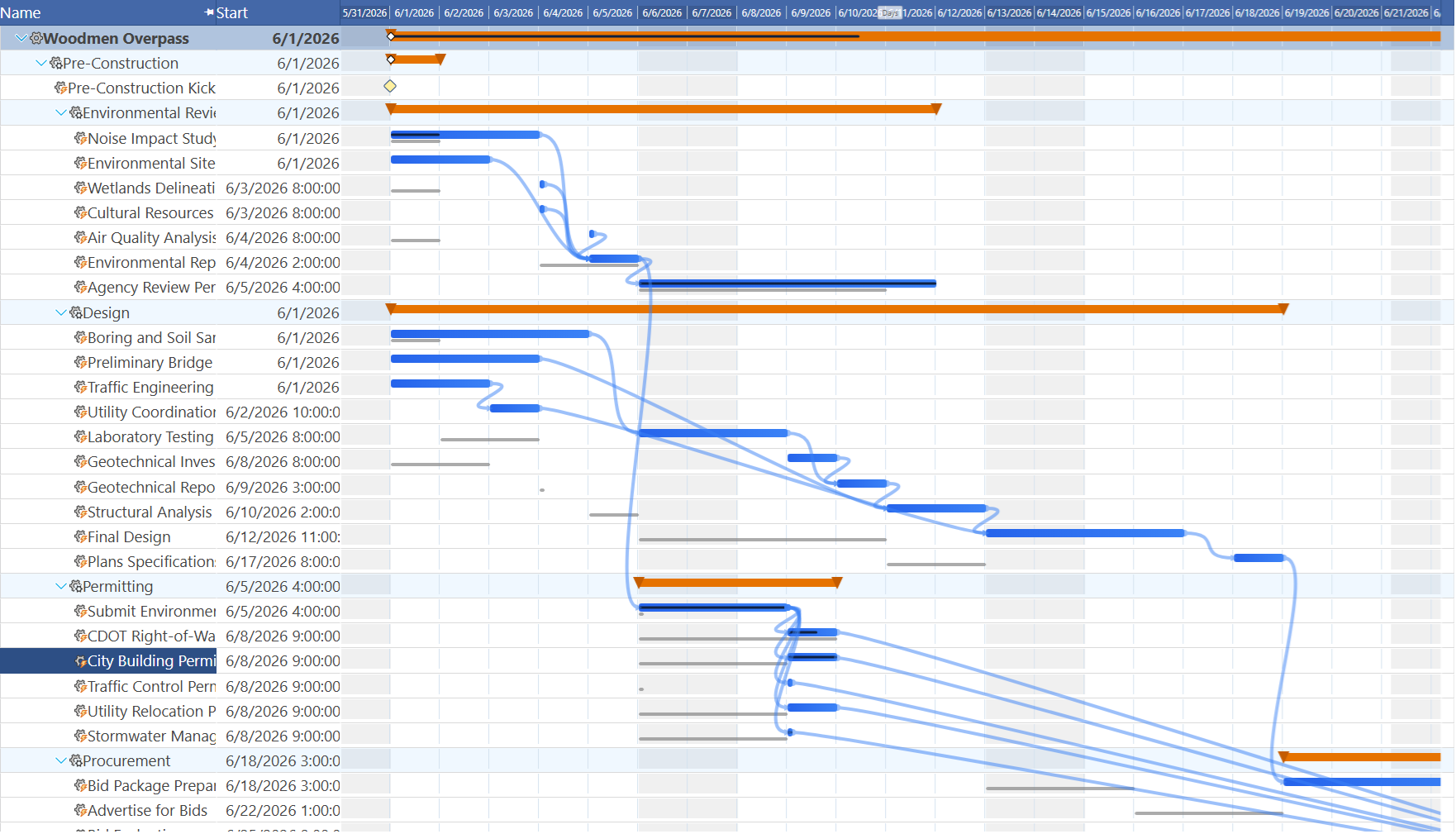
Maverick stores baselines natively and displays ghost bars on the Gantt chart — transparent bars showing the original planned position of each task alongside the current scheduled bar. The comparison is always visible. You can see immediately whether the project is running to plan or drifting, and explain variance to stakeholders in seconds.
TeamGantt has no baseline feature. Once you update a task's dates, the original planned dates are gone. If a stakeholder asks how the current schedule compares to the plan agreed at kickoff, you have no way to answer inside TeamGantt. For project managers who are accountable for explaining schedule performance — not just tracking current state — this is a fundamental gap that Maverick fills directly.
Time Tracking and Timesheets
Maverick wins for integrated project time tracking. TeamGantt includes a basic time logging capability where team members can log hours against tasks. For simple use cases — recording that you spent three hours on a task today — it covers the basics.
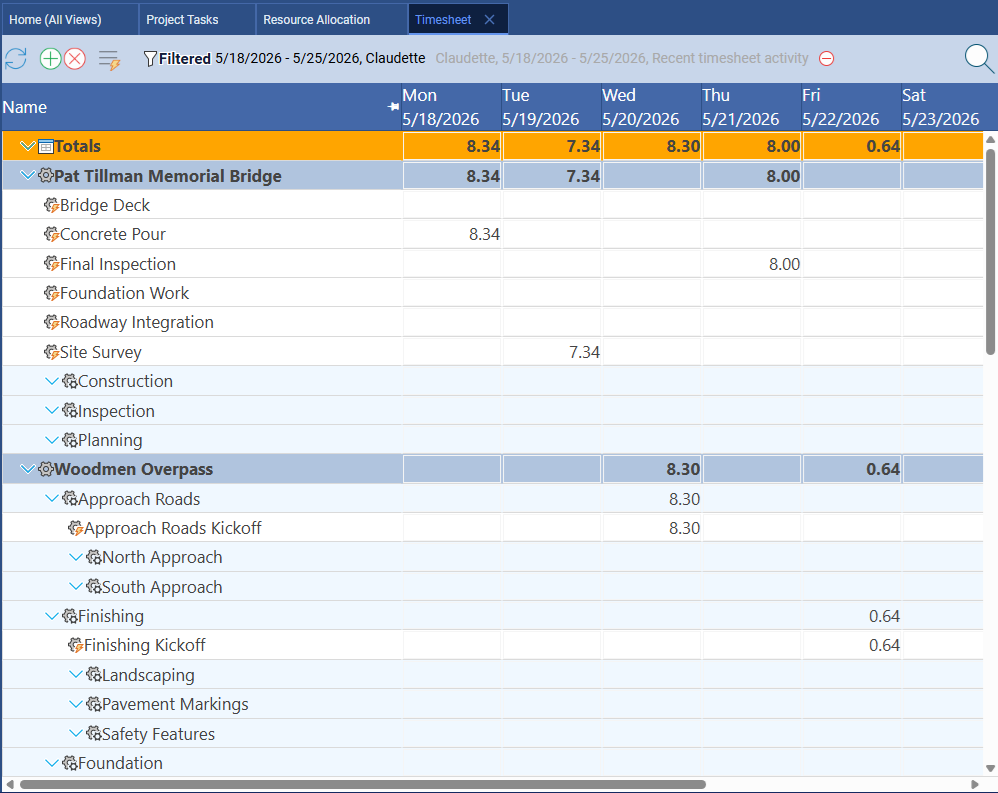
Maverick's built-in timesheet is a full employee timesheet integrated directly with the project schedule. Team members log actual hours against specific tasks. Managers filter timesheets by user, project, or date range to see exactly where time is going across the team. Actual hours feed into cost calculations and project reporting automatically. The timesheet is available on all plans with no additional configuration, and it connects directly to resource allocation data so planned versus actual utilization is always calculable.
TeamGantt's time tracking lacks the reporting depth and integration with project cost calculations that professional project accounting requires. For organizations that bill against projects, track labor cost to budget, or report on team utilization to management, Maverick's timesheet provides the depth that TeamGantt's basic logging does not.
Ease of Use and Onboarding
TeamGantt wins this category.
TeamGantt is one of the most approachable Gantt tools available. The interface is clean, uncluttered, and designed with new users in mind. Creating a project, adding tasks, setting dates, and linking them with basic Finish-to-Start dependencies takes minutes, not hours. The drag-and-drop interactions are polished, the visual design is pleasant, and there is no steep learning curve before a new user feels productive.
Maverick is purpose-built for the project scheduling discipline, which means its feature set reflects the complexity of that discipline. CPM scheduling, four dependency types, resource allocation charts, and AI scheduling are powerful capabilities — but they carry a learning investment that TeamGantt's simpler approach does not require. For users who are new to structured project scheduling or who manage small, straightforward projects, TeamGantt's simplicity is a genuine advantage. Maverick rewards users who invest in understanding its scheduling model, but the initial setup has more depth than TeamGantt's quick-start experience.
Collaboration and Guest Access
TeamGantt wins this category.
TeamGantt has invested consistently in collaboration features: per-task comment threads, file attachments, @mention notifications, and guest access that allows clients or external stakeholders to view a project at no additional cost. For teams that manage client-facing projects where visibility sharing is a frequent workflow, TeamGantt's guest access model is genuinely convenient. Project discussions stay attached to the tasks they relate to rather than drifting into disconnected email threads.
Maverick's collaboration approach is focused on the scheduling workflow: multi-user access to projects, shared resource pools, and permission controls. It does not offer the per-task comment threads and client-facing guest portal that TeamGantt provides. If rich in-tool collaboration and frictionless client sharing are central requirements alongside Gantt scheduling, TeamGantt's strength in this area is worth weighing honestly.
Pricing
Maverick delivers more scheduling depth at a substantially lower cost for most teams.
TeamGantt uses a per-manager pricing model rather than a per-user model. A "manager" in TeamGantt terminology is any person who needs edit access to projects. Viewers — people who can see projects but not make changes — are free. TeamGantt's Lite plan runs $19 per manager per month; the Pro plan, which adds resource management and more advanced features, runs $49 per manager per month on monthly billing.
The per-manager model is cost-efficient for teams where only one person manages projects and others are passive viewers. For organizations where multiple project managers all need full edit access — which describes most professional project environments — the math shifts significantly. A team of five project managers on TeamGantt Pro pays 5 × $49 = $245 per month. The same team on Maverick pays 5 × $8.99 = $44.95 per month, with all features included: CPM scheduling, AI, resource allocation, baselines, timesheets, and four dependency types.
TeamGantt's free plan — one manager, three projects — is a genuine option for freelancers or individual project managers testing the tool. Maverick does not offer a permanent free tier but provides a full-featured free trial so you can test the CPM engine, AI scheduling, and resource tools before committing.
Final Verdict: Which Tool Should You Choose?
TeamGantt is a well-executed Gantt tool that earns its reputation for simplicity and user experience. For individuals, freelancers, or small teams who need a friendly visual planner with basic Finish-to-Start dependencies and clean collaboration tools, it delivers exactly what it promises. The guest access model and polished onboarding make it particularly well-suited for client-facing work where stakeholder visibility matters as much as scheduling precision.
But the shared focus on Gantt charts should not obscure the fundamental difference in what sits behind them. TeamGantt's Gantt chart is a visual calendar with basic task links. Maverick's Gantt chart is driven by a CPM scheduling engine that calculates the critical path, computes float for every task, cascades dependency changes automatically, and supports all four standard link types with configurable lag. The tools use the same visual metaphor to solve different levels of the project scheduling problem.
For project managers who are accountable for delivering projects on defined timelines — who need to know which tasks are critical, identify resource overload before it becomes a crisis, compare actuals against the baseline at any point in the project, and build plans with the full range of dependency relationships that real-world work requires — Maverick provides the scheduling depth that TeamGantt was not designed to deliver.