AI Setup
Every AI Model Property, Explained
AI models sit beneath provider records and inherit their connection settings by default. Each model record lets you pin a specific model version, tune its behavior with a system prompt and sampling parameters, and override any provider credential when a model needs its own account or endpoint.
Try It FreeWhat Are AI Providers and Models?
Maverick organizes AI services in a two-level hierarchy — providers at the top, models beneath them.
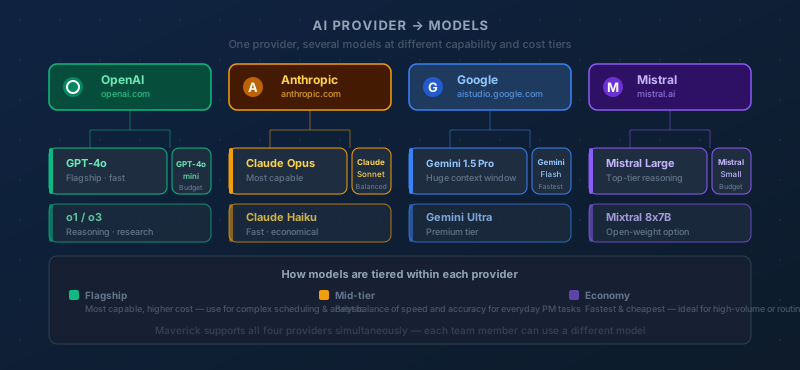
An AI provider is the company or service that operates the AI infrastructure — OpenAI, Anthropic, Google, Microsoft Azure, or an organization running its own local models with Ollama. The provider record holds the shared connection details: authentication credentials, the API endpoint, and the API version.
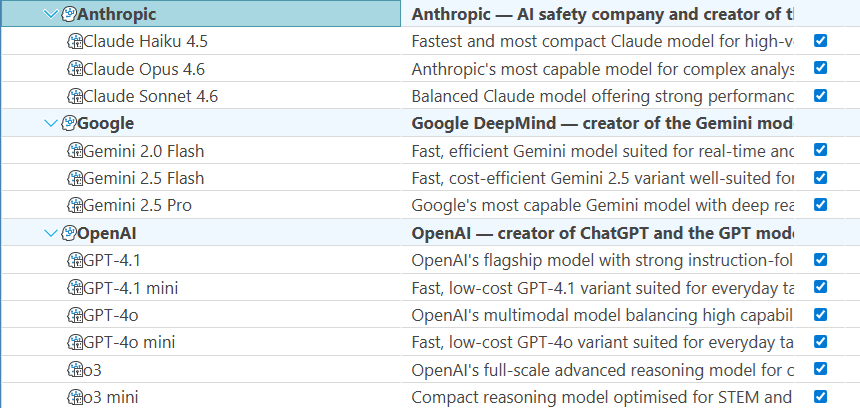
An AI model is a specific version of a language model offered by that provider — GPT-4o from OpenAI, Claude Sonnet 4.6 from Anthropic, or Gemini 2.0 Flash from Google. The model record sits beneath a provider and inherits all of that provider's connection settings by default. When a model needs different settings — a different billing account, a dedicated endpoint, a custom system prompt — you configure those differences on the model record without touching the provider or any sibling models.
This page covers every property on an AI model record. For the provider-level settings that model records inherit by default, see the companion reference:
Identity & Organization
These properties control how the model appears in the Maverick interface and whether it is available for use.
Name
The display name shown in dropdown menus and resource configuration panels when a user or administrator selects an AI model. The name is a UI label only — it has no effect on which model the API call reaches. Choose names that are self-explanatory at a glance: "Claude Sonnet 4.6 — Engineering" communicates more than "Model 1" when an administrator is scanning a list of dozens of model records. Including the provider and intended audience in the name eliminates guesswork.
Description
A freeform text field for administrative notes, visible only in the model configuration panel — never shown to end users. Use the description to document who this model is configured for, what tasks it is best suited to, when the credentials were last updated, or any usage policies the team should follow. A good description answers the question a new administrator will ask six months from now: "What is this model record for, and should I change it?"
Active
A yes/no toggle that controls whether this model is available for selection in Maverick. When a model is inactive, it disappears from user-facing dropdowns and cannot be assigned to resources or projects. The full configuration — model name, system prompt, credentials — is preserved exactly as it was, making reactivation a single click. Use the Active flag to take a model out of rotation temporarily during a key rotation, a usage review, or a model version upgrade, rather than deleting and recreating the record.
Provider & Model Identity
These properties establish which AI service this model belongs to and which specific version Maverick should request when routing AI calls.
Provider
The AI provider record this model belongs to. Every model must be linked to exactly one provider, which supplies the default connection settings — base URL, API key, API secret, and API version. When Maverick sends an AI request, it looks up the model's provider to determine where to send the request and how to authenticate it. Changing the provider reassigns the model to a different service's infrastructure, so all connection defaults change with it.
Model Name
The exact string identifier the AI provider uses to route your request to a specific model version. This is not a display label — it must match precisely what the provider's API expects, character for character. Using the wrong model name results in an API error or silently falls back to a default that may not be what you intended.
Examples by provider:
- OpenAI:
gpt-4o,gpt-4.1,o4-mini - Anthropic:
claude-sonnet-4-6,claude-opus-4-7,claude-haiku-4-5-20251001 - Google:
gemini-1.5-pro,gemini-2.0-flash - Ollama:
llama3.2,mistral
Always copy the model name directly from the provider's official documentation or API reference rather than typing it from memory.
Deployment Name
The name of the specific model deployment in Azure OpenAI Service. When you provision an OpenAI model inside Azure, you assign it a custom deployment name — a label you choose, such as "maverick-gpt4o-prod" or "team-claude". Azure's API routes requests using this deployment name rather than the underlying model identifier. Requests sent with the wrong deployment name fail with a 404.
This field is required when the parent provider is Azure OpenAI. For all other provider types — OpenAI, Anthropic, Google, Ollama, and Custom — leave this field blank. Those providers route by model name directly and do not use the deployment name concept.
Credential Overrides
AI models inherit authentication and connection settings from their parent provider by default. Fill in any of these fields only when this specific model needs to use different credentials or a different endpoint than the rest of the provider's models.
API Key
Overrides the parent provider's API key for this model only. When this field is blank, Maverick authenticates requests to this model using the provider-level API key — the standard case for most configurations. Fill it in when this particular model should bill against a different account, when a specific team has its own quota with the provider, or when you are rotating credentials for one model without disrupting others.
The override applies only to requests routed through this model record. Every other model under the same provider continues using the provider-level key unaffected.
API Secret
Overrides the parent provider's API secret for this model only. Most providers authenticate with an API key alone, so this field remains blank in the majority of configurations. It becomes relevant for Azure OpenAI deployments or custom provider setups that use a two-credential scheme. Like the API key override, filling in a model-level API secret affects only requests routed through this model — the provider record and all other models under it are unchanged.
Base URL
Overrides the parent provider's API endpoint for this model only. When blank, Maverick sends requests to the URL configured on the provider record — which is the correct behavior for models that share an endpoint. Override the base URL when a specific model lives on a different server: a fine-tuned model on a dedicated inference endpoint, a canary deployment being tested in a staging environment, or a model routed through a cost-tracking proxy while others go direct. The override is scoped to this model record; all siblings continue using the provider's base URL.
Model Behavior
These properties shape what the model says and how it generates responses. They are the primary levers for tuning a model's output to match the specific role and quality bar you need.
System Prompt
A block of instructions sent to the model at the beginning of every conversation, before any user message. The system prompt is invisible to end users but shapes every response they receive — it establishes the model's persona, sets behavioral boundaries, provides context about the organization, and specifies the format and tone of responses.
A well-written system prompt is the single most impactful configuration choice for a model record. Examples:
- "You are a project management assistant for Maverick. Help users analyze schedules, flag risks, and suggest task updates. Be concise and professional. Never discuss topics outside project management."
- "You are assisting a construction company. When responding about tasks, always check resource availability and task dependencies before suggesting changes. Use industry-standard terminology."
Different model records can carry different system prompts — a model assigned to executives might emphasize high-level summaries, while one assigned to schedulers might prioritize date and dependency precision.
Temperature
A sampling parameter, typically ranging from 0.0 to 1.0 (some providers allow up to 2.0), that controls how predictable or varied the model's word choices are at each step of generation. Lower values make the model more deterministic — it consistently picks the highest-probability next token, producing focused, repeatable output. Higher values introduce more randomness — the model will occasionally choose lower-probability words, producing more varied and creative responses.
Practical guidance:
- 0.0 – 0.3 — Best for structured tasks where accuracy matters more than variety: extracting dates, generating task lists, answering factual questions about project data. The model stays on the most reliable path.
- 0.4 – 0.6 — A balanced default for general project management conversation. Reliable enough to be trustworthy, flexible enough to feel natural.
- 0.7 – 1.0+ — Useful for brainstorming sessions or generating multiple alternative plans, but may produce less consistent results for data-driven queries. Use with caution when the model's output will feed directly into project records.
When left at the provider's default, most models start near 0.7–1.0. For project management use cases in Maverick, values in the 0.2–0.5 range tend to produce more reliable, actionable outputs.
Top P
Also called nucleus sampling. A value between 0.0 and 1.0 that limits which tokens the model considers at each generation step — only the smallest set of tokens whose cumulative probability reaches P are eligible candidates. A Top P of 1.0 means all tokens are in play (maximum diversity). A Top P of 0.1 means the model only considers the very top of the probability distribution, producing tight, predictable output similar to a low temperature setting.
Top P and Temperature are both diversity controls, but they operate differently: Temperature rescales the entire probability distribution before sampling, while Top P truncates it. Most providers recommend adjusting one parameter and leaving the other at its default rather than tuning both simultaneously — the effects can compound in ways that are hard to predict. If you are tuning model output in Maverick, start with Temperature and only adjust Top P if Temperature alone isn't giving you the behavior you want.
Leave this field at the provider's default (usually 1.0) unless you have a specific reason to change it.
Max Output Token Count
The maximum number of tokens the model is allowed to generate in a single response. A token is roughly three-quarters of a word in English — 1,000 tokens is approximately 750 words. Setting a max output limit prevents runaway responses that consume more API credits than necessary and keeps answers appropriately scoped for the interface.
Setting this too low will truncate responses mid-sentence, cutting off task lists, summaries, or structured data before they are complete. Setting it too high increases cost and response time without meaningful benefit — most users stop reading well before an AI response reaches 4,000 tokens.
Recommended starting points for Maverick use cases:
- 1,000 – 2,000 tokens — Status summaries, single-task updates, short Q&A responses.
- 2,000 – 4,000 tokens — Project-wide analyses, multi-task batch updates, detailed risk assessments.
- 4,000+ tokens — Full project plans, comprehensive reports, or tasks where the model needs to reason at length before answering.
When left unset, the model uses the provider's default limit, which varies by model version.
AI models inherit their connection settings from a provider record. To understand and configure those shared credentials — API key, base URL, provider type, and API version — see the companion reference: