AI Setup
Every AI Provider Property, Explained
AI providers are the services that power Maverick's AI chat and automation — OpenAI, Anthropic, Google, Azure, and more. Every provider record has a set of properties that control how Maverick connects, authenticates, and routes requests to that service.
Try It FreeWhat Are AI Providers and Models?
Before diving into properties, it helps to understand the two-level hierarchy Maverick uses to organize AI services.
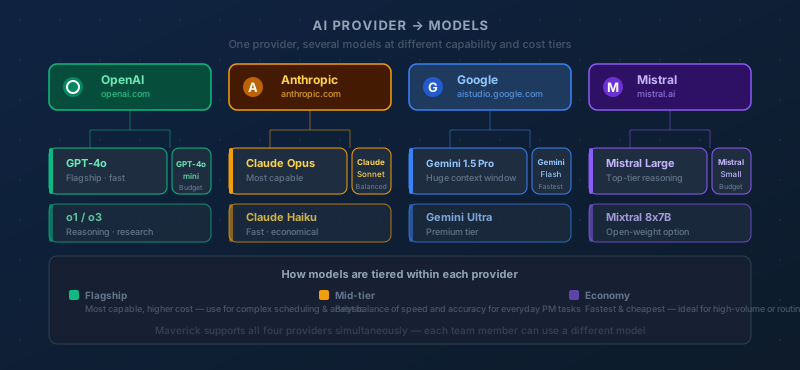
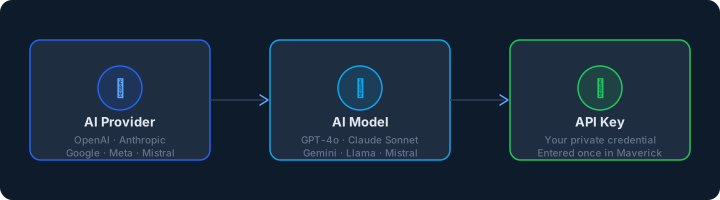
An AI provider is the company or service that operates the AI infrastructure — OpenAI, Anthropic, Google, Microsoft Azure, or an organization running its own local models with Ollama. The provider record holds the connection details: what type of service it is, how to authenticate, and where to send requests.
An AI model is a specific version of a language model offered by that provider — GPT-4o from OpenAI, Claude Sonnet 4 from Anthropic, or Gemini 1.5 Flash from Google. The model record sits beneath a provider and inherits that provider's connection settings by default, with the option to override any setting for that specific model.
This two-level design means you configure a provider once — enter the API key, set the base URL, choose the version — and every model under that provider inherits those credentials automatically. When a model needs different settings (a separate billing account, a different endpoint, a custom system prompt), you override only what's different at the model level without duplicating the shared configuration.
Identity & Organization
These properties control how the provider appears in the Maverick interface and how it is organized in the administration panel.
Name
The display name for this AI provider, shown in dropdown menus, resource configuration panels, and the AI provider administration list. The name is used for the interface only — it has no effect on how Maverick communicates with the provider's API. Choose a name that makes the provider instantly recognizable to administrators: something like "OpenAI — Production" or "Anthropic — Engineering Team" is more useful than a generic label when you're managing multiple provider accounts side by side.
Description
A freeform text field for administrative notes, visible only in the provider configuration panel — never shown to end users. Use the description to record context that isn't obvious from the name: which cost center or billing account this provider belongs to, which team or project it was set up for, when the API key was last rotated, or any usage restrictions that administrators should be aware of. Good descriptions pay off when a new administrator needs to understand why a given provider record exists and who owns it.
Active
A yes/no toggle that controls whether this provider is available for use in Maverick. When a provider is inactive, it cannot be selected in resource configuration panels, it will not appear in model dropdowns, and no AI requests will be routed through it. Deactivating a provider preserves its full configuration — API key, base URL, connection settings — so it can be reactivated without reconfiguration. This makes the Active flag the right tool for temporarily suspending a provider during a billing review, a contract renewal, or a key rotation, rather than deleting and recreating the record.
Folder
A display grouping that organizes AI providers in the administration interface. When you're managing a large number of providers — separate accounts for different clients, departments, regions, or environments — a flat alphabetical list becomes hard to navigate. Folders let you collapse related providers into labeled groups so administrators can find what they need quickly. Like the Name and Description fields, Folder is purely a UI construct: it has no effect on how Maverick connects to or authenticates with the provider.
Provider Type
The provider type identifies which AI service organization is supplying the models. This is not a display label — it determines the API protocol, authentication mechanism, and request format Maverick uses to communicate with the service.
OpenAI
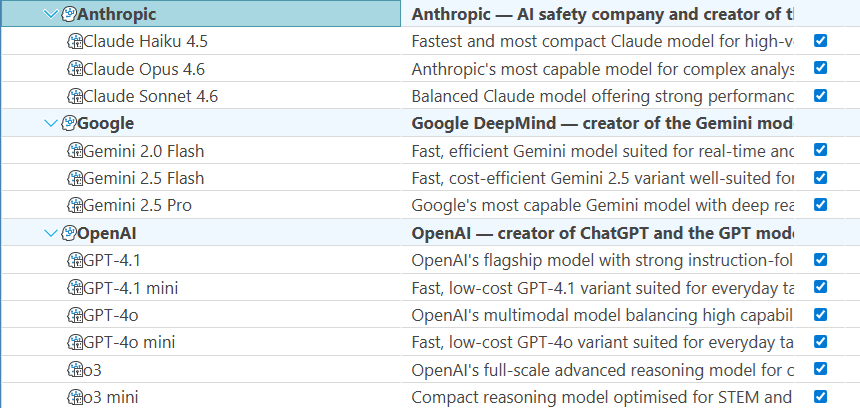
OpenAI is the organization behind the GPT family of models — GPT-4o, GPT-4.1, o4-mini, and others. Selecting this provider type tells Maverick to use OpenAI's standard REST API format, which is also the format used by many third-party providers and proxies. The API key authenticates requests against your OpenAI account, and usage is billed directly by OpenAI based on the number of tokens processed.
Anthropic
Anthropic develops the Claude family of models — Claude Opus, Sonnet, and Haiku across multiple generations. Selecting Anthropic as the provider type tells Maverick to use Anthropic's API format and authentication headers, which differ from OpenAI's. Anthropic's models are known for long context windows and careful instruction-following, making them well-suited for detailed project analysis and structured data output.
Google offers the Gemini family of models — Gemini 1.5 Pro, Gemini Flash, and others — through Google AI Studio and Google Cloud Vertex AI. Selecting this provider type configures Maverick to use Google's authentication and API endpoints. Google's models are particularly strong at reasoning over long documents and multimodal inputs, and are available at a range of capability and cost tiers.
Azure OpenAI
Azure OpenAI is Microsoft's enterprise-hosted version of OpenAI's models, deployed inside Azure's global data center infrastructure. Organizations that require data residency guarantees, private networking, or enterprise-grade compliance (HIPAA, FedRAMP, SOC 2) often use Azure OpenAI in place of the direct OpenAI API. Selecting this provider type tells Maverick to use Azure's distinct authentication scheme and to include an API version string with every request — both of which differ from the standard OpenAI format.
Ollama
Ollama is an open-source runtime that lets you download and run AI models locally on your own hardware — a laptop, a workstation, or an on-premises server — with no internet connection and no per-token billing. Selecting this provider type tells Maverick to connect to a locally running Ollama instance via the Base URL field. Ollama is popular with teams that have strict data-sovereignty requirements, want to experiment with open-source models like Llama or Mistral, or need to run AI features in an air-gapped environment.
Custom
The Custom provider type is for any AI service that exposes an OpenAI-compatible API — including many self-hosted inference servers, cloud proxies, and third-party aggregators. If you're running vLLM, LM Studio, Together AI, Groq, or another service that follows the OpenAI chat completions format, select Custom and fill in the Base URL pointing to that service's endpoint. Maverick will communicate with it using the standard OpenAI protocol, and your API key will authenticate requests as configured.
Authentication & Connection
These properties tell Maverick how to reach the provider's API and prove your identity. Each setting can be overridden at the model level when individual models need different credentials or endpoints.
API Key
The authentication credential issued by the AI provider when you create an account or billing subscription. Maverick includes this key in the authorization header of every API request to identify your account, authorize the request, and attribute usage for billing purposes. You obtain the API key from the provider's developer console — OpenAI's platform.openai.com, Anthropic's console.anthropic.com, or Google AI Studio — and paste it here.
The provider-level API key applies to all models under this provider by default. If an individual model record has its own API key filled in, that model-level key takes precedence for that model only — allowing you to split billing across multiple accounts, give a specific team its own quota, or rotate one model's credentials independently without touching the provider record.
API Secret
A secondary authentication credential required by some providers and configurations. Most providers — OpenAI, Anthropic, Google — authenticate with an API key alone and leave this field blank. Azure OpenAI in certain enterprise configurations and some self-hosted deployments require both a primary key and a secondary secret, using a two-credential scheme similar to OAuth client credentials.
Like the API key, the provider-level API secret is the default for all models under this provider. If a model record has its own API secret filled in, that model-level value overrides the provider's secret for that specific model, giving you per-model credential granularity without duplicating shared configuration across every model record.
Base URL
The network address of the AI provider's API endpoint — where Maverick sends its requests. For major cloud providers like OpenAI, Anthropic, and Google, the base URL is pre-configured and does not need to be filled in. This field becomes essential in three situations: when running a local model server (Ollama needs a base URL like http://localhost:11434), when routing requests through a corporate proxy or API gateway, or when using a load balancer in front of multiple inference servers.
A model-level base URL overrides this value for that specific model, making it possible to route different models through different endpoints — a local Ollama instance for draft work and a cloud endpoint for production — while keeping them organized under the same provider record.
API Version
The version of the provider's API to target with each request. Azure OpenAI requires an explicit API version string in every request — for example 2024-08-01-preview or 2025-01-01-preview — because Azure's deployment model ties specific capabilities to specific API versions, and using the wrong version can result in errors or degraded behavior. When using Azure, check the Azure OpenAI documentation for the version string that corresponds to the deployment and capabilities you need.
For OpenAI, Anthropic, Google, Ollama, and most Custom providers, API versioning is handled internally by the service. You select the model you want and the provider ensures you get the right version of that model — no explicit version string is required, and this field should be left blank to use the provider's current stable defaults.
Once a provider is configured, you add AI models beneath it — each with its own model name, system prompt, sampling parameters, and optional credential overrides. See the companion reference for everything on a model record: