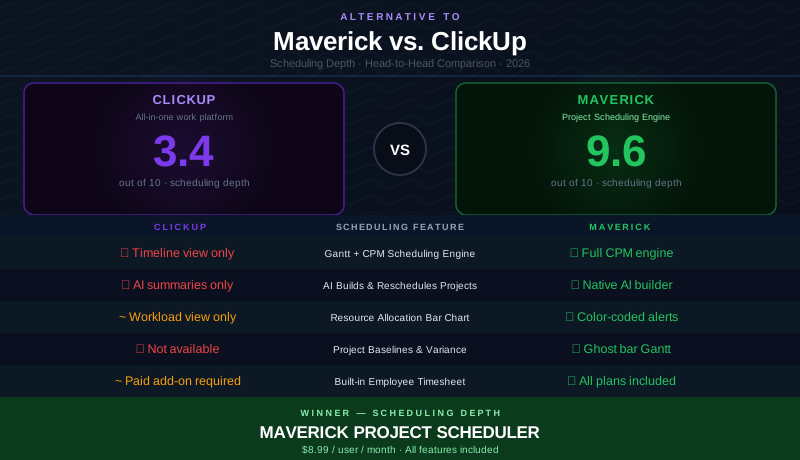
ClickUp is one of the most aggressively marketed tools in the productivity software industry. "One app to replace them all" is a compelling promise, and for some teams it delivers — particularly those managing marketing campaigns, creative workflows, and non-project operations that benefit from ClickUp's enormous flexibility.
But for project managers who need to deliver work on defined timelines with real dependencies, constrained resources, and stakeholder accountability, ClickUp's breadth-first approach starts to show its limits. Breadth and depth are not the same thing. This comparison looks at both platforms honestly, gives ClickUp credit where it deserves it, and lays out clearly where the discipline of project scheduling requires something more.
Quick Verdict
ClickUp is an excellent all-in-one productivity platform for teams that want one tool for tasks, documents, goals, whiteboards, and automations. Its flexibility is genuine and its free tier is generous. But for project managers who need a scheduling engine — Gantt charts backed by the Critical Path Method, automatic dependency cascading, resource allocation, and AI that builds actual project plans — ClickUp falls short of what the discipline requires.
If your job is to deliver projects on time with accountability for who is doing what and when, Maverick is the better ClickUp alternative for project scheduling.
Quick-Reference Comparison Table
The comparison above, summarized as a plain data table.
| Feature | Maverick | ClickUp |
|---|---|---|
| Gantt + CPM Scheduling Engine | ✓ Full CPM engine | ✗ Gantt view — no engine |
| Critical Path Method (CPM) | ✓ Auto-calculated | ✗ Not available |
| AI Builds & Reschedules Projects | ✓ Native AI builder | ✗ No AI schedule builder |
| Resource Allocation Bar Chart | ✓ Color-coded utilization | ~ Workload view only |
| Project Baselines & Variance Tracking | ✓ Ghost bar Gantt | ✗ Not available |
| Built-in Employee Timesheet | ✓ All plans, no add-on | ~ Add-on required |
| View Types & Flexibility | ~ Gantt + Grid | ✓ 15+ view types |
| Integration Breadth | ~ Core PM integrations | ✓ 1,000+ app integrations |
Feature Comparison at a Glance
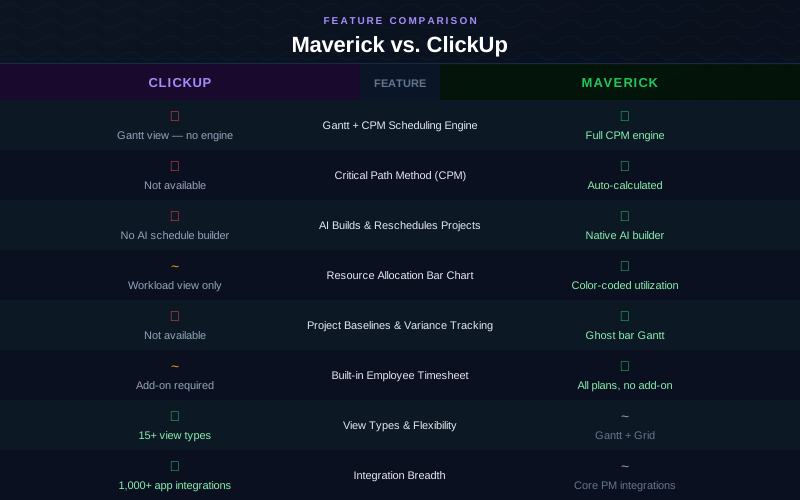
The table makes the pattern clear. ClickUp excels at views and integrations — things that make it a flexible general-purpose platform. Maverick wins every scheduling-specific category. Whether you need CPM, resource allocation, project baselines, or AI that restructures your plan, Maverick was built specifically for that work.
Gantt Chart and Scheduling Engine
Maverick wins clearly here. ClickUp has a Timeline view — a visual representation of task dates as horizontal bars on a calendar. It looks like a Gantt chart and behaves somewhat like one for simple date management. But it is not connected to a scheduling engine. When you drag a bar, the bar moves. The tasks that depend on it do not.
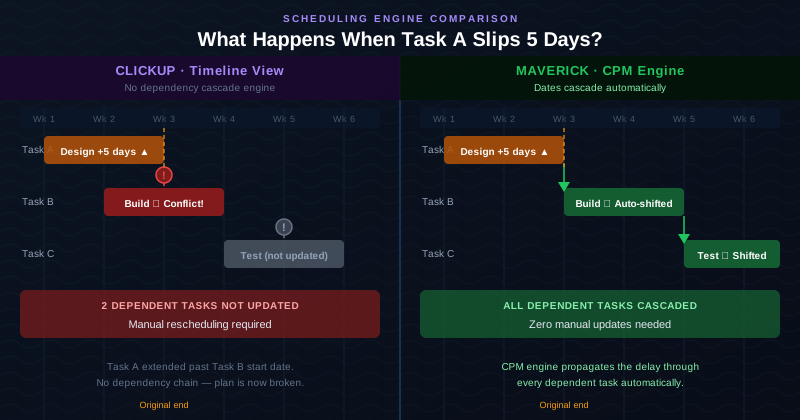
Maverick's Gantt chart is different in kind, not just in degree. Behind every task bar is a scheduling engine that understands dependency relationships. When Task A is delayed by five days, every successor task shifts automatically. This is not a UI behavior — it is the Critical Path Method, the same scheduling discipline used in construction, aerospace, and engineering for decades. On a complex project with fifty or a hundred interdependent tasks, automatic cascading is the difference between a plan that stays valid and a plan that requires constant manual correction.
Maverick also supports all four dependency link types — Finish-to-Start, Finish-to-Finish, Start-to-Start, and Start-to-Finish — with configurable lag days on every relationship. ClickUp's Timeline view supports predecessor linking for basic Finish-to-Start relationships, but the cascade logic that makes those relationships useful for scheduling is absent.
Critical Path Analysis
Maverick wins. ClickUp does not offer this feature.
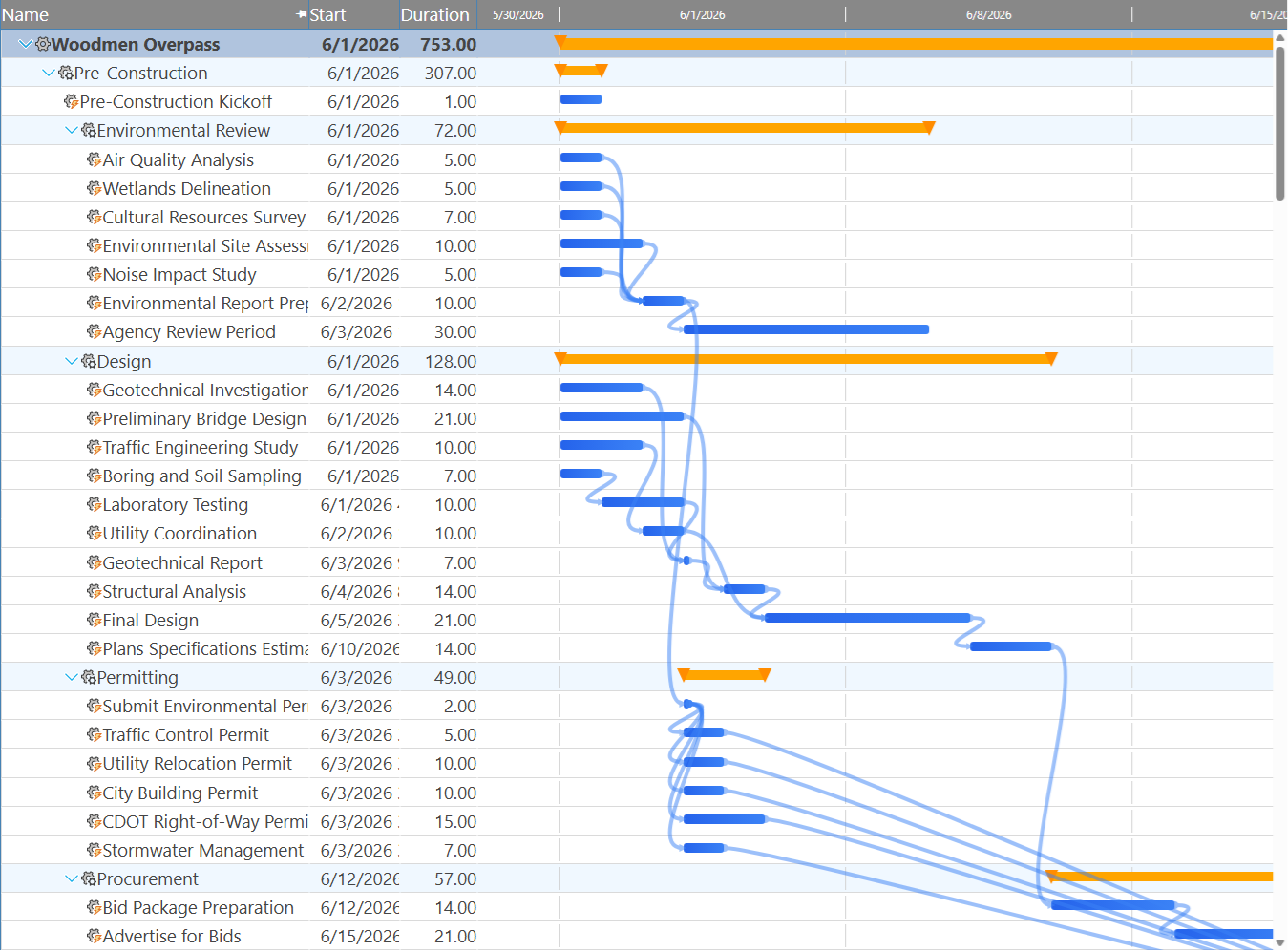
The critical path is the sequence of tasks that determines your project end date. Any delay to a critical task delays the entire project. Maverick calculates the critical path automatically, highlights critical tasks in red on the Gantt chart, and calculates total float for every non-critical task — telling you exactly how much scheduling flexibility each task has before it threatens the end date.
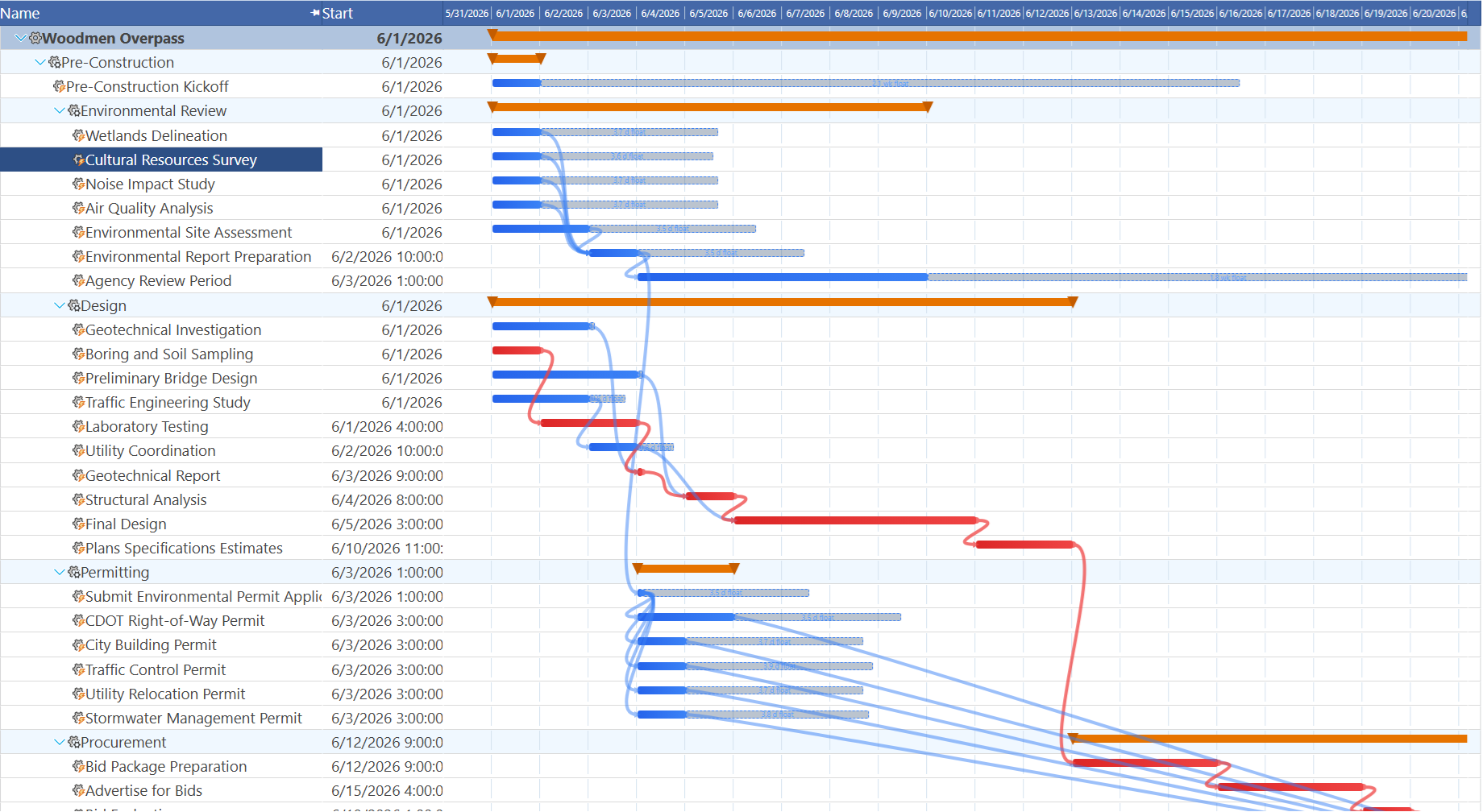
ClickUp has no equivalent. There is no critical path calculation, no float display, and no way to automatically answer "which tasks, if delayed, will push my project end date?" For project managers who brief stakeholders on schedule risk, this gap is meaningful. In Maverick, that answer is always visible at a glance.
Resource Management
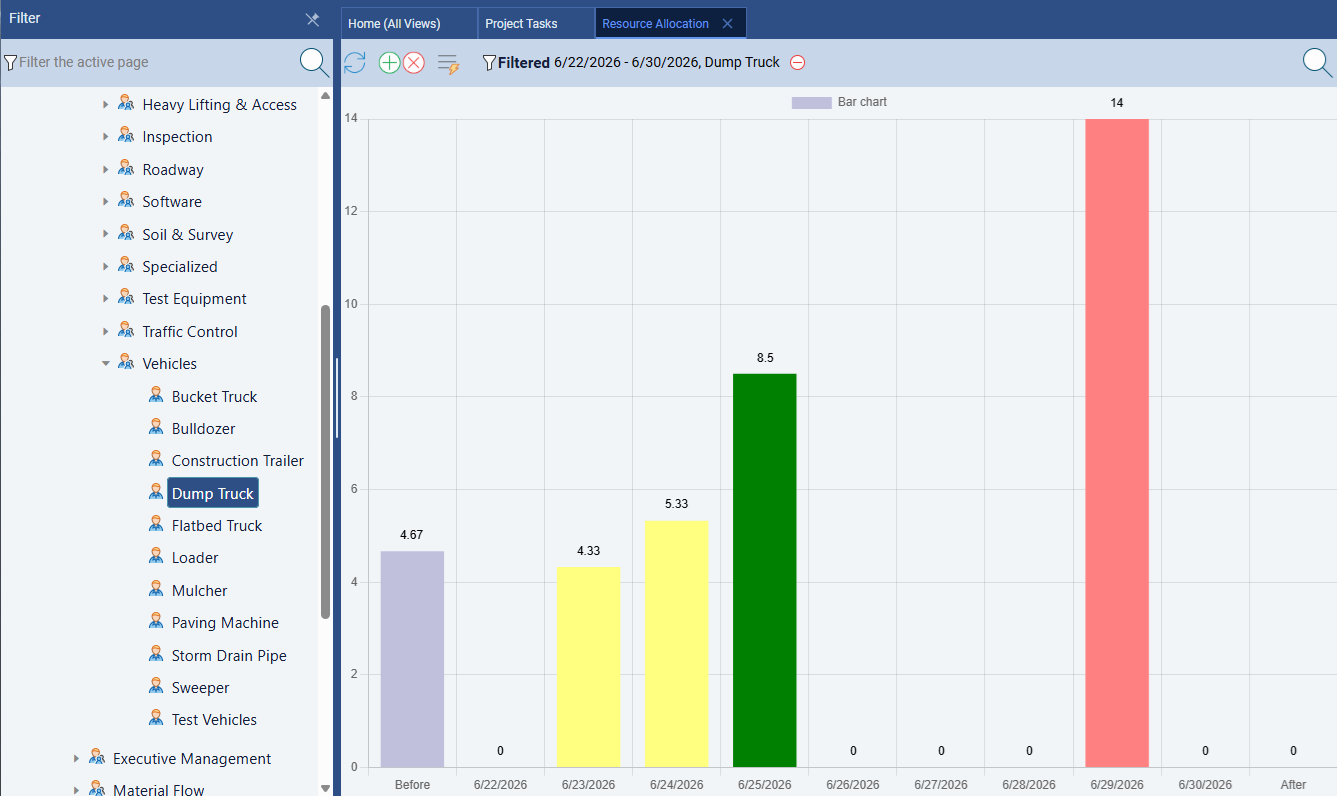
Maverick wins significantly. Maverick treats resource management as a scheduling discipline. Human, machine, and materials resource types are tracked separately. Each resource has a schedule and working hours. Assignments carry utilization percentages or hours per day, and the resource allocation bar chart uses color coding — green for correctly loaded, amber for under-allocated, red for over-allocated — to show the state of every resource across any time range you choose.
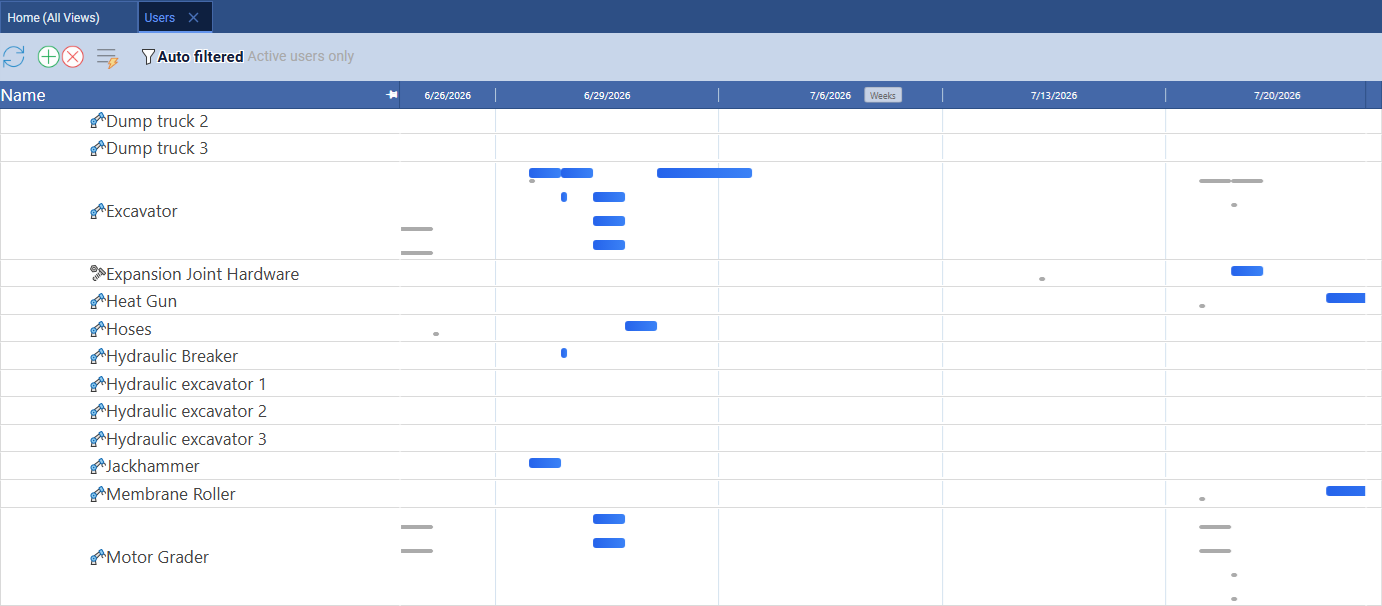
Maverick also provides a resource-centric Gantt on the Users page, where rows are individual resources and each bar is a task assigned to that resource on a timeline. Filtering to equipment only shows which pieces of machinery are double-booked in the same week and which are available — the kind of visibility that prevents sending two crews to the same machine on the same day. ClickUp has no equivalent for equipment or materials, and its Workload view is limited to human team members.
ClickUp has a Workload view that shows task volume assigned per person. It is useful for spotting obvious overload, but it does not factor resource-specific working schedules, it does not model non-human resources, and it does not calculate utilization percentages by hours. For teams managing constrained human and equipment resources — which describes most project environments — Maverick's allocation chart gives a level of precision that ClickUp's Workload view cannot match.
Maverick also supports resource-specific working hour schedules, so a part-time contractor working three days a week is correctly accounted for when calculating task durations and loading. ClickUp does not model resource working schedules at this level of fidelity.
AI and Automation
Maverick wins on scheduling AI. ClickUp wins on automation breadth.
ClickUp has invested heavily in AI features: task summaries, AI-generated descriptions, smart fields that auto-compute values, and an AI assistant that can respond to questions about your workspace. For teams that want to reduce the overhead of writing task descriptions and status updates, those features are genuinely useful. ClickUp's no-code automation builder is also impressive — triggering actions on status changes, date arrivals, and field updates with minimal setup.
Maverick's AI operates at a different level. Rather than summarizing what you already know, Maverick's AI reads your project — its tasks, resource assignments, dependencies, and constraints — and builds or restructures the schedule in response to plain-English instructions. You can ask it to reschedule everything after a delay, assign resources to unassigned tasks, build a new project from a description, or analyze risks across the current plan. The AI acts as a scheduling assistant, not a writing tool.
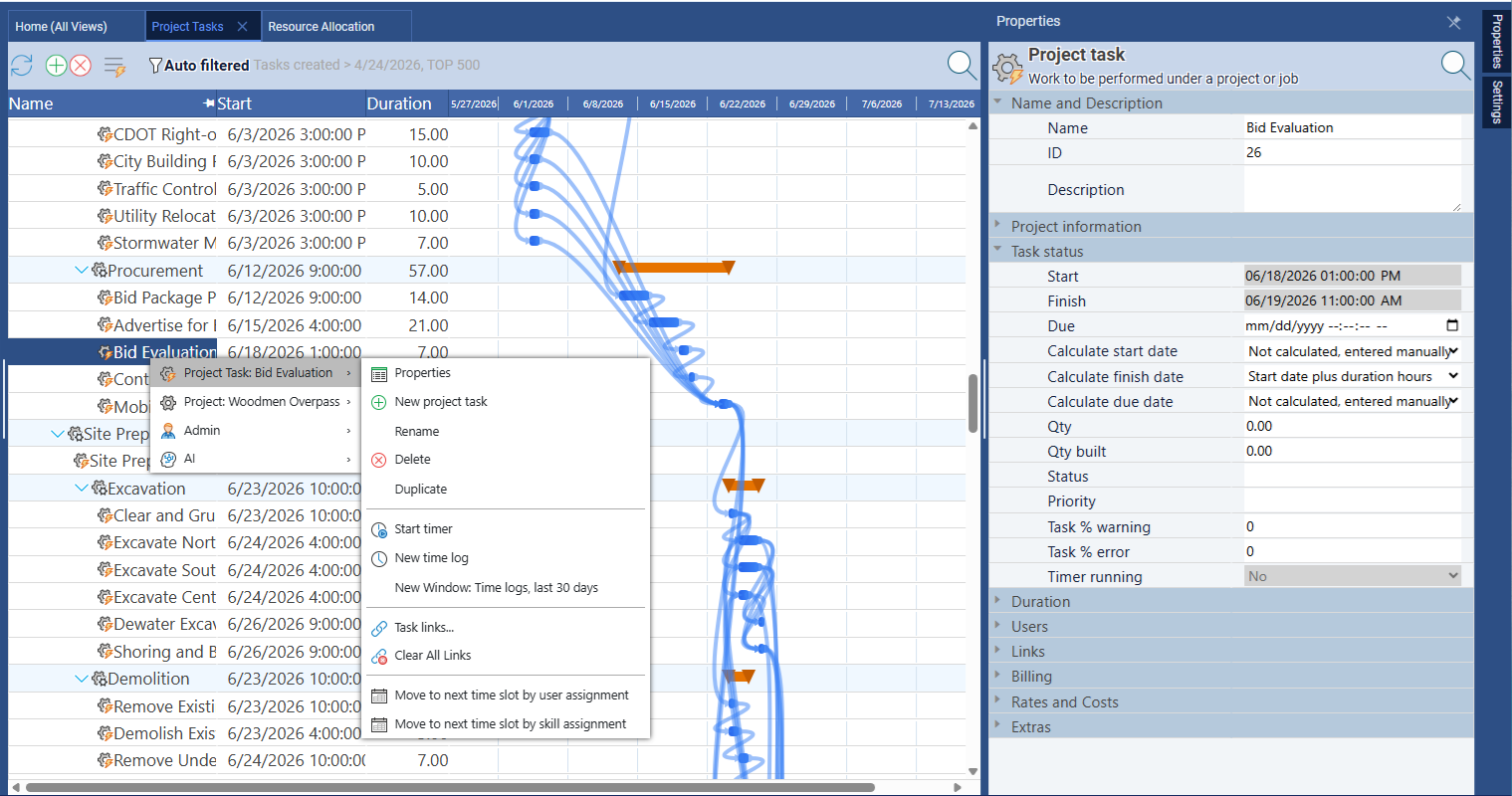
Maverick also lets you assign different AI providers and models per employee — so a power user can work with a premium model while the broader team uses a cost-efficient one. ClickUp's AI is a centralized feature without per-user model configuration.
Time Tracking and Timesheets
Maverick wins for integrated time tracking. ClickUp requires add-ons for equivalent functionality.
Maverick includes a full employee timesheet as a built-in feature across all plans. Team members log hours against specific tasks and projects. Managers filter timesheets by user, project, and date range to see exactly where time is going. Actual hours feed automatically into cost calculations and project reporting.
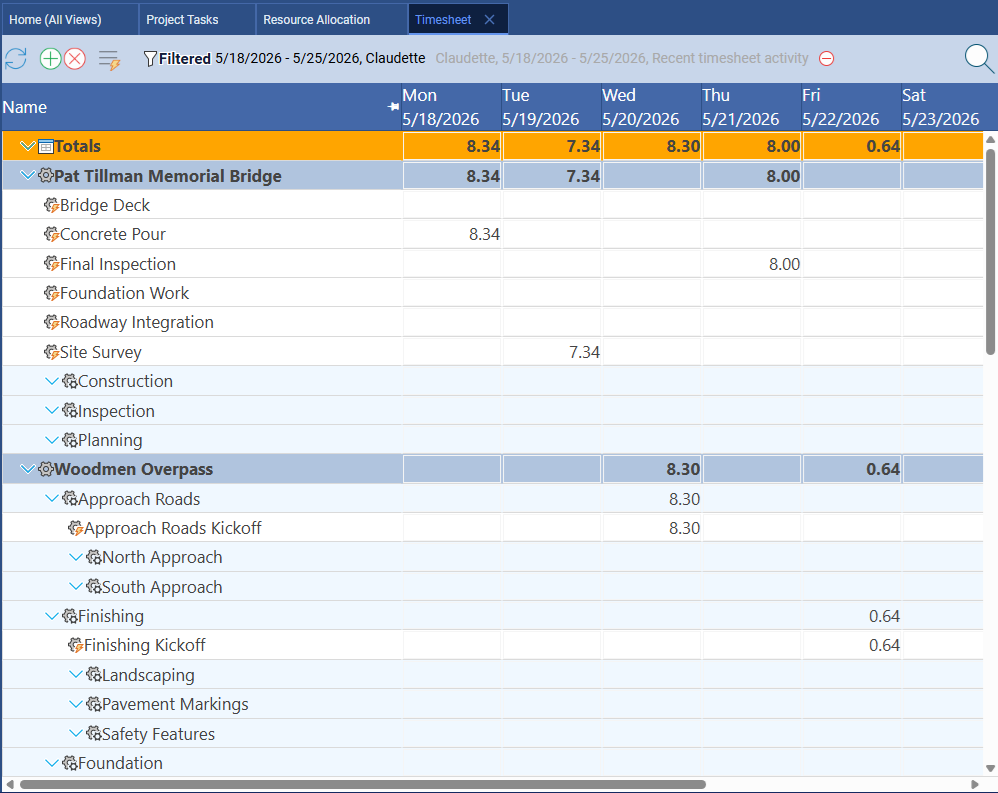
ClickUp does offer time tracking, but the full feature set — including time estimates, billable time flags, and detailed reporting — is gated behind paid plans. For teams that need time tracking as a native part of their project workflow rather than a separately-configured capability, Maverick's approach is simpler and more reliable. The timesheet is just there, on every plan, connected to every project.
Project Baselines and Variance Tracking
Maverick wins. ClickUp does not offer project baselines.
A project baseline is a snapshot of your original plan — the dates, durations, and costs as agreed at kickoff. As the project progresses, you compare actual performance against that baseline to understand schedule variance and explain it to stakeholders. Maverick supports baselines natively, displaying ghost bars on the Gantt chart so the original plan is always visible alongside the current schedule.
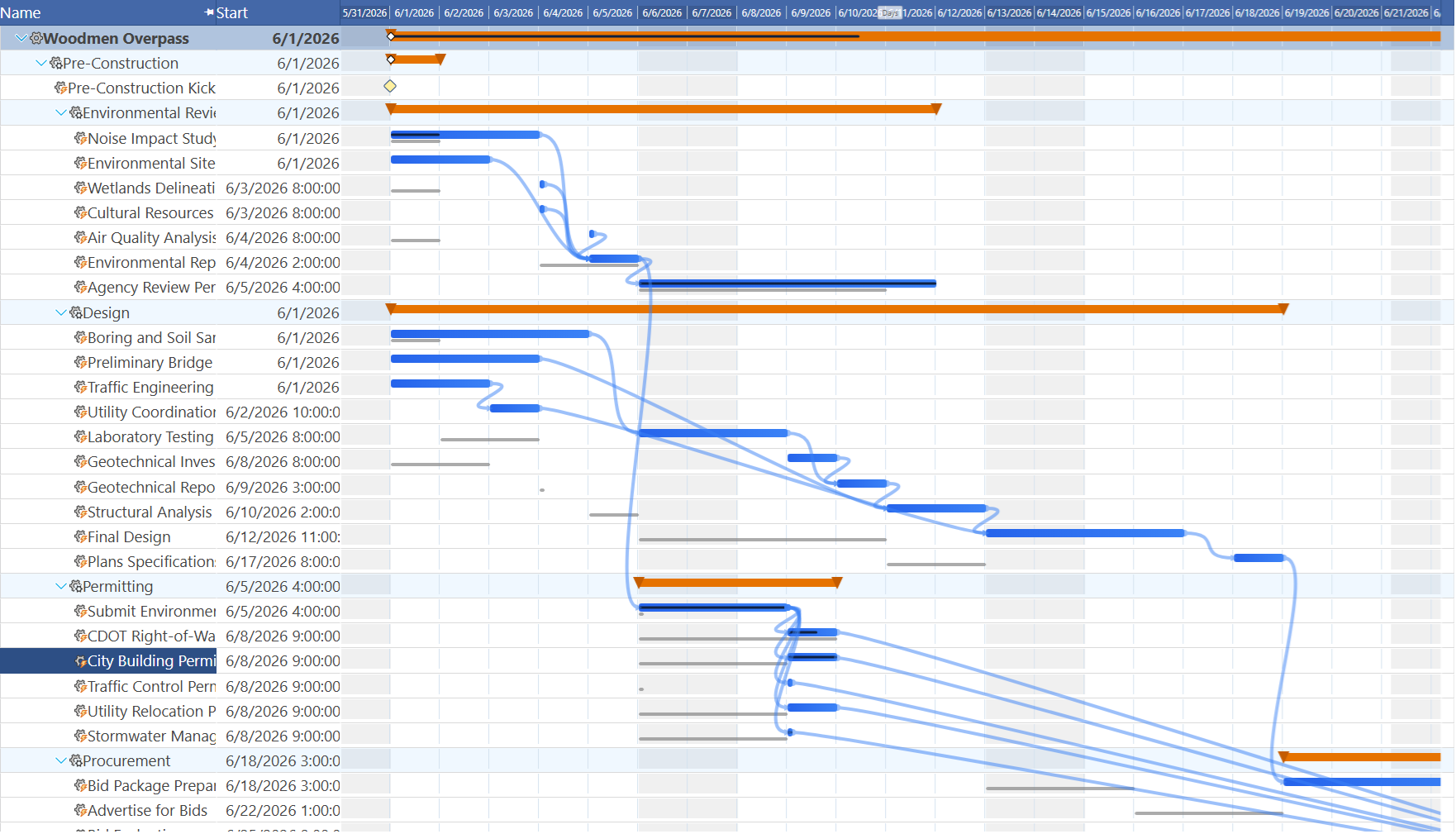
ClickUp has no baseline feature. Once you update a task's dates, the original planned dates are gone. For project managers who report on schedule variance — a standard requirement in construction, IT delivery, product development, and professional services — this is a meaningful gap. Maverick's ghost bar Gantt makes the comparison between plan and actuals immediately visible without any additional setup.
Views and Flexibility
ClickUp wins this category.
ClickUp's single biggest strength is the sheer number of ways you can view and organize work. List, Board (Kanban), Calendar, Table, Timeline, Workload, Mind Map, Gantt, Whiteboard, Chat — the platform offers over fifteen distinct view types, and switching between them is seamless. For non-project teams — marketing, operations, HR, product management — that flexibility makes ClickUp genuinely adaptable to almost any workflow.
Maverick's interface is purpose-built for the project scheduling workflow: a task grid, Gantt chart, resource allocation chart, and properties panel. It does not offer a Kanban board or whiteboard. If your team's primary need is flexible visual workspace for non-scheduled work, ClickUp is the better fit. If your primary need is delivering projects with defined timelines, dependencies, and resource accountability, Maverick is the right tool.
Integrations and Ecosystem
ClickUp wins this category.
ClickUp has built one of the larger integration ecosystems in the productivity software space — over one thousand native connectors covering Slack, Salesforce, GitHub, HubSpot, Zoom, and hundreds more. If your organization runs on a diverse stack of SaaS tools and wants a central hub that connects to all of them, ClickUp's integration breadth is a genuine advantage.
Maverick focuses on the integrations project managers rely on: Microsoft Project import and export, Excel, CSV, Google Sheets, and database connections for scheduled data sync. If the depth of your SaaS integration catalog is the deciding factor, ClickUp has the wider marketplace. For most project scheduling workflows, Maverick's core integrations cover the essential bases.
Pricing
Maverick delivers more scheduling depth for a competitive per-seat price.
ClickUp has a free plan with meaningful functionality, which is a genuine advantage for teams with tight budgets or small teams just getting started. Paid plans run from around $7 per user per month (Unlimited) to $12 per user per month (Business) on annual billing. Some features — including full time tracking reporting, unlimited timeline history, and advanced dashboards — require the Business tier or higher.
Maverick starts at $8.99 per user per month and includes all features — AI scheduling, resource allocation charts, timesheets, baselines, custom reporting, and automated exports — as part of every subscription during the current promotional period. There are no scheduling features gated behind higher tiers. When you factor in the full cost of the project scheduling capabilities a project manager actually needs, Maverick's all-inclusive pricing compares favorably to ClickUp's Business tier.
Final Verdict: Which Tool Should You Choose?
ClickUp is a genuinely versatile platform, and for teams that need one tool to handle tasks, documents, goals, whiteboards, and workflow automations, it earns its position as a market leader. If your team includes marketing, operations, or creative departments that need flexible work management more than disciplined scheduling, ClickUp's breadth is hard to match.
But "one app to replace them all" does not mean every app equally. When it comes to project scheduling — the discipline of building a plan that is internally consistent, tracks resource constraints, responds automatically to changes, and lets you compare actuals against the baseline — ClickUp is a general-purpose tool operating outside its core strength.
Maverick Project Scheduler was built specifically for this discipline. The CPM scheduling engine, resource allocation chart, AI scheduler, built-in timesheet, and project baselines work together as a coherent system designed around the demands of professional project delivery. For project managers who are accountable for delivering projects on time, Maverick provides the scheduling depth that ClickUp does not.