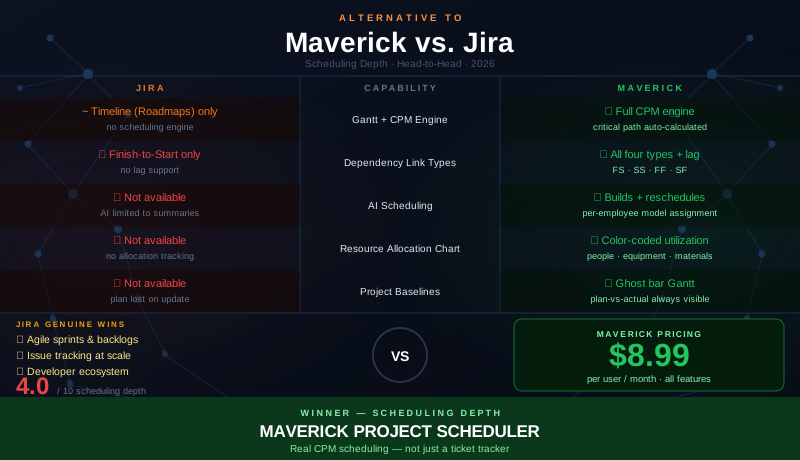
Jira occupies a unique position in the project management landscape. It is the dominant tool for software development teams — the standard platform for issue tracking, sprint planning, and agile workflow management at companies of every size. Atlassian has built an exceptional product for the software development use case, and its integration with the broader Atlassian ecosystem (Confluence, Bitbucket, GitHub, CI/CD pipelines) makes it deeply embedded in developer workflows worldwide.
But Jira was designed around issues, not schedules. The fundamental data model — tickets in a backlog, organized into sprints, tracked through a workflow — is not the same as a project schedule with task dependencies, resource constraints, and a critical path. Jira has added Roadmaps (formerly Portfolio for Jira) to address timeline visualization, but a visual timeline is not a scheduling engine. This comparison examines where that distinction matters most, gives Jira genuine credit for what it does exceptionally well, and lays out where Maverick's scheduling depth fills the gap for project managers who need more than sprint boards.
Quick Verdict
Jira is the right tool for software development teams that run agile sprints, manage backlogs, and track issues through defined development workflows. No tool in the market matches its depth for that specific use case. If your work is organized around tickets, epics, and sprint cycles, Jira's feature set is mature and unrivaled.
But Jira is not a project scheduling tool in the traditional sense. There is no Critical Path Method engine behind Roadmaps. Dependencies are limited to Finish-to-Start. There is no resource allocation bar chart, no project baselines, and no AI that builds or restructures a schedule. For project managers outside software development — or for software project managers who need to deliver on hard deadlines with resource constraints and schedule variance tracking — those gaps are significant.
If your projects require real scheduling discipline, Maverick is the stronger Jira alternative for project scheduling.
Quick-Reference Comparison Table
The comparison above, summarized as a plain data table.
| Feature | Maverick | Jira |
|---|---|---|
| Gantt + CPM Scheduling Engine | ✓ Full CPM — critical path + float | ~ Timeline (Roadmaps) — no CPM engine |
| All Four Dependency Link Types | ✓ FS · SS · FF · SF + configurable lag | ✗ Finish-to-Start only — no lag |
| AI Builds & Reschedules Projects | ✓ Native AI builder · per-employee models | ✗ AI limited to text summaries |
| Resource Allocation Bar Chart | ✓ Color-coded — human, machine, materials | ✗ Not available |
| Project Baselines & Variance Tracking | ✓ Ghost bar Gantt — plan-vs-actual visible | ✗ Not available |
| Human · Machine · Materials Resources | ✓ All three types — each with own schedule | ✗ People (users) only |
| Built-in Employee Timesheet | ✓ Full reporting · all plans | ~ Basic time logging per issue |
| Agile Sprint Management | ~ Basic task lists | ✓ Native sprints · backlog · burndown |
Feature Comparison at a Glance
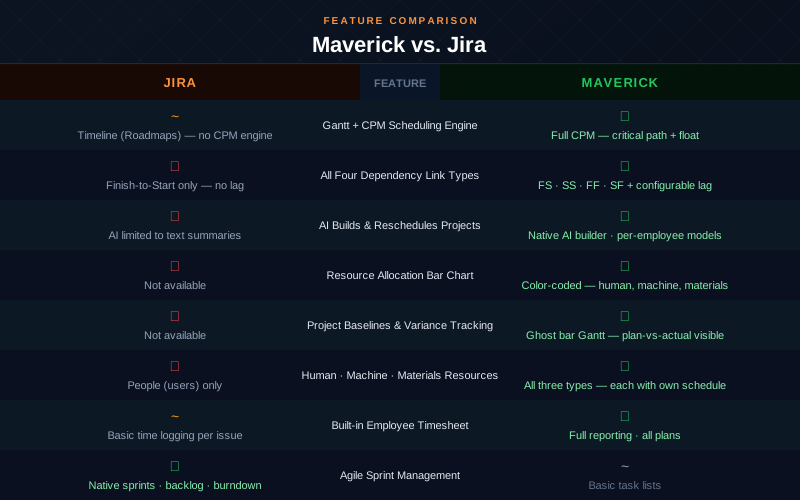
The table reflects the fundamental difference between the two tools. Jira wins convincingly on agile sprint management — that is its core capability and the reason millions of developers use it. On every scheduling-specific dimension — CPM, dependency depth, AI scheduling, resource allocation, and baselines — Maverick leads. These are not minor gaps; they reflect that the two tools were built for different purposes.
Gantt Chart and Scheduling Engine
Maverick wins decisively here. Jira's Roadmaps feature provides a timeline view where you can drag epics and issues onto a calendar. It is useful for communicating a rough plan to stakeholders and visualizing dependencies at a high level. But Roadmaps is a visual layout tool, not a scheduling engine.
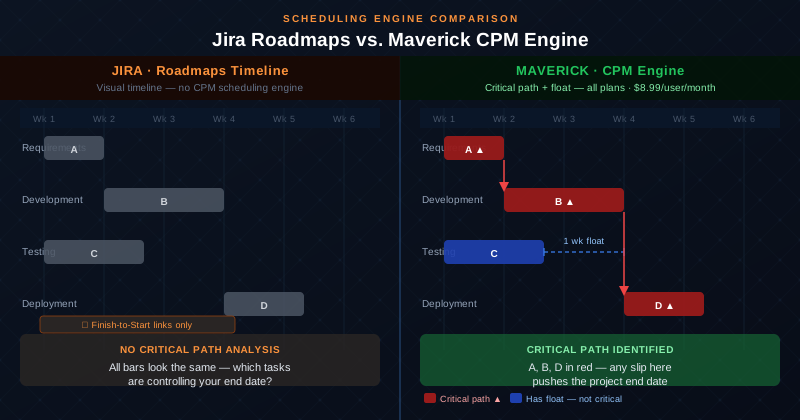
The distinction becomes clear when something slips. In Jira Roadmaps, if an upstream item is delayed, the downstream items do not move automatically based on scheduling logic — you update them manually. There is no engine calculating which tasks are on the critical path and what the ripple effect of a delay will be. The timeline shows you where things are planned; it cannot tell you where your schedule risk lives.
Maverick's Gantt chart is driven by the Critical Path Method, the same scheduling discipline used in construction, aerospace, engineering, and professional project management for decades. When Task A slips, every dependent task cascades automatically. The CPM engine identifies the critical path — the sequence of tasks that controls your project end date — and highlights critical tasks in red on the Gantt chart. Non-critical tasks display their float: the precise buffer of time available before they become critical. You always know where your delivery risk is without any manual calculation.
Dependency Types: Four vs. One
Maverick wins decisively. This is one of the sharpest technical differentiators between the two tools.
Jira supports one dependency type for timeline purposes: Finish-to-Start — Task B cannot start until Task A finishes. For simple sequential work, this covers a large portion of real-world relationships. But real projects routinely require relationships that Finish-to-Start cannot express.
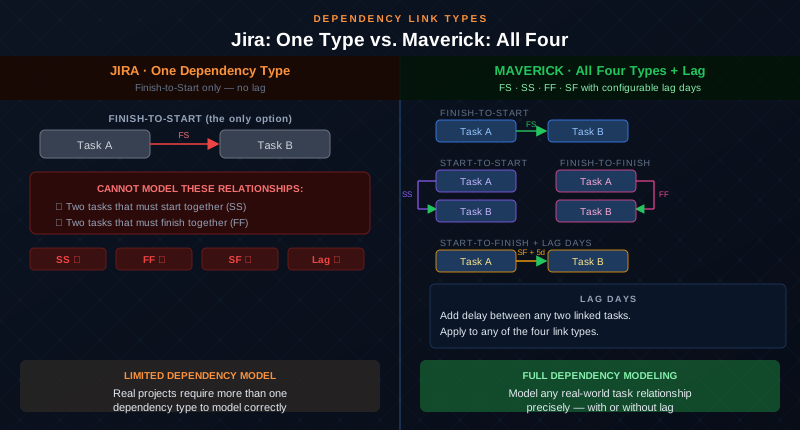
Maverick supports all four standard dependency types — Finish-to-Start, Start-to-Start, Finish-to-Finish, and Start-to-Finish — with configurable lag days on every relationship. Consider a few common scenarios: a code review that must begin the same day as the pull request (Start-to-Start), two parallel workstreams that must both be complete before either moves forward (Finish-to-Finish), or an external certification that must be received before the preceding installation phase can officially close (Start-to-Finish). Jira cannot model any of these. Maverick handles all of them with precision.
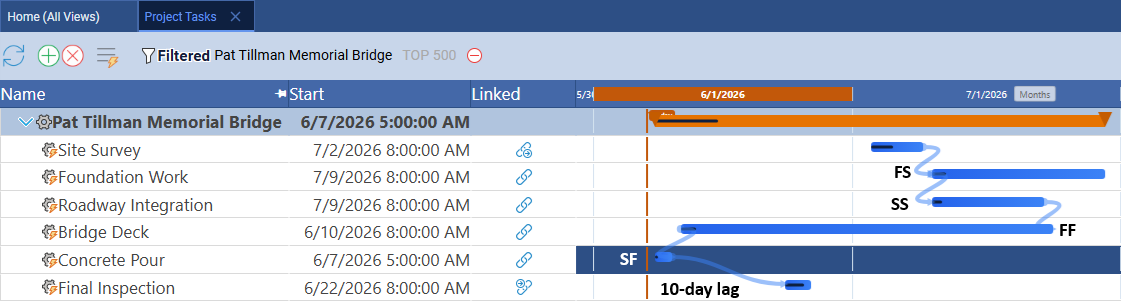
The screenshot above shows all four link types in a live Maverick project — each relationship clearly labeled, with a 10-day lag applied to the Start-to-Finish dependency. Jira's dependency model ends where Maverick's begins.
AI Features
Maverick wins. Jira's AI summarizes; Maverick's AI builds and reschedules.
Atlassian Intelligence is Jira's AI layer. It provides useful text capabilities: summarizing issue threads, drafting acceptance criteria, auto-filling fields, and generating reports in natural language. For knowledge workers who process a lot of written content in their tickets, these features have genuine utility. They reduce the friction of writing up issues and distilling long comment threads.
But Atlassian Intelligence does not build project schedules. You cannot describe a software release, a construction project, or a product launch to Jira's AI and receive back a structured schedule with tasks, dependencies, and resource assignments. The AI operates on text fields, not on the scheduling model.
Maverick's AI reads your project — its tasks, dependencies, resource assignments, and constraints — and functions as a scheduling assistant that acts on the plan. You can describe a new project in plain English and have a structured schedule with dependencies and resource assignments generated in seconds. You can ask the AI to reschedule everything following a two-week delay, identify tasks with no assigned resource, or analyze the plan for schedule risk. The AI produces scheduling decisions, not summaries of decisions you already made.
Maverick also supports per-employee AI model assignment, so organizations can configure different AI providers and models for different team members. A senior project manager might use a premium model for complex schedule analysis while the broader team uses a cost-efficient baseline. This granularity is not available in tools where AI is a single centralized service.
Resource Management
Maverick wins significantly. Jira tracks assignees on issues. Each issue can be assigned to a user, and you can filter views by assignee. For a team managing a sprint backlog, this is functional — you can see which developer has the most open tickets in the current sprint.
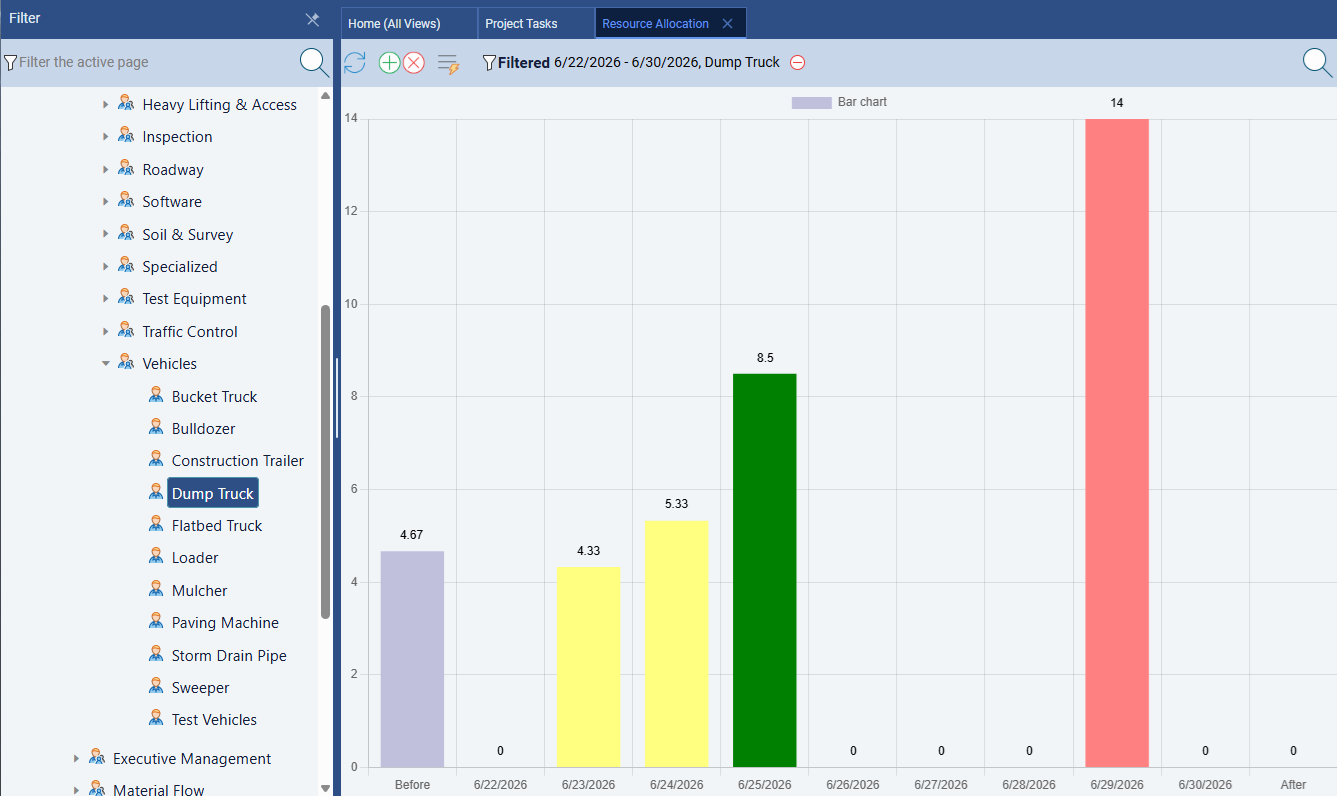
Maverick's resource management operates at the level of project scheduling. Every resource — human, machine, or materials — has a defined work schedule and working hour profile. Task assignments carry utilization percentages or hours-per-day values. The resource allocation bar chart uses color-coded columns to show the state of every resource across any time range: green for correctly loaded, amber for under-allocated, red for over-allocated. You can identify an overloaded team member before the sprint starts, not after they miss a deadline.
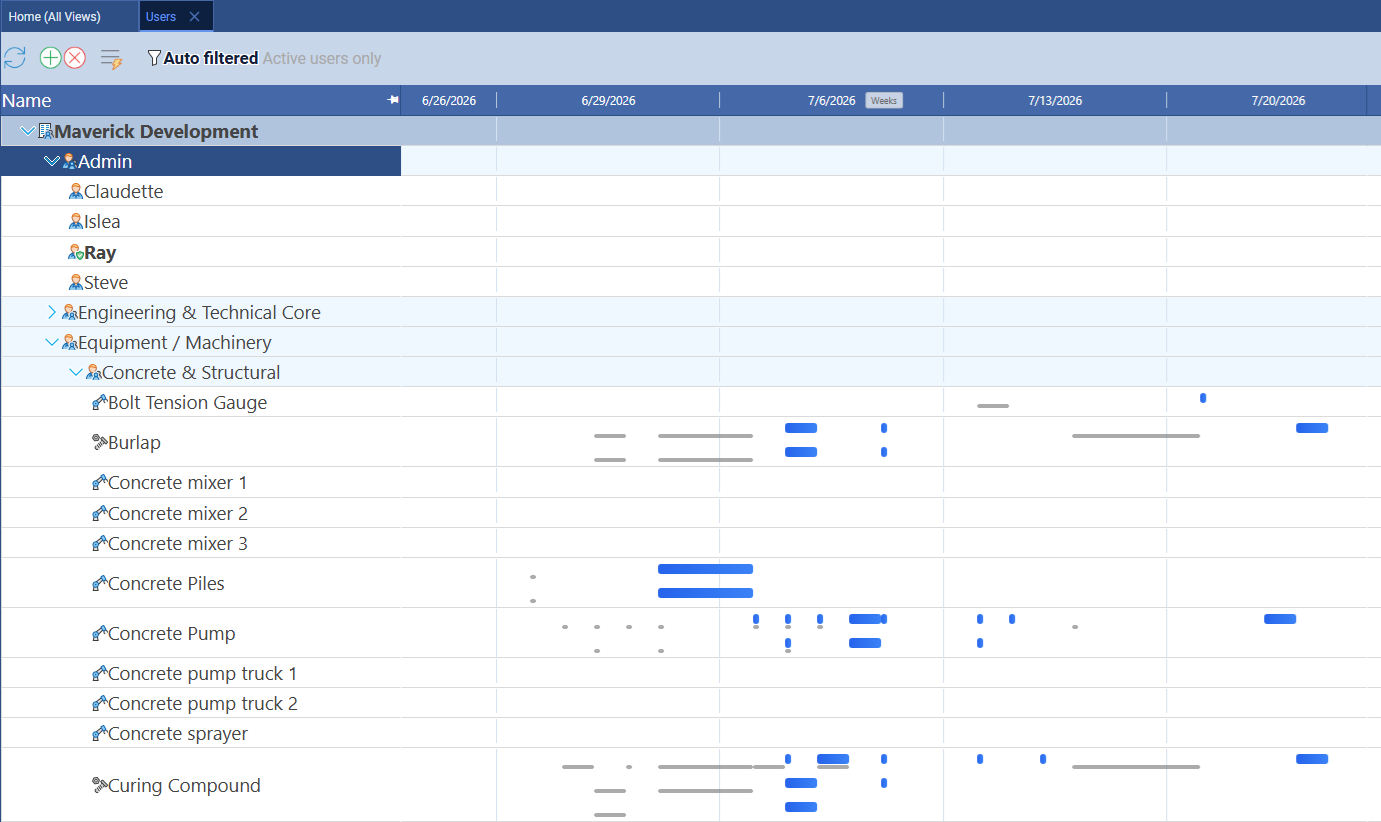
Maverick also provides a resource-centric Gantt view where rows represent resources rather than tasks. Every task assigned to a resource appears as a bar on that resource's timeline row — across all projects simultaneously. You can see at a glance whether a specific engineer is double-booked across two project phases, or whether a piece of equipment has idle time that could absorb additional scope. Jira has no equivalent view and no concept of non-human resources at all. For any team that manages equipment or material constraints alongside staff, the gap is especially pronounced.
Project Baselines and Variance Tracking
Maverick wins. Jira does not offer project baselines.
A project baseline is a snapshot of the approved plan at kickoff — the dates, durations, and resource assignments as agreed before work begins. As the project progresses, you compare actual performance against the baseline to understand schedule variance: how far ahead or behind are you, task by task, and why? Baseline comparison is a standard requirement for stakeholder reporting in software delivery, construction, IT projects, and professional services.
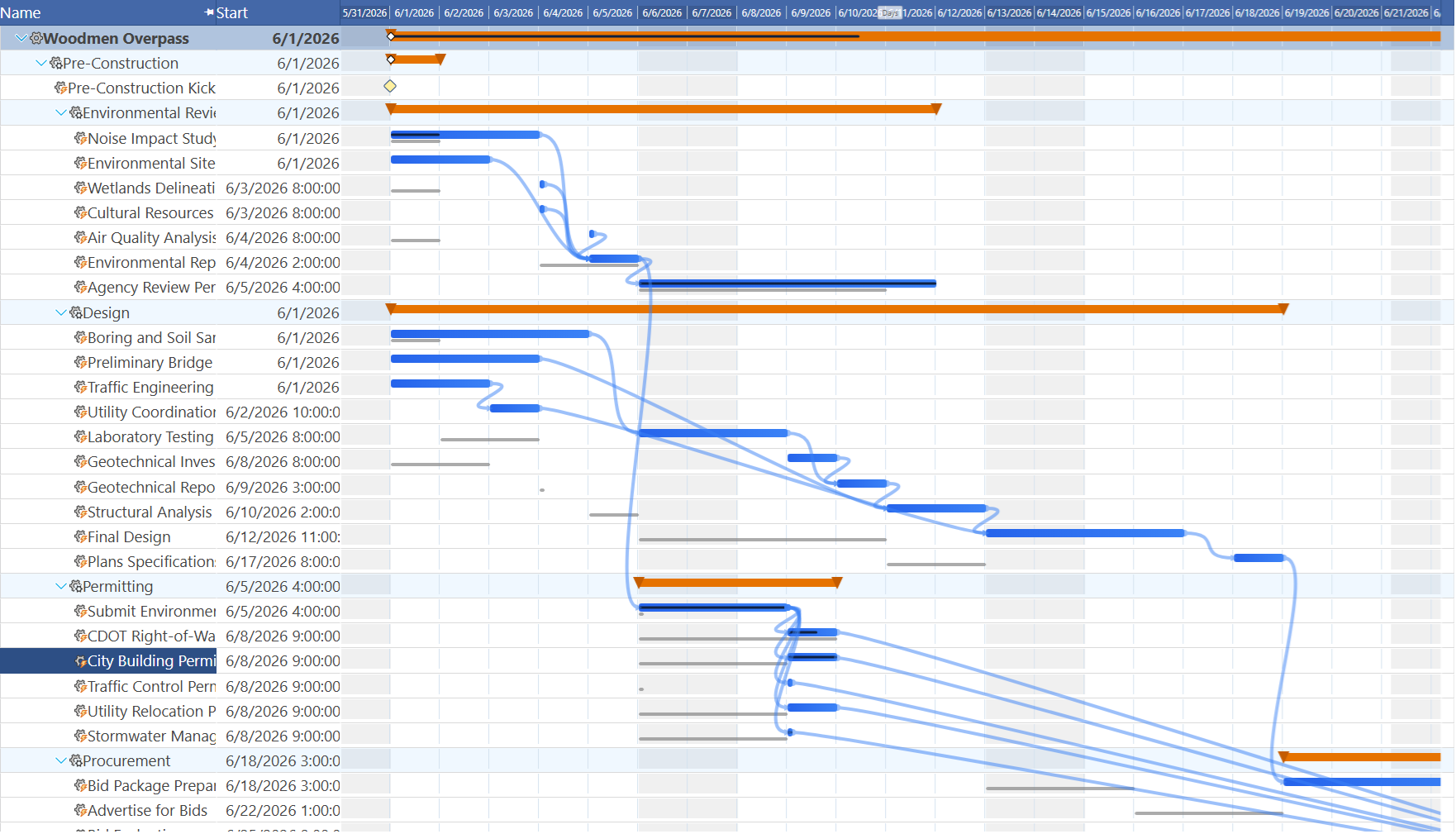
Maverick stores baselines natively and displays ghost bars on the Gantt chart — transparent bars showing the original planned position of each task alongside the current scheduled bar. The comparison is always visible. You can explain schedule variance to stakeholders in seconds, task by task, without building a separate spreadsheet comparison.
Jira has no baseline feature. Issue due dates can be set and updated, but the original planned date is not preserved as a reference point once it changes. If a stakeholder asks how the current delivery timeline compares to the plan agreed at the project kickoff, Jira cannot answer that question directly. Maverick provides that comparison as a standard feature on every plan.
Agile Sprint Management
Jira wins this category clearly.
Jira's agile sprint capabilities are the best in the market. Sprint planning boards, backlog grooming, story point estimation, velocity tracking, burndown charts, and sprint retrospective reporting are all mature, deeply integrated features. Development teams can run their entire agile process — from product backlog to sprint review — inside Jira without leaving the tool. The Scrum and Kanban board views are polished, and the flexibility to define custom workflows means Jira can adapt to virtually any software development process.
Maverick is a project scheduling tool, not a sprint management platform. It organizes work around tasks, dependencies, and timelines rather than sprints, stories, and velocity. For software development teams whose primary workflow is agile sprint cycles, Jira's sprint management depth is a genuine and decisive advantage that Maverick does not attempt to match.
Issue Tracking and Developer Workflow
Jira wins this category.
Jira's issue tracker is extremely powerful. Custom fields, issue types, workflows, transitions, automation rules, and screen configurations give teams the ability to model almost any software development workflow with precision. The integration depth with GitHub, Bitbucket, and CI/CD pipelines means issues can be linked directly to commits, pull requests, and deployment events — giving developers a seamless connection between their code workflow and their project tracking.
For organizations already running on the Atlassian ecosystem — using Confluence for documentation, Bitbucket for source control, and Jira for issue tracking — the integration value is substantial. Maverick does not offer issue-level tracking or developer tool integrations. For teams where the primary delivery artifact is software and the primary workflow is issue-driven development, Jira's ecosystem value is genuinely difficult to replace.
Pricing
Maverick delivers more scheduling depth at a comparable price.
Jira offers a free plan for teams of up to ten users with core issue tracking and agile boards. The Standard plan runs $8.15 per user per month billed monthly, which includes more storage, project roles, and audit logs. The Premium plan runs $16 per user per month and adds advanced roadmaps, automation at scale, and capacity planning features. An Enterprise tier exists for larger organizations with additional compliance and admin controls.
Maverick is priced at $8.99 per user per month. All features — CPM scheduling, AI scheduling, resource allocation, project baselines, four dependency types, and integrated timesheets — are available without plan tier gates. There is no separate upgrade required to access the scheduling engine or the AI capabilities.
For a five-person team, Jira Standard costs 5 × $8.15 = $40.75 per month. Maverick costs 5 × $8.99 = $44.95 per month — about four dollars more, with full CPM scheduling, AI plan building, resource allocation, and baselines included. For teams that need scheduling depth alongside their issue tracking, the value comparison favors Maverick significantly for the scheduling use case.
Final Verdict: Which Tool Should You Choose?
Jira is the right choice if your team runs agile sprints, manages software development issues, and operates within the Atlassian ecosystem. Its sprint management, issue tracking, and developer workflow integrations are unmatched. If Confluence, Bitbucket, and Jira are already your stack, and your project management need is primarily about tracking issues through a development workflow, Jira belongs in that stack.
But if your work requires project scheduling in the traditional sense — a plan with task dependencies, resource constraints, a critical path, and a baseline to compare against — Jira's Roadmaps feature is not a scheduling engine. It is a visual timeline that does not calculate float, does not identify critical tasks automatically, does not support the full range of dependency relationships that real projects require, and does not store baselines for variance tracking.
For project managers in construction, engineering, IT infrastructure, product development, professional services, and any other domain where delivering on a defined timeline is the core accountability — Maverick provides the scheduling depth that Jira was not built to deliver. The two tools solve adjacent but different problems, and for project scheduling specifically, Maverick is purpose-built for the work.