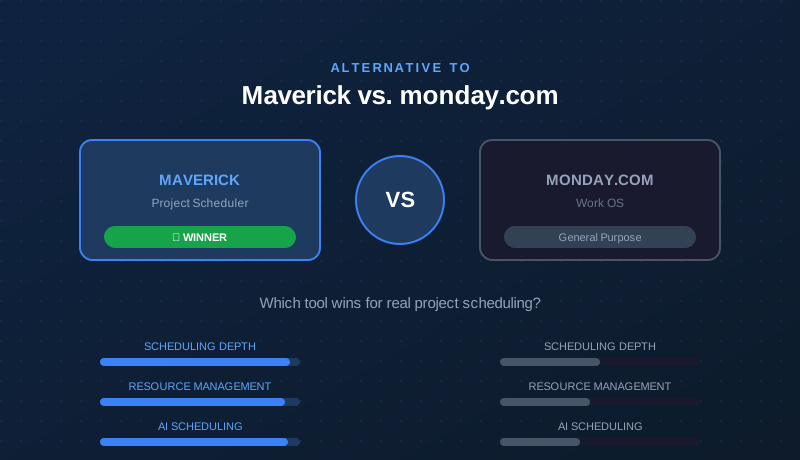
monday.com is one of the most recognized names in project management software — and for good reason. It is polished, flexible, and genuinely good at certain things. But if you manage projects with real deadlines, task dependencies, resource constraints, and accountable schedules, you have probably already noticed that monday.com is not quite doing what you need.
This comparison looks at both platforms honestly. monday.com earns credit where it deserves it. But for teams that need a true project scheduling engine — Gantt charts with critical path, dependency cascading, resource allocation, and AI that actually builds the plan — the outcome is clear.
Quick Verdict
monday.com is an excellent work management platform for marketing teams, HR departments, and operations teams that live in boards and need automation workflows. Maverick Project Scheduler is the right tool for project managers who need a scheduling engine: Gantt charts, critical path analysis, resource allocation, and a timesheet — all in one cloud application.
If your job is to deliver projects on time, with accountability for who is doing what and when, Maverick is the better alternative to monday.com.
Quick-Reference Comparison Table
The comparison above, summarized as a plain data table.
| Feature | Maverick | monday.com |
|---|---|---|
| True Gantt chart with scheduling engine | ✓ | Timeline only |
| Critical path calculation (CPM) | ✓ | ✗ |
| Task link types (FS, FF, SS, SF) with lag | ✓ | Basic only |
| Human, machine & materials resource types | ✓ | ✗ |
| Resource allocation bar chart | ✓ | ✗ |
| Built-in employee timesheet | ✓ | Add-on cost |
| AI builds and updates the project schedule | ✓ | Limited |
| Project baselines & variance tracking | ✓ | ✗ |
| Kanban / board views | ✗ | ✓ |
| Third-party integration marketplace | Core only | ✓ |
| Starting price per user / month | $8.99 (all features) | $9+ (basic tier) |
Feature Comparison at a Glance
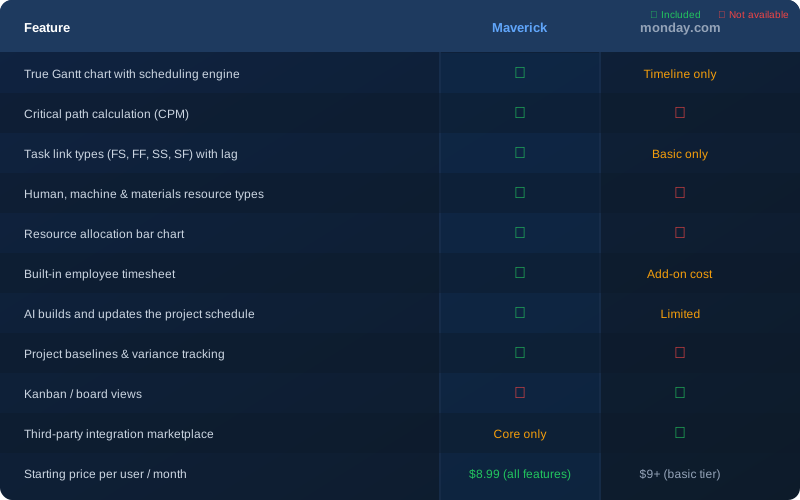
The table above covers the features that matter most for project scheduling. The pattern is consistent: where monday.com has a visual layer, Maverick has a scheduling engine underneath it. That difference determines whether your plan actually controls your project — or just describes it.
Gantt Chart and Scheduling Engine
Maverick wins clearly here. Maverick's Gantt chart is connected to a real scheduling engine. When you drag a task bar, every successor task shifts automatically based on its dependency relationships. When you build a dependency chain, Maverick enforces it — so your plan stays internally consistent even as dates change.
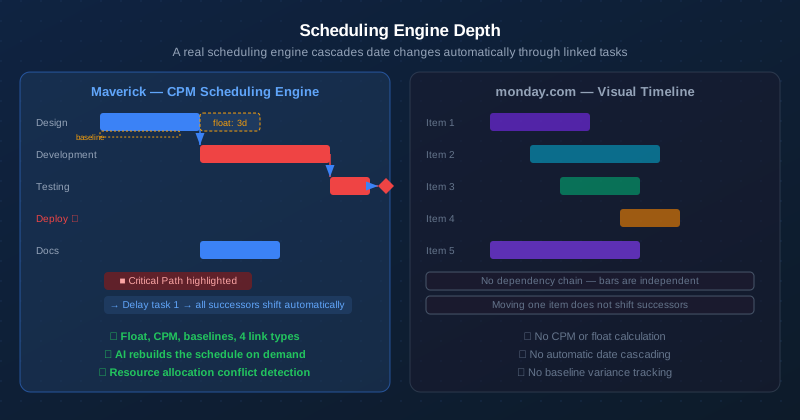
monday.com's Timeline view is a visual layer, not a scheduling engine. Bars represent date ranges, and you can drag them around, but there is no dependency chain driving those dates. If a task slips by a week, monday.com does not automatically move the tasks waiting on it. A project manager still has to do that manually — and on a complex project with 50 or 100 tasks, that quickly becomes unmanageable.
Maverick also supports four dependency link types — Finish-to-Start, Finish-to-Finish, Start-to-Start, and Start-to-Finish — each with configurable lag days. monday.com supports basic predecessor relationships but does not offer the same combination of link types, lag values, and automatic cascading.
Critical Path Analysis
Maverick wins. monday.com does not offer this feature.
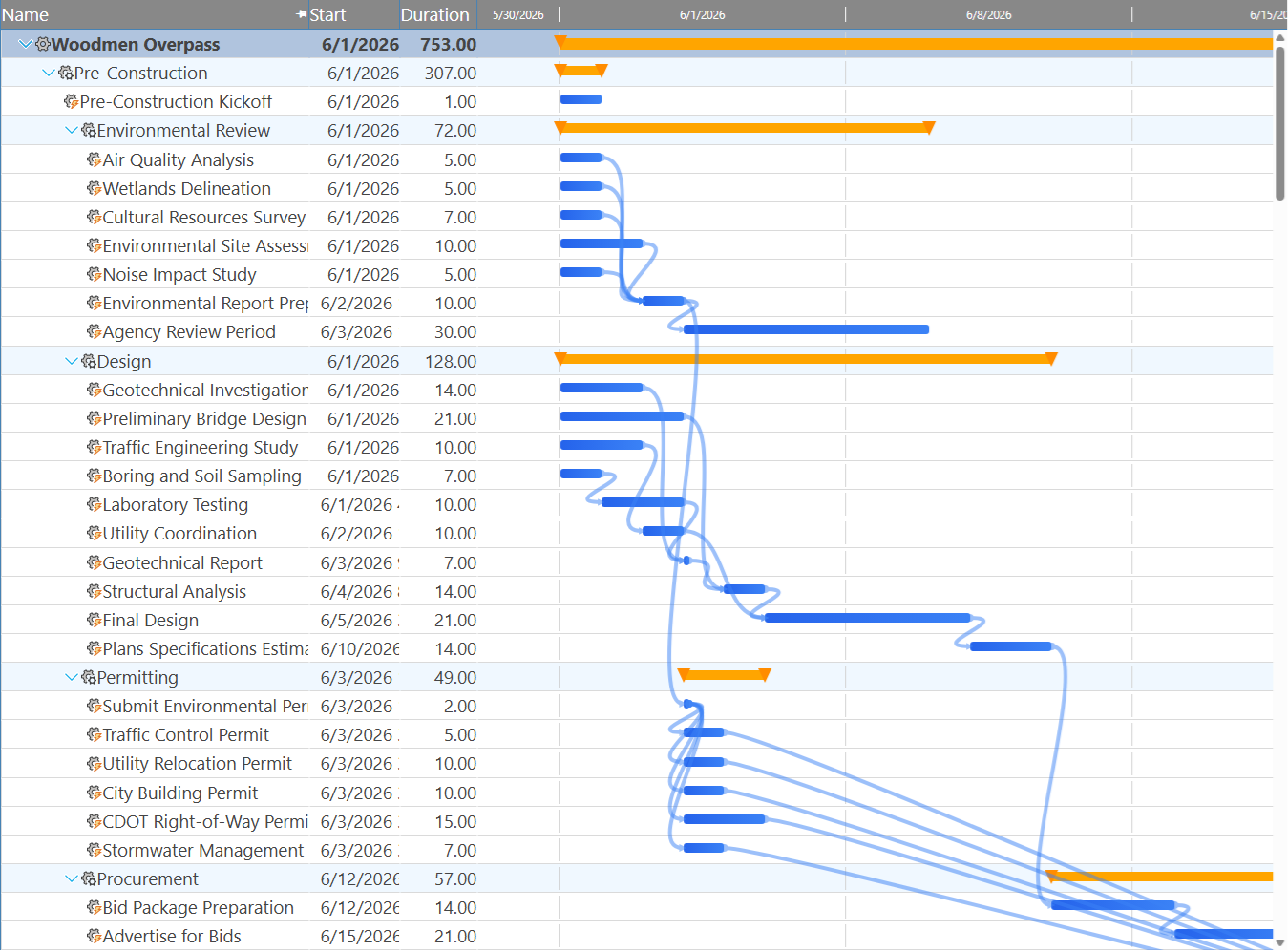
The critical path is the chain of tasks that determines your project end date. Any delay to a critical task delays the entire project. Maverick calculates the critical path automatically using the Critical Path Method (CPM), highlights critical tasks in red on the Gantt chart, and shows total float for every non-critical task so you know exactly how much scheduling flexibility you have.
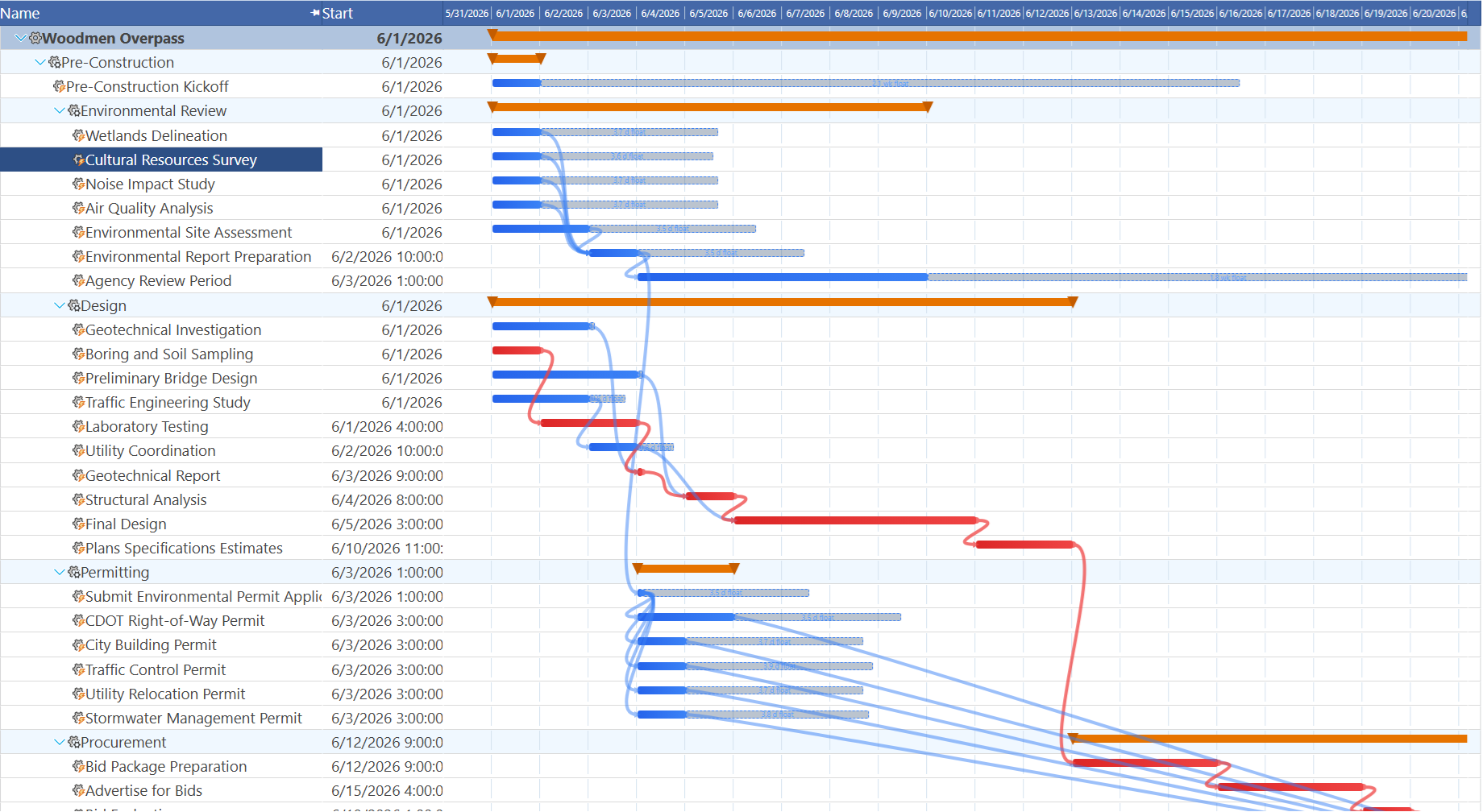
monday.com has no equivalent. There is no way to identify which tasks are on the critical path, no float calculation, and no automatic date-impact analysis when a task is delayed. For project managers who need to answer "what is at risk if this task slips?" — monday.com cannot provide that answer without manual analysis.
Resource Management
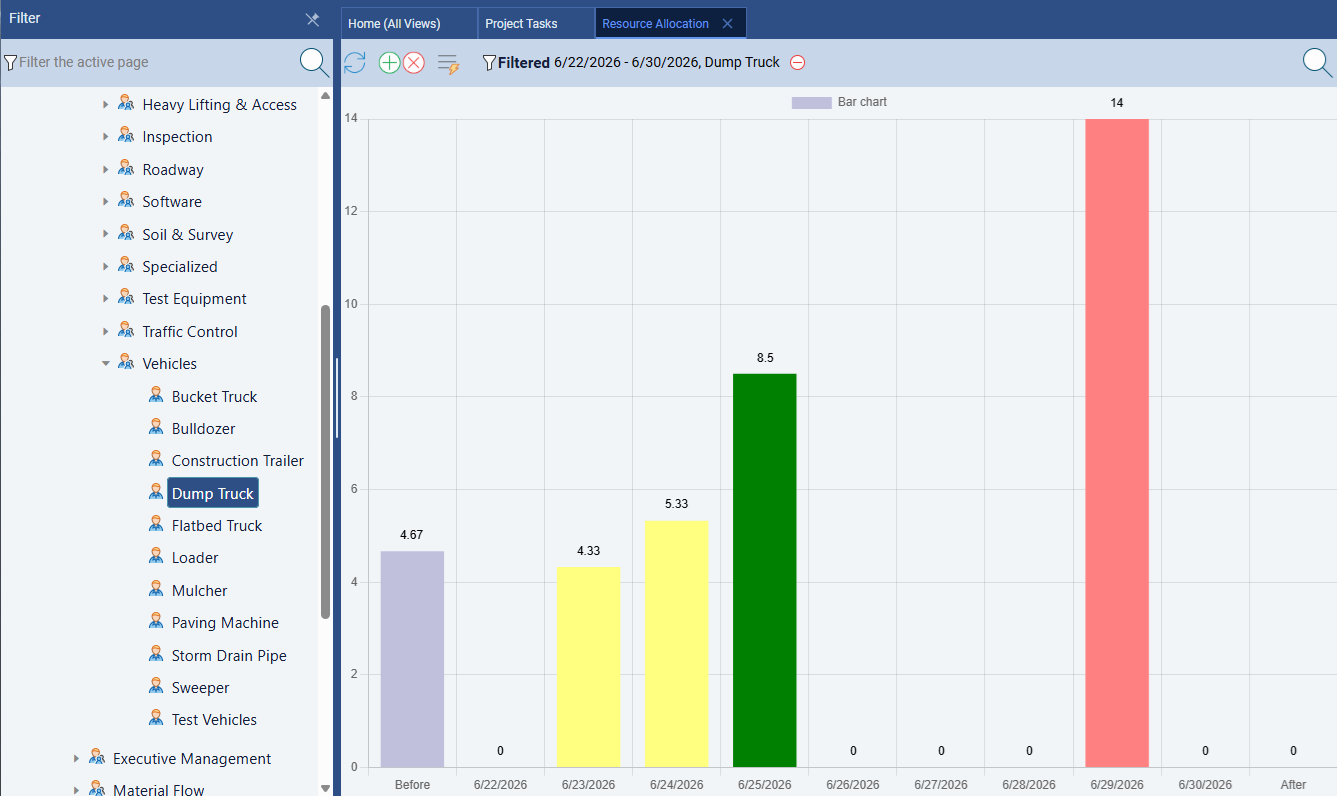
Maverick wins significantly. Maverick treats resource management as a first-class scheduling discipline. Human, machine, and materials resource types are all tracked separately. Resources have schedules and working hours. Assignments carry utilization percentages or hours per day. And the resource allocation bar chart shows — in color — exactly which resources are over-allocated, under-allocated, or correctly loaded across any time range you choose.
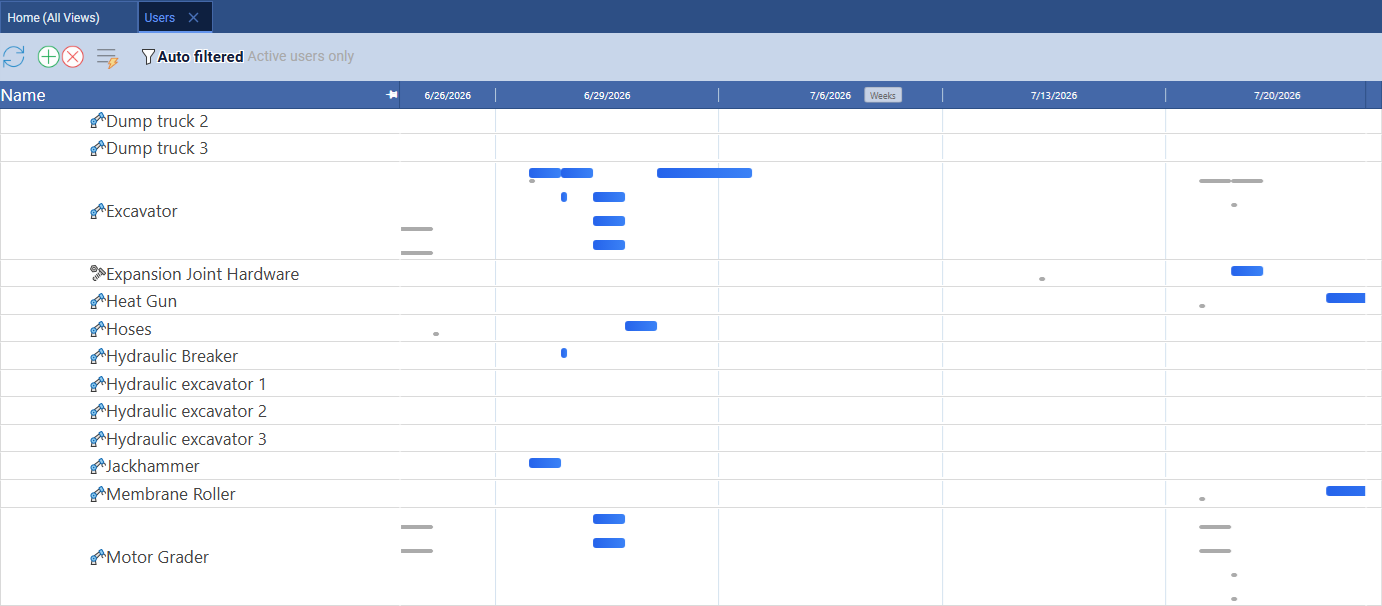
Maverick also includes a resource-centric Gantt on the Users page, where rows represent individual resources and each bar is a task assigned to that resource. You can filter to a single resource type — equipment only, for example — to see which machines are double-booked, which are idle, and which are correctly loaded. This is a scheduling timeline perspective on the same utilization data as the allocation bar chart, and it makes overlapping assignments visible in a way that utilization percentages alone cannot. monday.com has no equivalent view for non-human resources.
monday.com has a Workload view that shows task volume per person, but it does not differentiate between human and non-human resources, does not factor working schedules or hours into the calculation, and does not provide color-coded utilization alerts at the level Maverick does. For teams with constrained resources — which is most project teams — this gap matters.
Maverick also supports resource-specific working hour schedules, so a part-time contractor working three days a week is correctly accounted for when calculating task duration and resource loading. monday.com does not model this at all.
AI and Automation
Maverick wins on scheduling depth. monday.com wins on workflow automation breadth.
monday.com has a capable no-code automation builder that triggers actions based on status changes, date arrivals, and field updates. For teams that want to automate notifications, board movements, and status rollups, monday.com's automation center is genuinely useful.
Maverick's AI is different in kind, not just degree. Instead of automating status notifications, Maverick's AI reads your project — its tasks, resources, dependencies, and constraints — and builds or restructures the schedule in response to plain-English instructions. You can tell it to reschedule everything after a delay, assign resources to unassigned tasks, or build a new project from a description. The AI acts as a scheduling assistant, not a notification router.
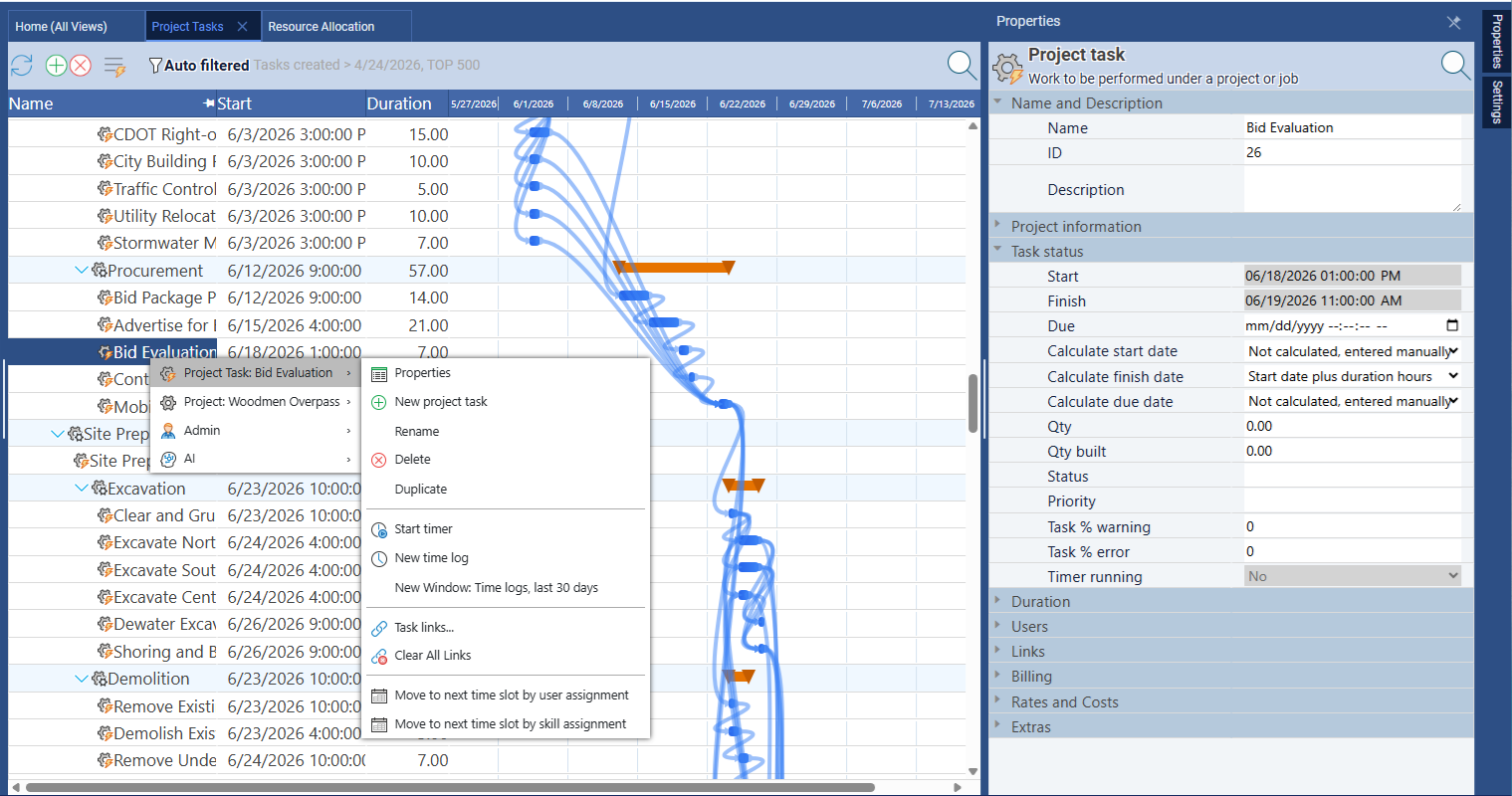
Maverick also lets you assign different AI providers and models per employee — so a power user can work with a premium model while the broader team uses a cost-effective one. monday.com's AI is a single centralized feature with no provider-level configuration.
Time Tracking and Timesheets
Maverick wins. monday.com requires third-party add-ons for equivalent functionality.
Maverick includes a full employee timesheet as a built-in feature — no add-on required. Team members log hours against specific tasks and projects. Managers can filter timesheets by user, project, and date range to see exactly where time is going. Actual hours feed back into cost calculations automatically.
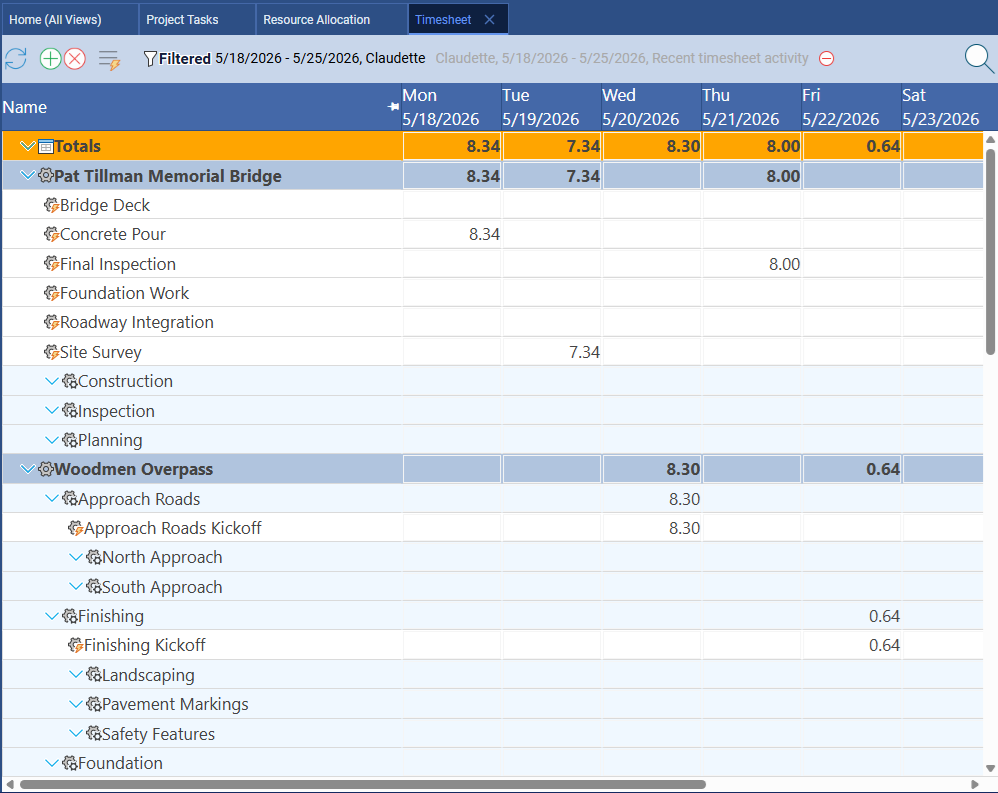
monday.com's core platform does not include a native timesheet. Time tracking requires either a third-party integration or the monday.com Workdocs / time tracking add-on, which adds cost and setup complexity. For teams that need time tracking as part of their project workflow — not bolted on from outside — Maverick's built-in approach is simpler and more reliable.
Project Baselines and Variance Tracking
Maverick wins. monday.com does not offer project baselines.
A project baseline is a snapshot of your original plan — dates, durations, and costs — taken at project kickoff. As the project progresses, you compare actual performance against that baseline to understand how far you have drifted and why. Maverick supports baselines natively, displaying ghost bars on the Gantt chart so the original plan is always visible alongside the current schedule.
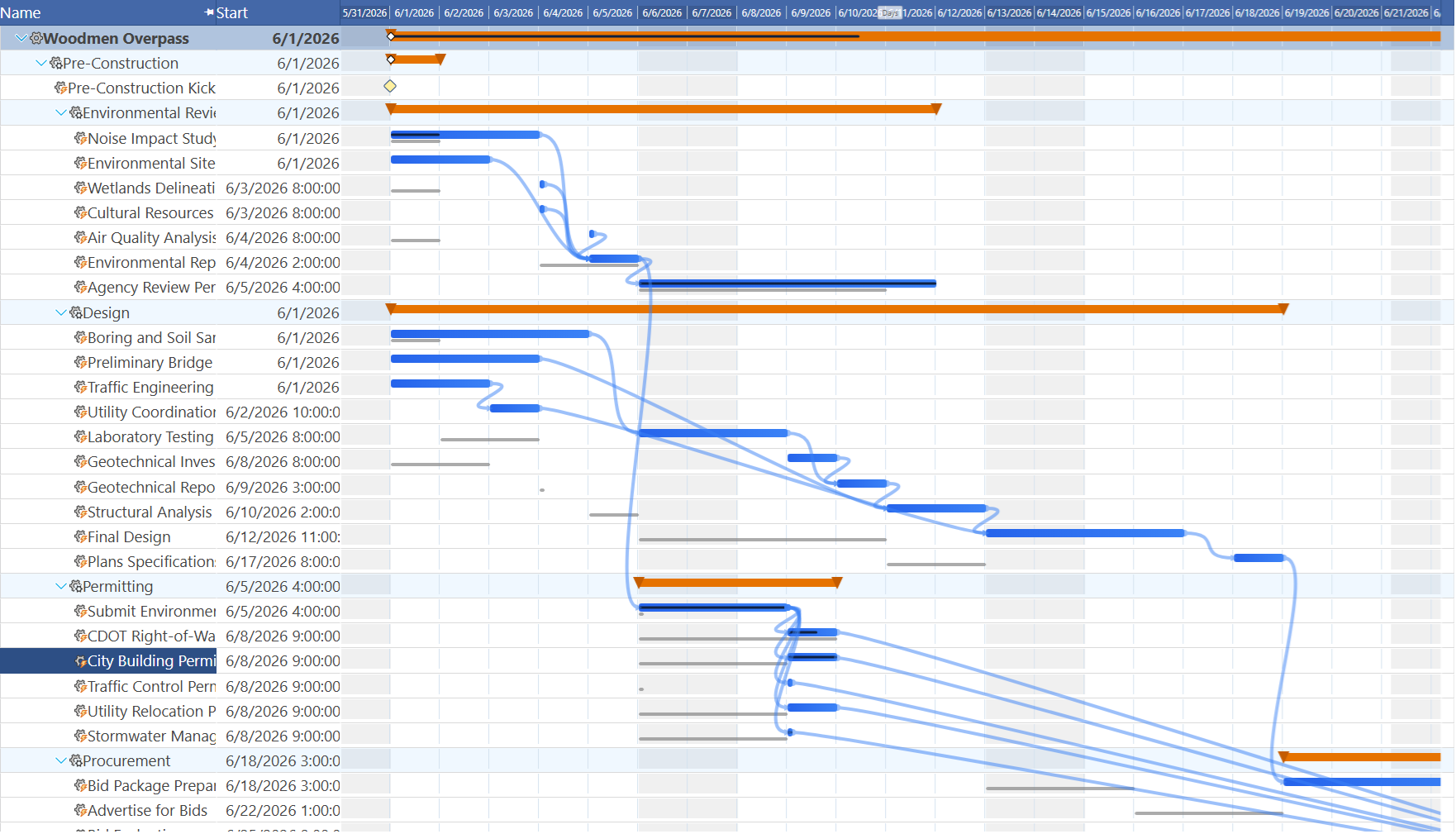
monday.com has no baseline feature. Once you update a task's dates, the original planned dates are gone. For project managers who report on schedule variance to stakeholders, this is a meaningful gap.
Integrations and Ecosystem
monday.com wins this category.
monday.com has built an impressive integration marketplace with over 200 third-party connectors — Slack, Salesforce, HubSpot, Jira, GitHub, and dozens more. If your organization runs on a diverse stack of SaaS tools, monday.com's ecosystem is a genuine advantage. The breadth of native integrations reduces the need for custom middleware.
Maverick focuses on the integrations project managers use most: Microsoft Project import/export, Excel, CSV, and database connections for scheduled imports and exports. If deep third-party SaaS integration is your top priority, monday.com has the wider catalog — though for most project scheduling workflows, Maverick's core integrations cover the essential bases.
Kanban Boards and Flexibility
monday.com wins this category.
monday.com's board-based interface is one of the most flexible in the industry. You can build custom boards for nearly any workflow, switch between Kanban, table, gallery, and calendar views, and configure columns exactly as your team needs them. For non-project teams — marketing, HR, operations, customer support — that flexibility is genuinely valuable.
Maverick's interface is designed around the scheduling workflow: a task grid, Gantt chart, resource allocation chart, and properties panel. It does not offer a Kanban view. If your team's primary need is a visual board for non-scheduled work, monday.com is the better fit. If your primary need is delivering projects with defined timelines and accountable resources, Maverick is the right tool.
Pricing
Essentially tied at the entry level — Maverick includes more for the price.
Maverick starts at $8.99 per user per month and includes all Pro features — AI scheduling, resource allocation charts, timesheets, custom reporting, and automated exports — as part of every subscription during the current promotional period. There are no gated tiers for core project scheduling features.
monday.com's pricing starts at a comparable per-seat rate but gates many useful features behind higher tiers. Time tracking, guest access limits, advanced automations, and reporting capabilities often require the Pro or Enterprise plan. When you add up the actual cost of the features a project manager needs, monday.com's all-in price is typically higher than Maverick's.
Final Verdict: Which Tool Should You Choose?
monday.com is a well-designed work management platform that works well for teams whose primary need is visual boards, workflow automation, and a broad SaaS integration ecosystem. If you manage marketing campaigns, HR processes, or operations workflows — and your team does not need a scheduling engine — monday.com is a reasonable choice.
But if you are a project manager responsible for delivering projects with real deadlines, dependencies, resource constraints, and stakeholder accountability, monday.com leaves too many gaps. No CPM. No automatic dependency cascading. No resource allocation bar chart. No built-in timesheet. No baselines. These are not edge cases — they are the core of professional project scheduling.
Maverick Project Scheduler was built specifically for this discipline. The scheduling engine, resource management, AI integration, and timesheet work together as a coherent system. The result is a tool that genuinely helps you deliver projects — not just track them.