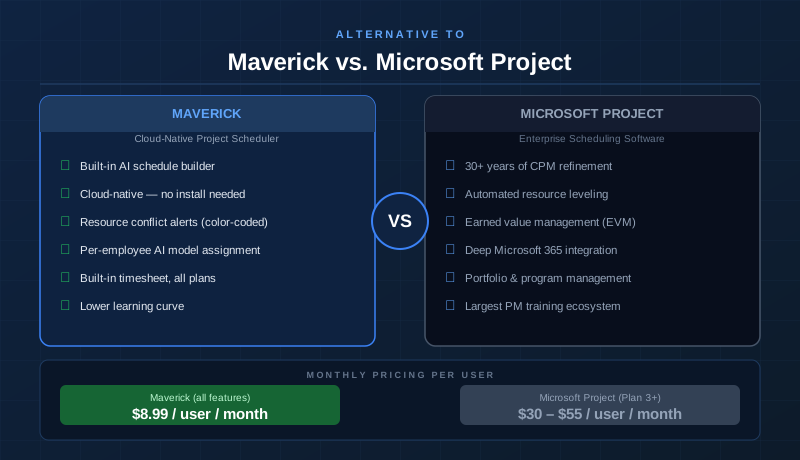
Microsoft Project is the original gold standard for professional project scheduling. It has been refining its Critical Path Method engine, resource management, and earned value tracking for more than three decades — and that depth shows. For enterprise teams with complex portfolio management needs, deep Microsoft 365 integration requirements, and dedicated IT support to manage deployments, Microsoft Project can be the right fit.
But the world has changed. Cloud-native scheduling tools have closed the gap on core CPM capabilities, AI now handles tasks that used to require a certified PMP to execute manually, and teams expect to open their project tool in a browser the same way they open their email. This comparison looks at both platforms honestly. Microsoft Project earns its wins. But for project managers who need a real scheduling engine — Gantt charts with critical path, dependency cascading, resource allocation, and AI that actually restructures the plan — at a price that does not require a budget justification meeting, the outcome deserves a hard look.
Quick Verdict
Microsoft Project is the more complete enterprise scheduling platform. Its automated resource leveling, earned value management (EVM), portfolio management, and deep Microsoft 365 integration give it a genuine edge for large organizations with complex, multi-project environments.
Maverick Project Scheduler is the right tool for project teams that need the same core scheduling discipline — Gantt charts with CPM, dependency cascading, resource allocation, built-in timesheets, and baselines — at a price that is three to six times lower per user. If your team needs real project scheduling and real value, Maverick is a compelling Microsoft Project alternative for growing businesses.
Quick-Reference Comparison Table
The comparison above, summarized as a plain data table.
| Feature | Maverick | Microsoft Project |
|---|---|---|
| True Gantt chart with CPM scheduling engine | ✓ | ✓ |
| Critical path calculation & float display | ✓ | ✓ |
| All 4 link types (FS, FF, SS, SF) with lag | ✓ | ✓ |
| Automated resource leveling | Manual only | ✓ |
| Earned value management (EVM) | ✗ | ✓ |
| Color-coded resource allocation bar chart | ✓ | Usage view only |
| AI builds and restructures the project schedule | ✓ | Copilot only |
| Built-in employee timesheet | ✓ | Plan 3 / Plan 5 only |
| Project baselines & variance tracking | ✓ | ✓ |
| Cloud-native — browser, no desktop install | ✓ | Online version available |
| Starting price per user / month | $8.99 (all features) | $10 – $55 (varies by plan) |
Feature Comparison at a Glance
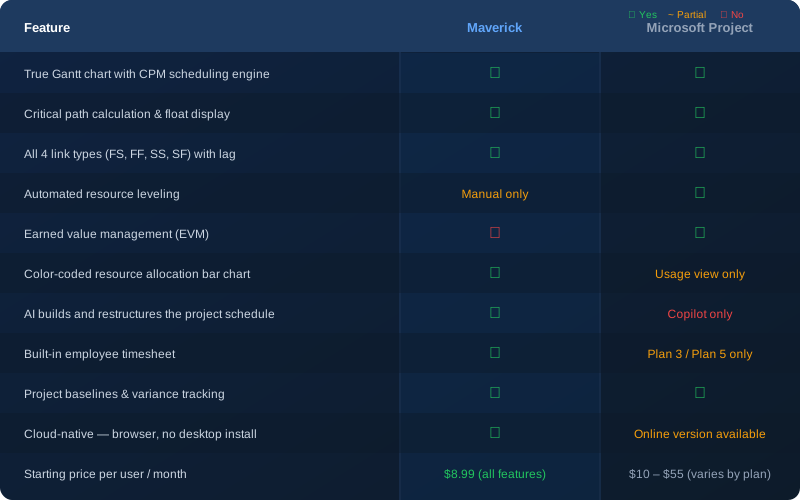
Both tools share the fundamentals: true Gantt charts backed by a scheduling engine, full CPM calculation, all four dependency link types with lag, and project baselines. Where they diverge is in enterprise depth (resource leveling, EVM, and portfolio management in Microsoft Project's favor) and modern cloud experience (AI scheduling, browser-native access, and pricing in Maverick's favor).
Gantt Chart and Scheduling Engine
A genuine tie at the core — with different implementations. Both Maverick and Microsoft Project are backed by real scheduling engines. When a predecessor task changes, every dependent successor shifts automatically based on its link type and lag days. This is the foundational behavior that separates a scheduling tool from a visual timeline, and both tools do it correctly.
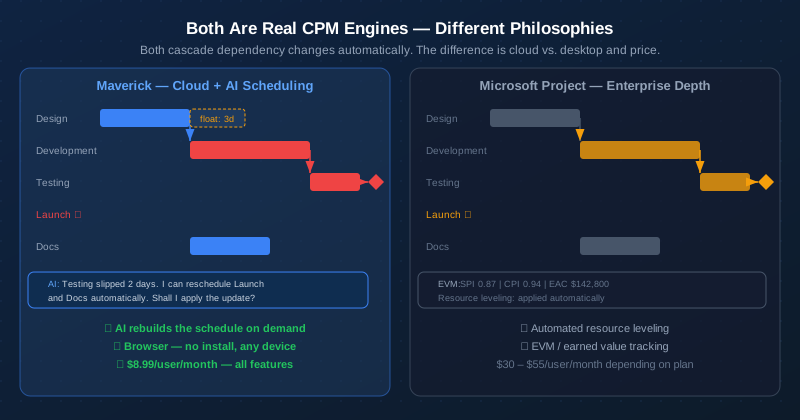
Microsoft Project's Gantt view is exceptionally configurable — column sets, custom fields, multiple baselines, and formatting options that have accumulated over decades of development. For a project manager who has spent years in MSP, the familiar environment and depth of configuration are real advantages.
Maverick's Gantt chart takes a cleaner approach. The three-panel interface — filter panel, Gantt grid, and properties panel — keeps the most critical scheduling information front and center without requiring significant configuration to get started. Task bars, dependency link lines, float indicators, and baseline ghost bars are all visible at a glance. For new team members or organizations without a dedicated MSP administrator, Maverick's interface is actionable from day one.
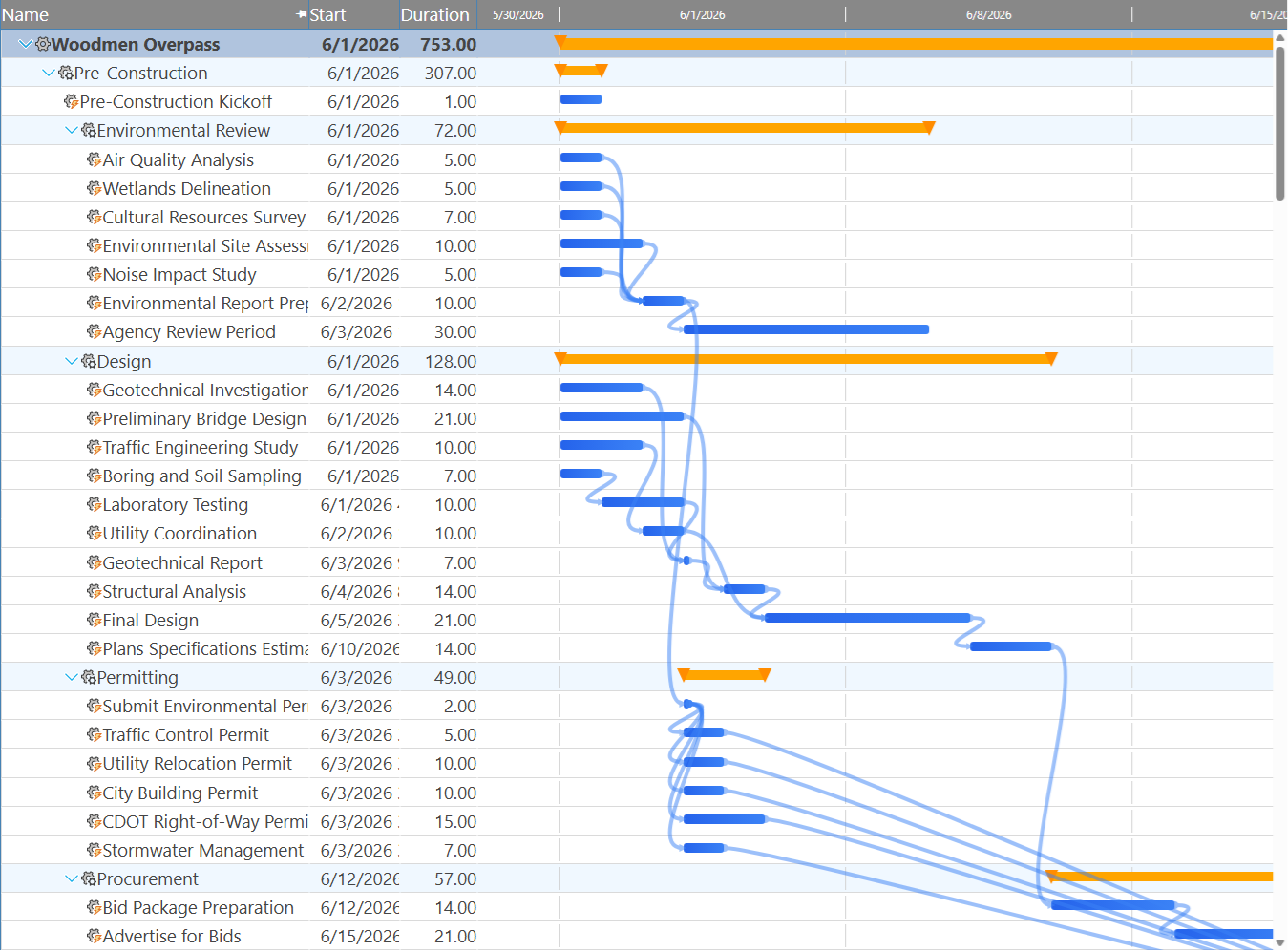
Both tools support all four dependency link types — Finish-to-Start, Finish-to-Finish, Start-to-Start, and Start-to-Finish — with configurable lag days on every relationship. This is one of the areas where the two tools are genuinely equivalent at the core scheduling level.
Critical Path Analysis
Both tools offer full CPM. Microsoft Project has more configuration options.
Maverick calculates the critical path automatically using the Critical Path Method, highlighting critical tasks in red on the Gantt chart and displaying total float for every non-critical task. The calculation runs continuously as the schedule changes — there is no manual refresh required.
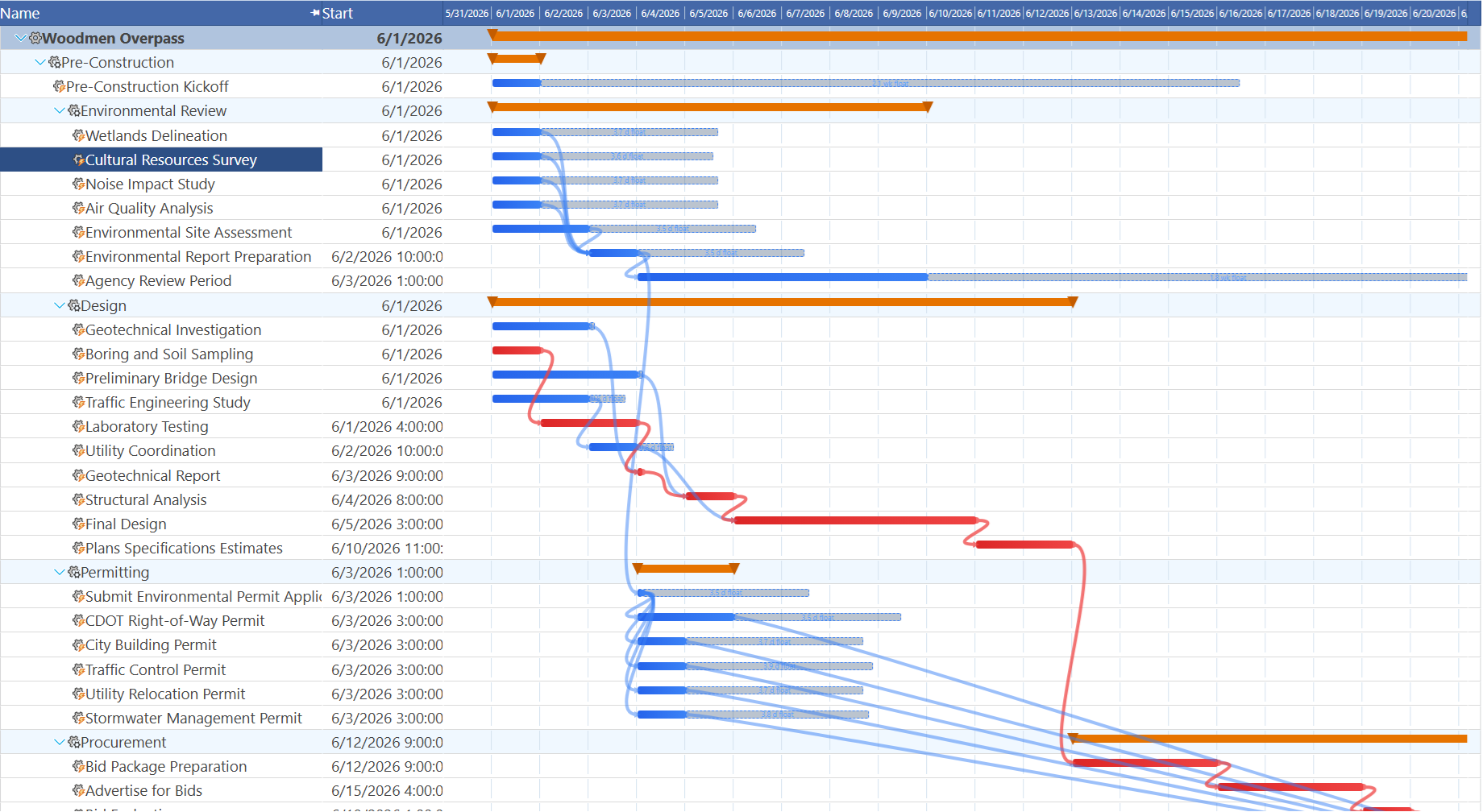
Microsoft Project's CPM engine is deeper — it supports multiple calendar types, multiple constraint options (Start No Earlier Than, Finish No Later Than, Must Start On, and more), and task type settings (Fixed Units, Fixed Duration, Fixed Work) that affect how the CPM calculation responds to changes. For project managers who need precise control over how the schedule engine interprets every task, MSP's additional constraint options are genuinely useful.
For the majority of project scheduling scenarios — linked tasks, cascading date changes, and a clear picture of what is on the critical path — both tools deliver the same outcome. Maverick's implementation is simpler and more approachable; Microsoft Project's is more configurable for complex edge cases.
Resource Management
Microsoft Project wins on automated leveling. Maverick wins on visual conflict visibility.
Microsoft Project's resource leveling feature is a genuine differentiator. When resources are over-allocated, MSP can automatically adjust the schedule — delaying tasks, splitting work, or adding overtime — to resolve conflicts without manual intervention. For large projects with dozens of resources and hundreds of tasks, automated leveling can save significant time.
Maverick takes a different approach: it shows you exactly where the conflicts are, in color, and lets the project manager decide how to resolve them. The resource allocation bar chart displays every resource's daily, weekly, or monthly utilization with color-coded alerts — green for correctly allocated, amber for under-allocated, and red for over-allocated. The chart makes it immediately obvious which resources need attention and when.
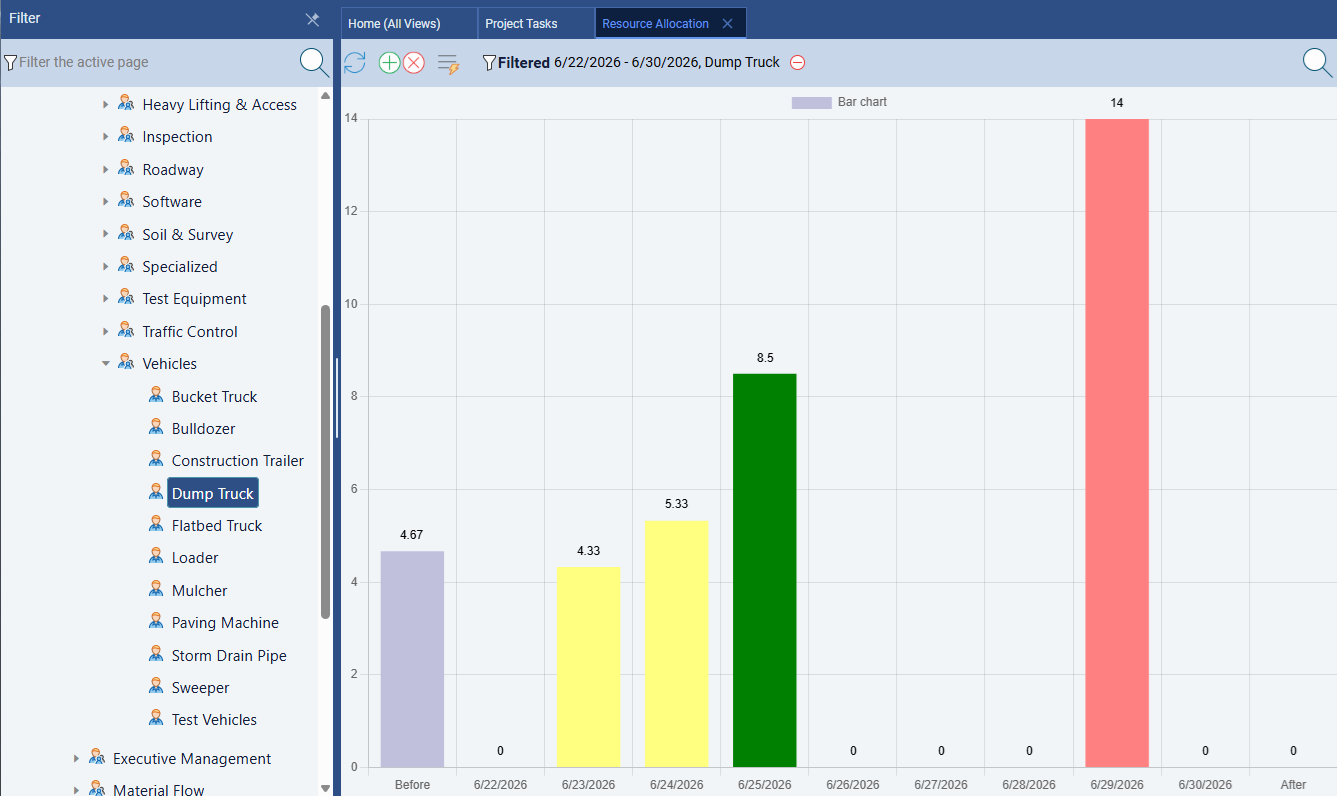
Maverick also supports three separate resource types — human, machine, and materials — each with their own cost rates and working schedules. Task assignments carry utilization percentages or hours per day. Microsoft Project also supports multiple resource types, but the comparison is close here.
The honest summary: if you need the scheduling system to resolve resource conflicts automatically, Microsoft Project's leveling is the right tool. If you need clear visual reporting on where the conflicts are so your team can make informed decisions, Maverick's color-coded allocation chart is more actionable.
Earned Value Management
Microsoft Project wins. Maverick does not offer EVM.
Earned Value Management is an enterprise project control methodology that tracks schedule performance (SPI), cost performance (CPI), and projected final cost (EAC) using a combination of planned value, earned value, and actual cost. Microsoft Project has built EVM support directly into the scheduling engine — as work is logged against tasks, the EVM metrics update automatically and can be displayed in project dashboards and reports.
Maverick does not offer EVM. If your organization requires earned value reporting for contract compliance, government projects, or program management oversight, Microsoft Project is the appropriate tool for that work. This is a genuine gap and not one to minimize — EVM is a meaningful enterprise requirement for certain project environments.
For the majority of commercial project teams that track schedule and cost without formal EVM methodology, the absence of EVM in Maverick is not a practical limitation. Time tracking, cost rates, and schedule variance through baselines cover the core project control needs for most teams.
AI and Automation
Maverick wins significantly on AI scheduling depth.
Microsoft Project has integrated Microsoft Copilot into the Project experience. Copilot can summarize project status, suggest risk items, answer questions about the schedule, and generate reports. These are genuinely useful capabilities for project managers who need to communicate quickly or get a high-level view of a complex plan.
Maverick's AI operates at a fundamentally different level. Instead of summarizing what already exists, Maverick's AI reads your project — its tasks, dependencies, resource assignments, constraints, and current schedule — and restructures the plan in response to plain-English instructions. You can tell it to reschedule the project after a two-week delay, assign the best-fit available resource to each unassigned task, or rebuild the task breakdown from a description of the project goals. The AI acts as a scheduling assistant that does real scheduling work, not just status reporting.
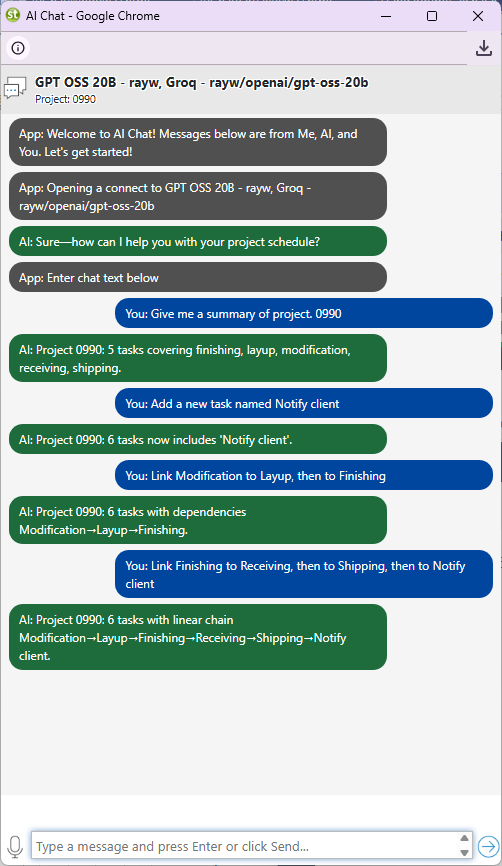
Maverick also lets you configure different AI providers and models per employee — so a project manager running a complex construction schedule can use a premium model while a coordinator doing simple status updates uses a cost-effective one. This per-employee AI configuration has no equivalent in Microsoft Project's Copilot implementation.
Cloud Access and Deployment
Maverick wins for cloud-native access. Microsoft Project offers both options.
Maverick is cloud-native by design. The full application runs in any modern browser — no desktop install, no IT configuration, no version management. A team member in a different office, on a client site, or working remotely opens the same application and sees the same live schedule as the project manager. Updates are immediate and there is no synchronization required.
Microsoft Project has evolved toward a hybrid model. Project for the Web (Plan 1 and Plan 3) is a browser-based experience built on Microsoft Dataverse. The traditional desktop application is available on Plan 5 and remains the platform of choice for power users who need the deepest feature set. Organizations that have already invested in Microsoft 365 infrastructure may find the integration natural. Organizations evaluating from scratch face a choice between the modern but more limited web experience and the powerful but installation-dependent desktop client.
For teams that want to get started today without an IT deployment project, Maverick's browser-native experience is meaningfully simpler. There is no version to install, no license to activate on each machine, and no compatibility matrix to check against the organization's Windows build.
Time Tracking and Timesheets
Maverick wins on simplicity and inclusion. Microsoft Project requires a higher plan.
Maverick includes a full employee timesheet as a built-in feature across all subscription plans — no add-on required and no additional configuration. Team members log hours against specific tasks and projects directly in Maverick. Managers can filter timesheets by user, project, and date range to see exactly where time is going. Actual hours flow back into cost calculations automatically.
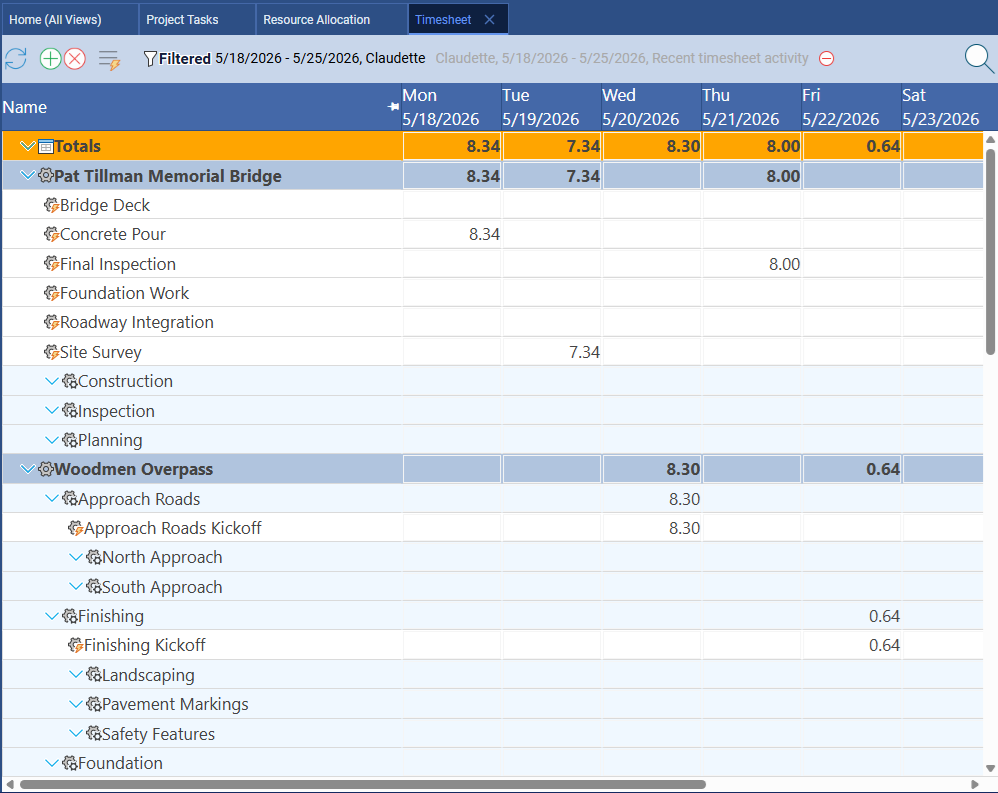
Microsoft Project does support timesheet and actual tracking, but the depth of the feature depends on which plan you are using. The full timesheet experience — where team members submit timesheets for manager approval and actuals feed into project plans — is available on Project Plan 3 and Plan 5. Plan 1 does not include the full timesheet workflow. For organizations already on Plan 3 or Plan 5, this is a non-issue. For teams evaluating entry-level Microsoft Project plans, timesheet functionality may require upgrading.
Project Baselines and Variance Tracking
Both tools offer project baselines. Microsoft Project supports multiple baselines.
Maverick supports project baselines natively. You snapshot the original plan at approval or kickoff, and the Gantt chart displays ghost bars alongside the live schedule so schedule variance is immediately visible. For most project management workflows — where you compare current dates against the original plan — this is everything you need.
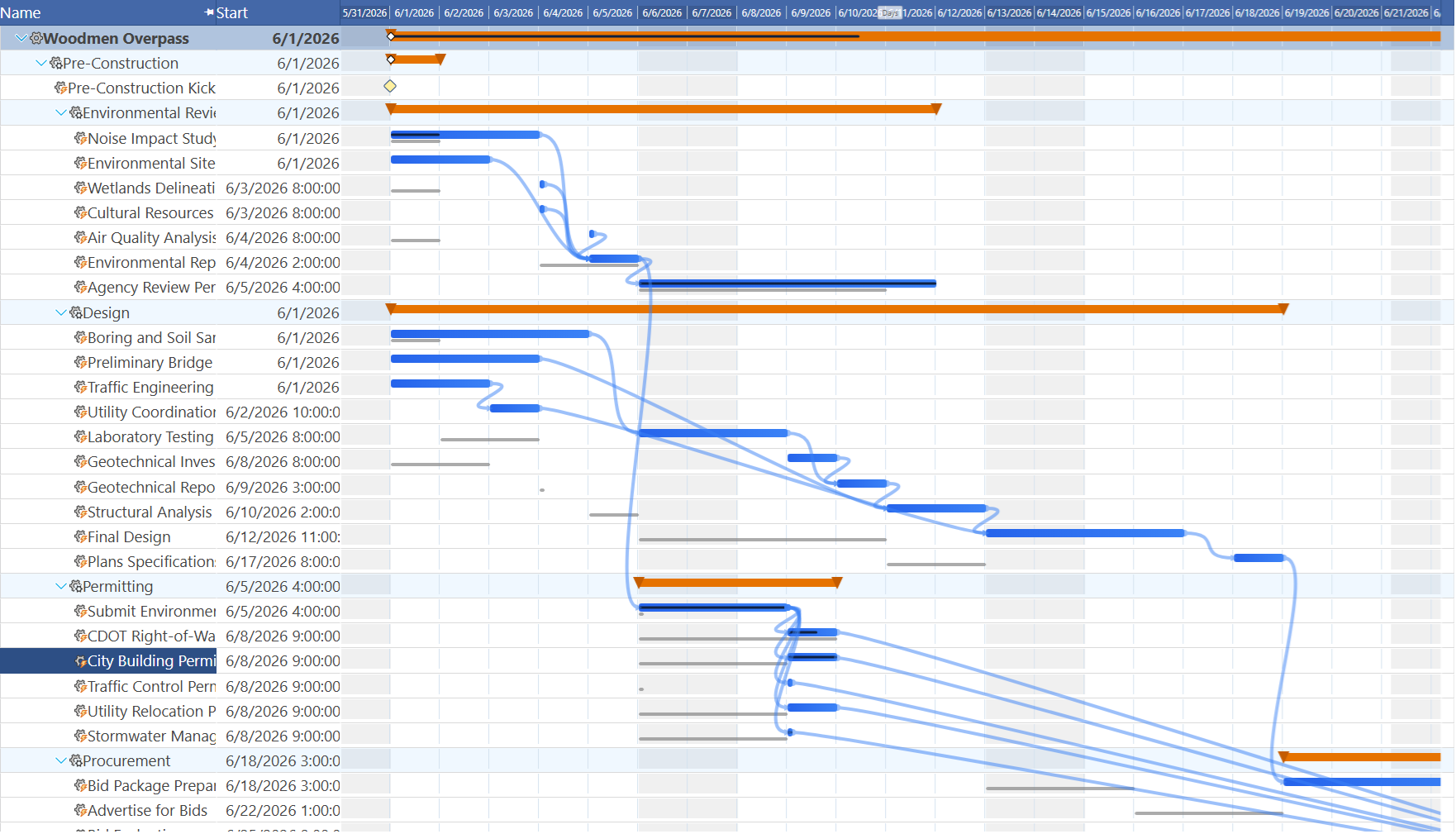
Microsoft Project supports up to eleven saved baselines simultaneously, which is useful in long-running programs where the approved plan is formally re-baselined at major milestones. If your project governance process requires multi-baseline tracking, MSP's depth here is relevant. For the typical project team saving one baseline at kickoff and comparing against it at weekly status reviews, both tools deliver the same practical outcome.
Microsoft 365 Integration and Ecosystem
Microsoft Project wins this category.
If your organization runs on Microsoft 365, Microsoft Project's ecosystem integration is a genuine advantage. Project schedules can be connected to SharePoint sites, Power BI dashboards can pull project data for executive reporting, Teams channels can surface task updates, and Outlook calendar integration keeps everyone aligned on deadlines. For organizations deeply invested in the Microsoft stack, the breadth of these connections is real.
Maverick focuses on the integrations that project managers use most: Microsoft Project import and export, CSV, and database connections for scheduled data exchange. If your organization needs your project tool to plug into a complex Microsoft 365 workflow — approval flows in Power Automate, risk tracking in SharePoint lists, or portfolio dashboards in Power BI — Microsoft Project has the native connectors to make that work. Maverick does not match that integration depth.
Pricing
Maverick wins significantly — and the gap matters for most teams.
Maverick starts at $8.99 per user per month and includes everything — AI scheduling, CPM, resource allocation charts, built-in timesheets, baselines, custom reporting, and automated exports. There are no gated tiers. The full feature set is available at the entry price during the current promotional period.
Microsoft Project's pricing spans three plans. Project Plan 1 (online only, no desktop) starts at approximately $10 per user per month but lacks several enterprise features including the full timesheet workflow. Project Plan 3 (the most commonly recommended online plan) runs approximately $30 per user per month. Project Plan 5 — which includes the traditional desktop application and full enterprise feature set — is approximately $55 per user per month.
For a team of ten people, the annual cost difference between Maverick ($8.99 × 10 × 12 = $1,079) and Microsoft Project Plan 3 ($30 × 10 × 12 = $3,600) is $2,521 per year. At Plan 5 pricing, the gap grows to more than $5,500 annually. For a team of twenty-five, the savings compound further. At the price of a single Microsoft Project Plan 5 seat, you can license more than six Maverick users.
If your team needs the full depth of Microsoft Project — EVM, automated resource leveling, multiple baselines, and deep M365 integration — that cost may be justified. If your primary need is real project scheduling with Gantt charts, CPM, resource management, AI, and timesheets, Maverick delivers that discipline at a fraction of the cost.
Why Not Use Both?
You do not have to choose. Maverick supports import and export of Microsoft Project XML files, so you can use both tools together. Run your projects in Maverick to take advantage of cloud access, built-in timesheets, AI scheduling, and a fraction of the licensing cost — then exchange files with colleagues or stakeholders who are working in Microsoft Project. You get the best of both worlds without locking your team into a single platform.
Final Verdict: Which Tool Should You Choose?
Microsoft Project is the overall winner on scheduling depth. Thirty years of refinement shows: automated resource leveling, earned value management, multiple baselines, and deep Microsoft 365 integration give it capabilities that Maverick does not match. For large enterprises, government contractors, and program management offices that require EVM, portfolio management, and M365 workflow integration, Microsoft Project is the appropriate platform.
But that is a specific profile. For the much larger universe of project teams — construction firms, IT departments, engineering groups, consulting practices, and professional services organizations — who need a real CPM scheduling engine, resource management, AI that builds and restructures the schedule, built-in timesheets, and baselines, Maverick delivers all of that. At $8.99 per user per month.
The question is not which tool is more powerful in absolute terms. The question is which tool gives your team the scheduling discipline it needs at a price that makes sense. For most project managers, the honest answer is that Maverick covers the core scheduling work — and keeps three to six times more budget in the project.