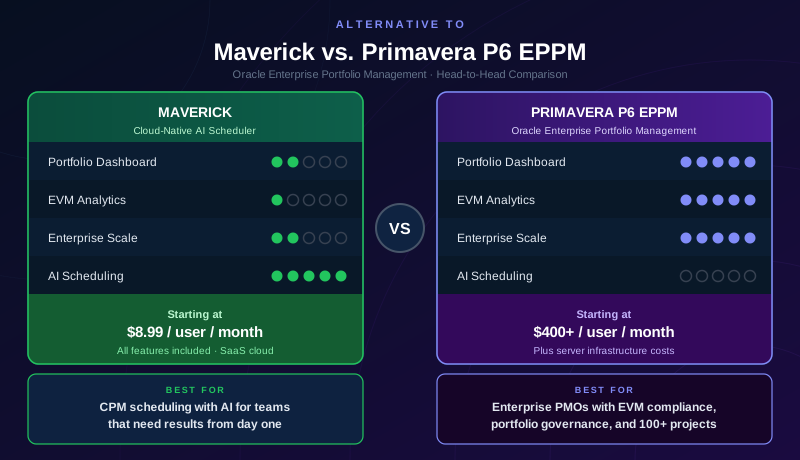
Oracle Primavera P6 Enterprise Project Portfolio Management (EPPM) is the enterprise server platform built on top of the same CPM scheduling engine used in Primavera P6 Professional. Where P6 Professional is a desktop application used by individual project schedulers, P6 EPPM is a multi-user, database-backed enterprise system that runs in a web browser against an Oracle WebLogic application server. It is the version government agencies, capital construction program management offices, and defense prime contractors deploy when they need portfolio governance across hundreds of concurrent projects — not the management of a single schedule file.
The distinction matters for this comparison. P6 EPPM adds a portfolio intelligence layer that P6 Professional does not have: cross-project dashboards, enterprise resource pools shared across all projects, approval workflows, progress entry for the entire workforce, and executive-level metrics that aggregate performance across the entire program. If you are evaluating whether to build that infrastructure, or whether a different platform would serve your team better, this comparison covers the full picture without pulling punches on either side.
This page covers P6 EPPM specifically. If your organization uses the Primavera P6 Professional desktop application, see our comparison of Maverick vs. Primavera P6 Professional instead.
Quick Verdict
Primavera P6 EPPM wins this comparison for the organizations it was built for. Its portfolio management capabilities, automated earned value management, Monte Carlo risk analysis, cross-project resource pools, and enterprise-scale governance features are the deepest available in any commercial project management platform. Government contractors with DCAA compliance requirements, energy sector capital program offices, and defense prime contractors managing multi-year portfolios of interdependent projects are using the right tool when they use P6 EPPM.
But the organizations that genuinely need EPPM represent a small fraction of the teams that pay for project management software. For companies managing fewer than fifty concurrent projects, teams where project schedulers work alongside business stakeholders rather than alongside dedicated P6 administrators, and organizations that do not have contractual or regulatory EVM reporting requirements, the cost, complexity, and infrastructure burden of P6 EPPM is not justified by the work being done. Those teams need a real CPM scheduling engine with resource management, AI assistance, and a price that does not require a board-level procurement decision — which is where Maverick competes.
Quick-Reference Comparison Table
The comparison above, summarized as a plain data table.
| Feature | Maverick | P6 EPPM |
|---|---|---|
| CPM scheduling engine with full Gantt chart | ✓ | ✓ |
| Portfolio dashboard & executive cross-project views | Summary only | ✓ |
| AI builds and restructures the project schedule | ✓ | ✗ |
| Earned value management (EVM / CPI / SPI / EAC) | ✗ | ✓ |
| Cross-project enterprise resource pools & leveling | Per project | ✓ |
| Monte Carlo probabilistic risk simulation | ✗ | ✓ |
| Browser-based access for all users | ✓ | Server deploy |
| Built-in team timesheet (all plans, no add-on) | ✓ | Progress Reporter |
| Project baselines & schedule variance tracking | ✓ | ✓ |
| Learning curve | Low — days | High — months+ |
| Starting price per user / month | $8.99 (all features) | $400+ (+ server) |
Feature Comparison at a Glance
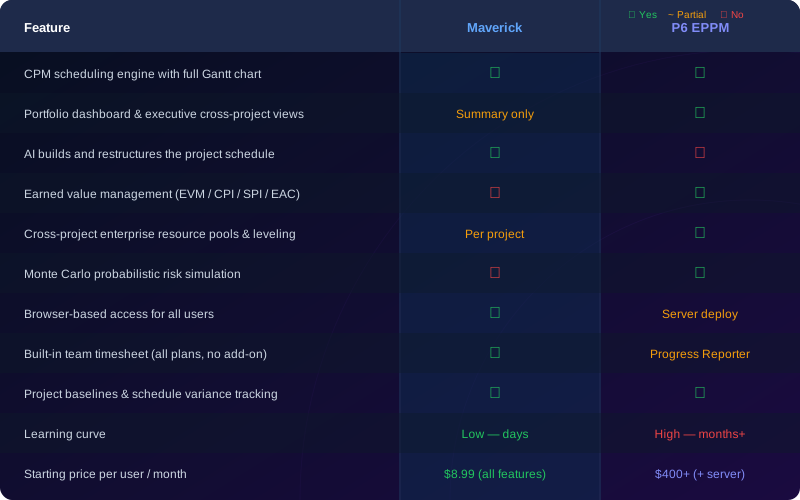
Both tools share a genuine CPM foundation and browser-based access — though EPPM's browser access requires a full Oracle WebLogic server deployment, while Maverick is SaaS. The comparison diverges sharply at the portfolio layer: P6 EPPM dominates on cross-project portfolio dashboards, automated EVM, enterprise resource pools, and Monte Carlo risk simulation. Maverick wins decisively on AI scheduling, price, and deployment speed. No version of Primavera P6 offers native AI that builds or restructures a schedule on demand.
What Is Primavera P6 EPPM?
P6 EPPM is the web application server edition of Oracle's Primavera platform. Unlike P6 Professional — a Windows desktop application — EPPM runs on Oracle WebLogic Server (or Oracle Application Server for older installations) with an Oracle Database or SQL Server backend. Every user accesses the system through a web browser, and the enterprise data — projects, resources, activity codes, OBS structures, calendars, and historical performance — lives in a shared relational database rather than individual schedule files.
This architecture is what enables EPPM's portfolio capabilities. Because all projects share a single database, portfolio dashboards can aggregate earned value metrics, resource utilization, and schedule performance across the entire program in real time without requiring individual project managers to submit reports. The program management office sees a live view of the portfolio. Individual project schedulers see their projects within the context of the broader enterprise data structure.
That architecture also explains EPPM's complexity. Before any project scheduling can happen, the enterprise data structure must be configured: the organizational breakdown structure (OBS), work breakdown structure (WBS) templates, activity codes, resource dictionaries, calendars, and role hierarchies. In large EPPM deployments, this configuration work is a multi-month implementation project in itself, typically delivered by Oracle-certified implementation consultants.
Portfolio Management and Executive Dashboards
P6 EPPM wins this category. Its portfolio governance capabilities have no equivalent in Maverick.
The portfolio layer is the defining capability of P6 EPPM versus its desktop counterpart. Portfolio managers see aggregate schedule performance — earned value curves, SPI and CPI trends, resource demand versus capacity, and milestone status — across all active programs simultaneously, without opening a single project file. Dashboards are configurable at the portfolio, program, and project level, and executives can drill from a top-level program summary down to individual activity status without leaving the browser interface.
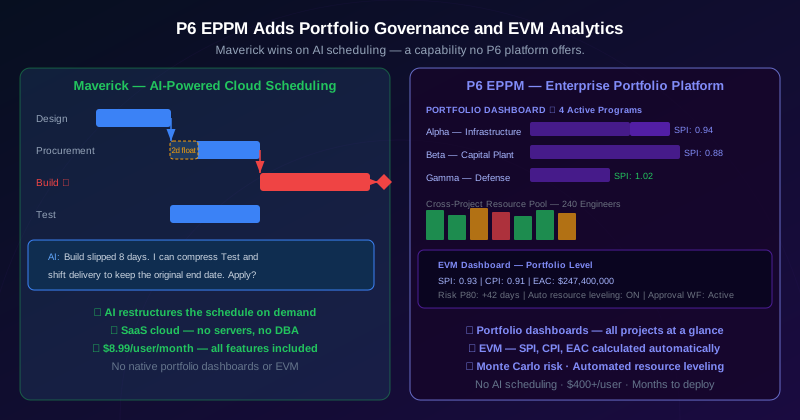
Stage gate reviews, project approval workflows, and resource demand forecasting at the portfolio level are native EPPM features. A capital project that moves from feasibility to detailed design triggers an approval workflow before the schedule is baselined. Resource demand across all projects in the portfolio is visible months in advance, allowing resource managers to identify hiring gaps or subcontracting needs before they become schedule risks.
Maverick supports lightweight cross-project visibility — you can filter projects by category, view the shared resource allocation chart across all active projects, and export summary data. For a team managing a dozen concurrent client engagements and needing to know which resources are over-allocated across them, this is sufficient. It is not portfolio governance in the EPPM sense, and it is not marketed as such. Organizations that need formal portfolio management with approval workflows, stage gate controls, and executive EVM dashboards should evaluate EPPM on those merits.
Scheduling Engine and Gantt Charts
Both tools run real CPM engines. EPPM has more constraint options; Maverick has AI.
P6 EPPM runs the same scheduling engine that powers P6 Professional. The engine supports all four dependency link types with configurable lag, multiple duration types, an extensive activity constraint library, multiple calendars per project, and resource-dependent scheduling that adjusts activity durations when resource availability changes. For large infrastructure programs with complex schedule logic spanning hundreds of activities and dozens of contractors, that configuration depth is operationally necessary.
Maverick's CPM engine covers the scheduling fundamentals that most project teams actually use: all four dependency link types with lag, automatic critical path calculation with red highlighting on the Gantt, float display for every non-critical task, and baseline ghost bars showing schedule variance at a glance. When a predecessor task changes, every downstream successor shifts automatically.
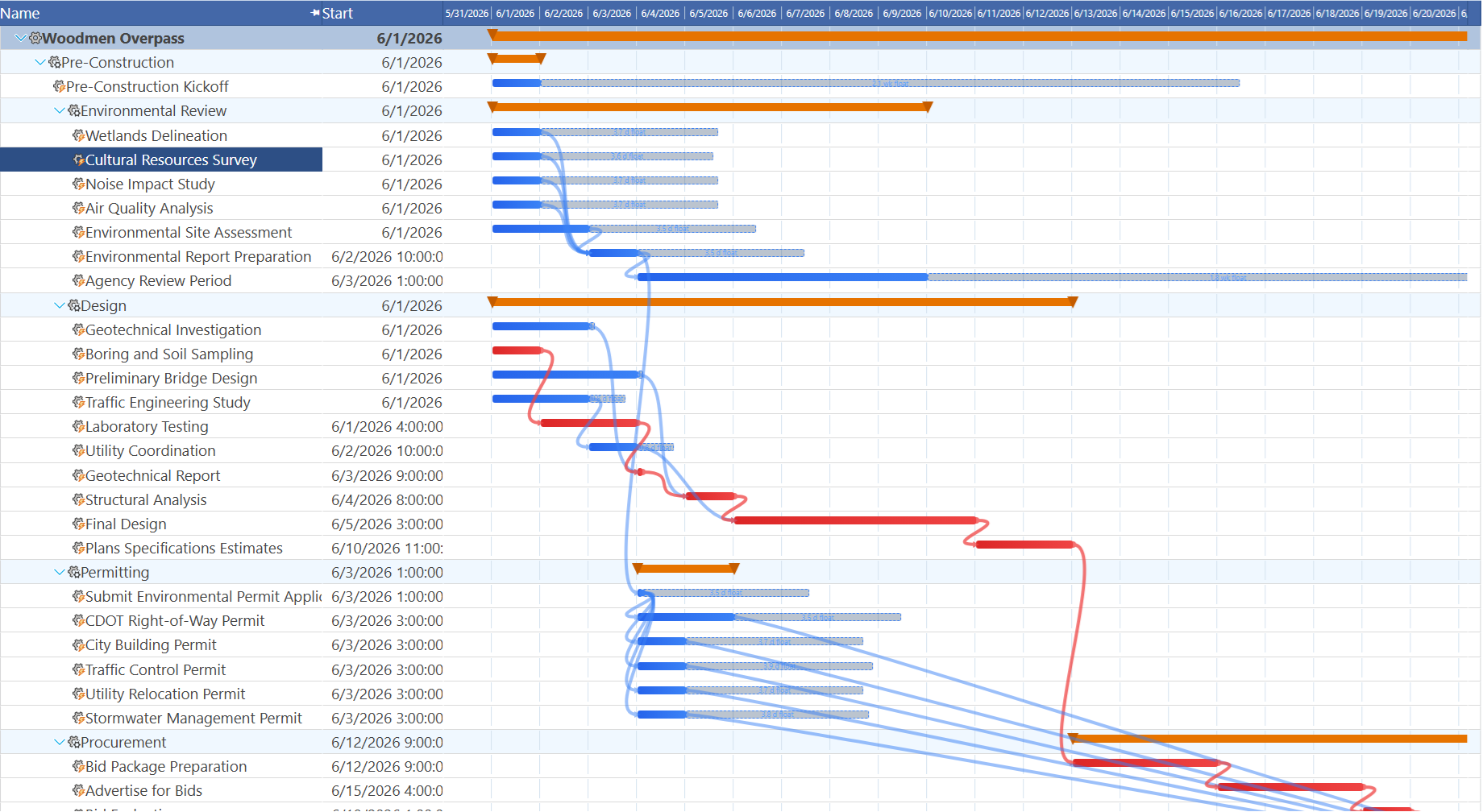
Where Maverick adds something no P6 platform offers: AI. You describe the project in plain English and the AI builds the full task structure with dependencies, durations, and resource assignments. When a task slips, the AI reads the current schedule, identifies the downstream impact on the critical path, and proposes a revised plan to recover the end date. P6 EPPM, P6 Professional, and Oracle Primavera Cloud each require schedulers to make every structural change manually.
Resource Management at Enterprise Scale
P6 EPPM wins on enterprise resource pools and automated cross-project leveling.
P6 EPPM manages resources at the enterprise level. A resource pool is defined once at the organization level and is shared across all projects in the portfolio. Resource managers can see demand versus capacity for any role or individual across all concurrent projects simultaneously. When two projects compete for the same structural engineer in the same two-week window, EPPM surfaces that conflict at the enterprise level — not just within the individual project. The automated resource leveling engine can resolve cross-project conflicts by shifting activities, adjusting assignments, and applying leveling priorities defined at the portfolio level.
Maverick takes a different approach: it shows you where the conflicts are, clearly and immediately, and gives the project manager the information to resolve them. The resource allocation bar chart displays every resource's utilization by day, week, or month across all their assigned projects, with green for correctly allocated, amber for under-utilized, and red for over-allocated. The visual clarity is a genuine advantage for day-to-day project management decisions.
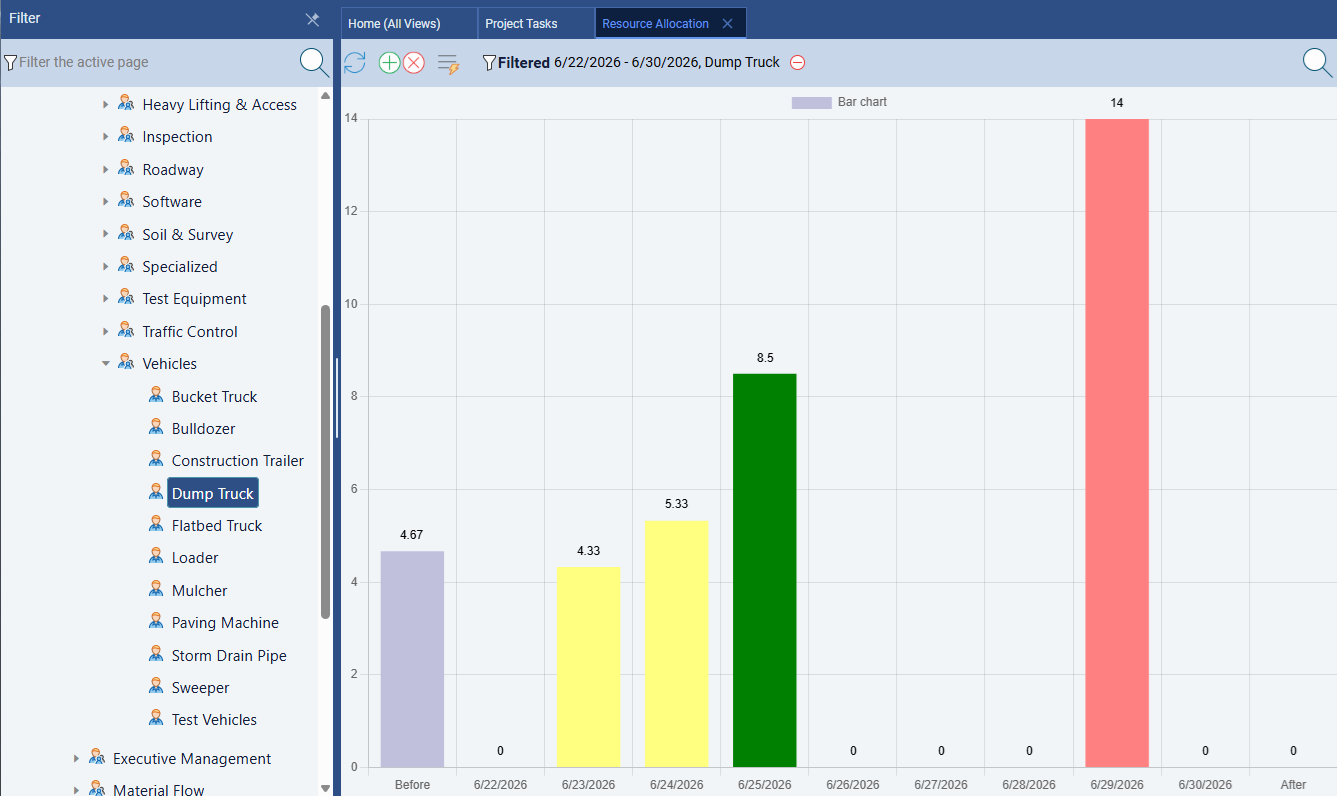
Maverick supports three resource types — human, machine, and materials — with independent cost rates and working schedules. Task assignments carry utilization percentages or hours per day, and actual hours logged through the built-in timesheet flow back into cost calculations automatically. For teams managing a manageable number of projects and resources, this covers the complete workflow. For program management offices balancing hundreds of resources across dozens of simultaneous capital projects, EPPM's portfolio-level resource management is in a different category.
Earned Value Management
P6 EPPM wins this category. It automates EVM at both the project and portfolio level.
Earned Value Management is the cost-schedule integration methodology used in government contracting, energy capital projects, and major infrastructure programs to track whether a project is delivering the right amount of work for the money it has spent. P6 EPPM integrates EVM natively at every level of the system. Schedule Performance Index, Cost Performance Index, Budgeted Cost of Work Scheduled, Earned Value (BCWP), and Estimate at Completion are calculated automatically as actuals are logged and progress is updated. Portfolio-level EVM dashboards roll up SPI and CPI across all projects in the program without requiring project managers to do any additional reporting.
For organizations with DCAA compliance requirements, Department of Defense EVMS obligations, or capital project governance requirements from major energy operators or infrastructure owners, EPPM's EVM implementation is the industry standard for a reason. The calculations are auditable, the data structures are designed for the formal EVM methodology, and the outputs meet the reporting requirements that regulators and program oversight bodies expect.
Maverick tracks the three inputs that EVM requires: budgeted cost per task, actual cost, and percent complete. A project manager who wants to compute BCWP, SPI, and CPI manually has everything they need in the system. What Maverick does not do is automate those calculations or surface them as dashboard metrics. For commercial teams that want cost visibility without formal EVM reporting, Maverick's cost and progress fields cover the practical need. For organizations with contractual EVM reporting obligations, P6 EPPM is the appropriate tool.
Risk Analysis and Scenario Planning
P6 EPPM wins with integrated Monte Carlo risk simulation at portfolio scale.
Oracle Primavera Risk Analysis integrates with P6 EPPM to provide probabilistic schedule risk analysis. Schedulers assign probability distributions to activity durations — triangular, uniform, or beta — and the Monte Carlo engine runs thousands of schedule simulations to produce a confidence-interval forecast for the project completion date. Portfolio-level risk dashboards show P50 and P80 completion dates across all programs simultaneously, giving executives statistically grounded schedule confidence alongside the deterministic baseline dates.
For government contractors reporting schedule confidence intervals to program oversight boards, energy operators presenting risk-adjusted completion dates to boards of directors, and infrastructure owners managing regulatory milestone commitments, probabilistic risk analysis is a required capability rather than a nice-to-have. P6 EPPM implements it correctly and at the scale these organizations require.
Maverick does not offer probabilistic risk analysis. It tracks float on non-critical tasks, highlights critical path exposure, and surfaces schedule variance against baselines — which gives project managers the qualitative information to manage schedule risk on most commercial projects. For teams that need formal Monte Carlo analysis and confidence-interval reporting, P6 EPPM has the capability Maverick does not.
AI and Automation
Maverick wins this category. No version of Primavera P6 — including EPPM — offers native AI scheduling.
Oracle has announced AI capabilities across its broader product portfolio, and Oracle Primavera Cloud (the separate SaaS version of Primavera) has been adding AI-assisted features. But P6 EPPM — the on-premises and hosted enterprise server platform that most large program management offices run — does not have native AI that builds or restructures project schedules on demand. Creating a schedule in P6 EPPM is a manual process that requires trained schedulers who understand the system's data model and scheduling conventions. That is part of why Primavera certifications exist and why large EPPM deployments maintain dedicated P6 administrators.
Maverick's AI operates at the schedule level. It reads the entire project — tasks, dependencies, resource assignments, constraints, and current dates — and responds to plain-English instructions. Tell it to build the initial schedule from a project description, identify which tasks are at risk after a delay, reassign unassigned work to the best-fit available resource, or propose a recovery plan after scope additions. The AI does actual scheduling work, not just summarizing what the user already knows.
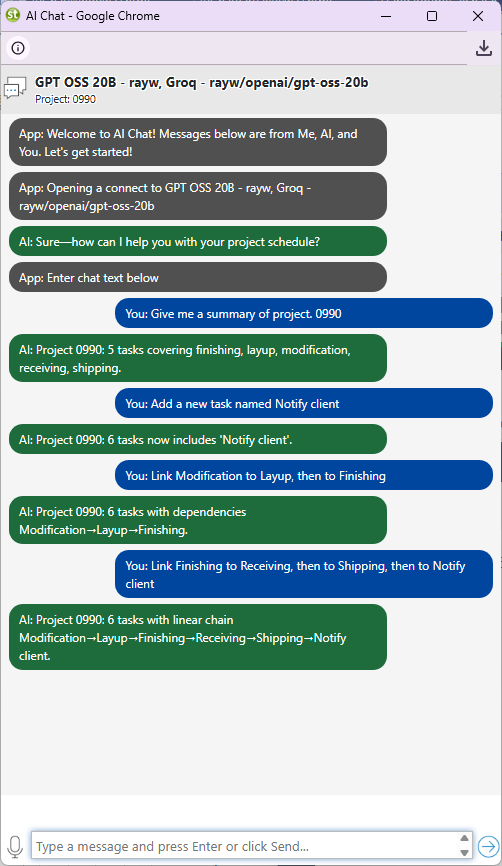
Maverick also supports per-employee AI provider and model configuration — a project manager running a critical path analysis can use a premium AI model while a team member logging routine updates uses a cost-effective one. This degree of AI integration has no equivalent in any Primavera P6 platform currently available.
Deployment and Server Infrastructure
P6 EPPM has a full web interface. Deploying it requires Oracle server infrastructure that Maverick does not.
Unlike P6 Professional, which is a Windows desktop application, P6 EPPM is a genuine browser-based application — all users access it through a web browser with no local software to install. That is a meaningful step forward in accessibility compared to the desktop client. However, browser-based does not mean cloud SaaS. P6 EPPM requires a licensed Oracle WebLogic application server, an Oracle Database or Microsoft SQL Server instance managed by a qualified DBA, and the network and security infrastructure to host the platform. For organizations evaluating from scratch, a full EPPM deployment typically takes three to six months from contract to go-live and requires Oracle-certified implementation services.
Oracle also offers P6 in a hosted cloud configuration through Oracle Cloud Infrastructure, which reduces the on-premises infrastructure burden. For organizations already in the Oracle ecosystem, this can meaningfully accelerate deployment. The licensing model, implementation services requirements, and ongoing Oracle administration overhead remain, but the server provisioning layer is managed by Oracle rather than the customer's IT department.
Maverick is cloud SaaS. There are no servers to provision, no database to manage, no DBA to hire, and no version compatibility to maintain. A team member in a different country logs in with credentials and sees the current project schedule immediately. For organizations evaluating from a clean slate without existing Oracle infrastructure, Maverick's deployment model eliminates an entire category of cost and timeline.
Learning Curve and Administration
Maverick wins significantly. P6 EPPM adds portfolio administration complexity on top of P6's already steep scheduling learning curve.
P6 EPPM requires two distinct categories of expertise before any project scheduling can happen. The first is enterprise data administration: configuring the organizational breakdown structure, defining resource dictionaries and roles, setting up activity code libraries, creating calendar templates, and establishing the approval workflow rules. This configuration work is done by P6 EPPM administrators — a role that typically requires months of specialized training and often a formal Oracle certification. In large organizations, a team of EPPM administrators maintains the enterprise scheduling environment as their primary job function.
The second is project scheduling expertise itself, which carries the same forty-plus-hour training requirement as P6 Professional. New project schedulers working in a correctly configured EPPM environment still need significant training before they can build a meaningful schedule that correctly uses the enterprise data structures their organization has defined.
Maverick is designed to be productive from day one. The three-panel interface — filter panel, Gantt grid, and properties panel — keeps scheduling information organized without requiring pre-configuration. Most users are building real project schedules within hours of first login. For organizations that rotate project managers between assignments, bring in subcontractors who need to update a schedule immediately, or want a scheduling tool that new team members can pick up without a dedicated training program, the difference in learning curve has direct operational consequences.
Time Tracking and Progress Entry
Maverick wins on inclusion. P6 EPPM's Progress Reporter module adds team-facing timesheet functionality but requires additional configuration.
Maverick includes a built-in employee timesheet across all subscription plans — no add-on required and no module to configure. Team members log hours against specific tasks and projects directly in Maverick. Managers can filter by user, project, and date range to see exactly where hours are being spent. Actual hours flow back into task cost calculations automatically, keeping budget tracking current without manual reconciliation.
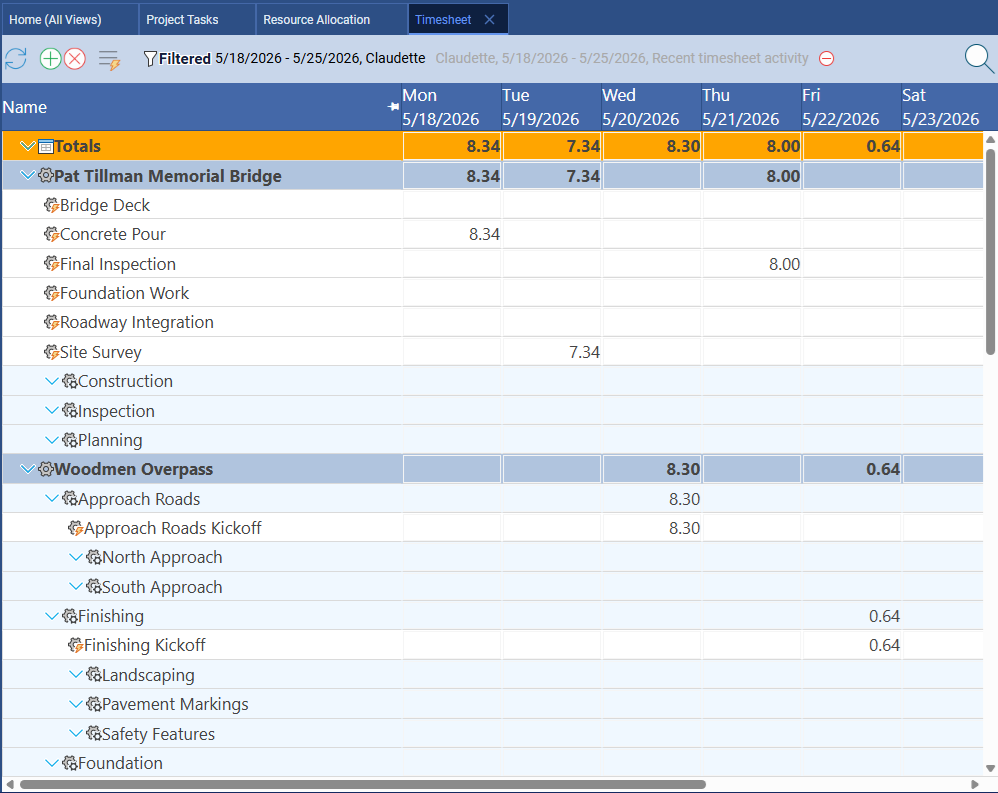
P6 EPPM includes the Progress Reporter module for team member time entry and progress updates. Team members submit actuals through the web interface, and managers or schedulers review and approve submissions before actuals are posted to the project schedule. For enterprise deployments where a formal approval workflow between team member time entry and schedule update is required by governance policy, this architecture is the right design. Correctly configured, it keeps the schedule accurate without giving every team member direct write access to the scheduling database.
The caveat is that Progress Reporter requires configuration as part of the overall EPPM implementation. It does not work out of the box — approval workflows, activity assignments, and resource permissions must all be set up correctly before team members can begin submitting progress. For organizations that have already completed a full EPPM implementation, Progress Reporter is a natural extension of the platform. For organizations evaluating whether to invest in that implementation, it is part of the overall infrastructure cost.
Project Baselines and Variance Tracking
Both tools offer baselines. P6 EPPM supports multiple simultaneous baselines per project.
Maverick supports project baselines natively. You snapshot the original plan at kickoff, and the Gantt chart displays baseline ghost bars alongside the live schedule so schedule variance is visible at the task level without running a report. For most project management workflows, a single approved baseline compared against the current schedule throughout the project lifecycle is exactly what you need.
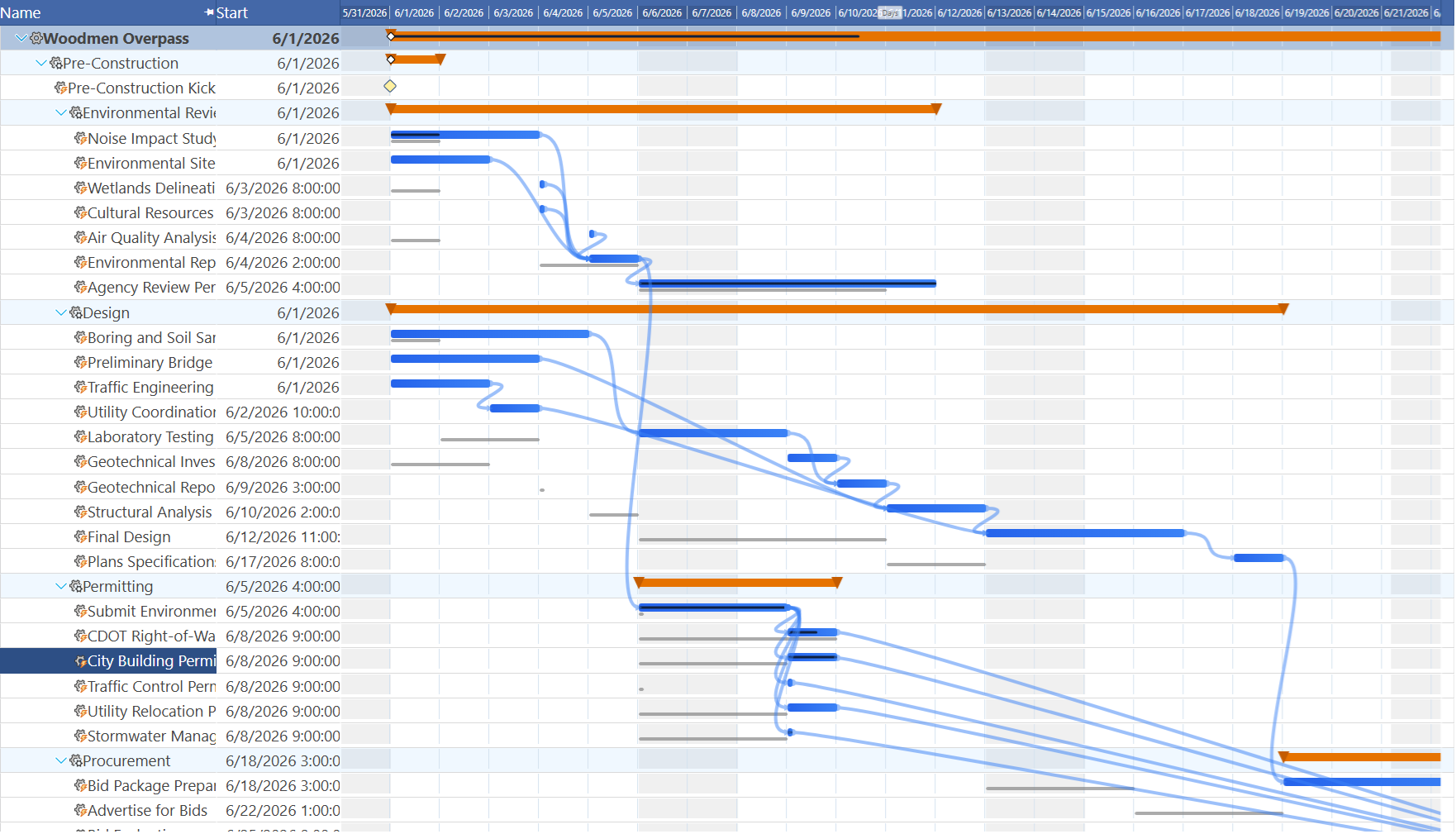
P6 EPPM supports multiple saved baselines per project and at the portfolio level, with the ability to compare the current schedule against both the original baseline and the most recent re-baseline simultaneously. In large capital programs where the schedule is formally re-baselined at major contract modifications or phase gate approvals, the ability to maintain an audit trail of all approved baselines is a governance requirement, not a convenience feature. For program offices with formal re-baselining procedures, EPPM's multi-baseline capability is necessary infrastructure.
Pricing
Maverick wins by a significant margin. The gap is even wider than the comparison with P6 Professional.
Maverick starts at $8.99 per user per month and includes the complete feature set: AI scheduling, CPM with critical path, resource allocation charts, built-in timesheets, project baselines, and all four dependency link types. No gated tiers, no add-ons, no implementation services required to get started.
Oracle Primavera P6 EPPM pricing is not publicly listed and requires Oracle sales engagement. P6 EPPM licensing is more expensive than P6 Professional because it includes the application server licensing, the Progress Reporter module, the EPPM portfolio layer, and the Oracle-tier support obligations. Industry benchmarks for P6 EPPM subscription pricing typically run from $400 to $800 per user per month depending on the Oracle product bundle, configuration, and contract terms. This figure does not include the WebLogic server licensing, Oracle Database licensing, the DBA retained to manage the database environment, or the Oracle-certified implementation services required for the initial deployment — which for a mid-size organization typically run between $100,000 and $500,000 or more.
For a team of ten users, the comparison is stark: Maverick at $8.99 × 10 × 12 = $1,079 per year versus P6 EPPM at a conservative $400 × 10 × 12 = $48,000 per year — before implementation or infrastructure. For a team of twenty-five, Maverick costs $2,697 annually while P6 EPPM licensing alone runs $120,000 or more. For a team of one hundred, the annual EPPM licensing cost exceeds $480,000, before a single line of implementation work.
The price difference is only justified when your organization genuinely needs what EPPM uniquely delivers: formal EVM for contract compliance, Monte Carlo risk simulation for regulatory reporting, portfolio-level governance across hundreds of concurrent projects, or an enterprise data structure shared by a workforce of trained P6 schedulers. If your team needs CPM scheduling, resource conflict visibility, AI-driven plan building, and built-in timesheets, Maverick delivers that discipline at a price that most project budgets absorb without a procurement review.
Who Should Choose P6 EPPM
Primavera P6 EPPM is the right platform when one or more of the following applies:
Your organization has contractual or regulatory EVM requirements. Government contractors operating under DCAA oversight, Department of Defense EVMS requirements, or major energy operator governance frameworks that mandate earned value reporting need EPPM's integrated EVM capability. No other tool in this space implements it at this depth and at this scale simultaneously.
You manage a portfolio of hundreds of concurrent projects. The enterprise resource pool, cross-project dashboards, and portfolio-level Monte Carlo risk analysis are designed for organizations where the management challenge is across the portfolio, not within a single project. If your PMO oversees dozens of capital programs with shared resource pools, EPPM's architecture solves that problem at scale.
P6 EPPM is contractually required. Major capital project owners — port authorities, energy operators, defense agencies, and large infrastructure owners — increasingly specify P6 as the scheduling platform of record in construction and engineering contracts. If your client or the project owner requires EPPM-format schedule submissions, there is no practical alternative.
You already have Oracle enterprise infrastructure. Organizations already running Oracle Database, Oracle WebLogic, and Oracle licensing agreements have the foundational infrastructure in place. For those organizations, adding EPPM to an existing Oracle stack is an incremental decision. For organizations without Oracle infrastructure, it is a foundational one.
Final Verdict: Which Tool Fits Your Organization?
P6 EPPM wins for enterprise portfolio management. Its integrated EVM, cross-project resource pools, Monte Carlo risk simulation, multi-level portfolio dashboards, and stage gate governance are the most comprehensive set of enterprise scheduling capabilities available in a single platform. For the defense contractors, energy capital PMOs, and infrastructure program management offices that have invested in Oracle infrastructure and trained scheduling staff, P6 EPPM is the right tool — and replacing it with anything else would require a careful accounting of what you actually depend on.
But that description applies to a narrow slice of the organizations that buy project scheduling software. The construction contractor managing a commercial office complex, the IT program manager overseeing a cloud migration, the engineering firm handling a portfolio of client design projects, the consulting practice managing delivery across twenty concurrent engagements — none of these organizations need DCAA-compliant EVM dashboards or probabilistic risk curves for regulatory reporting. They need real CPM scheduling, visual resource conflict alerts, AI that builds and restructures the plan on demand, built-in timesheets, and a price that does not require an Oracle sales cycle.
For those teams, Maverick delivers the scheduling discipline that actually matters. A genuine CPM engine. Critical path calculation and highlighting. All four dependency link types with lag. Color-coded resource allocation charts. AI that reads the project and fixes the schedule. Built-in timesheets with manager filtering. Baselines with ghost bar variance tracking. All of it available in a browser, operational in a day, at $8.99 per user per month.
The question is not which tool is more powerful in absolute terms. The question is whether your organization needs what makes EPPM powerful — the portfolio governance, the regulatory EVM, the enterprise resource pools, the Oracle server stack — or whether you need a rigorous scheduling engine that works without an infrastructure project to deploy it. For most project teams, that answer points to Maverick.