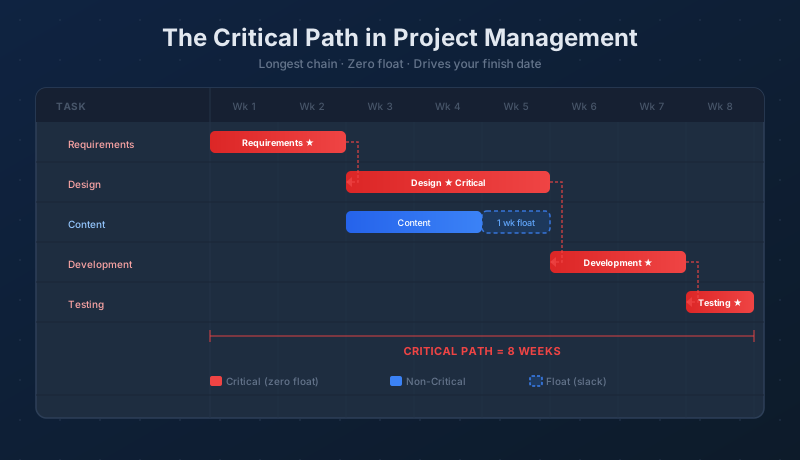
Every project has a finish date question: what is the earliest we can be done? The critical path is the answer. It is the longest unbroken chain of dependent tasks in your schedule — and every task on it has exactly zero flexibility. Shorten the critical path and the project finishes earlier. Let any critical task slip, and the whole project slips with it.
What Is the Critical Path?
Maverick calculates the critical path by analyzing the sequence of task dependencies you have defined with FS, FF, SS, and SF links. Starting from the first task and working forward through every chain of dependencies, it identifies the sequence whose total duration is longest. That sequence is the critical path.
The rest of the tasks — those that do not fall on the critical path — have float, also called slack. They can start a little later, run a little longer, or absorb a small delay without pushing the project finish date. Tasks on the critical path have no such cushion. Their float is zero.
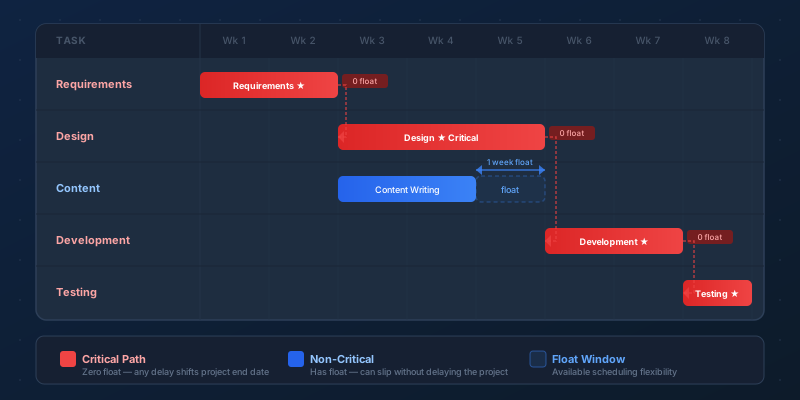
In the diagram above, Requirements, Design, Development, and Testing form the critical chain. The Content task runs in parallel and finishes before Development begins — it has one week of float. If Content slips by one day, it still does not affect the end date. If it slips by eight days, it becomes critical itself and the project end date moves right.
Forward Pass, Backward Pass, and Float
Maverick derives the critical path using a two-pass calculation that runs whenever the schedule changes.
The forward pass works from the project start toward the end. For every task, Maverick calculates the earliest possible start date — which is the latest finish date of all its predecessors — and then the earliest possible finish date based on the task duration. The result is the earliest the project can complete.
The backward pass works in reverse, from the target finish date back toward the start. For every task, it calculates the latest allowable start and finish dates that would not push the project past its earliest finish date. A task whose latest start matches its earliest start has zero flexibility — it is on the critical path. A task whose latest start is later than its earliest start has float equal to that difference.
This is what float means in concrete terms: a task with three days of float can begin up to three days later than its earliest start date without affecting the project end. A task with zero float is critical — any movement at all ripples through to the finish date.
Reading the Critical Path on the Gantt Chart
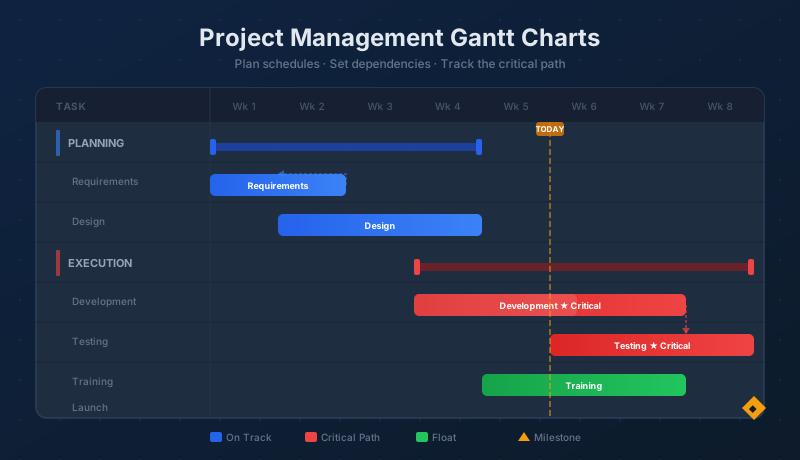
Maverick highlights critical path tasks directly on the Gantt chart. The visual indicator makes it easy to trace the chain from the project start to the finish date at a glance. Non-critical tasks appear in a contrasting color, and their float is visible as the gap between their bar and the latest point at which they could finish without affecting the end date.
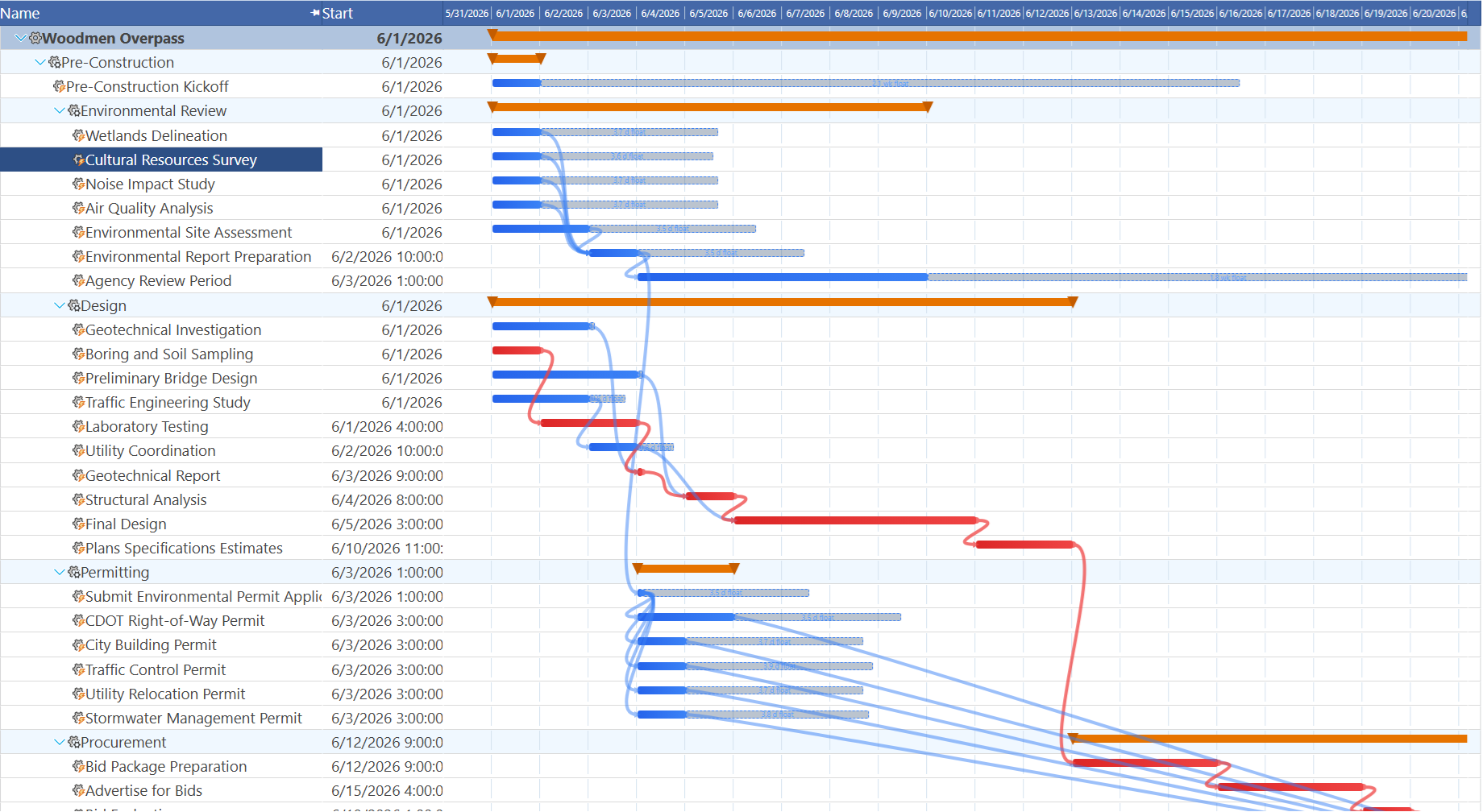
The critical path is recalculated dynamically. Add a new task, change a dependency, update a duration, or assign a resource constraint — Maverick recalculates which tasks are critical and updates the Gantt display immediately. A task that had two days of float this morning might become critical this afternoon after someone extends an upstream task duration. The Gantt shows you the new reality the moment it changes.
Following the critical path on the Gantt is straightforward: start at the task with the earliest start date that is highlighted as critical, then follow the dependency arrows through each successive highlighted task until you reach the final milestone. That chain is the schedule's spine.
On a schedule long enough to require scrolling, tracing that chain end to end can mean losing your place. The Gantt mini-map adds a frozen overview row that compresses the whole project into one strip, so you can drag straight to the stretch of the critical path you need without hunting through screens of non-critical tasks first — see Stacking Frozen Rows for how to pin it alongside a team-workload strip too.
Float and What It Actually Means for Planning
Float is often described as "slack" or "scheduling flexibility," but the practical meaning goes further than that. Float is shared across the chain of tasks that depend on each other. If Task C has five days of float and Task D depends on Task C and also has five days of float, using up three of Task C's float reduces Task D's float by three days as well. Float is not owned by a single task — it belongs to the path.
This has implications for how you assign resources to non-critical tasks. A project manager who aggressively schedules non-critical tasks at their earliest start dates uses float before it is needed, eliminating the buffer that would have absorbed a future delay. Deliberately leaving float intact on non-critical tasks is a legitimate risk management strategy — it keeps options open for when the unexpected happens on the critical path.
For a detailed look at the dependency types that create these chains — including lag, lead, and how each link type affects date cascades — see: Task Link Relationships.
Using the Critical Path to Compress Your Schedule
When the end date needs to move earlier, every schedule compression technique works through the critical path. Non-critical tasks are not useful targets — shortening a task with five days of float does not move the finish date, it just increases that task's float to something larger.
Two primary compression techniques apply to critical tasks:
- Crashing — add resources to a critical task to shorten its duration. This works when more people or equipment genuinely reduce the time required. It does not work when the task is inherently sequential: nine women cannot produce a baby in one month. Crashing also increases cost, so it is worth evaluating which critical task delivers the most schedule compression per dollar of additional resource.
- Fast-tracking — start a critical successor task before its predecessor fully finishes, overlapping work that was originally planned as sequential. Fast-tracking introduces risk: if the predecessor's late deliverables change something the successor already assumed, rework follows. Fast-tracking is most viable when the downstream task has a portion that is genuinely independent of the predecessor's final output.
Both techniques require identifying which critical tasks have room to be shortened. A two-week task on the critical path with one available resource and no parallelizable components cannot be crashed. A four-week development sprint that has three independent modules can potentially be split across parallel teams and fast-tracked against the testing phase. The critical path shows you where to look; the task structure tells you what is possible.
How AI Helps You Work the Critical Path
Maverick's AI chat is effective at critical path analysis. Ask it directly: "What is on the critical path right now?" and it will list the tasks, their durations, and the total path length. Ask "Which resources are assigned to critical tasks and how close are they to full allocation?" and it will cross-reference the critical path with the resource allocation data to surface bottlenecks before they become delays.
For schedule compression, ask: "What are my options for pulling the finish date in by two weeks?" The AI will evaluate the critical path, suggest candidates for crashing or fast-tracking, and flag tasks where overlapping work would create logical problems. It can run through compression scenarios without you manually tracing the dependency chain and recalculating float by hand.
The AI also watches for critical path changes as the project progresses. When you update a task's actual duration or log that a task has started late, the AI can alert you to newly critical tasks that previously had float — keeping you ahead of schedule drift rather than reacting to it after the end date has already slipped.
For a complete reference of every task field that affects critical path calculations — including duration, dependency links, constraints, and scheduling method — see:
Every Task Property, Explained
Find Your Critical Path Today
Start a free cloud trial, build your project schedule, add task dependencies, and let Maverick calculate the critical path automatically. Use the AI chat to ask about your schedule, identify compression opportunities, and stay ahead of delays before they reach the finish date.
Access the Free Cloud Trial