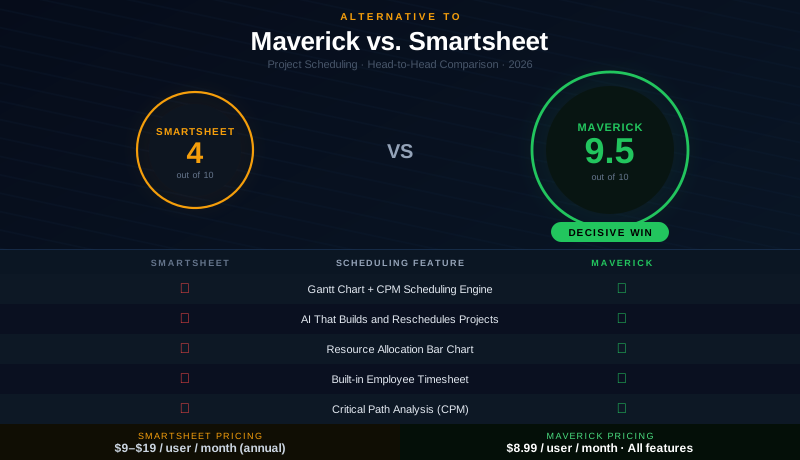
Smartsheet has earned a loyal following by making spreadsheet-style project tracking feel modern and collaborative. Its grid views, card views, dashboards, and no-code automations appeal to teams that live in Excel and want something that looks and behaves similarly — but in the cloud, with sharing and notifications built in. For teams whose primary challenge is organizing information and keeping stakeholders in the loop, Smartsheet does the job well.
But Smartsheet is not a project scheduling tool. Beneath its bar chart view lies a fundamental gap: there is no scheduling engine connecting those bars to each other. Dates do not cascade. Dependencies are basic. The critical path does not exist as a calculated concept. Resource allocation is managed separately. And the timesheets that project managers need for cost accountability are not included. This comparison examines both platforms honestly — and explains why teams that need to answer scheduling questions should look elsewhere.
Quick Verdict
Smartsheet is a capable spreadsheet-based work management platform. It excels at organizing data, building automated workflows, and presenting information in clean dashboards. For teams running marketing campaigns, IT intake queues, or simple content calendars, it is a reasonable choice.
Maverick Project Scheduler is a different kind of tool. It is built around a CPM scheduling engine that calculates task dependencies, cascades date changes automatically, highlights the critical path, and tracks resource utilization in real time. For teams delivering projects with accountable timelines, constrained resources, and real stakes, Maverick is the decisive alternative to Smartsheet. The comparison is not close.
Quick-Reference Comparison Table
The comparison above, summarized as a plain data table.
| Feature | Maverick | Smartsheet |
|---|---|---|
| Gantt Chart | ✓ CPM-powered Gantt | Basic bars — no CPM math |
| Critical Path Method (CPM) | ✓ Automatic CPM | ✗ |
| Task Dependency Types | ✓ FS, FF, SS, SF + lag | Finish-to-Start only |
| Resource Allocation Bar Chart | ✓ Color-coded chart | ✗ |
| Built-in Employee Timesheet | ✓ Full timesheet | ✗ |
| AI Scheduling Engine | ✓ Builds & reschedules | ✗ |
| Project Baselines | ✓ Ghost bars on Gantt | Limited snapshot only |
| Grid / Spreadsheet Views | ✓ Grid + Gantt | ✓ Core strength |
| Integrations | ✓ MS Project, QuickBooks… | ✓ Many (Salesforce, Jira…) |
| Pricing | $8.99 / user / month | $9–$19 / user / month |
| Cloud Hosting | ✓ Yes | ✓ Yes |
Feature Comparison at a Glance
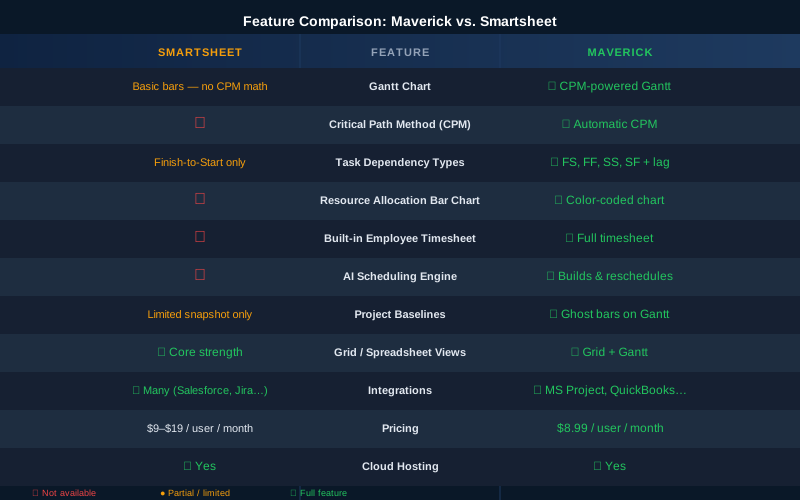
The table tells the story clearly. Smartsheet wins on spreadsheet familiarity, automations, and its integration marketplace. Maverick wins on every dimension of project scheduling — Gantt with CPM, critical path analysis, resource allocation, AI scheduling, built-in timesheet, and project baselines. These are not edge cases. They are the core capabilities that project managers depend on to deliver work on time.
Gantt Chart and Scheduling Engine
Maverick wins decisively here. Smartsheet includes a Gantt view — bars on a timeline that give a visual sense of when tasks are scheduled. It looks right on a screenshot. But looks are deceiving. Those bars are not connected to each other through a scheduling engine. If you change a task's duration, the tasks that depend on it do not move. There is no concept of predecessors driving successors through date math. You move bars manually, and the rest of the plan stays where it was until you update each row by hand.
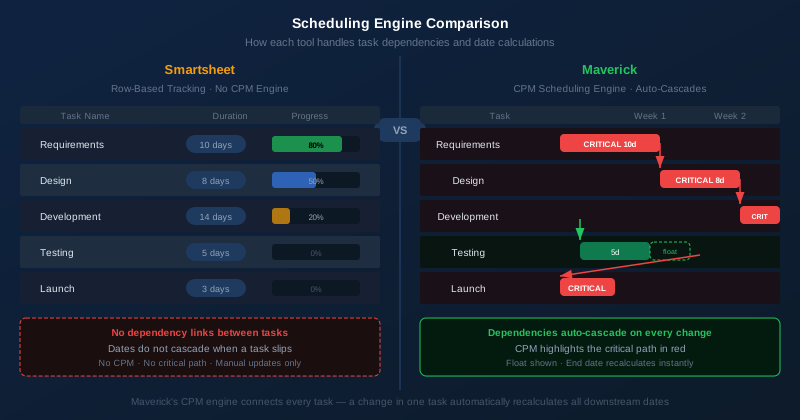
Maverick's Gantt chart is connected to a real scheduling engine. When you build a project in Maverick, you define task durations, link tasks with dependency relationships, and assign resources. When Task A slips by three days, every task that depends on it — directly or through a chain of relationships — shifts automatically. The plan stays internally consistent without any manual intervention. You spend your energy managing the project, not managing the spreadsheet.
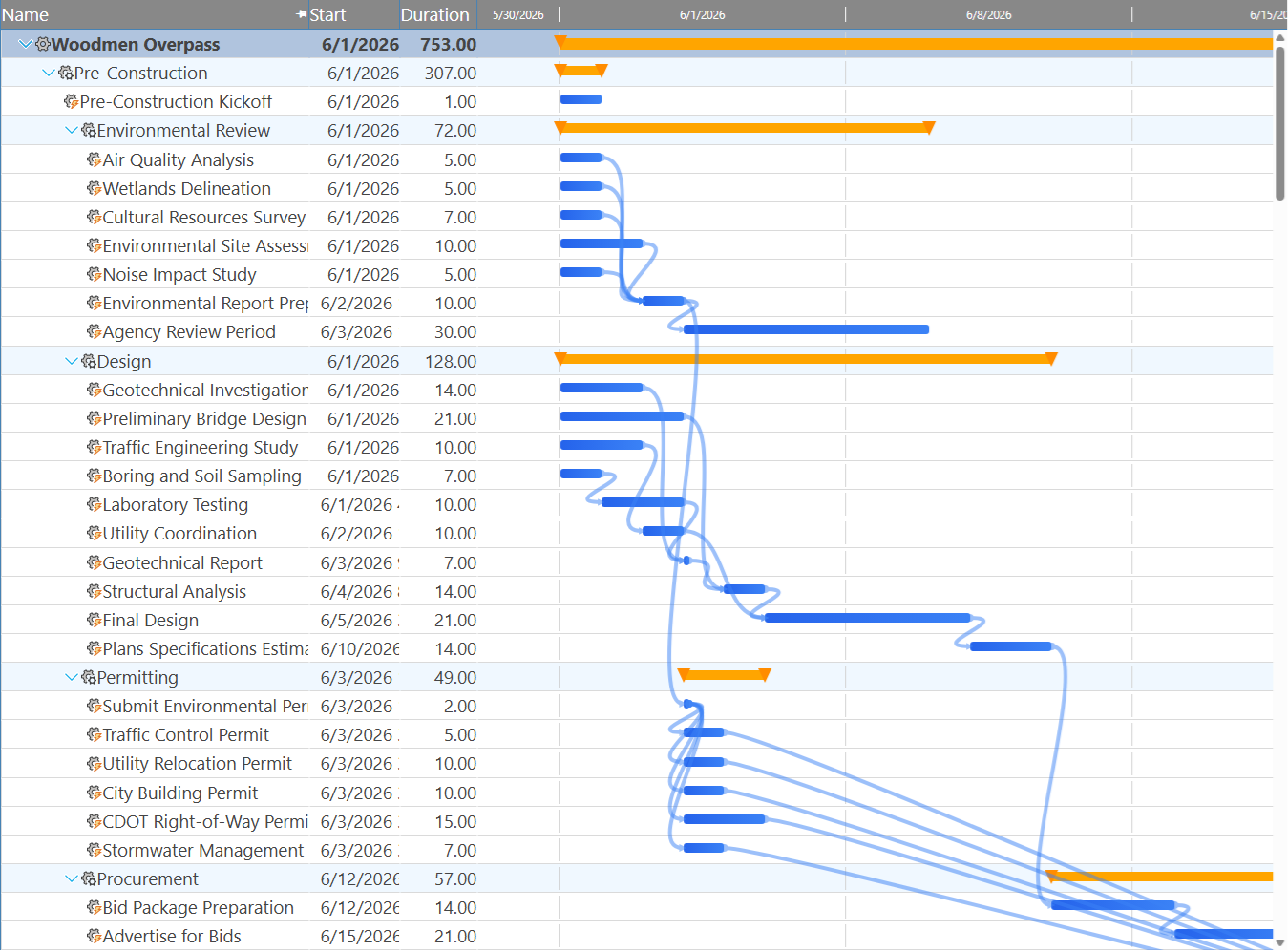
Maverick also supports four dependency link types — Finish-to-Start, Finish-to-Finish, Start-to-Start, and Start-to-Finish — with configurable lag days on every relationship. Smartsheet supports only basic Finish-to-Start predecessor linking. For projects with complex sequencing — construction phases, software sprints, phased product rollouts — the difference between one link type and four is the difference between a schedule that models reality and one that approximates it.
Critical Path Analysis
Maverick wins. Smartsheet does not offer this feature.
The critical path is the sequence of tasks that determines when your project ends. Any delay to a task on the critical path delays the entire project. Maverick calculates the critical path automatically using the Critical Path Method — highlighting critical tasks in red on the Gantt chart, calculating total float for every non-critical task, and making it immediately visible which tasks have scheduling slack and which do not.
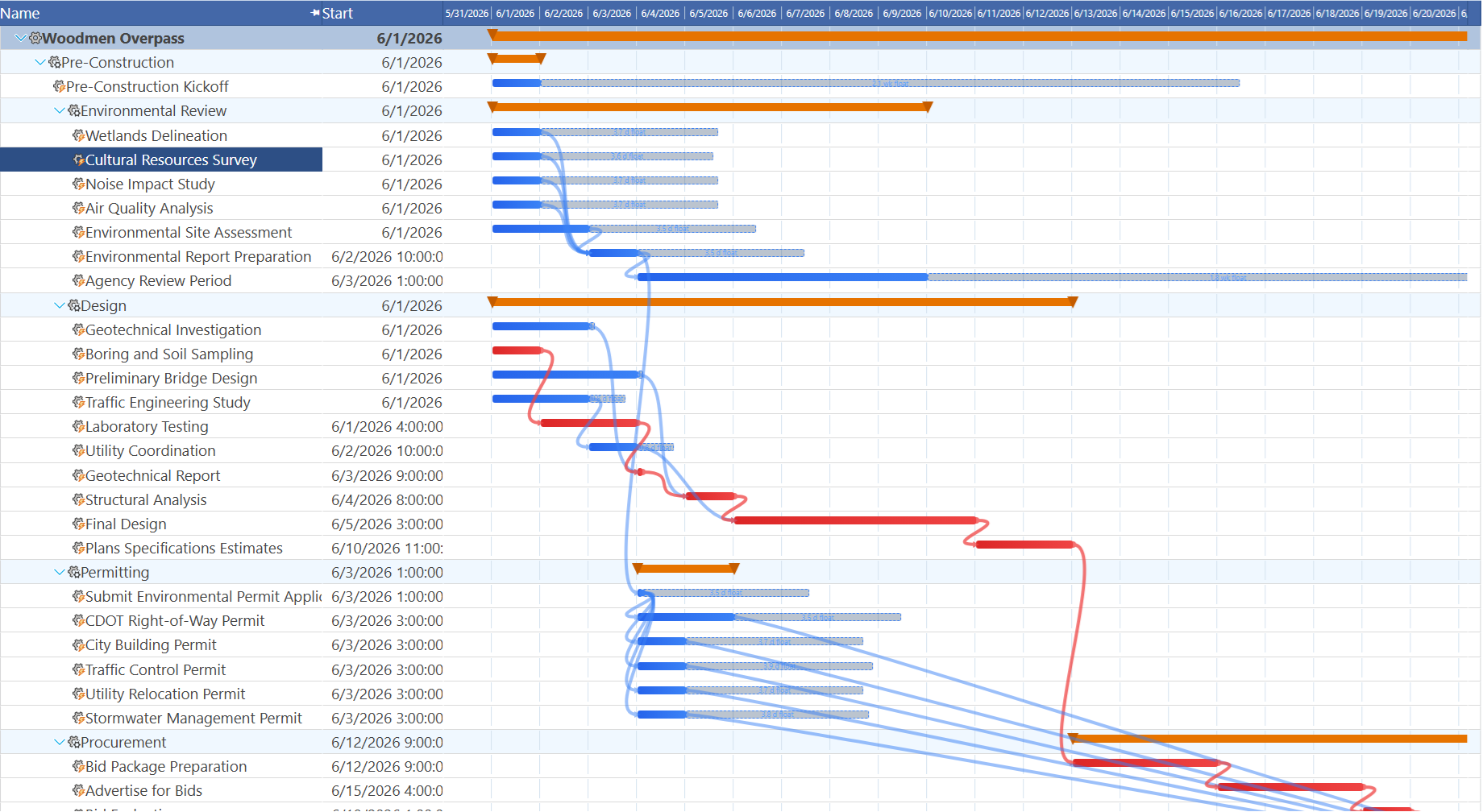
When a stakeholder asks "what is the risk to our delivery date?" or "which tasks can slip without affecting the deadline?" — Maverick answers those questions instantly. Smartsheet cannot. There is no critical path in Smartsheet, no float calculation, and no way to automatically identify which tasks control the end date. Project managers who need those answers must perform the analysis manually in a separate tool, which introduces both delay and the risk of human error.
For any team managing projects with more than a handful of interdependent tasks, the absence of CPM in Smartsheet is a significant operational gap. It is not a missing feature — it is a missing discipline.
AI Scheduling
Maverick wins on scheduling AI. Smartsheet wins on AI-assisted writing and data extraction.
Smartsheet has added AI capabilities that are genuinely useful for certain tasks. You can ask Smartsheet AI to fill cells, generate summaries, extract data from text, and draft content directly in a grid. For teams using Smartsheet as a data collection and presentation tool, these features save time. They are assistive AI — helpful additions to what you are already doing.
Maverick's AI operates at the level of the scheduling engine itself. The AI reads your project — its tasks, dependencies, durations, resources, and constraints — and acts on the schedule in response to plain-language instructions. Tell the AI to build a project plan for a software launch with a fixed end date, to reschedule everything after a delayed predecessor task, or to reassign unassigned work to available resources. The AI produces a revised, internally consistent project plan with dates, assignments, and dependency logic intact.
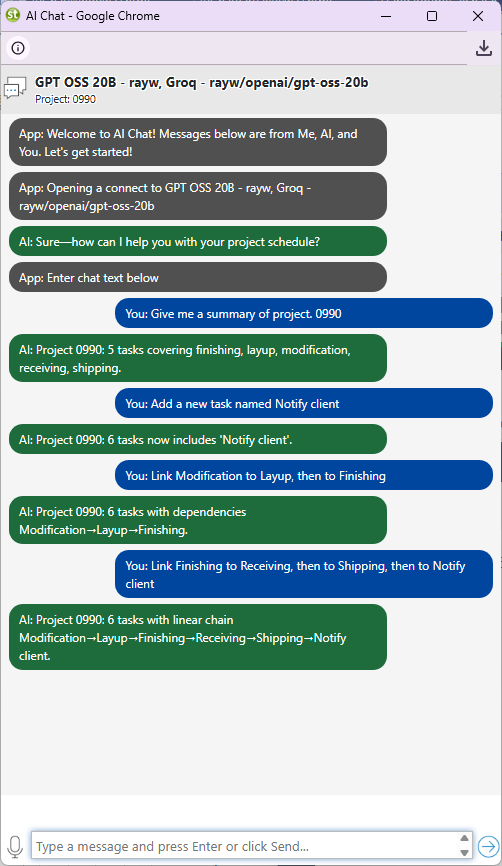
This is a meaningful distinction. Smartsheet's AI helps you work with data. Maverick's AI helps you build and manage a project plan. If your goal is faster data entry, Smartsheet's AI is relevant. If your goal is a schedule that responds intelligently to change, Maverick's AI is in a different category entirely.
Maverick also supports per-employee AI provider and model configuration. Different team members can work with different AI providers — OpenAI, Anthropic, Google, Mistral, or cost-effective open alternatives like Groq and Cerebras — each configured with the right model for their role and budget. Smartsheet's AI is a single shared feature with no user-level configuration.
Resource Management
Maverick wins significantly. Smartsheet offers resource management as a premium add-on to its higher-tier plans. With it, you can see who is assigned to what and view workload summaries. But there is no allocation bar chart, no color-coded over-allocation detection, and no direct connection between resource availability and task scheduling. You see that someone is busy; you do not see precisely how busy or what the scheduling consequence is.
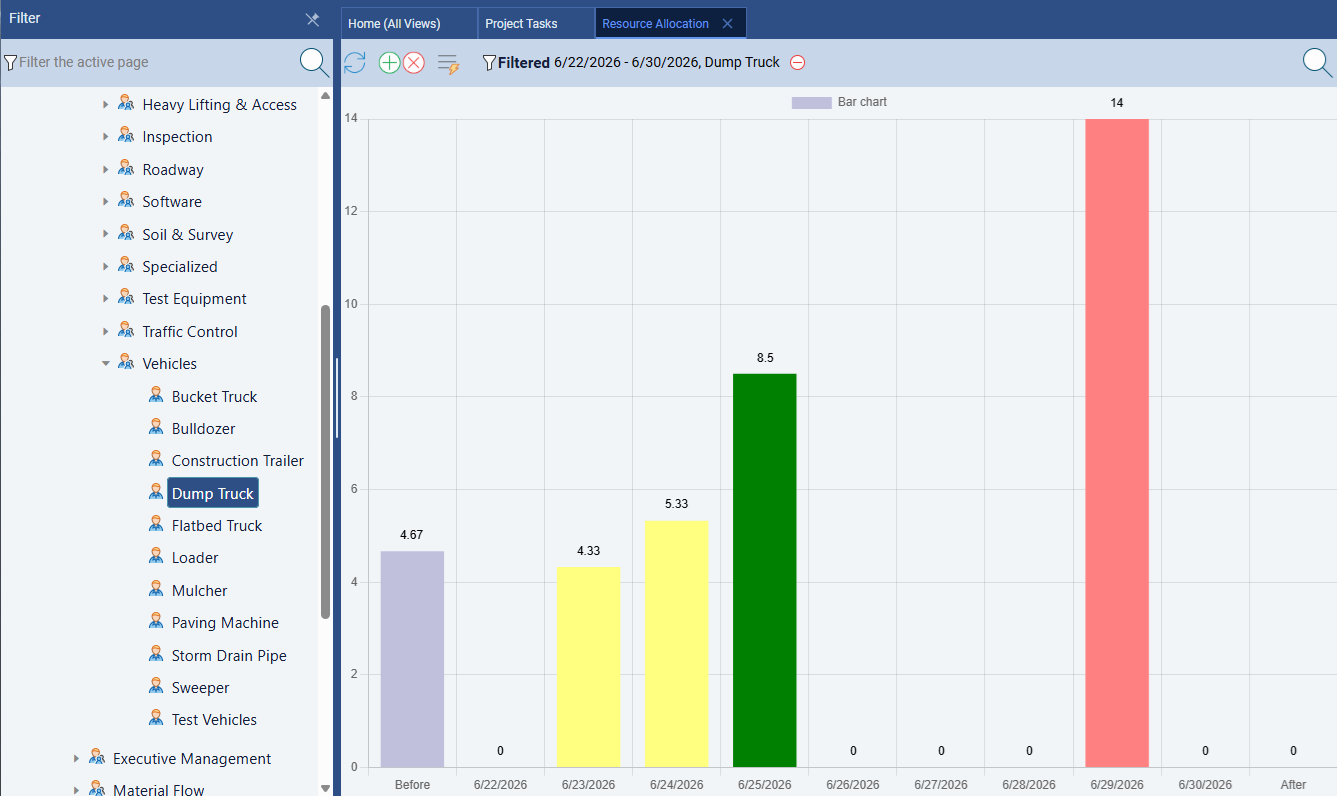
Maverick also provides a resource-centric Gantt on the Users page. Instead of rows for project tasks, rows represent resources — human team members, equipment, or materials. Every task assigned to a resource appears as a bar on that resource's row, making overlapping assignments visible immediately. You can filter the view to a single resource type and scan the timeline for conflicts. Smartsheet's workload summary (available as a premium add-on) shows task volume; it does not support non-human resources and provides no scheduling timeline per resource.
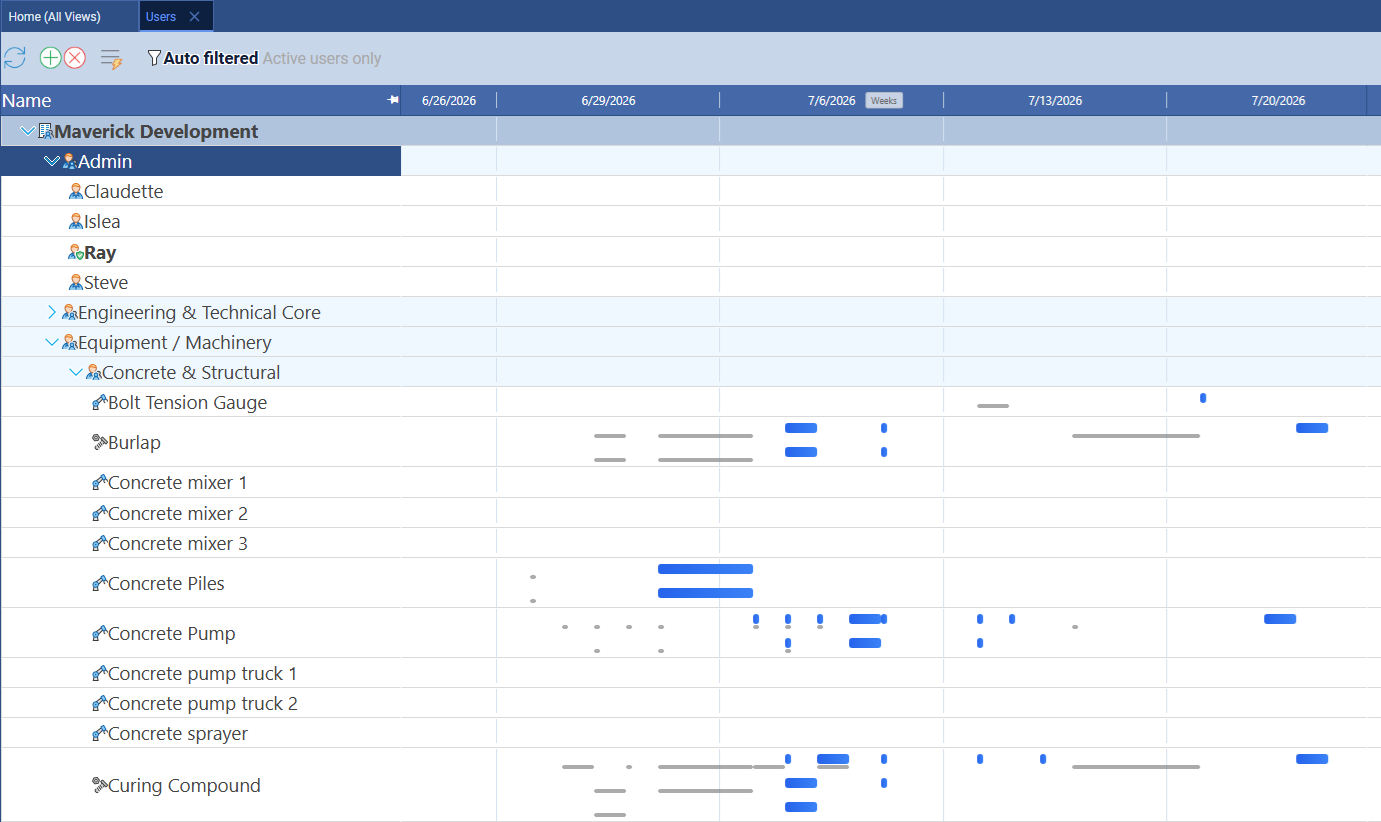
Maverick treats resource management as a first-class scheduling discipline. You define human, machine, and materials resources — each with their own working schedule, availability percentage, and billing rate. When you assign resources to tasks, Maverick tracks cumulative utilization across the entire project timeline. The resource allocation bar chart shows every resource's loading by day, week, or month, color-coded for correct allocation (green), over-allocation (red), and under-allocation (amber). When a resource is overloaded, you see it immediately and can adjust assignments before it becomes a missed deadline.
This is the kind of visibility that prevents projects from going sideways. In Smartsheet, you find out a resource is overloaded when they tell you — or when they deliver late. In Maverick, the bar chart tells you before the problem materializes.
Time Tracking and Timesheets
Maverick wins. Smartsheet does not include time tracking natively.
Maverick includes a full employee timesheet as a standard built-in feature. Team members log hours against specific tasks and projects directly inside Maverick. Managers can filter timesheets by user, project, or date range to understand exactly where time is going. Actual hours feed back into cost calculations automatically, keeping budget tracking current without extra data entry or spreadsheet maintenance.
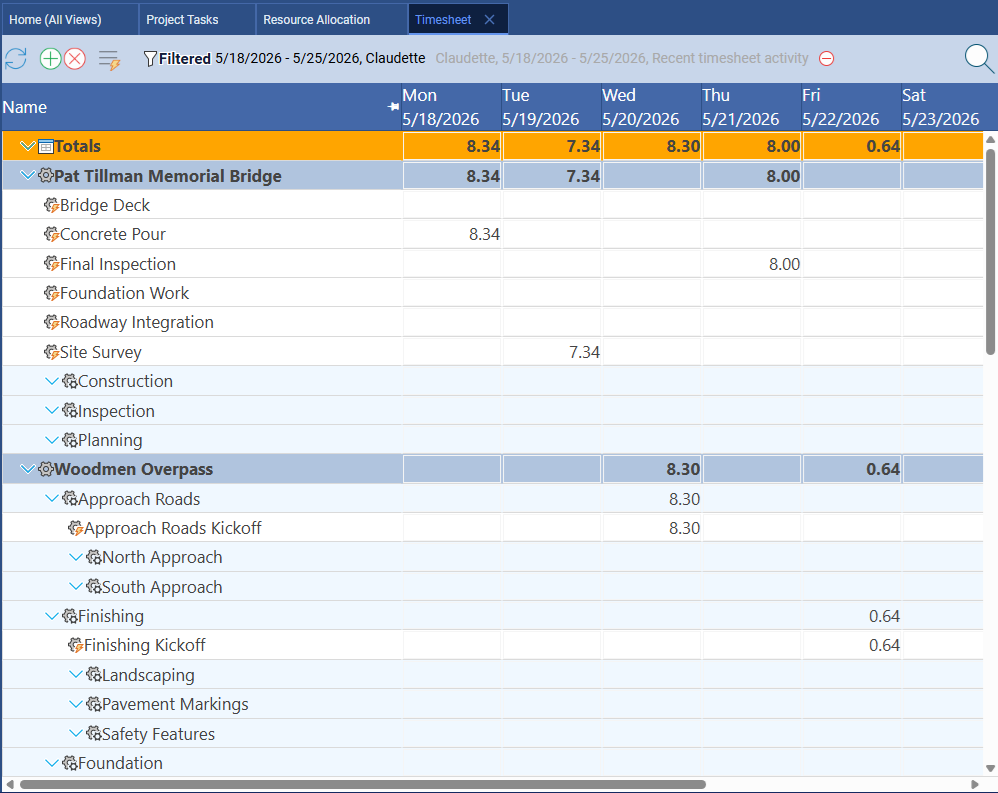
Smartsheet does not include time tracking. If you need to capture hours against projects — for client billing, cost management, compliance, or simple team accountability — you need a third-party tool. Common options include Harvest, Clockify, or Toggl, each of which adds subscription cost, requires a separate login, and demands that your team work across two different systems. When a manager wants to reconcile actual hours against project estimates, they are exporting data between tools rather than reading a native report.
The embedded timesheet in Maverick is not an afterthought. It connects directly to resource assignments, so time logged against a task updates the actual work field, which flows into cost and billing calculations. The integration is seamless because it is the same product — not two separate tools bolted together.
Project Baselines
Maverick wins. Smartsheet offers a limited baseline snapshot without Gantt visualization.
Maverick supports project baselines that let you snapshot the original plan and compare it to actual progress throughout the project lifecycle. When you set a baseline, Maverick records the planned start date, finish date, and duration for every task. As the project progresses, Maverick displays ghost bars on the Gantt chart — translucent indicators of where each task was originally planned — alongside the current bar. The variance between planned and actual is visible at a glance without any manual analysis.
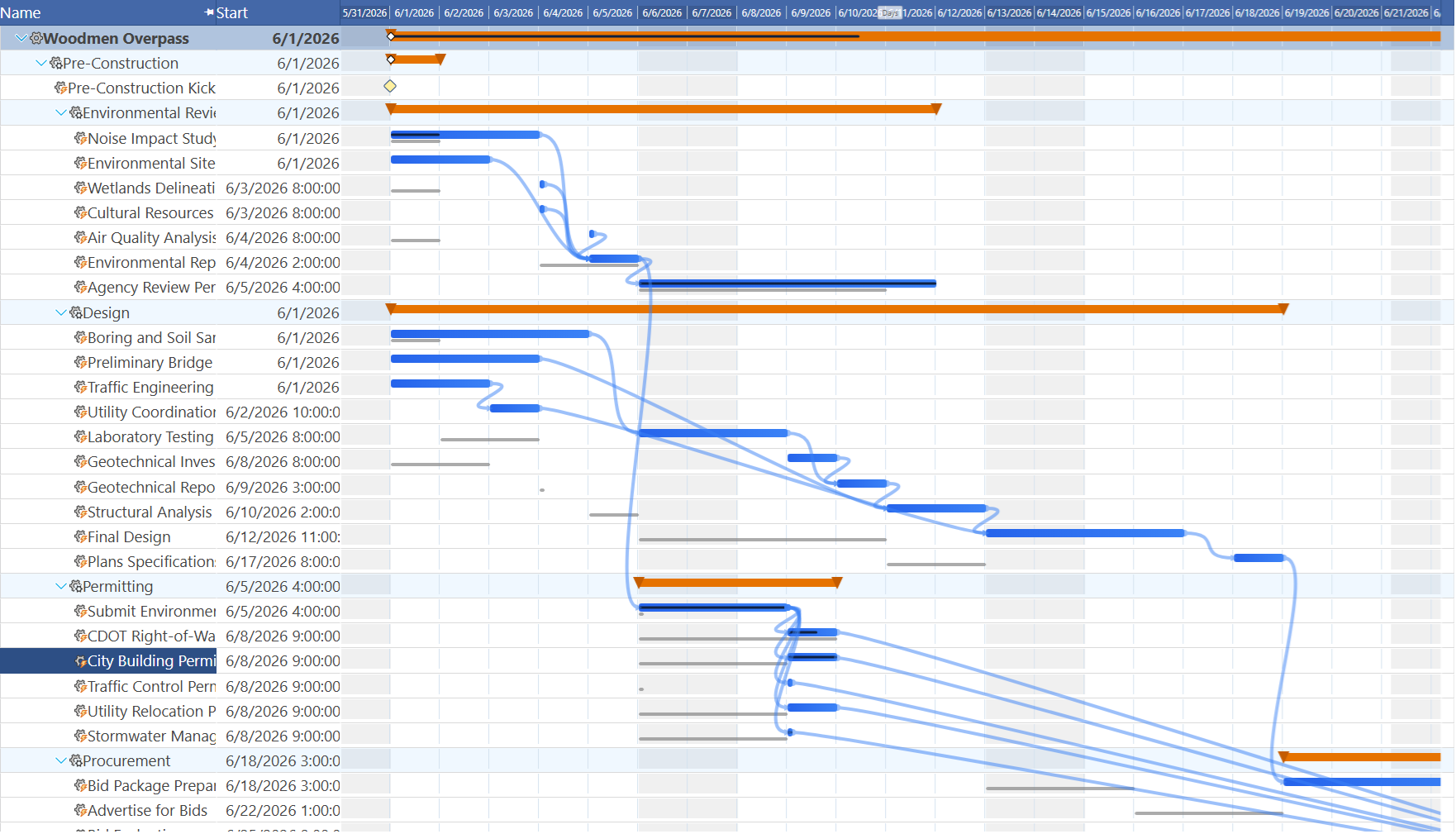
Smartsheet offers a basic baseline feature in its Business and Enterprise tiers that captures planned start and end dates. You can display the baseline in a Gantt view alongside current dates. What it does not do is connect the baseline comparison to the scheduling engine — there is no automatic tracking of float variance, no color-coding of slipped tasks, and no integrated view that shows the schedule impact of baseline deviation across a project network. It is a snapshot, not a diagnostic tool.
For teams that need to report on schedule performance to clients or executives, Maverick's baseline ghost bars provide an immediate, credible answer to "are we behind?" that Smartsheet's basic snapshot cannot match.
Integrations and Connected Systems
Smartsheet wins on breadth of third-party integrations. Maverick wins on depth of scheduling-focused integrations.
Smartsheet has built an impressive integration marketplace over the years. It connects natively to Salesforce, Jira, Microsoft 365, Google Workspace, Slack, DocuSign, Tableau, ServiceNow, and dozens more through its premium Connectors program. For enterprise teams that need to sync Smartsheet data with their CRM or service desk, this marketplace is a genuine strength. If your organization already has deep investments in Salesforce workflows or Jira issue tracking, Smartsheet's connectors can bridge those systems without custom development.
Maverick's integration story is built around the project scheduling workflow — the tools that project managers actually need connected to run and deliver projects:
- AI Providers — Maverick connects to OpenAI, Anthropic, Google, Azure, Mistral, and cost-effective open alternatives including Groq, Cerebras, GitHub Models, and OpenRouter, as well as local Ollama models. Each employee can be configured with a different provider and model, giving organizations precise control over AI cost and capability. See the AI provider integration guide.
- Microsoft Project — Full bidirectional import and export via the MSPDI XML format. Import an existing Microsoft Project schedule into Maverick and preserve tasks, dependencies, resources, assignments, and timephased actual hours. Export a Maverick project back to Microsoft Project format for stakeholders who require it. See the Microsoft Project integration guide.
- Microsoft Office — Export your project task grid to Excel, Word, HTML, and CSV in a single click. Import task data back from Excel or CSV files. Ideal for stakeholders who need a report in a familiar format without logging into Maverick. See the Microsoft Office integration guide.
- Google Sheets — Export and sync project task data with Google Sheets for teams that live in the Google Workspace ecosystem. Share live project data with stakeholders who do not need a Maverick login.
- QuickBooks Online — Connect Maverick's project cost data to QuickBooks Online for billing and accounting. Log time in Maverick's timesheet and push hours and expense data to QuickBooks without manual re-entry. A natural fit for project-based businesses that bill clients by the hour or by milestone.
- Zapier — Connect Maverick to thousands of third-party apps through Zapier's automation platform. Trigger Maverick actions from external events, or push Maverick project data to external systems — CRMs, ticketing tools, communication platforms — without custom code.
The distinction is strategic intent. Smartsheet's integrations are wide and shallow — they move data between tools. Maverick's integrations are built around the project scheduling lifecycle: import a plan, run it in Maverick, export it for stakeholders, bill the client, and automate the workflow. Explore the full Maverick integrations page.
Spreadsheet Views and No-Code Automations
Smartsheet wins this category.
Smartsheet's core product is genuinely excellent at what it was built to do. The grid view feels like Excel — familiar, flexible, and fast to configure. You can create forms that populate rows automatically, build conditional formatting rules that highlight cells based on values, construct dashboards that pull from multiple sheets, and define automated workflows that send notifications, update cells, or move rows when conditions are met. For teams that need a smarter spreadsheet, Smartsheet delivers.
Maverick's task grid is powerful and supports custom views, filtering, and grouping. But Maverick was not built to be a spreadsheet replacement. It was built to be a scheduling engine. Teams that need rich no-code automation of spreadsheet-style data workflows will find more flexibility in Smartsheet for that specific use case.
The strategic question is what you need most. If your team's primary work is data collection, reporting, and workflow automation across many types of projects — Smartsheet's spreadsheet power is relevant. If your team's primary work is planning, scheduling, and delivering complex projects with dependencies and resources — Maverick's scheduling engine is the right foundation. Many mature organizations end up using both: Maverick for project scheduling and a data platform for operational tracking.
Pricing
Maverick wins on per-user cost and included features.
Smartsheet's Pro plan starts at $9 per user per month billed annually, with a minimum of three users. The Business plan — which includes resource management, more automations, and premium connectors — costs $19 per user per month. Enterprise pricing is custom. Many of the integrations and advanced features that teams expect from a project management tool require the Business tier or above, which puts the real working cost for a project team well above the advertised starting price.
Maverick costs $8.99 per user per month, and every feature — Gantt charts, CPM scheduling, AI scheduling, resource allocation, timesheets, project baselines, all four dependency link types, and all integrations — is included. There is no premium tier for scheduling features. There is no add-on for resource management. The price you see is the price you pay, and it includes everything a project manager needs to run a project from start to finish.
For a team of ten people, Smartsheet Business costs $190 per month ($2,280 per year). Maverick costs $89.90 per month ($1,078.80 per year). For a team of twenty, Smartsheet runs $380 per month ($4,560 per year) versus Maverick at $179.80 per month ($2,157.60 per year). At every scale, Maverick costs less — and includes a scheduling engine that Smartsheet does not have at any price.
Final Verdict: Maverick Wins on Every Scheduling Dimension
Smartsheet is a well-executed product. Its spreadsheet-like interface reduces the learning curve for Excel users, its automations genuinely save time on repetitive tasks, and its dashboard and reporting features present data clearly to stakeholders. Teams using Smartsheet for operational tracking, request intake, and lightweight project coordination often find it sufficient for their needs.
But the moment a team needs to answer scheduling questions — when does this project end, what tasks are on the critical path, which resources are overloaded, how far behind are we from the original plan — Smartsheet cannot help. Those answers require a scheduling engine, and Smartsheet does not have one. Project managers working in Smartsheet supplement it with manual date calculations, separate resource tracking, and external timesheet tools. The result is more time managing the toolset and less time managing the project.
Maverick Project Scheduler was built specifically for the discipline of project scheduling. The CPM engine, resource allocation bar chart, four dependency link types, AI scheduling assistant, built-in timesheet, and baseline ghost bars are not bolt-on features — they are the core of how Maverick works. Every day in Maverick, project managers see the critical path, know who is overloaded, and understand exactly where their project stands against the original plan.
For teams that schedule projects, manage resources, and deliver to deadlines — this is not a close comparison. Maverick wins the scheduling match decisively. The only question is how long you want to work around Smartsheet's gaps before switching to a tool that was built for the job.