What Is the Maverick OData Feed?
Maverick exposes your project data as a live OData v4 feed — a standard HTTP/JSON API that Power BI, Excel, and other BI tools understand natively. Every request returns JSON; authentication uses an API key sent as the X-Api-Key request header. A missing or invalid key returns HTTP 401.
Base URLs
| Deployment | Base URL | CID required? |
|---|---|---|
| Cloud (stcloud67.com) | https://stcloud67.com/odata/ |
Yes — append ?cid=YOUR_CID_HERE to every request |
| On-premise | https://your-server.com/odata/ |
No — omit the cid parameter entirely |
Supported Query Options
| Option | Purpose | Example |
|---|---|---|
$filter | Filter rows by field value | $filter=Created gt 2026-01-01 |
$select | Return only specified fields | $select=TimeLogID,UserName,Date |
$orderby | Sort results | $orderby=Created desc |
$top | Limit number of rows returned | $top=500 |
$skip | Skip N rows (for pagination) | $skip=1000 |
$count | Include total row count in response | $count=true |
Filter operators: eq ne gt ge lt le and or not. Date literals: ISO 8601 (2026-01-01 or 2026-01-01T00:00:00-05:00). Not supported: $expand, $search, contains(), startswith(), arithmetic operators (add/sub/mul/div), in.
Jump to Entity
TimeLogs · Projects · ProjectTasks · Subprojects · Users · Clients · Categories · Expenses · Invoices · BillingRates · Inventory
Entity Sets Overview
All 11 entity sets are listed below with their primary keys and FK counts. The color coding in the diagram groups related entities: blue = fact table, cyan = project structure, purple = resources/people, green = clients, orange = financial, amber = reference/lookup.
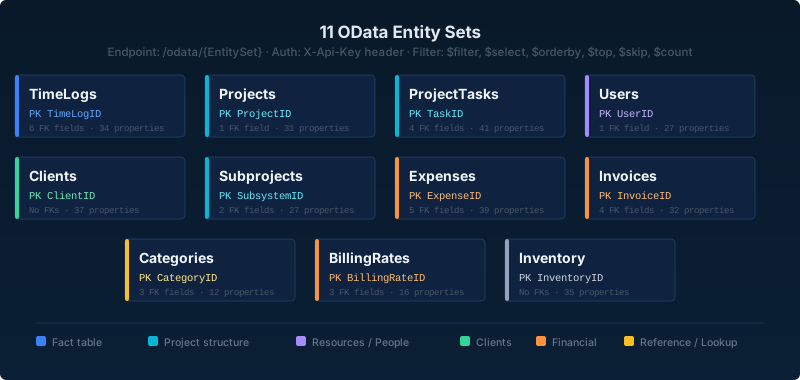
| Entity Set | Endpoint | Primary Key | FK Fields |
|---|---|---|---|
TimeLogs | /odata/TimeLogs | TimeLogID | ProjectID, UserID, ClientID, ProjectTaskID, SubsystemID, CategoryID |
Projects | /odata/Projects | ProjectID | ClientID |
ProjectTasks | /odata/ProjectTasks | TaskID | ProjectID, ClientID, SubsystemID, CategoryID |
Subprojects | /odata/Subprojects | SubsystemID | ProjectID, ParentID (self-ref) |
Users | /odata/Users | UserID | ManagerID (self-ref) |
Clients | /odata/Clients | ClientID | None |
Categories | /odata/Categories | CategoryID | ProjectID, SubsystemID, UserID (optional scoping) |
Expenses | /odata/Expenses | ExpenseID | ProjectID, ClientID, UserID, SubsystemID, CategoryID |
Invoices | /odata/Invoices | InvoiceID | ClientID, ProjectID, SubprojectID, TaskID |
BillingRates | /odata/BillingRates | BillingRateID | UserID, ProjectID, CategoryID |
Inventory | /odata/Inventory | InventoryID | None |
TimeLogs
One row per timesheet entry. Each entry links a user to a project, task, subproject, and category with logged hours. TimeLogs is typically the primary fact table in Power BI models — it contains all hours, costs, and billable flags from employee timesheets.
Endpoint: GET /odata/TimeLogs · Primary key: TimeLogID · Filtered pull recommended (use $filter=Created gt with a rolling date)
| Property | Edm Type | Key | Notes |
|---|---|---|---|
TimeLogID | Edm.String | PK | Unique identifier for the time log record |
StartTime | Edm.DateTimeOffset | Clock-in date and time | |
EndTime | Edm.DateTimeOffset | Clock-out date and time | |
Date | Edm.Date | Calendar date of the entry (yyyy-MM-dd) | |
TimeLogDurationHours | Edm.Decimal | Elapsed hours (EndTime − StartTime ÷ 3600), precision 18 scale 4 | |
Billable | Edm.Boolean | Whether the time is billable to the client | |
Billed | Edm.Boolean | Whether an invoice has been issued for this entry | |
Approved | Edm.Boolean | Manager-approved flag | |
TimeLogCostClient | Edm.Decimal | Hours × client rate (billable cost to charge the client) | |
TimeLogCostSalary | Edm.Decimal | Hours × salary rate (internal labor cost) | |
TimeLogClientRate | Edm.Decimal | Effective hourly client billing rate applied to this entry | |
TimeLogSalaryRate | Edm.Decimal | Effective hourly salary/cost rate applied to this entry | |
TimeLogQty | Edm.Decimal | Custom quantity field (for non-time-based entries) | |
UserName | Edm.String | Login name of the employee who logged time | |
TimeLogUserFullName | Edm.String | Full display name of the employee | |
Notes | Edm.String | Free-text memo entered by the employee | |
ProjectName | Edm.String | Denormalized project name — convenience field, not a FK | |
ClientName | Edm.String | Denormalized client name | |
TaskName | Edm.String | Denormalized task name | |
SubsystemName | Edm.String | Denormalized subproject/phase name | |
CategoryName | Edm.String | Denormalized category name | |
Location | Edm.String | Physical location recorded at time of entry | |
UserText1 | Edm.String | Custom user-defined field 1 | |
UserText2 | Edm.String | Custom user-defined field 2 | |
UserText3 | Edm.String | Custom user-defined field 3 | |
ProjectID | Edm.String | FK → Projects | Links to Projects.ProjectID |
UserID | Edm.String | FK → Users | Links to Users.UserID |
ClientID | Edm.String | FK → Clients | Links to Clients.ClientID |
ProjectTaskID | Edm.String | FK → ProjectTasks | Links to ProjectTasks.TaskID — field names differ; set this join manually in Power BI |
SubsystemID | Edm.String | FK → Subprojects | Links to Subprojects.SubsystemID |
CategoryID | Edm.String | FK → Categories | Links to Categories.CategoryID |
Created | Edm.DateTimeOffset | Record creation timestamp — use in $filter for rolling pulls | |
Modified | Edm.DateTimeOffset | Last-modified timestamp |
Projects
Top-level project records — the primary container for tasks, time logs, and expenses. Each project belongs to a client and can have a project manager, billing type, quoted cost, and custom scheduling dates.
Endpoint: GET /odata/Projects · Primary key: ProjectID
| Property | Edm Type | Key | Notes |
|---|---|---|---|
ProjectID | Edm.String | PK | Unique identifier for the project |
ProjectName | Edm.String | Project display name | |
Description | Edm.String | Free-text project description | |
Status | Edm.String | Project status (e.g. Active, On Hold, Closed) | |
Priority | Edm.String | Priority level | |
Active | Edm.Boolean | Whether the project is active (non-archived) | |
ProjectProjectCode | Edm.String | Custom project code or number | |
BillingType | Edm.String | Billing method — Fixed Price, T&M, Retainer, etc. | |
ProjectClientRate | Edm.Decimal | Default hourly client billing rate for this project | |
ProjectSalaryRate | Edm.Decimal | Default hourly salary/cost rate | |
ProjectQty | Edm.Decimal | Custom quantity field | |
ProjectQtyBuilt | Edm.Decimal | Quantity completed to date | |
StartDate | Edm.Date | Scheduled project start date | |
FinishDate | Edm.Date | Scheduled project end date | |
ProjectLaunchDate | Edm.Date | Planned or actual launch/go-live date | |
DeliveryDate | Edm.Date | Delivery or handoff date | |
ProjectQuotedDuration | Edm.Int32 | Quoted duration in hours | |
ProjectQuotedCost | Edm.Decimal | Quoted project cost (contract value) | |
PO | Edm.String | Purchase order number | |
ProjectFolder | Edm.String | Folder hierarchy path for organizing projects | |
ProjectProjectTypeName | Edm.String | Project type classification | |
ManagerUserName | Edm.String | Login name of the assigned project manager | |
ManagerFullName | Edm.String | Full name of the assigned project manager | |
ProjectAssemblyLineName | Edm.String | Assembly line or workflow name | |
ClientID | Edm.String | FK → Clients | Links to Clients.ClientID |
ClientName | Edm.String | Denormalized client name | |
UserText1 | Edm.String | Custom field 1 | |
UserText2 | Edm.String | Custom field 2 | |
UserText3 | Edm.String | Custom field 3 | |
Created | Edm.DateTimeOffset | Record creation timestamp | |
Modified | Edm.DateTimeOffset | Last-modified timestamp |
ProjectTasks
Individual tasks within projects — the main scheduling unit in Maverick. Each task has dates, duration, percent complete, cost fields, and links to its parent project, subproject, and category. Actual hours from timesheets roll up here as ActualHours.
Endpoint: GET /odata/ProjectTasks · Primary key: TaskID
| Property | Edm Type | Key | Notes |
|---|---|---|---|
TaskID | Edm.String | PK | Unique identifier for the task |
TaskName | Edm.String | Task display name | |
Description | Edm.String | Free-text task description | |
Status | Edm.String | Task status | |
Priority | Edm.String | Priority level | |
PercentComplete | Edm.Int32 | Completion percentage, 0–100 | |
Completed | Edm.Boolean | Task fully complete flag | |
Billable | Edm.Boolean | Whether time on this task is billable | |
StartDate | Edm.Date | Scheduled start date | |
FinishDate | Edm.Date | Scheduled finish date (CPM-calculated) | |
TaskDueDate | Edm.Date | Due date (may differ from FinishDate) | |
CompletedDate | Edm.Date | Actual completion date | |
TaskDurationHours | Edm.Decimal | Scheduled duration in decimal hours | |
ActualHours | Edm.Decimal | Total hours logged from timesheets for this task | |
RemainingHours | Edm.Decimal | Estimated remaining hours to complete | |
TaskCostClient | Edm.Decimal | Budgeted client cost (duration × client rate) | |
TaskCostSalary | Edm.Decimal | Budgeted salary/internal cost | |
TaskCostClientActual | Edm.Decimal | Actual incurred client cost to date | |
TaskCostClientRemain | Edm.Decimal | Remaining client cost forecast | |
TaskCostSalaryActual | Edm.Decimal | Actual incurred salary cost to date | |
TaskCostSalaryRemain | Edm.Decimal | Remaining salary cost forecast | |
TaskClientRate | Edm.Decimal | Effective hourly client rate for this task | |
TaskSalaryRate | Edm.Decimal | Effective hourly salary rate for this task | |
TaskQuotedCost | Edm.Decimal | Quoted/estimated cost for the task | |
TaskQty | Edm.Decimal | Custom quantity field | |
TaskQtyBuilt | Edm.Decimal | Quantity built/completed to date | |
ProjectID | Edm.String | FK → Projects | Links to Projects.ProjectID |
ProjectName | Edm.String | Denormalized project name | |
ClientID | Edm.String | FK → Clients | Links to Clients.ClientID |
ClientName | Edm.String | Denormalized client name | |
SubsystemID | Edm.String | FK → Subprojects | Links to Subprojects.SubsystemID |
SubsystemName | Edm.String | Denormalized subproject/phase name | |
CategoryID | Edm.String | FK → Categories | Links to Categories.CategoryID |
CategoryName | Edm.String | Denormalized category name | |
TaskProjectTypeName | Edm.String | Project type classification inherited from the project | |
TaskAssemblyLineName | Edm.String | Assembly line or workflow name | |
UserText1 | Edm.String | Custom field 1 | |
UserText2 | Edm.String | Custom field 2 | |
UserText3 | Edm.String | Custom field 3 | |
Created | Edm.DateTimeOffset | Record creation timestamp | |
Modified | Edm.DateTimeOffset | Last-modified timestamp |
Subprojects
Phases and sub-project nodes within the project hierarchy. Subprojects nest inside a parent project and can nest inside each other. The Level field indicates depth (1 = top-level phase). Note that the primary key field is SubsystemID — a legacy field name.
Endpoint: GET /odata/Subprojects · Primary key: SubsystemID
| Property | Edm Type | Key | Notes |
|---|---|---|---|
SubsystemID | Edm.String | PK | Unique identifier for the subproject/phase |
Name | Edm.String | Subproject display name | |
ExtendedName | Edm.String | Full hierarchical name including parent path | |
Description | Edm.String | Free-text description | |
Status | Edm.String | Phase status | |
Priority | Edm.String | Priority level | |
Active | Edm.Boolean | Active/archived flag | |
Level | Edm.Int32 | Depth in hierarchy — 1 = top-level phase, 2 = sub-phase, etc. | |
Order | Edm.Int32 | Display sort order among siblings | |
SubprojectProjectCode | Edm.String | Custom project code for this phase | |
StartDate | Edm.Date | Phase scheduled start date | |
FinishDate | Edm.Date | Phase scheduled finish date | |
SubprojectLaunchDate | Edm.Date | Launch or go-live date for this phase | |
SubprojectQuotedDuration | Edm.Int32 | Quoted phase duration in hours | |
SubprojectQuotedCost | Edm.Decimal | Quoted phase cost | |
SubprojectClientRate | Edm.Decimal | Default client billing rate for this phase | |
SubprojectSalaryRate | Edm.Decimal | Default salary/cost rate for this phase | |
SubprojectQty | Edm.Decimal | Custom quantity field | |
SubprojectQtyBuilt | Edm.Decimal | Quantity completed | |
ProjectID | Edm.String | FK → Projects | Links to Projects.ProjectID (parent project) |
ProjectName | Edm.String | Denormalized project name | |
ParentID | Edm.String | FK → Subprojects | Links to Subprojects.SubsystemID (parent phase); null at top level |
UserText1 | Edm.String | Custom field 1 | |
UserText2 | Edm.String | Custom field 2 | |
UserText3 | Edm.String | Custom field 3 | |
Created | Edm.DateTimeOffset | Record creation timestamp | |
Modified | Edm.DateTimeOffset | Last-modified timestamp |
Users
Employees, contractors, machines, and material resources. The ResourceType field distinguishes the three resource kinds: Human, Machine, and Materials. Users are organized in workgroups and can be assigned AI providers and billing rates.
Endpoint: GET /odata/Users · Primary key: UserID
| Property | Edm Type | Key | Notes |
|---|---|---|---|
UserID | Edm.String | PK | Unique identifier for the user/resource |
UserName | Edm.String | Login/account name | |
FullName | Edm.String | Full display name | |
Email | Edm.String | Email address | |
Active | Edm.Boolean | Active/inactive flag | |
Admin | Edm.Boolean | Administrator rights flag | |
Contractor | Edm.Boolean | External contractor flag | |
Exempt | Edm.Boolean | FLSA-exempt (salaried) flag | |
ResourceType | Edm.String | "Human", "Machine", or "Materials" — the three Maverick resource kinds | |
Workgroup | Edm.String | Workgroup assignment name | |
Department | Edm.String | Department name | |
EmployeeNum | Edm.String | Employee ID number | |
HireDate | Edm.Date | Hire or onboarding date | |
UserClientRate | Edm.Decimal | Default hourly client billing rate | |
UserSalaryRate | Edm.Decimal | Default hourly salary/cost rate | |
UserMileageRate | Edm.Decimal | Mileage reimbursement rate per mile/km | |
Skills | Edm.String | Free-text skills list | |
UserRole | Edm.String | Role code | |
UserRoleName | Edm.String | Role display name | |
ManagerID | Edm.String | FK → Users | Links to Users.UserID (reporting manager); null at org top |
ParentName | Edm.String | Workgroup parent name in the resource tree | |
UserText1 | Edm.String | Custom field 1 | |
UserText2 | Edm.String | Custom field 2 | |
UserText3 | Edm.String | Custom field 3 | |
Created | Edm.DateTimeOffset | Record creation timestamp | |
Modified | Edm.DateTimeOffset | Last-modified timestamp |
Clients
Client companies and internal organizations. Projects, time logs, and expenses all link back to a client. The ThisCompany flag marks the account holder's own organization. No FK fields — Clients is a root dimension table.
Endpoint: GET /odata/Clients · Primary key: ClientID
| Property | Edm Type | Key | Notes |
|---|---|---|---|
ClientID | Edm.String | PK | Unique identifier for the client |
CompanyName | Edm.String | Client company name | |
Description | Edm.String | Free-text description | |
Status | Edm.String | Client status | |
Priority | Edm.String | Priority level | |
Active | Edm.Boolean | Active/inactive flag | |
ThisCompany | Edm.Boolean | Marks the account holder's own company record | |
ClientTerms | Edm.String | Payment terms (e.g. "Net 30") | |
Web | Edm.String | Client website URL | |
ClientInvoiceNote | Edm.String | Default note printed on invoices for this client | |
ClientTaxRate | Edm.Decimal | Default tax rate used when generating invoices | |
TaxID | Edm.String | Tax identification number (EIN/VAT) | |
CurrencyID | Edm.String | Currency code (e.g. USD, EUR) | |
ClientFolder | Edm.String | Folder path for organizing clients | |
MainContact | Edm.String | Primary contact person name | |
MainContactPhone | Edm.String | Primary contact phone | |
MainContactMobile | Edm.String | Primary contact mobile | |
MainContactFax | Edm.String | Primary contact fax | |
MainContactEmail | Edm.String | Primary contact email | |
MainAddress1 | Edm.String | Main address line 1 | |
MainAddress2 | Edm.String | Main address line 2 | |
MainCity | Edm.String | Main address city | |
MainState | Edm.String | Main address state/province | |
MainZip | Edm.String | Main address postal code | |
MainCountry | Edm.String | Main address country | |
BillingContact | Edm.String | Billing contact person name | |
BillingContactPhone | Edm.String | Billing contact phone | |
BillingContactMobile | Edm.String | Billing contact mobile | |
BillingContactFax | Edm.String | Billing contact fax | |
BillingContactEmail | Edm.String | Billing contact email | |
BillingAddress1 | Edm.String | Billing address line 1 | |
BillingAddress2 | Edm.String | Billing address line 2 | |
BillingCity | Edm.String | Billing address city | |
BillingState | Edm.String | Billing address state/province | |
BillingZip | Edm.String | Billing address postal code | |
BillingCountry | Edm.String | Billing address country | |
Created | Edm.DateTimeOffset | Record creation timestamp | |
Modified | Edm.DateTimeOffset | Last-modified timestamp |
Categories
Work categories used to classify time log entries and expenses (e.g. Development, Design, Travel). Categories can optionally be scoped to a specific project, phase, or user — when a FK field is set, that category is only available in that scope.
Endpoint: GET /odata/Categories · Primary key: CategoryID
| Property | Edm Type | Key | Notes |
|---|---|---|---|
CategoryID | Edm.String | PK | Unique identifier for the category |
Name | Edm.String | Category display name | |
Description | Edm.String | Free-text description | |
Active | Edm.Boolean | Active/inactive flag | |
CategoryClientRate | Edm.Decimal | Client billing rate override for this category | |
CategorySalaryRate | Edm.Decimal | Salary/cost rate override for this category | |
CategoryFolder | Edm.String | Folder path for organizing categories | |
ProjectID | Edm.String | FK → Projects | Optional — when set, category is scoped to this project only |
SubsystemID | Edm.String | FK → Subprojects | Optional — when set, category is scoped to this phase only |
UserID | Edm.String | FK → Users | Optional — when set, category is scoped to this user only |
Created | Edm.DateTimeOffset | Record creation timestamp | |
Modified | Edm.DateTimeOffset | Last-modified timestamp |
Expenses
Expense reports — receipts, mileage, and reimbursements submitted by employees. Each expense links to a user, project, client, phase, and category, and carries billable, reimbursable, and approval flags.
Endpoint: GET /odata/Expenses · Primary key: ExpenseID
| Property | Edm Type | Key | Notes |
|---|---|---|---|
ExpenseID | Edm.String | PK | Unique identifier for the expense record |
ExpenseDate | Edm.Date | Date the expense was incurred | |
ExpenseAmount | Edm.Decimal | Total expense amount | |
Price | Edm.Decimal | Unit price (for quantity-based expenses) | |
ExpenseQty | Edm.Decimal | Quantity (for quantity-based expenses) | |
Tax | Edm.Decimal | Tax amount on the expense | |
ExpenseMileageRate | Edm.Decimal | Per-mile/km reimbursement rate for mileage entries | |
Distance | Edm.Decimal | Distance traveled (for mileage entries) | |
OdometerBegin | Edm.Decimal | Starting odometer reading | |
OdometerEnd | Edm.Decimal | Ending odometer reading | |
Billable | Edm.Boolean | Whether the expense is billable to the client | |
Billed | Edm.Boolean | Whether an invoice has been issued for this expense | |
Reimbursable | Edm.Boolean | Whether the employee is to be reimbursed | |
Reimbursed | Edm.Boolean | Whether reimbursement has been paid | |
CompanyPaid | Edm.Boolean | Paid with a company credit card or account | |
Approved | Edm.Boolean | Manager-approved flag | |
PO | Edm.String | Purchase order number | |
Payee | Edm.String | Merchant or payee name | |
CheckNum | Edm.String | Check number if paid by check | |
Description | Edm.String | Expense description | |
Location | Edm.String | Location where the expense was incurred | |
InventoryName | Edm.String | Linked inventory item name (if expense draws from inventory) | |
InventoryCode | Edm.String | Linked inventory item code | |
ExpenseProjectTypeName | Edm.String | Project type classification | |
UserName | Edm.String | Denormalized employee login name | |
ExpenseUserFullName | Edm.String | Denormalized employee full name | |
ProjectName | Edm.String | Denormalized project name | |
ClientName | Edm.String | Denormalized client name | |
SubsystemName | Edm.String | Denormalized subproject/phase name | |
CategoryName | Edm.String | Denormalized category name | |
ProjectID | Edm.String | FK → Projects | Links to Projects.ProjectID |
ClientID | Edm.String | FK → Clients | Links to Clients.ClientID |
UserID | Edm.String | FK → Users | Links to Users.UserID |
SubsystemID | Edm.String | FK → Subprojects | Links to Subprojects.SubsystemID |
CategoryID | Edm.String | FK → Categories | Links to Categories.CategoryID |
UserText1 | Edm.String | Custom field 1 | |
UserText2 | Edm.String | Custom field 2 | |
UserText3 | Edm.String | Custom field 3 | |
Created | Edm.DateTimeOffset | Record creation timestamp | |
Modified | Edm.DateTimeOffset | Last-modified timestamp |
Invoices
Invoice records with totals, due dates, and payment status. Each invoice links to a client and optionally to a project, subproject, or task. Use BalanceDue and PaidInFull to report on outstanding receivables.
Endpoint: GET /odata/Invoices · Primary key: InvoiceID
| Property | Edm Type | Key | Notes |
|---|---|---|---|
InvoiceID | Edm.String | PK | Unique identifier for the invoice |
InvoiceNum | Edm.String | Human-readable invoice number (e.g. INV-1042) | |
DateSent | Edm.Date | Date the invoice was sent to the client | |
InvoiceDueDate | Edm.Date | Payment due date | |
DatePaid | Edm.Date | Date payment was received | |
PaidInFull | Edm.Boolean | Invoice fully paid flag | |
SubTotal | Edm.Decimal | Subtotal before tax | |
InvoiceTaxRate | Edm.Decimal | Tax rate applied (decimal, e.g. 0.08 for 8%) | |
TaxAmount | Edm.Decimal | Tax amount (SubTotal × InvoiceTaxRate) | |
InvoiceAmount | Edm.Decimal | Total invoice amount including tax | |
AmountPaid | Edm.Decimal | Amount received to date | |
BalanceDue | Edm.Decimal | Remaining balance (InvoiceAmount − AmountPaid) | |
InvoiceTerms | Edm.String | Payment terms (e.g. "Net 30") | |
PO | Edm.String | Client purchase order number | |
InvoiceInvoiceNote | Edm.String | Note printed on the invoice | |
Notes | Edm.String | Internal memo | |
Representative | Edm.String | Sales representative name | |
StartRange | Edm.Date | Billing period start date (when invoice covers a time range) | |
EndRange | Edm.Date | Billing period end date | |
MilestoneName | Edm.String | Milestone name if invoice is tied to a milestone | |
MilestoneDate | Edm.Date | Milestone date | |
ClientName | Edm.String | Denormalized client name | |
ProjectName | Edm.String | Denormalized project name | |
SubprojectName | Edm.String | Denormalized subproject name | |
TaskName | Edm.String | Denormalized task name | |
UserName | Edm.String | Denormalized user name | |
ClientID | Edm.String | FK → Clients | Links to Clients.ClientID |
ProjectID | Edm.String | FK → Projects | Links to Projects.ProjectID |
SubprojectID | Edm.String | FK → Subprojects | Links to Subprojects.SubsystemID |
TaskID | Edm.String | FK → ProjectTasks | Links to ProjectTasks.TaskID |
Created | Edm.DateTimeOffset | Record creation timestamp | |
Modified | Edm.DateTimeOffset | Last-modified timestamp |
BillingRates
Rate schedule records — hourly client and salary rates that can be scoped by user, project, category, or role, with optional effective date ranges. The RateType field indicates the scope of each rate record.
Endpoint: GET /odata/BillingRates · Primary key: BillingRateID
| Property | Edm Type | Key | Notes |
|---|---|---|---|
BillingRateID | Edm.String | PK | Unique identifier for the billing rate record |
RateType | Edm.String | Scope of this rate — "User", "Project", "Category", or "Role" | |
BillingRateClientRate | Edm.Decimal | Hourly client billing rate | |
BillingRateSalaryRate | Edm.Decimal | Hourly salary/cost rate | |
StartDate | Edm.Date | Effective date start (null = no start boundary) | |
EndDate | Edm.Date | Effective date end (null = no end boundary) | |
BillingRateRoleName | Edm.String | Role name (when RateType = "Role") | |
UserName | Edm.String | Denormalized user name | |
ProjectName | Edm.String | Denormalized project name | |
CategoryName | Edm.String | Denormalized category name | |
UserID | Edm.String | FK → Users | Links to Users.UserID (when RateType = "User") |
ProjectID | Edm.String | FK → Projects | Links to Projects.ProjectID (when RateType = "Project") |
CategoryID | Edm.String | FK → Categories | Links to Categories.CategoryID (when RateType = "Category") |
RoleID | Edm.String | Role identifier — no corresponding OData entity set | |
Created | Edm.DateTimeOffset | Record creation timestamp | |
Modified | Edm.DateTimeOffset | Last-modified timestamp |
Inventory
Parts, materials, and physical assets tracked in stock. Inventory items can be linked to expenses (when an expense draws from inventory). No FK fields — Inventory is a standalone reference table with no relationships in the OData feed.
Endpoint: GET /odata/Inventory · Primary key: InventoryID
| Property | Edm Type | Key | Notes |
|---|---|---|---|
InventoryID | Edm.String | PK | Unique identifier for the inventory item |
Name | Edm.String | Item display name | |
Description | Edm.String | Free-text description | |
Code | Edm.String | Internal item code | |
Status | Edm.String | Item status | |
Active | Edm.Boolean | Active/inactive flag | |
QtyInStock | Edm.Decimal | Current quantity on hand | |
QtyWhenToReorder | Edm.Decimal | Reorder point — reorder when stock drops to this level | |
QtyToReorder | Edm.Decimal | Quantity to order when reordering | |
UnitsType | Edm.String | Unit of measure (each, lb, ft, etc.) | |
CostUnit | Edm.Decimal | Cost per unit (purchase cost) | |
CostClient | Edm.Decimal | Client billing price per unit | |
LeadTimeDays | Edm.Int32 | Procurement lead time in days | |
BuyOrBuild | Edm.String | "Buy" or "Build" sourcing decision | |
Labor | Edm.Decimal | Labor cost component per unit (for Build items) | |
Weight | Edm.String | Item weight | |
Size | Edm.String | Item dimensions or size | |
Condition | Edm.String | Physical condition (New, Used, Refurbished, etc.) | |
SKU | Edm.String | Internal stock keeping unit | |
VendorSKU | Edm.String | Vendor's item number | |
MfgSKU | Edm.String | Manufacturer's part number | |
ModelNum | Edm.String | Model number | |
SerialNum | Edm.String | Serial number | |
Vendor | Edm.String | Vendor/supplier name | |
Manufacturer | Edm.String | Manufacturer name | |
Location | Edm.String | Physical storage location | |
Weblink | Edm.String | Vendor or product page URL | |
Notes | Edm.String | Free-text notes | |
InventoryFolder | Edm.String | Folder path for organizing inventory items | |
UserText1 | Edm.String | Custom field 1 | |
UserText2 | Edm.String | Custom field 2 | |
UserText3 | Edm.String | Custom field 3 | |
Created | Edm.DateTimeOffset | Record creation timestamp | |
Modified | Edm.DateTimeOffset | Last-modified timestamp |
Power BI M Queries
Each query below is ready to paste into the Power BI Advanced Editor (Home → Get Data → Blank Query → Advanced Editor). Replace YOUR_CID_HERE with your company ID and YOUR_API_KEY with your API key. For on-premise installations, remove the &cid=YOUR_CID_HERE portion — it is not needed.
Queries with a DaysBack variable pull only records created within that rolling window. Increase the number to load more history. For a complete step-by-step Power BI setup guide, see the Power BI OData Integration page. For copy-paste DAX measures and four finished dashboards built from these tables, see Four Visually Striking Power BI Dashboards. If you just want to confirm your API key and CID work before pasting any of the queries below, run the Power BI connection smoke test first.
TimeLogs
let // Fetch only time logs created in the last N days. // Increase DaysBack to load more history; set to 9999 for all records. DaysBack = 14, Cutoff = DateTimeZone.ToText( DateTimeZone.LocalNow() - #duration(DaysBack, 0, 0, 0), "yyyy-MM-ddTHH:mm:sszzz" ), Source = OData.Feed( "https://stcloud67.com/odata/TimeLogs?cid=YOUR_CID_HERE&$filter=Created gt " & Cutoff, null, [Headers = [#"X-Api-Key" = "YOUR_API_KEY"]] ) in Source
Projects
let DaysBack = 30, Cutoff = DateTimeZone.ToText( DateTimeZone.LocalNow() - #duration(DaysBack, 0, 0, 0), "yyyy-MM-ddTHH:mm:sszzz" ), Source = OData.Feed( "https://stcloud67.com/odata/Projects?cid=YOUR_CID_HERE&$filter=Created gt " & Cutoff, null, [Headers = [#"X-Api-Key" = "YOUR_API_KEY"]] ) in Source
ProjectTasks
let DaysBack = 30, Cutoff = DateTimeZone.ToText( DateTimeZone.LocalNow() - #duration(DaysBack, 0, 0, 0), "yyyy-MM-ddTHH:mm:sszzz" ), Source = OData.Feed( "https://stcloud67.com/odata/ProjectTasks?cid=YOUR_CID_HERE&$filter=Created gt " & Cutoff, null, [Headers = [#"X-Api-Key" = "YOUR_API_KEY"]] ) in Source
Subprojects
let Source = OData.Feed( "https://stcloud67.com/odata/Subprojects?cid=YOUR_CID_HERE", null, [Headers = [#"X-Api-Key" = "YOUR_API_KEY"]] ) in Source
Users
let Source = OData.Feed( "https://stcloud67.com/odata/Users?cid=YOUR_CID_HERE", null, [Headers = [#"X-Api-Key" = "YOUR_API_KEY"]] ) in Source
Clients
let Source = OData.Feed( "https://stcloud67.com/odata/Clients?cid=YOUR_CID_HERE", null, [Headers = [#"X-Api-Key" = "YOUR_API_KEY"]] ) in Source
Categories
let Source = OData.Feed( "https://stcloud67.com/odata/Categories?cid=YOUR_CID_HERE", null, [Headers = [#"X-Api-Key" = "YOUR_API_KEY"]] ) in Source
Expenses
let DaysBack = 90, Cutoff = DateTimeZone.ToText( DateTimeZone.LocalNow() - #duration(DaysBack, 0, 0, 0), "yyyy-MM-ddTHH:mm:sszzz" ), Source = OData.Feed( "https://stcloud67.com/odata/Expenses?cid=YOUR_CID_HERE&$filter=Created gt " & Cutoff, null, [Headers = [#"X-Api-Key" = "YOUR_API_KEY"]] ) in Source
Invoices
let Source = OData.Feed( "https://stcloud67.com/odata/Invoices?cid=YOUR_CID_HERE", null, [Headers = [#"X-Api-Key" = "YOUR_API_KEY"]] ) in Source
BillingRates
let Source = OData.Feed( "https://stcloud67.com/odata/BillingRates?cid=YOUR_CID_HERE", null, [Headers = [#"X-Api-Key" = "YOUR_API_KEY"]] ) in Source
Inventory
let Source = OData.Feed( "https://stcloud67.com/odata/Inventory?cid=YOUR_CID_HERE", null, [Headers = [#"X-Api-Key" = "YOUR_API_KEY"]] ) in Source
Recommended Relationships
The diagram below shows the recommended Power BI table relationships. TimeLogs is the primary fact table — connect it to all six dimension tables for full slicing by project, user, client, task, phase, and category. Power BI auto-detect finds most joins; the one exception is TimeLogs.ProjectTaskID → ProjectTasks.TaskID, where the field names differ and the relationship must be set manually in the Model view.
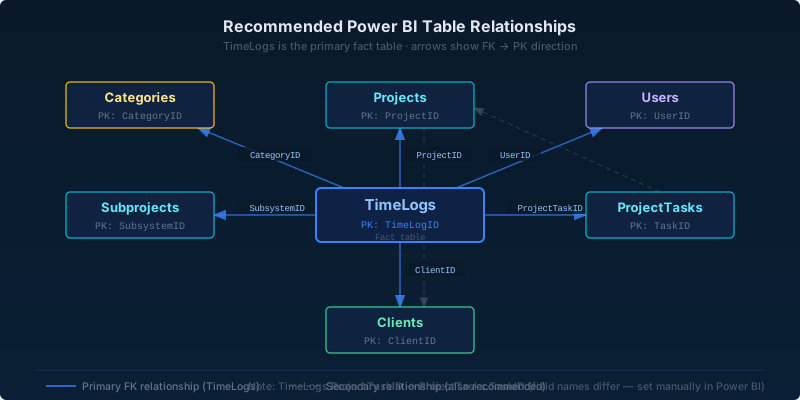
Primary Relationships (TimeLogs as fact table)
| From (Many) | Field | To (One) | Field | Note |
|---|---|---|---|---|
TimeLogs | ProjectID | Projects | ProjectID | Auto-detected |
TimeLogs | UserID | Users | UserID | Auto-detected |
TimeLogs | ClientID | Clients | ClientID | Auto-detected |
TimeLogs | ProjectTaskID | ProjectTasks | TaskID | Set manually — field names differ |
TimeLogs | SubsystemID | Subprojects | SubsystemID | Auto-detected |
TimeLogs | CategoryID | Categories | CategoryID | Auto-detected |
Secondary Relationships
| From (Many) | Field | To (One) | Field | Note |
|---|---|---|---|---|
Projects | ClientID | Clients | ClientID | Auto-detected |
ProjectTasks | ProjectID | Projects | ProjectID | Auto-detected |
ProjectTasks | ClientID | Clients | ClientID | May cause ambiguous paths — enable only if needed |
Expenses | ProjectID | Projects | ProjectID | Auto-detected |
Expenses | UserID | Users | UserID | Auto-detected |
Expenses | ClientID | Clients | ClientID | Auto-detected |
Invoices | ClientID | Clients | ClientID | Auto-detected |
Invoices | ProjectID | Projects | ProjectID | Auto-detected |
BillingRates | UserID | Users | UserID | Auto-detected; only relevant when RateType = "User" |
BillingRates | ProjectID | Projects | ProjectID | Auto-detected; only relevant when RateType = "Project" |
Subprojects | ProjectID | Projects | ProjectID | Auto-detected |