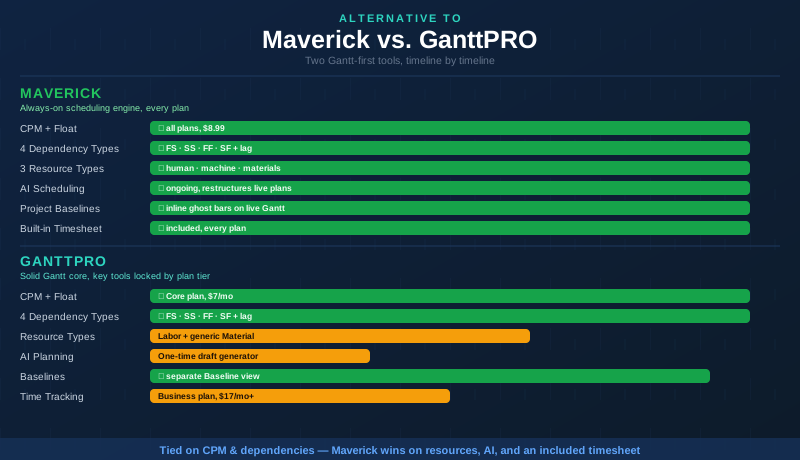
GanttPRO is not a watered-down Gantt tool. Unlike most of the competitors in this comparison series, GanttPRO was built around the Gantt chart from day one — and it shows. Its Core plan, priced at $7 per user per month billed annually, already includes automatic critical path calculation, full Total Float and Free Float values, all four standard dependency link types with lag, and native project baselines. That is a genuinely strong starting point, and most of the "tool X has no CPM" comparisons that apply to other competitors simply do not apply here.
So this comparison is more nuanced than most. Where GanttPRO and Maverick are tied, we say so plainly. Where the gap is real — resource modeling depth, the accessibility of resource and time tracking tools across plan tiers, and how deeply AI is integrated into a live, running project — this comparison lays out exactly what separates the two tools and why it matters for project managers who are accountable for delivery.
Quick Verdict
On core scheduling mechanics — critical path, float, and all four dependency types — GanttPRO and Maverick are evenly matched, and GanttPRO deserves credit for including these at its lowest tier. The real separation shows up in three places: how resources beyond people are modeled, whether resource allocation and time tracking are included or gated behind a pricier plan, and how deeply AI is woven into the day-to-day act of scheduling rather than a one-time setup step.
GanttPRO treats equipment, software, vehicles, and facilities as one generic "Material" bucket with no per-item availability calendar, and its workload view and time tracking are locked behind the $17-per-user-per-month Business plan. Its AI capability is a free, separate tool that drafts an initial plan once and then hands you off to a static chart. Maverick includes three true resource types with full scheduling depth, a resource allocation chart, and a built-in timesheet on every plan — plus an AI assistant embedded in the live project that can restructure your schedule from a plain-English instruction at any point, not just at kickoff.
For project managers who need that depth available on day one without a plan upgrade, Maverick is the stronger GanttPRO alternative for project scheduling.
Quick-Reference Comparison Table
The comparison above, summarized as a plain data table.
| Feature | Maverick | GanttPRO |
|---|---|---|
| Critical Path Method + Float | ✓ All plans, $8.99 | ✓ Core plan, all tiers |
| All Four Dependency Link Types | ✓ FS · SS · FF · SF + lag | ✓ FS · SS · FF · SF + lag |
| Project Baselines & Variance | ✓ Inline ghost bars, live Gantt | ~ Separate Baseline view |
| Human · Machine · Materials Resources | ✓ 3 true types, each own schedule | ~ Labor + generic Material bucket |
| Resource Allocation Bar Chart | ✓ Included, every plan | ~ Workload view — Business, $17/mo+ |
| AI Builds & Reschedules Live Projects | ✓ Embedded, ongoing, restructures plans | ~ Free one-time AI draft generator |
| Per-Employee AI Model Assignment | ✓ Different provider/model per employee | ✗ Not available |
| Built-in Employee Timesheet | ✓ Included, all plans, filter by user/date | ~ Time log — Business, $17/mo+ |
Feature Comparison at a Glance
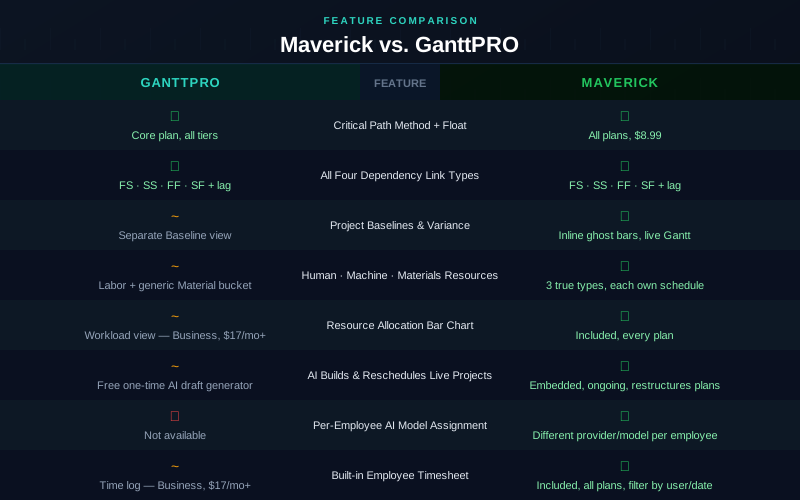
Two rows in that table are flat ties, and we are not going to pretend otherwise: GanttPRO's critical path and dependency engine genuinely match Maverick's at the mechanical level. The separation appears in resource modeling, in which capabilities are gated behind a higher plan tier, and in how AI participates in the schedule after the first draft is created.
Gantt Chart and Scheduling Engine
A close tie on mechanics — the difference is how the engine stays involved. GanttPRO's Gantt chart supports auto-scheduling, drag-and-drop task editing, and dependency-driven date cascades, the same way Maverick's does. When you change a task's dates, dependent tasks downstream move with it. Both tools take scheduling seriously as a discipline, not just a visual layer.
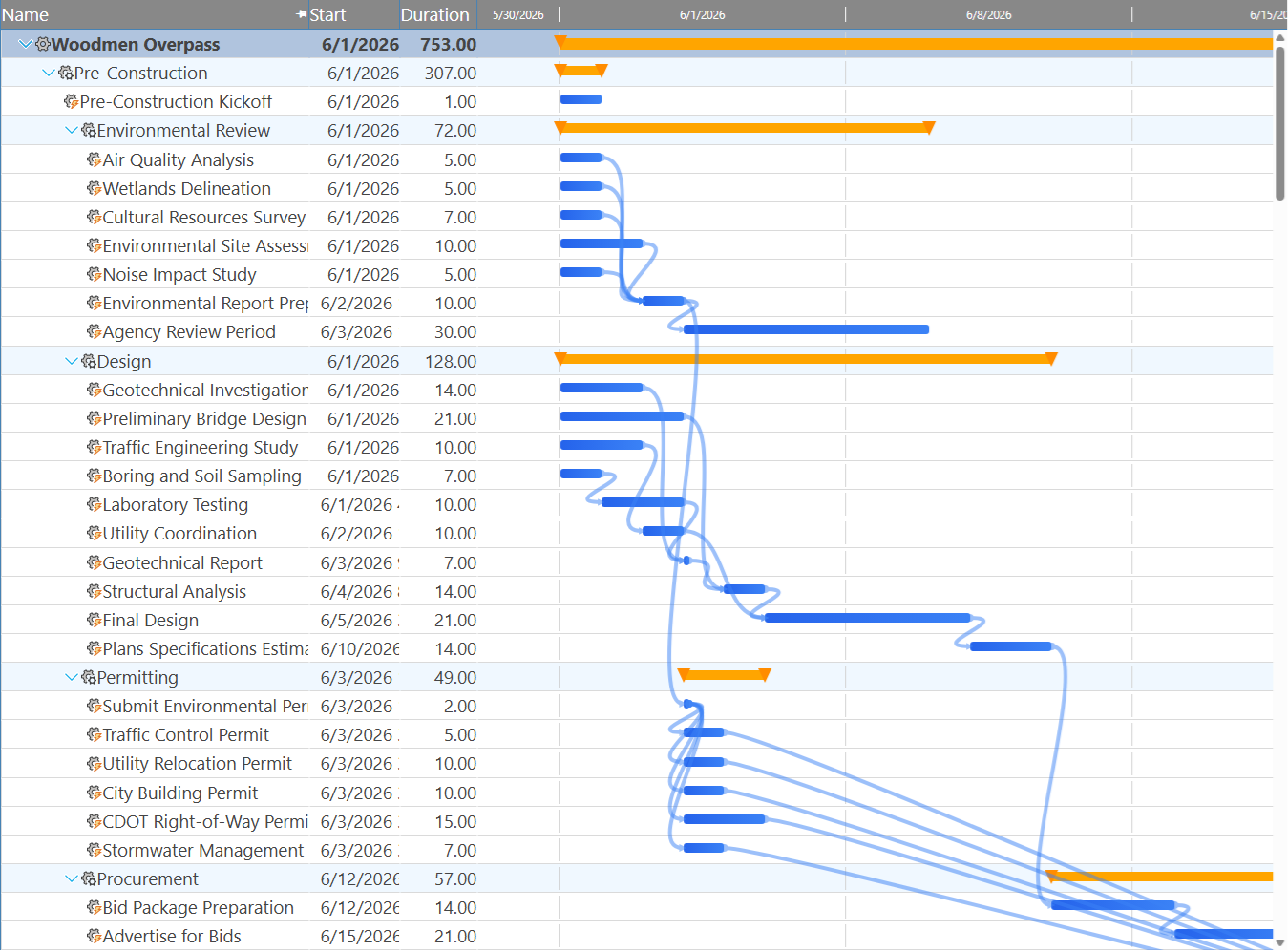
The real difference shows up once the project is underway. GanttPRO recently added a free AI Gantt Chart Maker that turns a short text description into a structured first draft — task groups, dependencies, and milestones generated in seconds. It is a genuinely useful way to skip a blank canvas. But it is a standalone, one-time generator: once the draft lands in your project, the AI's job is done, and every subsequent change is manual.
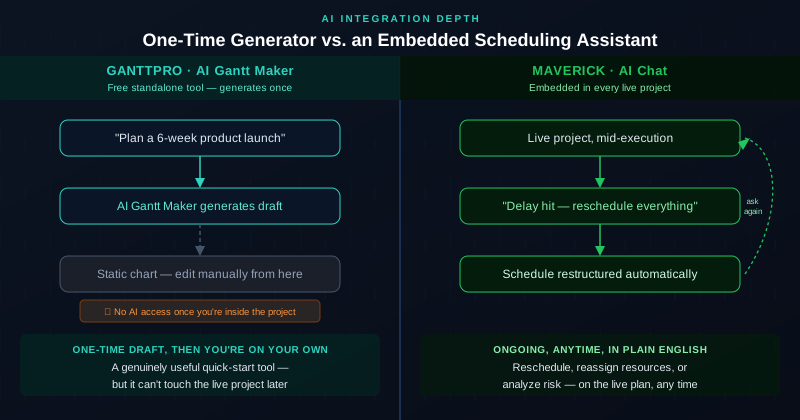
Maverick's AI lives inside the project for its entire lifecycle. You can ask it to draft the initial plan, just like GanttPRO's tool — but you can also come back three weeks later, mid-execution, and tell it "a permit delay just pushed concrete pour back two weeks, reschedule everything downstream and flag anything that's now critical." Maverick's engine reads the live project state and restructures it. That is the difference between a generator and an assistant.
Critical Path Method and Float
This category is a genuine tie, and GanttPRO earns it. GanttPRO calculates the critical path automatically and includes it on the Core plan — no upgrade required. Enabling its Float feature adds Total Float and Free Float columns to the task grid, plus a graphical shadow on the Gantt chart showing how far a task can shift before it threatens the project end date. That is a real, useful implementation of CPM, not a watered-down approximation.
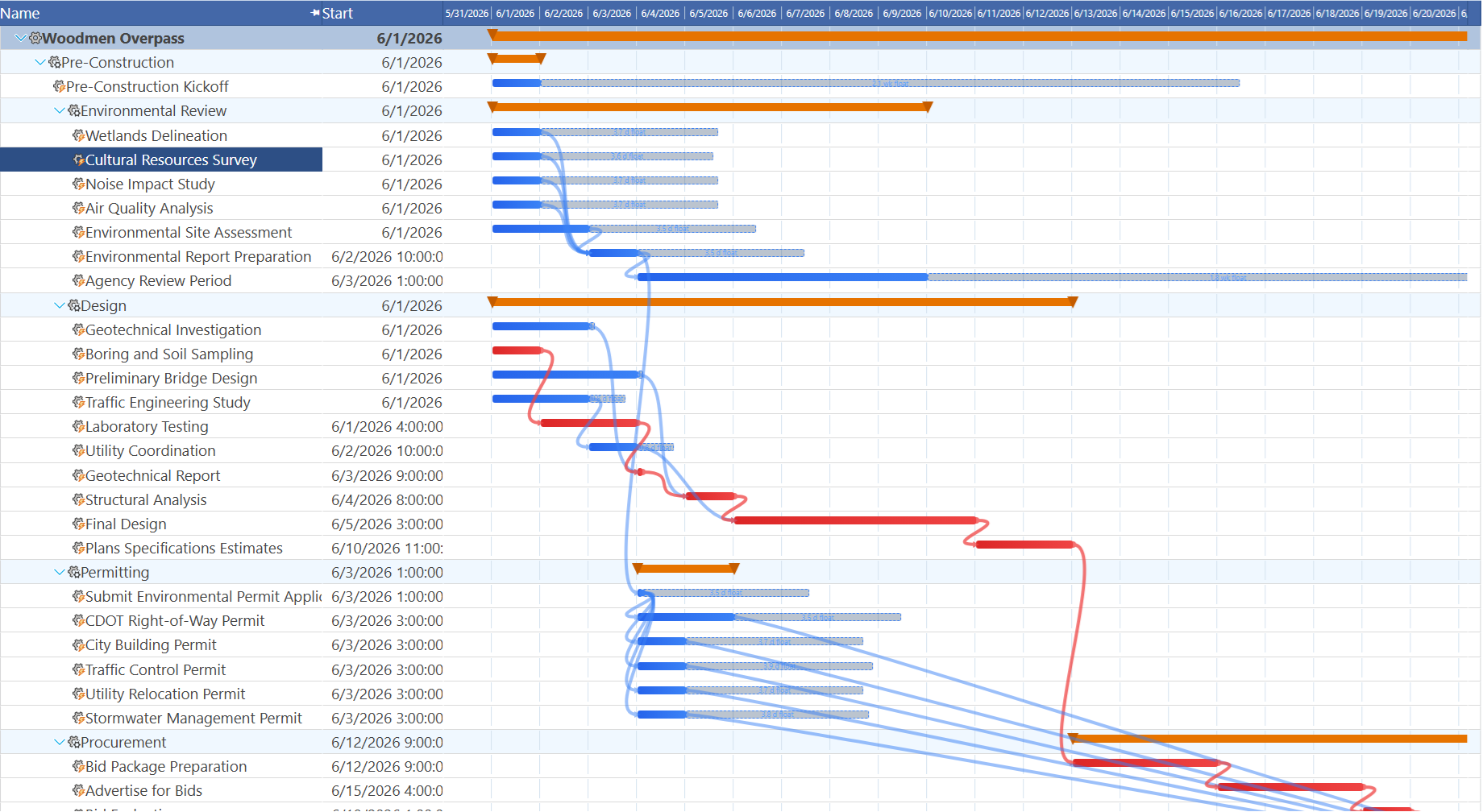
Maverick's CPM engine works the same way: critical tasks highlighted in red automatically, float values displayed for every non-critical task, and the entire calculation refreshed the moment any task date changes. If your evaluation criteria stop at "does this tool calculate critical path," both tools clear the bar. The distinction that matters is what happens around that calculation — which is where the rest of this comparison focuses.
Dependency Types
Another tie. GanttPRO supports all four standard dependency link types — Finish-to-Start, Start-to-Start, Finish-to-Finish, and Start-to-Finish — with configurable lag or lead time on each relationship, set with a drag. That covers the full range of scheduling constraints that real projects require, including the less common Start-to-Finish relationship that many competitors in this comparison series skip entirely.
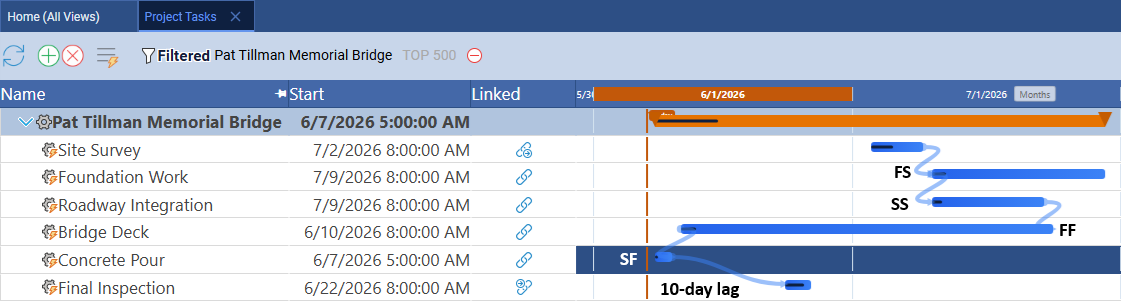
Maverick's dependency model covers the identical four types with the same lag configurability. Where the two tools diverge is not in what relationships can be expressed, but in what those relationships connect to — Maverick's dependency cascade reaches across human, machine, and materials resources simultaneously, which is the subject of the next section.
Project Baselines and Variance Tracking
Close, with a real but minor difference in how the comparison is surfaced. GanttPRO includes a baseline feature on its Core plan: you save a baseline snapshot of the plan, and a dedicated Baseline view lets you compare it against current dates later. That is a legitimate variance-tracking capability and a fair answer to "what was the original plan."
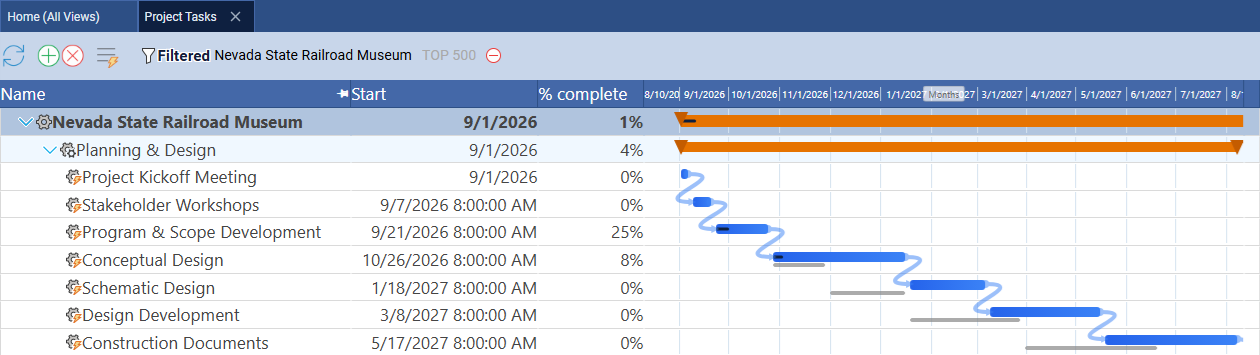
Maverick's baseline comparison is inline rather than a separate mode: thin ghost bars sit directly behind the current task bars on the working Gantt chart you use every day, so the variance is visible without switching views. It is a smaller distinction than most categories in this comparison, but for project managers who want the plan-versus-actual comparison in their peripheral vision at all times rather than a deliberate lookup, it is a real one.
Resource Model: Three True Types vs. a Generic Bucket
Maverick wins clearly here. GanttPRO organizes resources into three charge categories: Labor (people, billed per hour), Material (equipment, software, vehicles, and facilities — billed per item), and Fixed Cost (permits, licenses, bonuses, and consulting fees, which are excluded from the workload view entirely). That is a reasonable cost-accounting model, but it is not the same thing as scheduling depth.
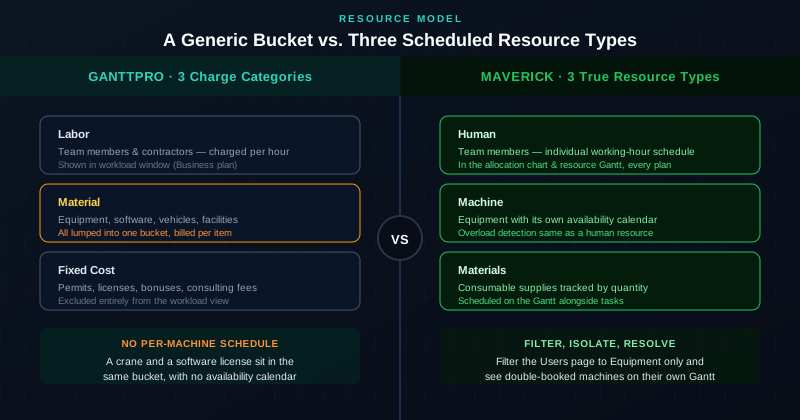




A bulldozer and a software license both land in GanttPRO's "Material" bucket. Neither gets an individual availability calendar the way a person does — they are billed per item, not scheduled by the hour against working time. Maverick's resource model treats human, machine, and materials resources as equals: every machine resource carries its own working-hour schedule, generates its own utilization data, and can be double-booked or sit idle in exactly the way a person can.
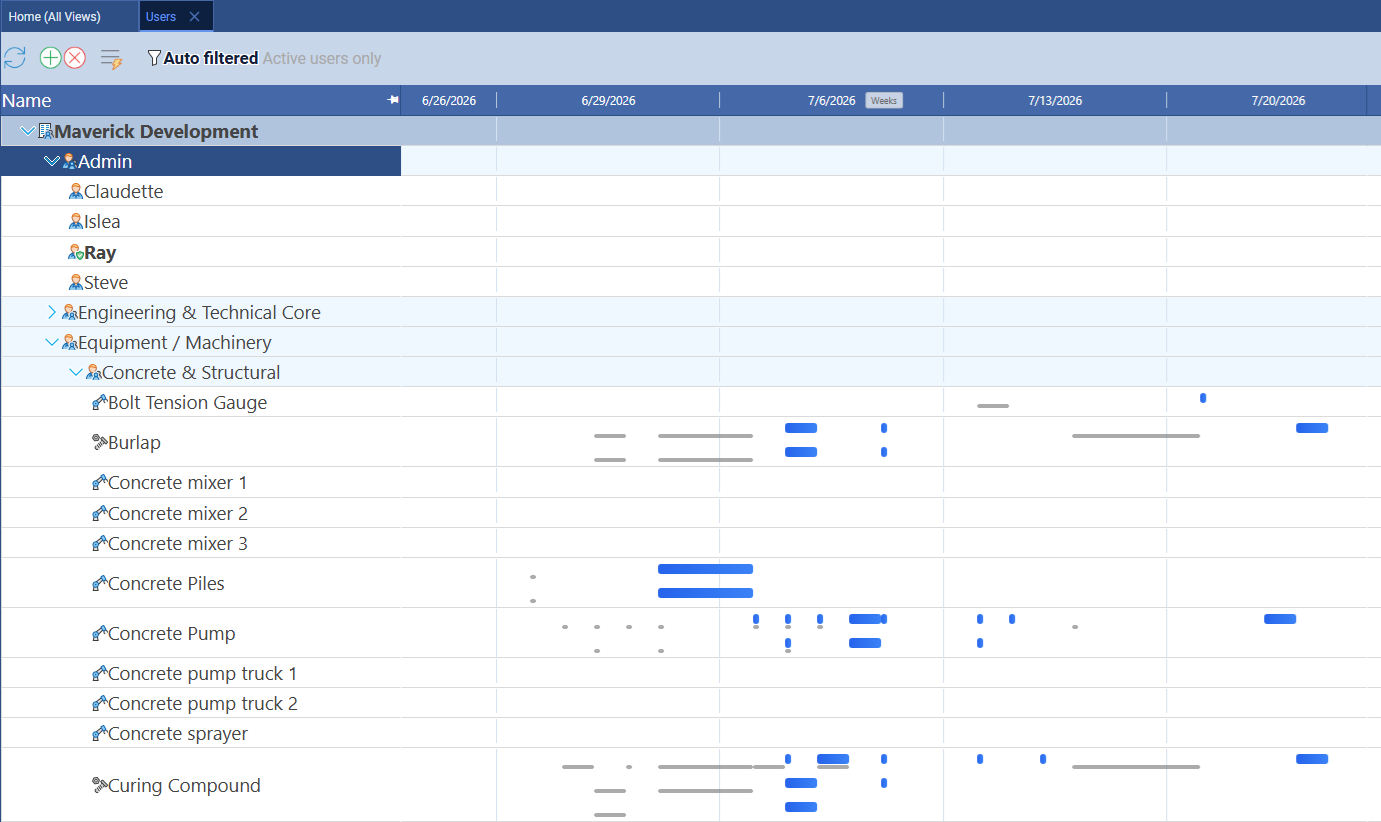
The screenshot above shows Maverick's Users view with all three resource types in a single hierarchy, each with task bars on its own timeline row. For a construction, manufacturing, or field-services project where a crane's schedule is as important as a foreman's, that distinction is not academic — it is the difference between catching an equipment conflict on the Gantt chart and discovering it on site.
Resource Allocation and Plan-Tier Access
Maverick wins on accessibility. GanttPRO's workload feature — the view that shows whether a resource is overloaded, idle, or correctly loaded — is a genuinely capable tool. It automatically calculates workload, supports drag-and-drop redistribution of tasks, and gives a clear day-by-day picture of availability. The catch is that it is locked behind the Business plan, currently $17 per user per month billed annually — more than double the cost of GanttPRO's entry tier, and almost double Maverick's full price.
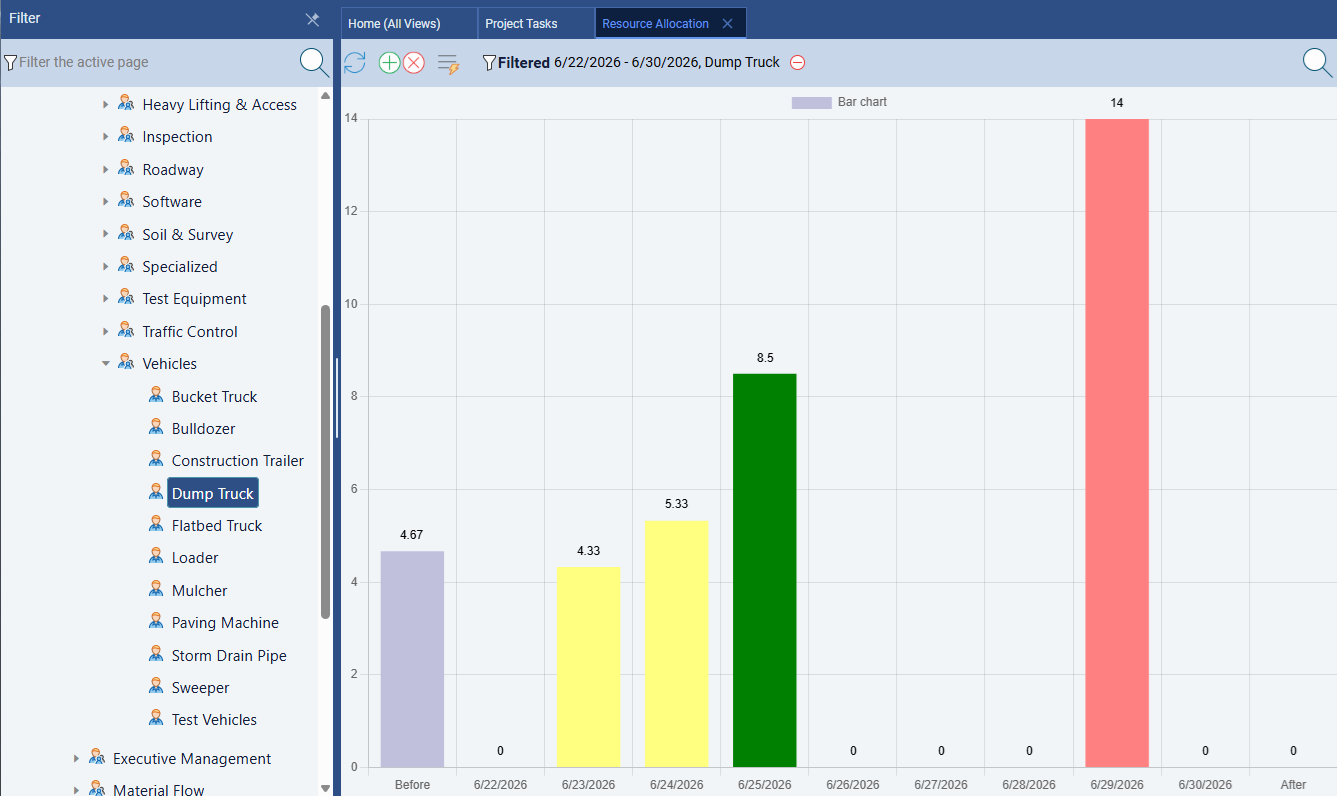
Maverick's resource allocation bar chart is included on every plan at $8.99 per user per month — no upgrade gate. It color-codes every resource green, amber, or red based on hours against their defined working schedule, across all three resource types simultaneously. A team evaluating GanttPRO on its $7 Core plan is not actually comparing against Maverick's full feature set; the comparable GanttPRO tier is Business, at more than 140% of Maverick's price.
AI Scheduling: Generator vs. Assistant
Maverick wins on depth, GanttPRO deserves credit for accessibility. GanttPRO's AI Gantt Chart Maker is free to use and does not require a paid plan to try — a genuinely user-friendly way to get a first draft of a complex project without staring at a blank grid. It detects the likely project domain (construction, IT, marketing, events, and more) and produces a structured plan with milestones and dependencies already in place.
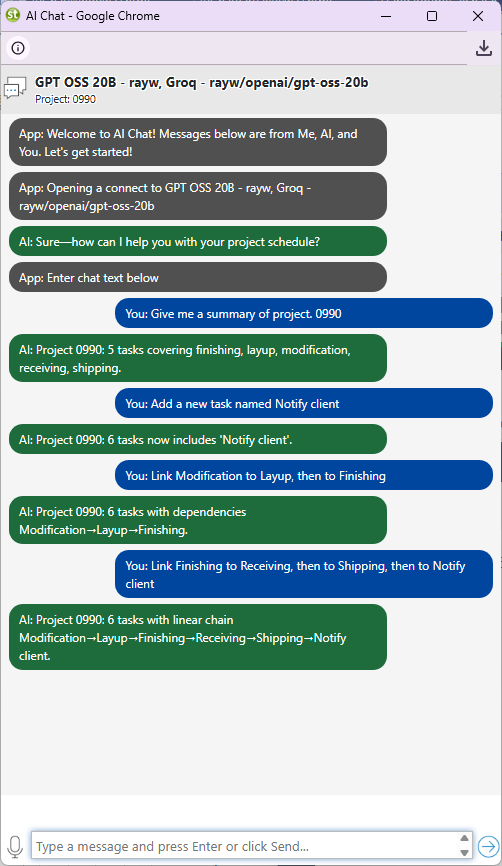
What it does not do is stay involved. Once the draft becomes a real project, the AI Gantt Maker's role ends — every later change is manual, the same as in any Gantt tool without AI at all. Maverick's AI operates inside the live project for its full lifecycle: describe a new project and get a structured plan with dependencies and assignments, or come back mid-project and ask it to identify unassigned tasks, model the impact of a two-week delay, or rebalance assignments after a resource becomes unavailable. The schedule stays a living document the AI can act on, not a draft it handed off once.
Maverick also supports per-employee AI model and provider assignment — a power user can run a premium model while the rest of the team uses a cost-efficient one, all inside the same account. GanttPRO's AI tool has no equivalent concept; it is a single, centralized generator with no per-user configuration.
Time Tracking and Timesheets
Maverick wins on accessibility. GanttPRO's Time Log feature lets team members track time spent on tasks, either with a live timer or logged after the fact, and a Time Log Report rolls that data up for review. Functionally, it covers the basics of project time tracking well. The constraint, again, is plan tier: time tracking is available starting on the Business plan at $17 per user per month — the same gate as the workload feature.
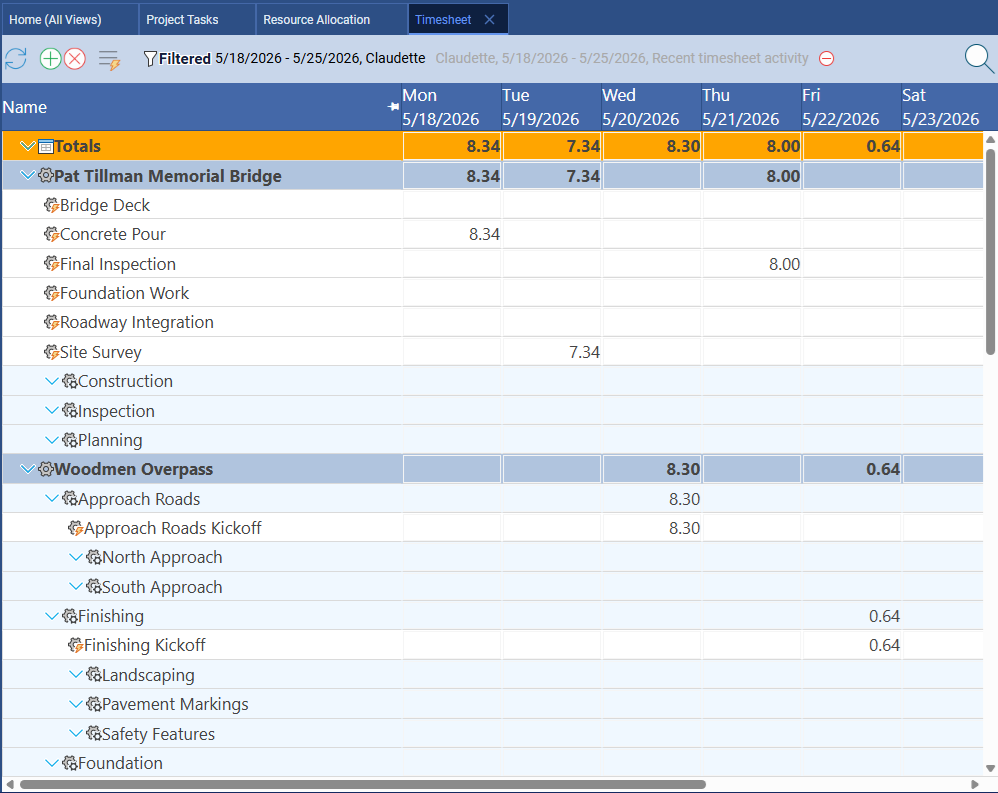
Maverick's built-in timesheet is included on every plan with no additional cost. Team members log hours against specific tasks, managers filter by user, project, or date range, and actual hours feed automatically into cost and resource allocation reporting. For organizations that need time tracking from day one rather than after an upgrade, the gap between GanttPRO's Core and Business plans is the gap that matters most.
Ease of Use, Templates, and Quick Setup
GanttPRO wins this category.
GanttPRO's onboarding is fast and friendly. Drag-and-drop task creation, a large library of ready-made templates across industries, and a clean interface mean a new user can have a usable Gantt chart within minutes. Combined with the free AI Gantt Maker for an even faster first draft, GanttPRO is genuinely one of the quickest ways to go from a blank page to a structured plan.
Maverick's feature set — three resource types, CPM with float, four dependency types, an AI assistant that reads the full project state, and a resource allocation chart — reflects the complexity of professional project scheduling, and that complexity carries a steeper initial learning curve than GanttPRO's more streamlined design. Users who need a fast, simple plan with no resource modeling beyond people will find GanttPRO's onboarding smoother out of the gate.
Integrations and Ecosystem
GanttPRO wins this category.
GanttPRO connects to Jira, Slack, Google Drive, Google Calendar, and Zapier, and supports Microsoft Project import/export for teams migrating data between tools. For organizations with an existing stack of project-adjacent tools, that breadth of native connections reduces the number of manual data hand-offs.
Maverick's native integrations are more focused: Microsoft Project, Microsoft Office exports, Google Sheets, and Google Drive, alongside its AI provider connections. Teams that need to connect their scheduling tool to a broad app ecosystem will find GanttPRO's integration list longer. Teams whose priority is scheduling depth inside the tool itself will find that gap secondary to the resource, AI, and pricing differences covered above.
Pricing
GanttPRO is cheaper at the entry tier — Maverick is cheaper for the equivalent feature set.
GanttPRO's Core plan, at $7 per user per month billed annually, undercuts Maverick's $8.99 entry price and includes solid CPM, dependencies, and baselines. But Core does not include the workload management or time tracking that this comparison has covered as significant gaps. Matching those capabilities requires the Business plan at $17 per user per month — nearly double Maverick's price — and Business still does not add true equipment or materials resource types, or an AI assistant that stays involved after the first draft.
A team of ten project managers on GanttPRO Business pays 10 × $17 = $170 per month. The same team on Maverick pays 10 × $8.99 = $89.90 per month, with three resource types, a resource allocation chart, a built-in timesheet, and an ongoing AI assistant included — none of which GanttPRO's Business plan adds. For a team that only needs Core-level scheduling and never touches workload or time tracking, GanttPRO's entry price is genuinely the cheaper option. For any team that needs resource allocation or time tracking — which is most project-driven organizations — Maverick is the better value at every tier.
Final Verdict: Which Tool Should You Choose?
GanttPRO earned an unusually honest comparison here. Its Core plan includes real critical path analysis, full float values, all four dependency types, and project baselines — capabilities that several other tools in this comparison series lock behind expensive upgrades or don't offer at all. Teams that need a fast, friendly Gantt tool with solid fundamentals and a broad integration ecosystem will find GanttPRO delivers on that promise.
But "good Gantt fundamentals" is not the same as "complete scheduling depth." GanttPRO's resource model treats equipment and materials as a generic billing category rather than a scheduled resource type. Its workload management and time tracking — the tools that turn a Gantt chart into an accountability system — sit behind a plan that costs nearly twice Maverick's price. And its AI, while genuinely useful for a first draft, has no role in the project once that draft is created.
For project managers who need equipment and materials scheduled with the same rigor as people, resource allocation and time tracking included without a plan upgrade, and an AI assistant that stays involved for the life of the project — not just the first five minutes — Maverick provides the scheduling depth that GanttPRO's strong Gantt foundation does not extend all the way to.