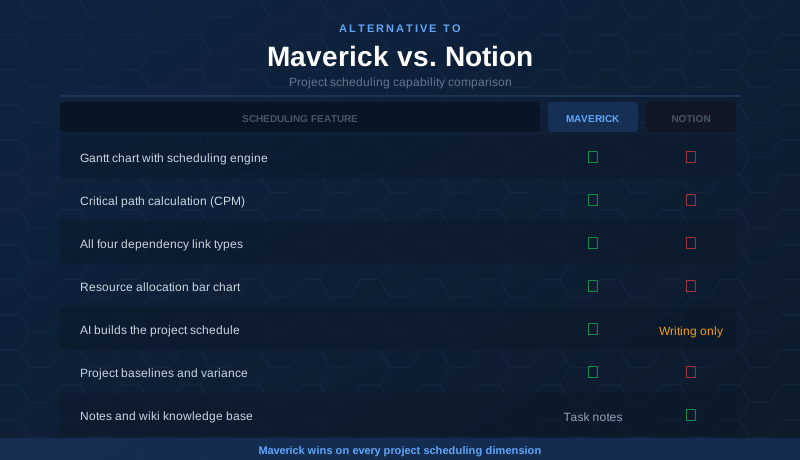
Notion is one of the most beloved productivity tools in the market — and for good reason. It is beautiful, flexible, and genuinely excellent at organizing information. Notes, wikis, databases, meeting summaries, lightweight task lists — Notion handles all of this with an elegance that few tools match. Teams that live in written documentation love it.
But there is a category of work Notion was never designed to do: project scheduling. If you need Gantt charts with real dependency enforcement, critical path analysis, resource allocation across teams and equipment, AI that builds plans rather than writes prose, and a timesheet to track where hours actually go — you have already noticed that Notion's Timeline view is not filling that role. This comparison looks at both tools honestly, giving Notion credit where it earns it, and showing clearly where a dedicated scheduling engine changes the picture.
Quick Verdict
Notion is an outstanding knowledge management platform for teams that need a flexible workspace for documentation, wikis, and lightweight project tracking. Maverick Project Scheduler is the right tool for project managers who need a real scheduling engine: Gantt charts, critical path analysis, resource allocation, and a timesheet — built to work together as a coherent system.
If your job is to deliver projects on time with accountability for who is doing what and when, Maverick is the better alternative to Notion.
Quick-Reference Comparison Table
The comparison above, summarized as a plain data table.
| Feature | Maverick | Notion |
|---|---|---|
| True Gantt chart with scheduling engine | ✓ | Timeline only |
| Critical path calculation (CPM) | ✓ | ✗ |
| Task link types (FS, FF, SS, SF) with lag | ✓ | ✗ |
| Human, machine & materials resource types | ✓ | ✗ |
| Resource allocation bar chart | ✓ | ✗ |
| Built-in employee timesheet | ✓ | ✗ |
| AI builds and updates the project schedule | ✓ | Writing AI only |
| Project baselines & variance tracking | ✓ | ✗ |
| Notes & wiki knowledge base | Task notes | ✓ |
| Flexible database & kanban views | ✗ | ✓ |
| Starting price per user / month | $8.99 (all features) | $0 free / $10+ Plus |
Feature Comparison at a Glance
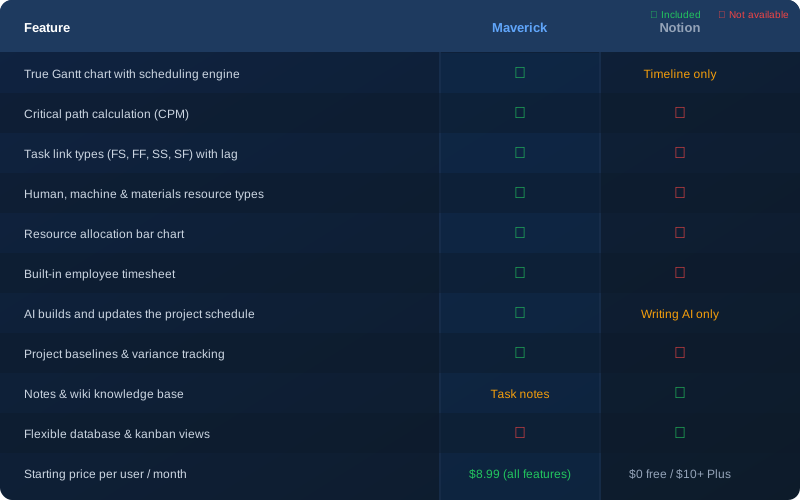
The pattern in that table is consistent: Notion has views and blocks; Maverick has a scheduling engine underneath them. That difference is what determines whether your plan actually controls your project — or just describes it.
Gantt Chart and Scheduling Engine
Maverick wins clearly here. Maverick's Gantt chart is driven by a real scheduling engine. When a task slips, every successor task shifts automatically. When you create a dependency between two tasks, Maverick enforces it — so your plan stays internally consistent across all the date changes that happen during a real project.
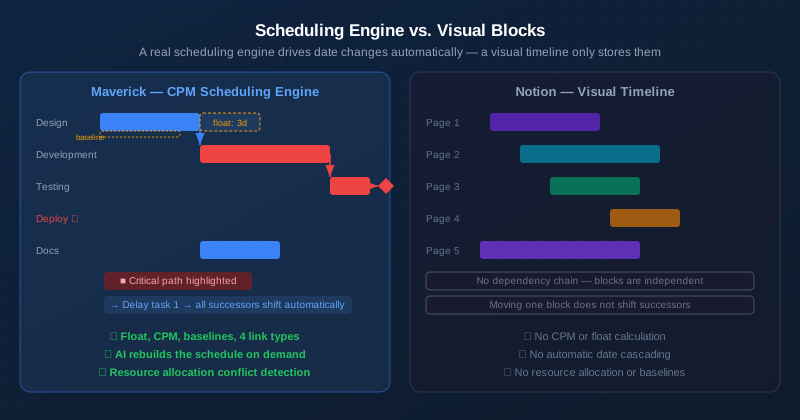
Notion has a Timeline view that shows date ranges as colored blocks on a horizontal axis. It is a visual representation of dates you have already set — not a scheduling system. Drag a block to a new date and nothing else moves. There is no dependency chain, no constraint enforcement, and no concept of a task needing to follow another. For a simple content calendar or editorial schedule, that is sufficient. For a project with 30 tasks, interdependencies, and a hard deadline, it falls apart quickly.
Maverick supports all four dependency link types — Finish-to-Start, Finish-to-Finish, Start-to-Start, and Start-to-Finish — each with configurable lag days. Learn more about how task dependency link types work in a scheduling engine. Notion offers no equivalent relationship modeling.
Critical Path Analysis
Maverick wins. Notion does not offer this feature.
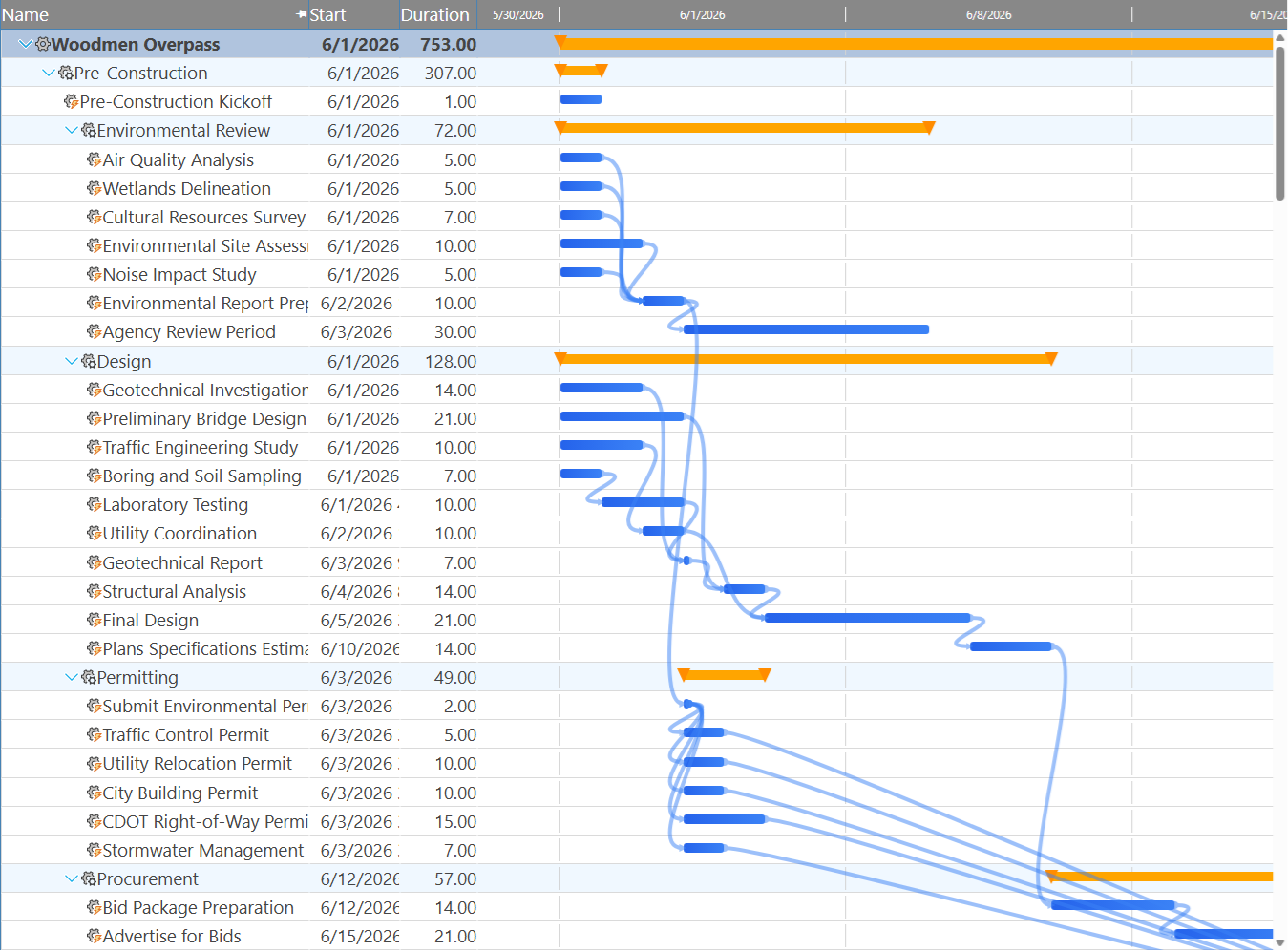
The critical path is the chain of tasks that determines your project end date. Any delay to a critical task delays the entire project. Maverick calculates the critical path automatically using the Critical Path Method (CPM), highlights critical tasks in red on the Gantt chart, and shows total float for every non-critical task so you know exactly how much scheduling flexibility you have before a task becomes critical.
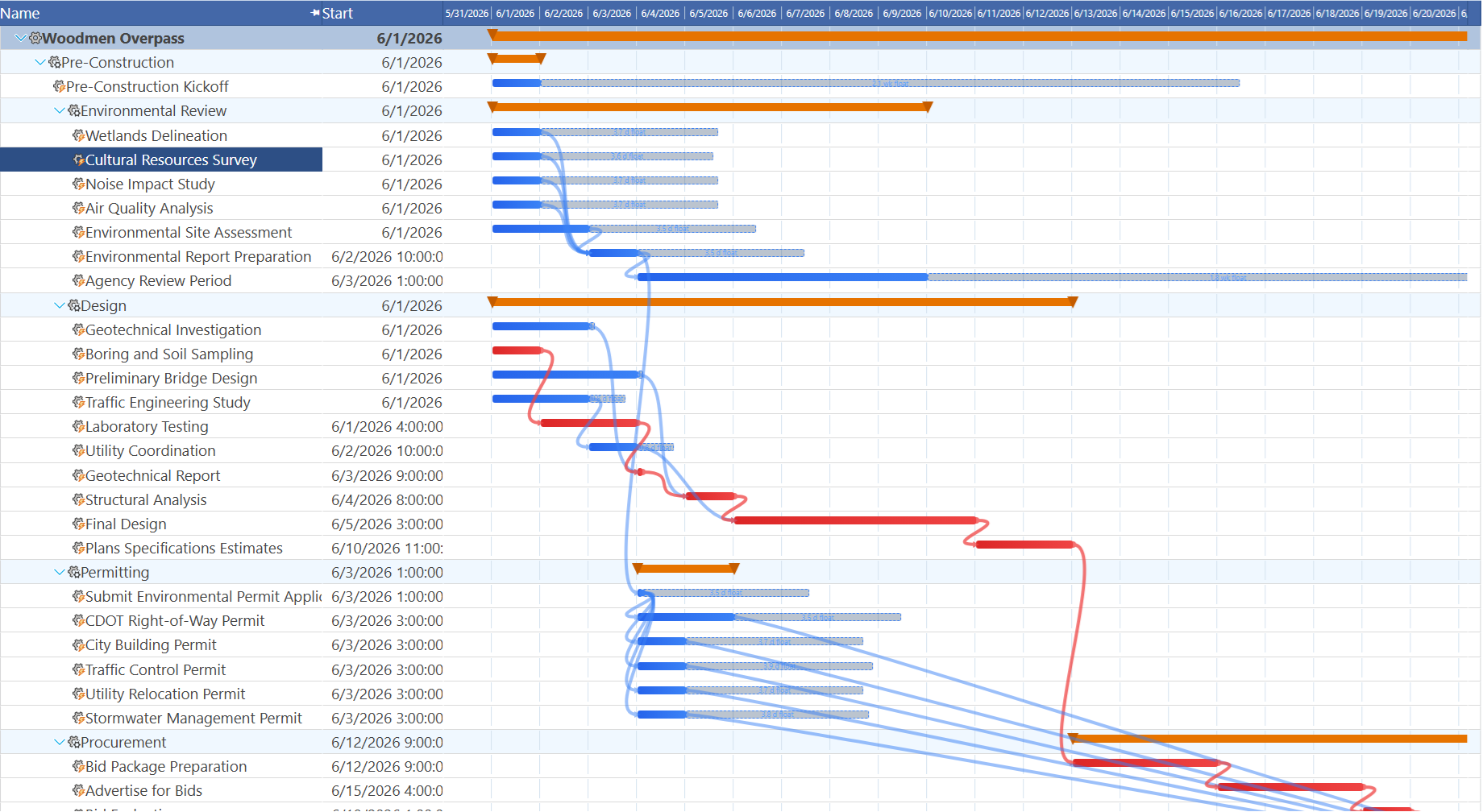
Notion has no concept of a critical path. Its Timeline view treats every block as independent. When a stakeholder asks "what happens to our launch date if design slips two weeks?" — Notion cannot answer that question. Maverick can answer it immediately, showing exactly which tasks are affected and by how much.
Resource Management
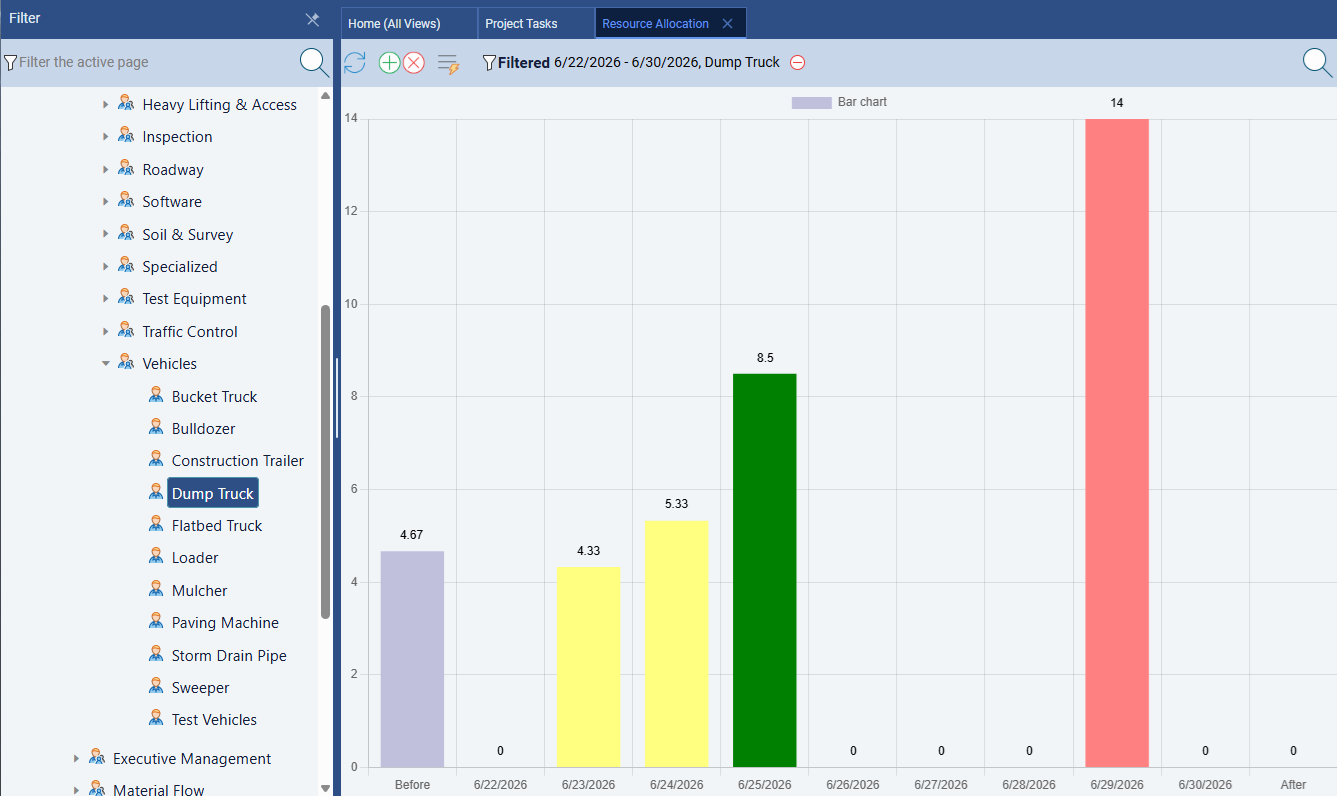
Maverick wins significantly. Maverick treats resource management as a first-class scheduling discipline. Human, machine, and materials resource types are all tracked separately. Resources have individual working hour schedules. Assignments carry utilization percentages or hours per day. The resource allocation bar chart shows — in color — exactly which resources are over-allocated, under-allocated, or correctly loaded across any time range.
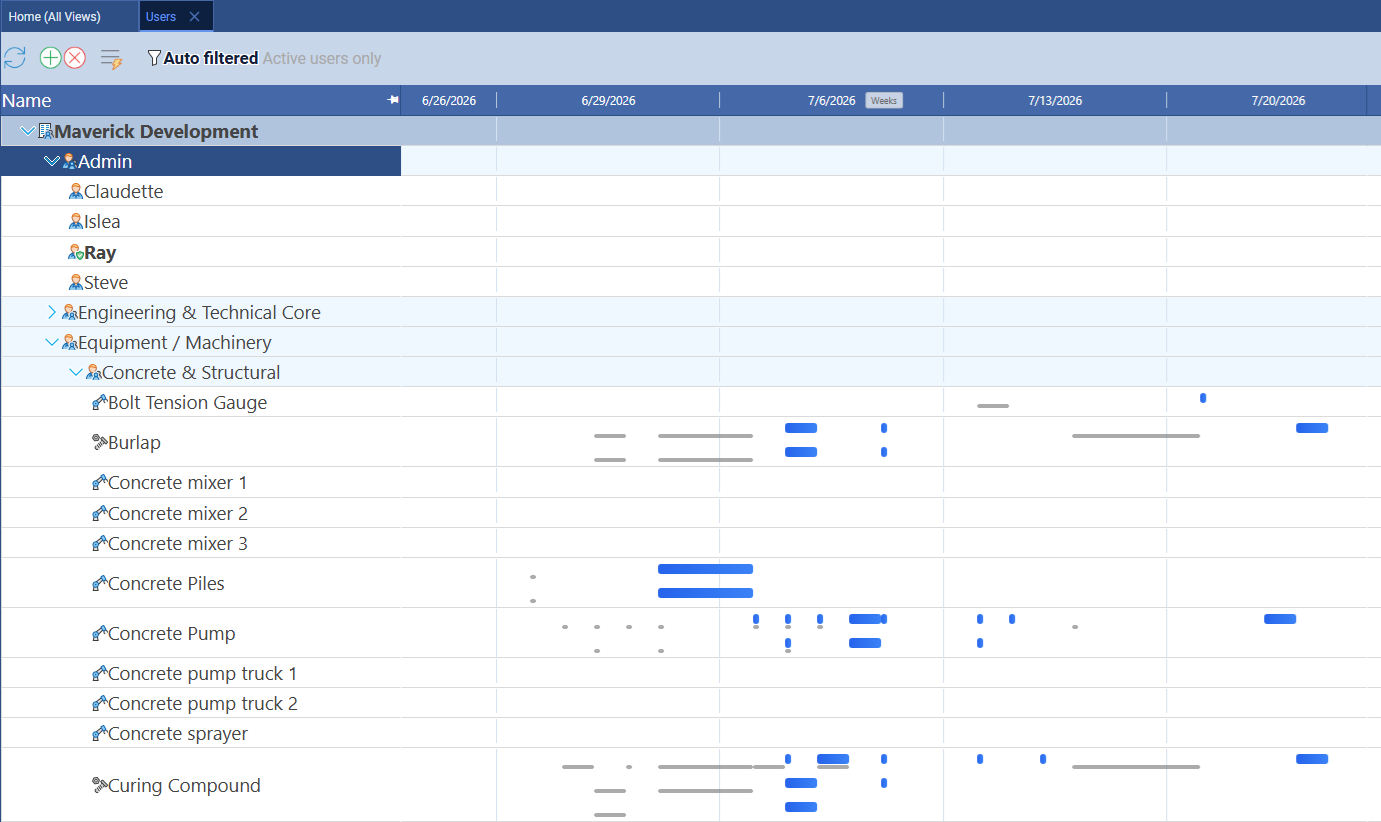
Maverick also includes a resource-centric Gantt on the Users page, where rows represent individual resources and each bar shows every task assigned to that resource across all projects. You can filter to a single resource type — human, machine, or materials — to see which are double-booked, idle, or correctly loaded. This timeline view makes overlapping assignments visible in a way that utilization percentages alone cannot.
Notion has no resource management capability. You can assign a task to a person via a People property, but there is no concept of utilization, schedule conflicts, or allocation limits. There is no way to know whether a team member is overloaded across multiple concurrent projects, and no way to model non-human resources like equipment or materials at all.
AI and Automation
Maverick wins on scheduling depth. Notion wins on writing assistance.
Notion AI is genuinely useful for what it was built to do: summarizing pages, drafting content, cleaning up meeting notes, answering questions about your workspace. If your primary use of AI is as a writing and knowledge assistant, Notion AI integrates naturally into the experience.
Maverick's AI is different in kind. Instead of working with text and documents, Maverick's AI reads your project — its tasks, resources, dependencies, and constraints — and builds or restructures the schedule in response to plain-English instructions. You can tell it to reschedule everything after a delay, assign resources to unassigned tasks, or build a new project from a description. The AI acts as a scheduling assistant, not a text editor. Notion AI cannot do any of this because Notion has no underlying scheduling model for the AI to operate on.
Maverick also lets you assign different AI providers and models per employee — so a power user can work with a premium model while the broader team uses a cost-effective one. This level of configuration has no equivalent in Notion AI.
Time Tracking and Timesheets
Maverick wins. Notion has no native timesheet.
Maverick includes a full employee timesheet as a built-in feature. Team members log hours against specific tasks and projects directly in the application. Managers can filter timesheets by user, project, and date range to see exactly where time is going. Actual hours feed back into cost calculations automatically, creating a closed loop between the plan and actual performance.
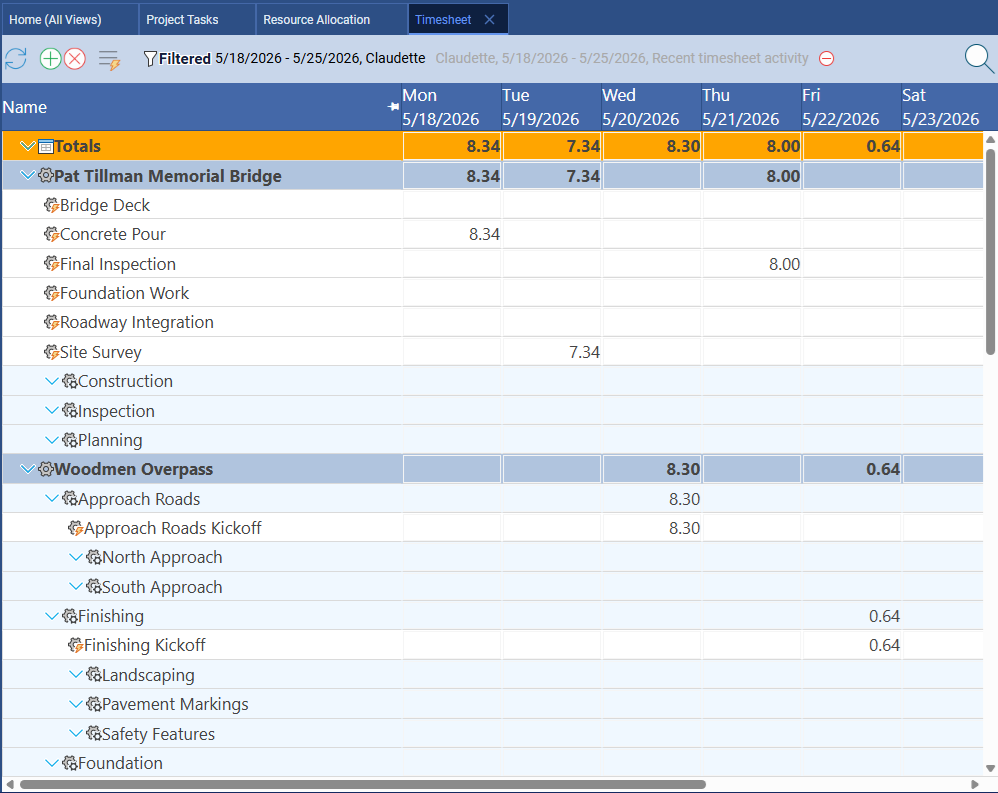
Notion does not include time tracking. You can add a date range property or a number field to a database, but that is not the same as a timesheet. For teams that need to track actual hours against specific tasks and roll them up into project cost reports, Notion requires a third-party integration, which adds cost and creates data fragmentation.
Project Baselines and Variance Tracking
Maverick wins. Notion has no baseline concept.
A project baseline is a snapshot of your original plan — dates, durations, and costs — taken at project kickoff. As the project progresses, you compare actual performance against that baseline to understand how far you have drifted and why. Maverick supports baselines natively, displaying ghost bars on the Gantt chart so the original plan is always visible alongside the current schedule.
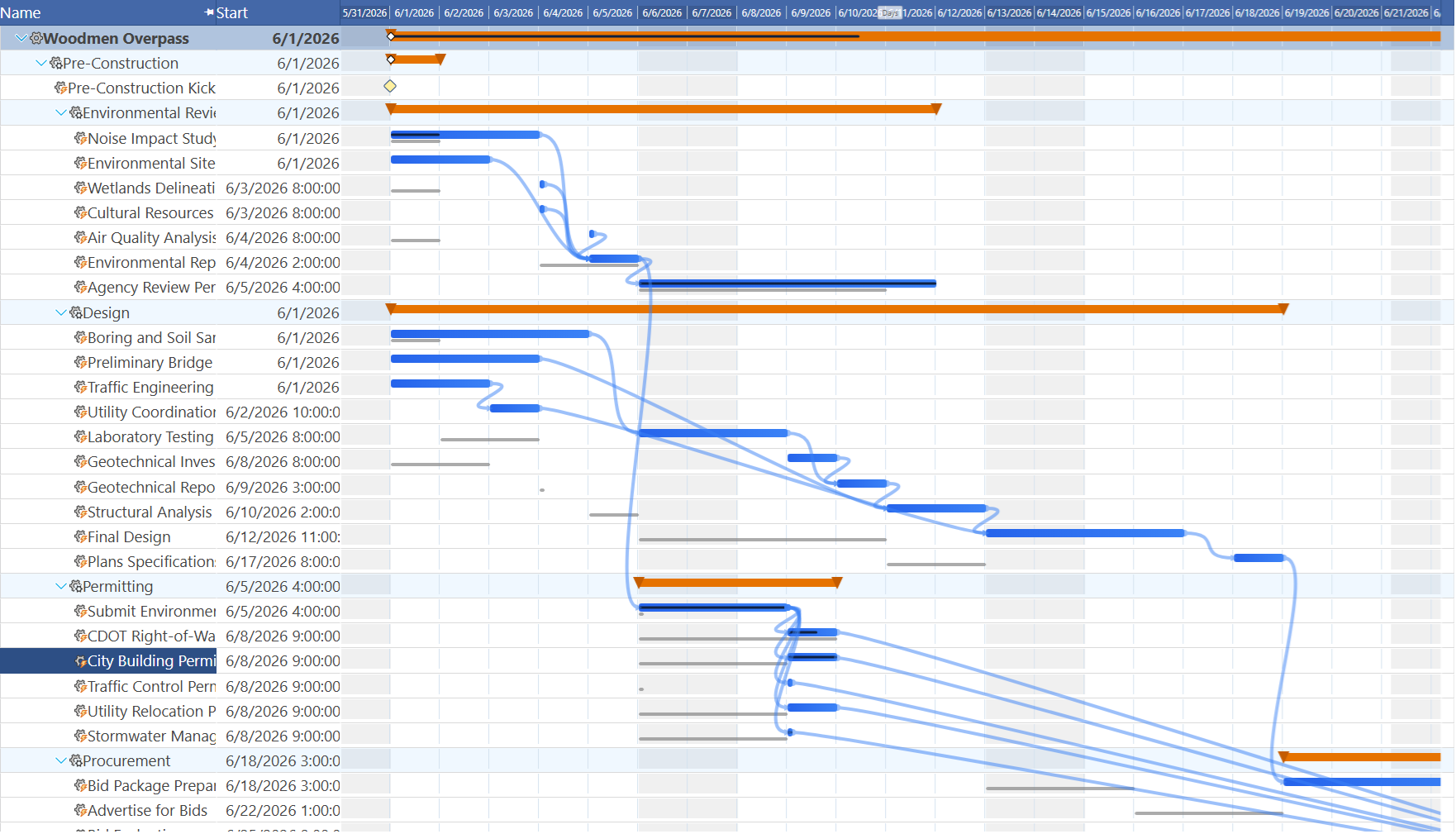
Notion has no baseline feature. Once you update a task's date, the original planned date is gone. For project managers who report on schedule variance to stakeholders — showing why a project is late and by how much compared to the original plan — this gap is significant.
Notes, Wikis, and Knowledge Bases
Notion wins this category decisively.
This is where Notion genuinely shines. Notion's block-based editor, flexible database views, and deeply interconnected pages make it one of the best tools available for team knowledge management. Engineering wikis, onboarding documentation, meeting notes, product specs, decision logs — Notion handles all of this with a polish and flexibility that purpose-built scheduling tools do not attempt to match.
Maverick has task and project description fields that support rich notes, but it is not a wiki. If your team's primary need is a knowledge base that doubles as a lightweight project tracker, Notion is a natural fit. Where Notion falls short is when that lightweight tracking needs to evolve into real schedule management: coordinated dependencies, resource constraints, and critical path accountability.
Flexible Databases and Views
Notion wins this category.
Notion's database system is one of its most powerful features. A single database can be viewed as a table, Kanban board, gallery, calendar, timeline, or list — and you can build custom filters, sorts, and groupings on any of them. For teams managing editorial content, product roadmaps, or customer pipelines, this flexibility is genuinely valuable.
Maverick does not offer a Kanban board or general-purpose database. Its interface is organized around the scheduling workflow: a task grid, Gantt chart, resource allocation chart, and properties panel. If your team's primary need is managing work through visual boards and flexible views across multiple use cases, Notion delivers more surface area. If your primary need is delivering projects with defined timelines and accountable resources, Maverick is the more capable tool.
Pricing
Notion is cheaper to start — Maverick includes more for serious project teams.
Notion's free tier is genuinely useful for individuals and small teams, and the Plus plan starts around $10 per user per month. That accessibility makes Notion an easy starting point for teams that are not yet sure what they need.
Maverick starts at $8.99 per user per month and includes all Pro features — AI scheduling, resource allocation charts, timesheets, custom reporting, and automated exports — as part of every subscription during the current promotional period. When you factor in that Notion at the team tier still provides no scheduling engine, no CPM, no resource management, and no timesheet, the comparison shifts: teams that need real project scheduling get far more capability per dollar from Maverick.
Final Verdict: Which Tool Should You Choose?
Notion is an excellent knowledge management platform that works well for teams whose primary need is documentation, wikis, and lightweight task tracking. If your team does most of its work in written pages — planning in prose, capturing decisions, maintaining a knowledge base — and your project tracking is simple enough that a visual timeline without dependency logic is sufficient, Notion is a reasonable choice.
But if you are a project manager responsible for delivering projects with real deadlines, dependencies, resource constraints, and stakeholder accountability, Notion leaves critical gaps. No CPM. No dependency cascading. No resource allocation bar chart. No built-in timesheet. No baselines. No AI that actually builds the schedule. These are not edge cases — they are the core capabilities of professional project scheduling.
Maverick Project Scheduler was built specifically for this discipline. The scheduling engine, resource management, AI integration, and timesheet work together as a coherent system. The result is a tool that genuinely helps you deliver projects — not just document that you tried.