If you've spent any time in modern project management circles, you've encountered Kanban — and the praise it receives is genuinely earned. Kanban is a useful method. But "useful for some work" and "the right tool for every project" are different claims, and that distinction matters when you're responsible for a project with a hard deadline, tasks that depend on each other, and resources shared across multiple workstreams.
This guide gives Kanban its honest due, explains exactly where it falls short for schedule-driven project management, and describes what project managers should look for when a project requires more precision than a board of cards can provide.
What Kanban Does Well
Kanban originated in Toyota's manufacturing plants in the 1940s as a scheduling system for production lines. It entered software teams in the mid-2000s and has since spread into nearly every knowledge-work environment. The core mechanic is simple: work items move through columns — typically something like Backlog, In Progress, Done — and teams limit how many items can be in each column at once (work-in-progress limits, or WIP limits).
This simplicity is not a weakness. For the right class of work, Kanban is genuinely effective:
- Visual workflow management. A well-maintained Kanban board gives anyone in the room an instant view of what's moving, what's stuck, and where the queue is building up. That shared visibility reduces status meetings.
- WIP limits prevent overload. Capping how many items can be in progress at once forces teams to finish work before starting new work. This reduces context switching and exposes bottlenecks before they become crises.
- No sprint overhead. Kanban has no sprints, no planning ceremonies, and no fixed cadence. Work flows continuously, which suits teams handling a steady stream of incoming requests — support queues, maintenance requests, content pipelines, and similar continuous-delivery environments.
- Low ceremony. Kanban boards are fast to set up and require minimal training. Teams can start getting value from a Kanban board in an afternoon.
None of this is marketing language. Kanban genuinely fits these use cases, and teams that try to replace it with a Gantt chart for ongoing support operations often make their work harder, not easier.
Where Kanban Falls Short
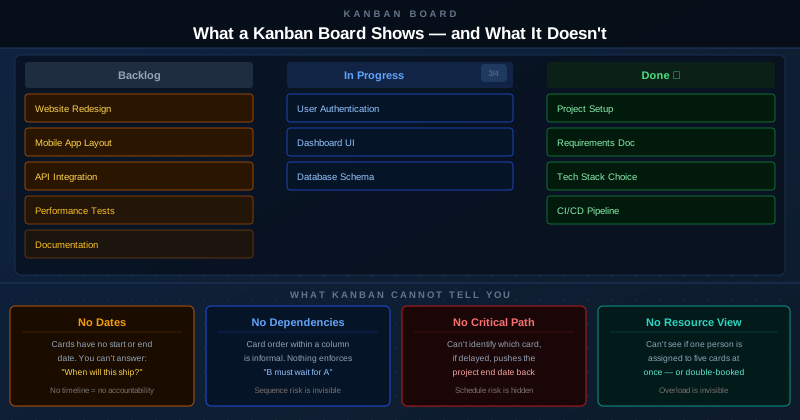
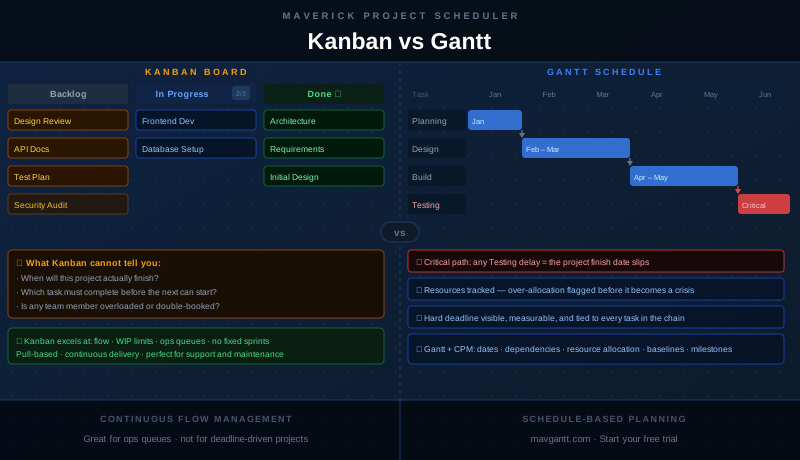
The Kanban board tells you what state each card is in. It does not tell you when that card will be done, whether one card depends on another, whether the project is on track to hit its deadline, or whether any team member is carrying more work than they can realistically deliver.
Those four gaps are not minor inconveniences. They are the core questions of project management:
No Start or End Dates
Cards on a Kanban board have no dates attached to them. Moving a card to "In Progress" does not record when work started. Moving it to "Done" does not record when it finished. The board shows states, not timelines.
This means you cannot answer the most fundamental project question: when will we be done? You can look at historical throughput and make statistical estimates, but the board itself carries no schedule information. If your project has a contractual delivery date, a product launch tied to marketing spend, or a regulatory deadline, Kanban gives you no direct way to measure whether you're on track.
No Task Dependencies
Kanban boards have no concept of task dependencies. A card's position in a column is informal — there is nothing in the system preventing a team from working on a card that cannot start until another card finishes. The board does not model "B must wait for A" because it has no mechanism for expressing that relationship.
For many knowledge-work projects, dependency chains are the central scheduling challenge. A construction phase cannot begin until permits are approved. A software integration cannot begin until both APIs it connects are complete. A product cannot ship until regulatory testing passes. Without dependency tracking, you are managing those relationships in someone's head or a separate spreadsheet — and the board gives you no warning when a dependency is violated.
No Critical Path
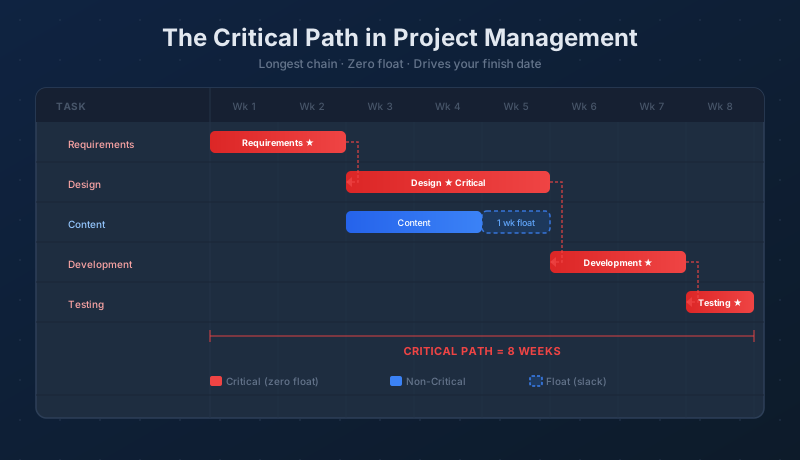
The critical path is the sequence of tasks, connected by dependencies, that determines the earliest possible completion date for the project. If any task on the critical path slips, the project end date slips by the same amount. Tasks off the critical path have float — they can slip by some amount without affecting the deadline.
Kanban has no critical path because it has no dependencies, no durations, and no end date. Every card looks equally important on the board. You cannot distinguish a card whose delay will push your launch date from a card that has two weeks of schedule slack.
No Resource Model
Kanban cards are not assigned to specific resources with tracked capacity. You may add a name or an avatar to a card, but the board has no concept of how many hours that person has available, how many other cards they're assigned to, or whether they're already committed to other work during the same window.
A board can have three cards "In Progress" all assigned to the same engineer without any visual signal that this person is overloaded or double-booked. The WIP limit on the column constrains the total number of items in flight, but it does not account for who is doing the work.
Four Questions to Ask Before Choosing a Method
The choice between Kanban and a schedule-based approach often comes down to four questions:
- Does this project have a hard deadline? If a missed date has financial, legal, or reputational consequences, you need a scheduling method that ties every task to a timeline and shows whether the deadline is achievable.
- Do any tasks depend on other tasks? If the project has sequential phases — or any work that cannot start until other work is complete — you need dependency tracking to enforce that sequence and surface schedule risk early.
- Are resources shared or constrained? If team members, equipment, or materials are shared across tasks, you need a resource model that tracks allocation and warns when any resource is over-committed.
- Does a slip in one area ripple forward? If a delay in one part of the project has downstream consequences, you need critical path analysis to identify which delays matter and which have slack to absorb.
If you answer no to all four — you're running a continuous support queue with no fixed scope, no deadlines, and no cross-task dependencies — Kanban is probably the right tool. If you answer yes to any of them, you need schedule-based planning.
What a Gantt Schedule Adds
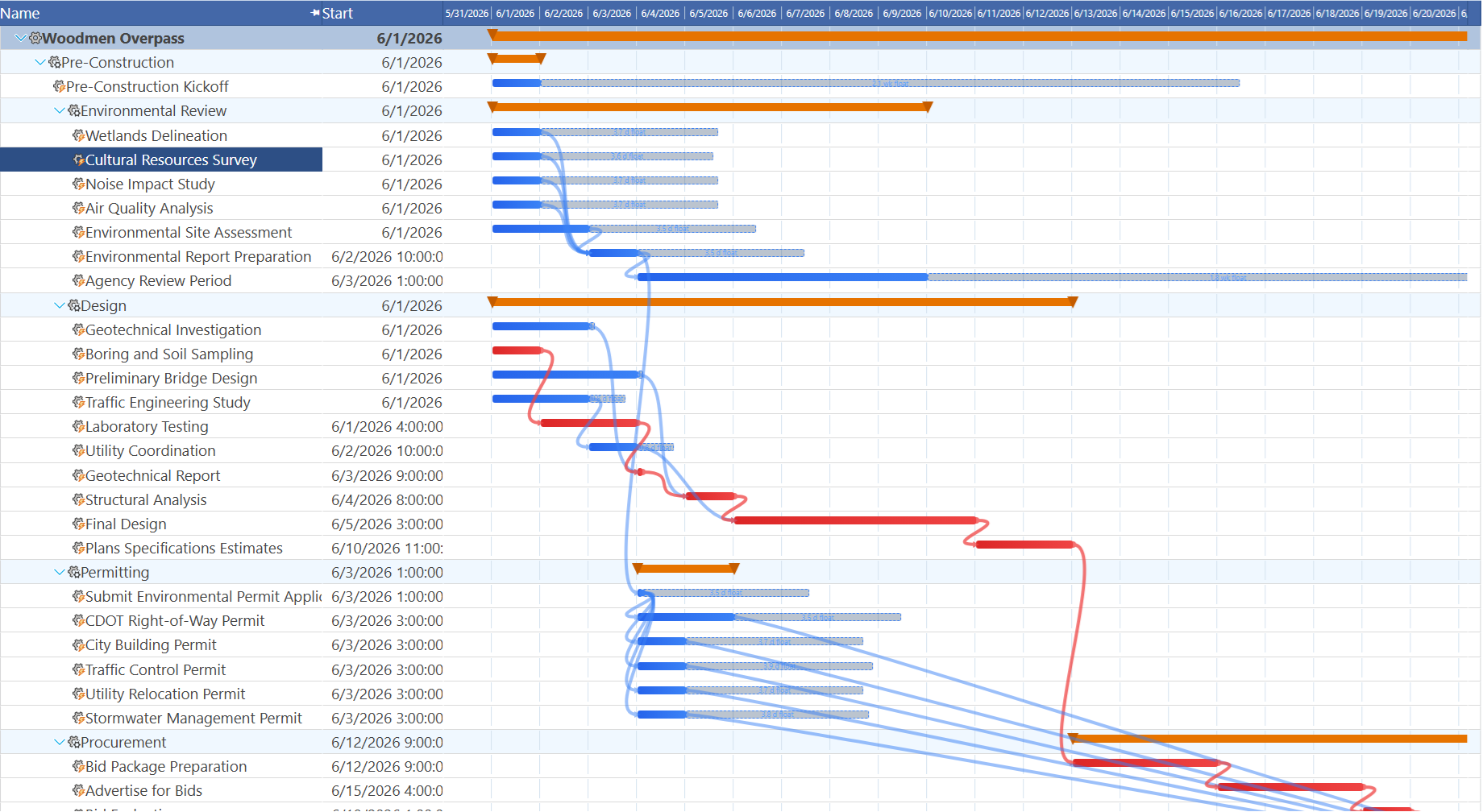
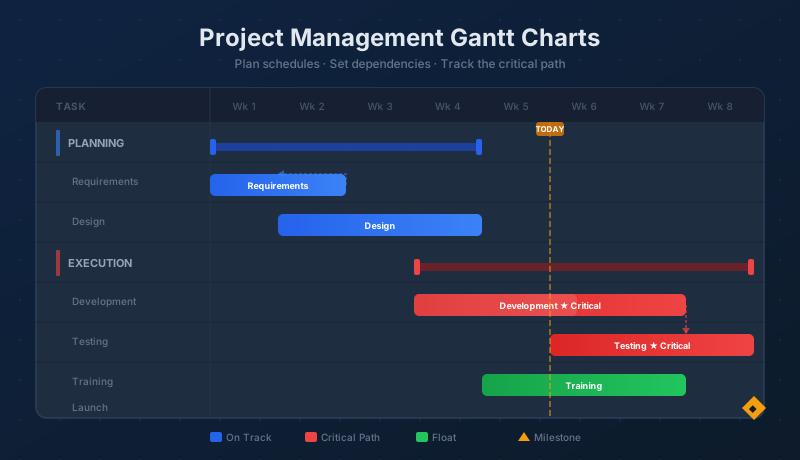
A Gantt chart gives every task a start date, an end date, and a duration. Those properties are not decorative — they are the foundation of the entire schedule. When a task's duration changes, the dates of every downstream task update automatically. When a dependency is added between two tasks, the schedule reflows to reflect the new constraint.
Maverick Project Scheduler supports four dependency link types: finish-to-start (the most common), start-to-start, finish-to-finish, and start-to-finish — each with optional lag or lead time. This gives project managers precise control over how tasks relate to one another, not just a rigid "this must finish before that starts" rule.
The critical path is calculated automatically from the dependency network and task durations. Maverick highlights critical tasks in the Gantt chart, giving you an immediate visual answer to the question: which tasks, if delayed, will push my project finish date? Tasks off the critical path are shown with their available float — the amount of time they can slip before they too become critical.
Baseline tracking is another capability with no equivalent in Kanban. When you set a baseline in Maverick, the system records the planned start and finish dates for every task. As the project progresses and dates shift, the Gantt shows both the current bars and the original baseline bars — letting you see at a glance whether the project is ahead or behind its original plan, and by how much.
Resource Visibility That Kanban Lacks
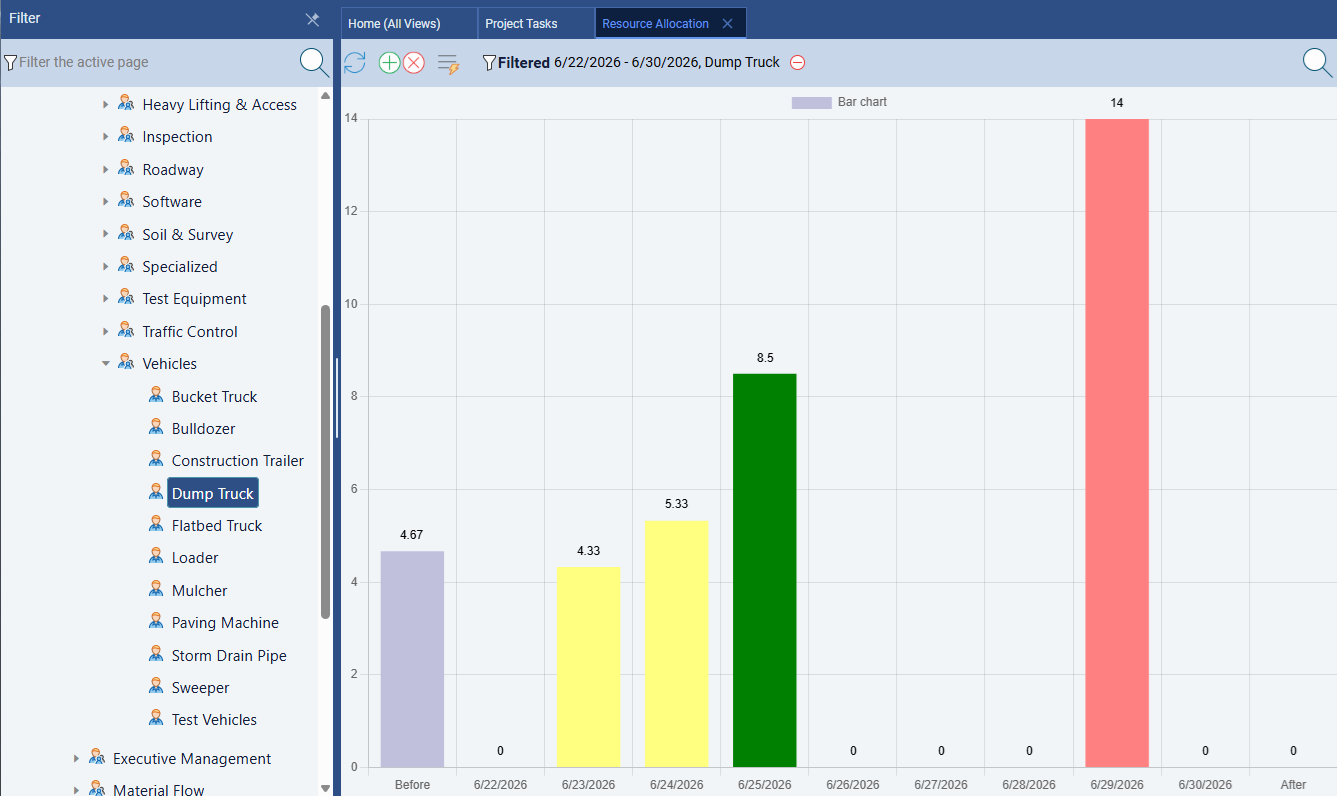
Maverick's resource allocation bar chart is the direct answer to Kanban's resource blindspot. Every resource — human, machine, or material — is tracked against the tasks assigned to it. The allocation chart shows bars color-coded by utilization status:
- Green — the resource is correctly allocated for that period: productive without being overloaded.
- Yellow — the resource is under-allocated: capacity going unused, which may indicate a gap in the schedule.
- Red — the resource is over-allocated: more hours are assigned than the resource can deliver, which will cause delays unless the schedule is adjusted.
The Gantt chart adds a second dimension to resource visibility: the resource-centric Gantt view shows each person's or machine's task assignments as horizontal bars on a timeline, organized by resource rather than by task. You can see immediately whether two tasks assigned to the same engineer overlap in time — and by exactly how much.
This is information a Kanban board simply cannot provide. A WIP limit of 3 tells you that no more than 3 cards can be in progress at once — but it does not tell you that all 3 are assigned to the same person, that person is already at 120% capacity, or that two of those tasks have a deadline in the same week.
Maverick can even pin a compact version of that same allocation data — the Team Capacity row — directly above the task Gantt itself, next to the Gantt mini-map's schedule overview. See Stacking Frozen Rows: Gantt Mini-Map + Team Capacity for how the two work together — a resource blindspot Kanban has no equivalent for at all.
The Right Tool for the Right Work
Kanban and Gantt scheduling answer different questions, and many organizations benefit from using both — applied to the work they're actually suited for.
Use Kanban for:
- IT support and help desk queues where requests arrive continuously and unpredictably
- Maintenance and facilities work with no fixed scope or end date
- Content pipelines (articles, social posts, videos) with ongoing production cadences
- Bug triage and backlog management where the work is reactive rather than planned
Use Gantt scheduling for:
- Construction projects with sequential phases and subcontractor dependencies
- Product launches with contractual delivery dates and cross-functional dependencies
- Software releases with feature interdependencies and QA gates
- Any project where "when will this be done?" is a question that matters to a stakeholder
If your team is already running support on a Kanban board, adding Maverick for your project portfolio does not require replacing anything. The scheduled projects — launches, implementations, infrastructure migrations — live in Maverick with full Gantt charts, dependency links, and resource tracking. The support queue stays on the Kanban board. Each tool handles what it's good at.
What Maverick will not do is pretend that a list of cards is a project schedule. If you have a deadline, dependencies, and constrained resources, you need a scheduling tool that models those realities — not one that hides them behind a pleasingly simple board.
See What Schedule-Based Planning Looks Like
Start a free cloud trial and build your first Gantt schedule — add tasks, set dependencies, assign resources, and let Maverick calculate the critical path automatically. No card to swipe, no commitment required.
Access the Free Cloud Trial