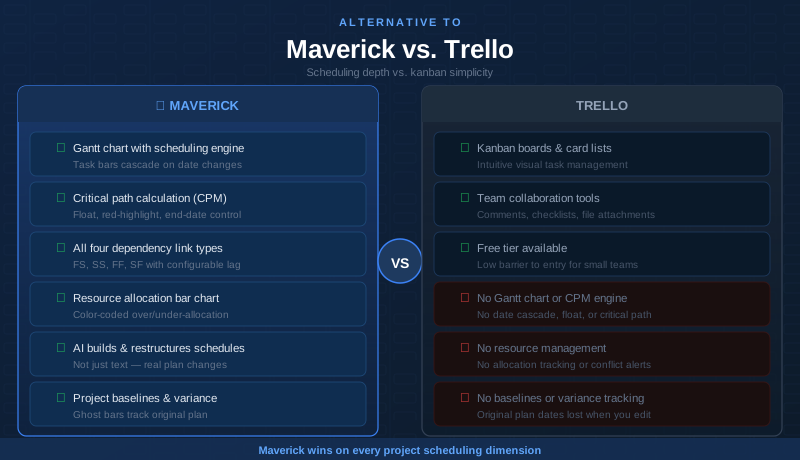
Trello is one of the most accessible project management tools ever built. Its kanban board interface — columns of cards that move from To Do to Done — is intuitive enough that teams can be productive within minutes of signing up. For lightweight task management, content calendars, personal to-do lists, and simple team workflows, Trello earns its massive following.
But kanban and project scheduling are fundamentally different disciplines. If your work involves interdependent tasks, hard deadlines, resource constraints across people and equipment, AI that restructures plans rather than automates card movements, and a timesheet to track where hours actually go — you have probably already sensed that Trello's board is not filling that role. This comparison looks at both tools honestly, crediting Trello where it excels and showing clearly where a dedicated scheduling engine changes the picture.
Quick Verdict
Trello is an excellent kanban tool for teams that need a simple, visual way to track task status across a small-to-medium workflow. Maverick Project Scheduler is the right tool for project managers who need a real scheduling engine: Gantt charts, critical path analysis, resource allocation, and a timesheet built to work together as a coherent system.
If your job is to deliver projects on time with accountability for who is doing what and when, Maverick is the better alternative to Trello for serious project scheduling.
Quick-Reference Comparison Table
The comparison above, summarized as a plain data table.
| Feature | Maverick | Trello |
|---|---|---|
| Gantt chart with scheduling engine | ✓ | ✗ |
| Critical path calculation (CPM) | ✓ | ✗ |
| Task link types (FS, FF, SS, SF) with lag | ✓ | ✗ |
| Human, machine & materials resource types | ✓ | Assignees only |
| Resource allocation bar chart | ✓ | ✗ |
| AI builds and updates the project schedule | ✓ | Butler rules only |
| Project baselines & variance tracking | ✓ | ✗ |
| Built-in employee timesheet | ✓ | ✗ |
| Kanban board view | ✗ | ✓ |
| Starting price per user / month | $8.99 (all features) | $0 free / $5+ Standard |
| Power-Ups & integration ecosystem | Native integrations | ✓ |
Feature Comparison at a Glance
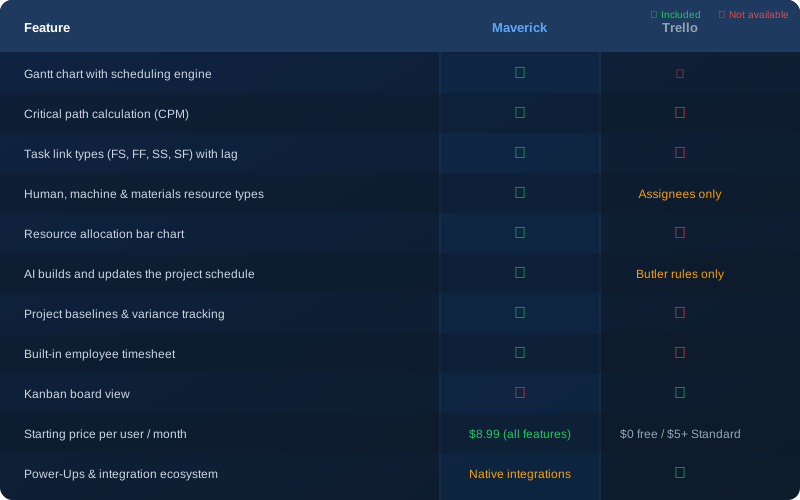
The pattern in that table reflects a fundamental difference in design intent: Trello tracks the status of work; Maverick schedules it. That distinction determines whether your project plan actually controls your delivery dates — or just describes them.
Gantt Chart and Scheduling Engine
Maverick wins clearly here. Maverick's Gantt chart is driven by a real scheduling engine. When a task slips, every successor task shifts automatically. When you create a dependency between two tasks, Maverick enforces it — so your plan stays internally consistent across all the date changes that happen during a real project.
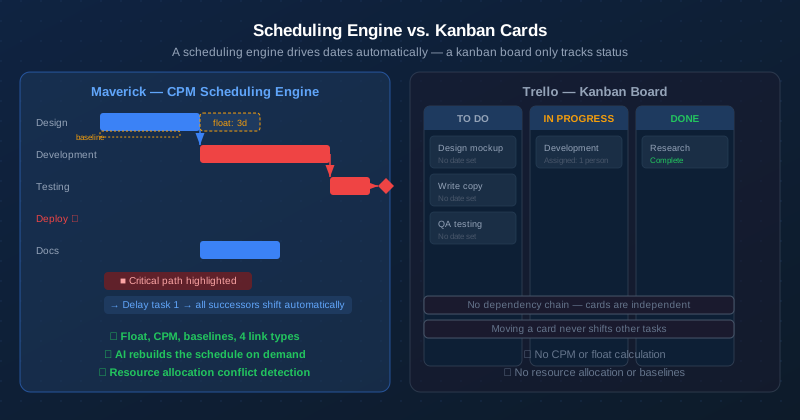
Trello does not have a Gantt chart. Its Timeline view (available on paid plans) shows date ranges for cards on a horizontal axis — but it is a visual layer on top of dates you have already set, not a scheduling system. Drag a card to a new date and nothing else changes. There is no concept of a task needing to follow another, no constraint enforcement, and no automatic recalculation of downstream dates. For a content calendar or sprint board, that is often sufficient. For a 40-task construction project with interdependencies and a hard completion date, it breaks down immediately.
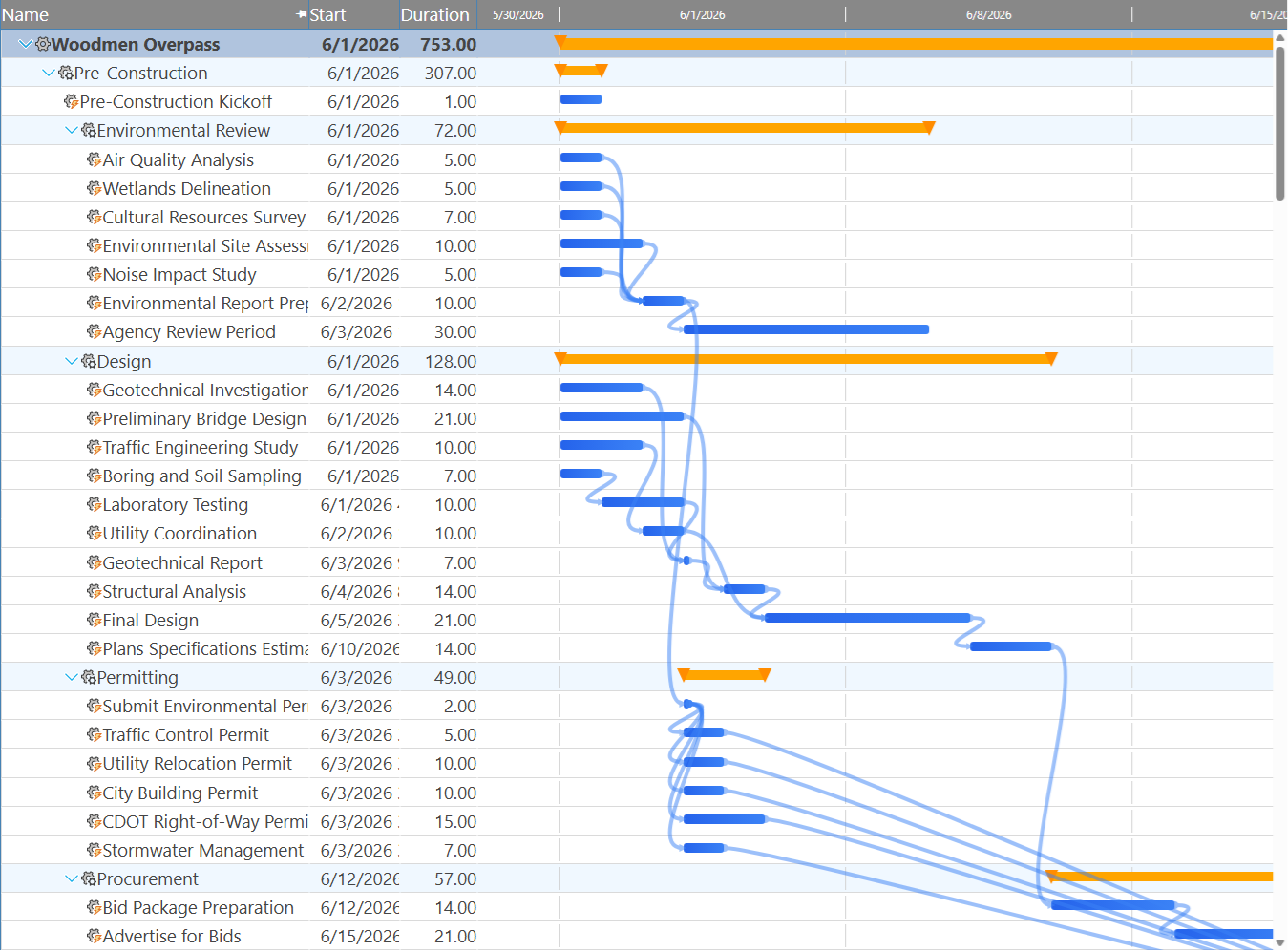
The difference between kanban and Gantt chart workflows is not merely visual — it reflects two different theories of how work should be organized. Kanban focuses on flow and throughput; Gantt charts focus on date commitments and dependency logic. Both are valid, but only one answers the question: "If this task is late, which other tasks are affected, and by how much?"
Critical Path Analysis
Maverick wins. Trello does not offer this feature.
The critical path is the chain of tasks that determines your project end date. Any delay to a critical task delays the entire project. Maverick calculates the critical path automatically using the Critical Path Method (CPM), highlights critical tasks in red on the Gantt chart, and shows total float for every non-critical task so you know exactly how much scheduling flexibility you have before a task becomes critical.
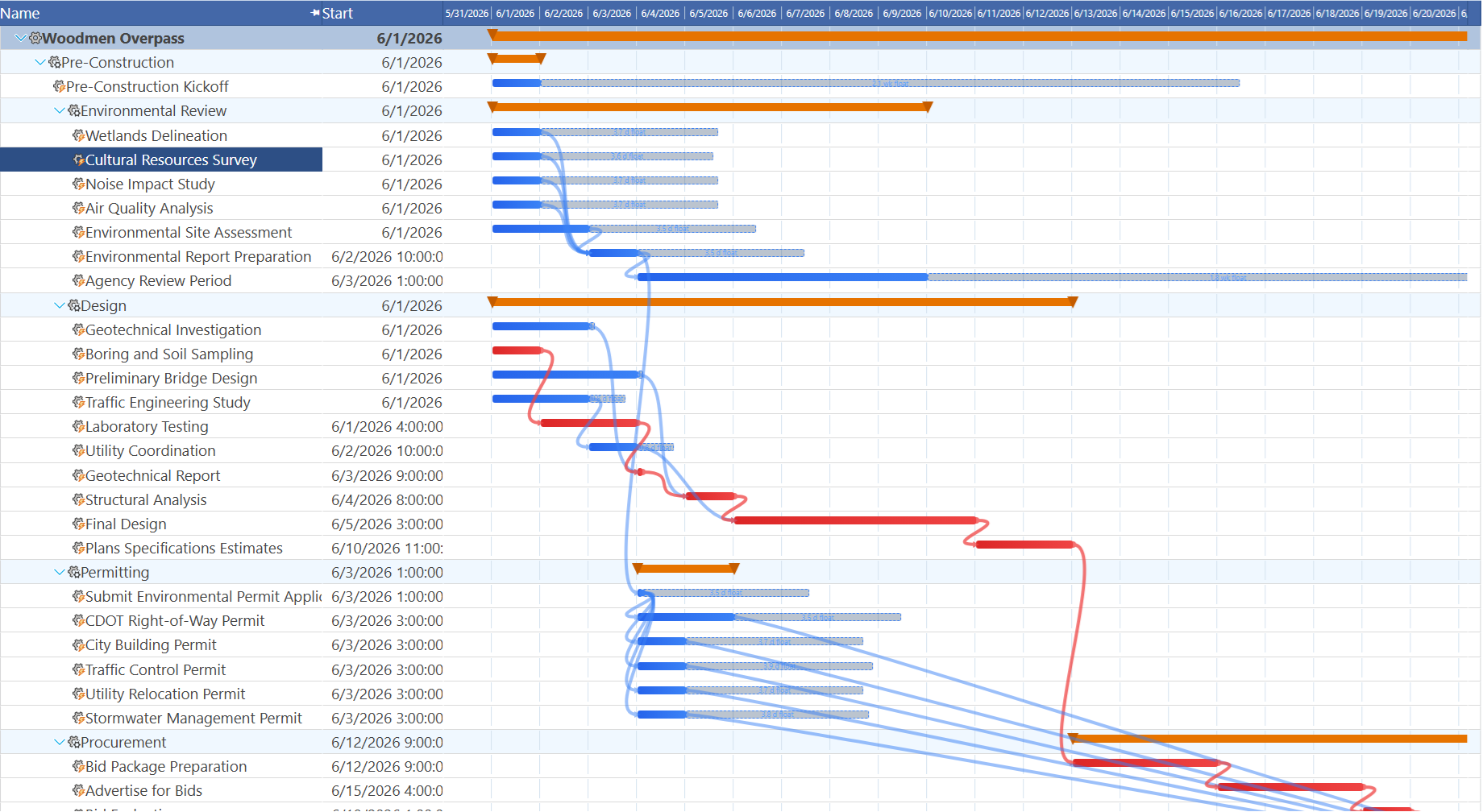
Trello has no concept of a critical path. Its board shows you what is in each status column — it cannot tell you which card, if delayed, pushes your launch date out by two weeks. When a stakeholder asks "what is the worst-case impact of the design phase running over?" — Trello cannot answer that question. Maverick can answer it immediately.
Task Dependencies
Maverick wins decisively. Trello has no native task dependency model.
Maverick supports all four dependency link types — Finish-to-Start, Finish-to-Finish, Start-to-Start, and Start-to-Finish — each with configurable lag days. Learn more about how task dependency link types work in a scheduling engine. When you set a Finish-to-Start dependency between task A and task B, Maverick ensures task B cannot start before task A is complete — and if task A slips, task B's scheduled dates shift automatically.
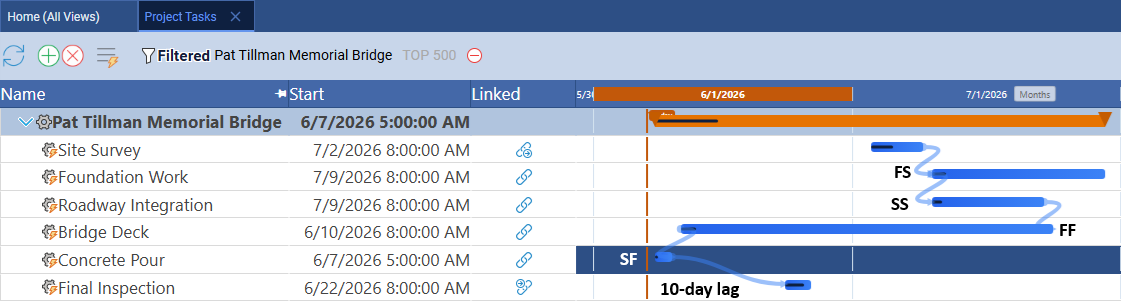
Trello has no native dependency system. You can reference other cards in the description or use third-party Power-Ups to link cards, but these are informational annotations — they do not affect dates, enforce ordering, or trigger any recalculation. If your workflow requires task B to wait for task A, Trello offers no mechanism to enforce or track that relationship in the schedule.
Resource Management
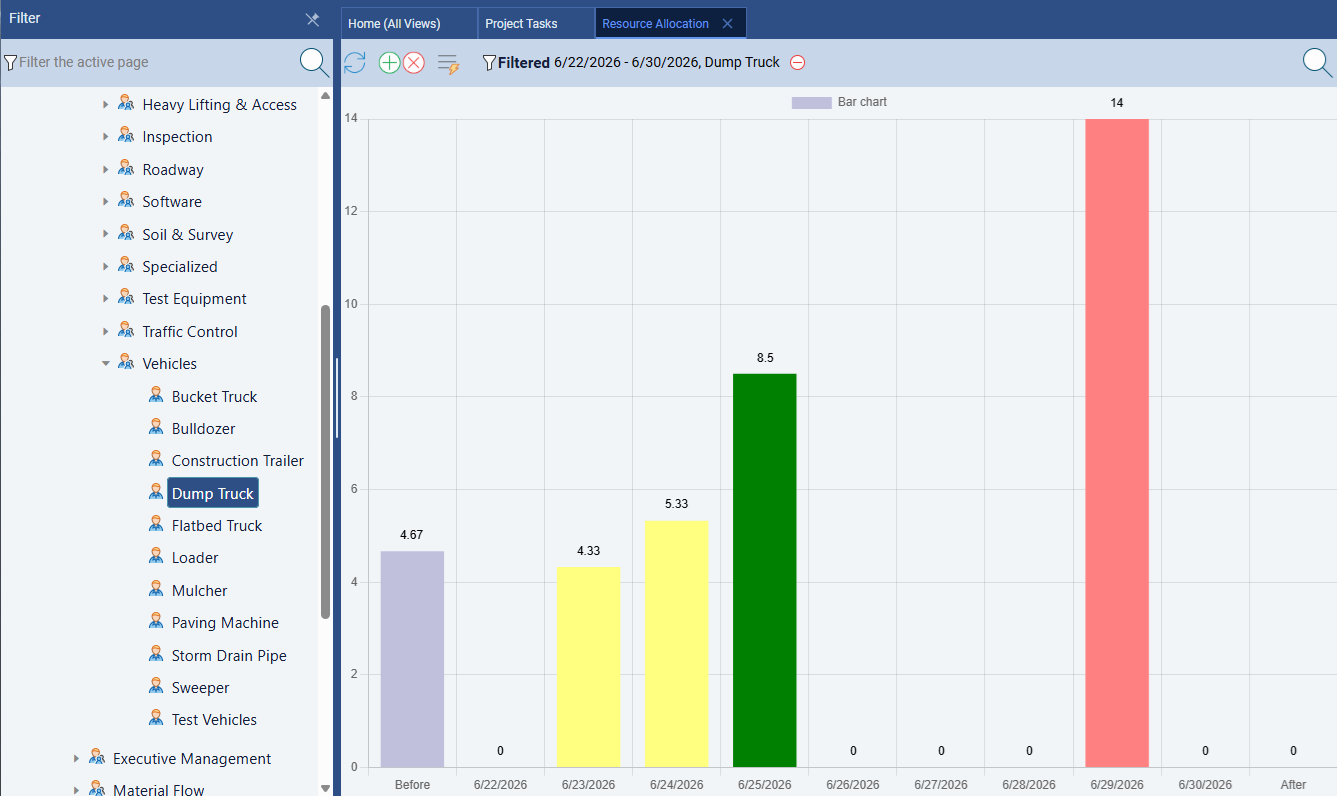
Maverick wins significantly. Maverick treats resource management as a first-class scheduling discipline. Human, machine, and materials resource types are all tracked separately. Resources have individual working hour schedules. Assignments carry utilization percentages or hours per day. The resource allocation bar chart shows — in color — exactly which resources are over-allocated, under-allocated, or correctly loaded across any time range.
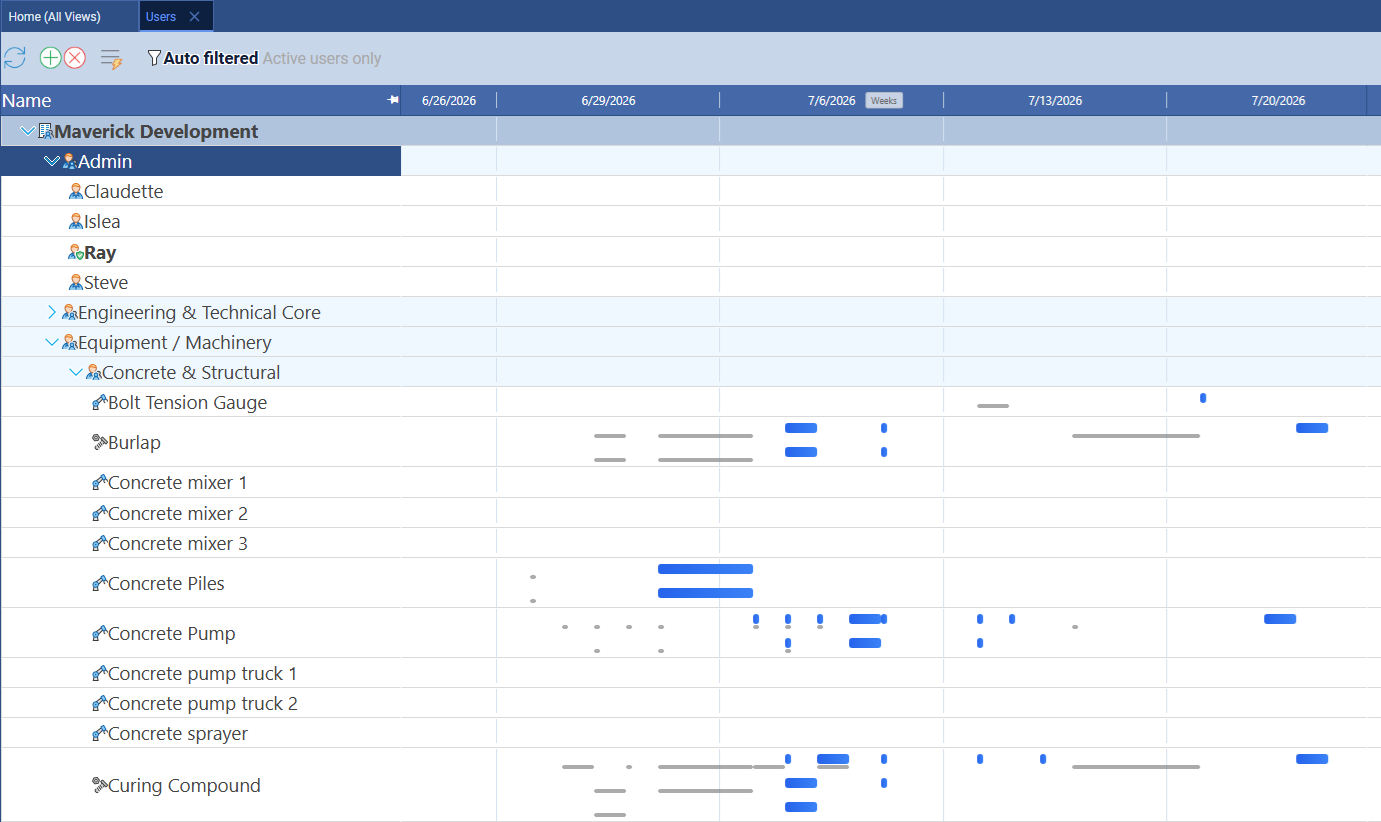
Maverick also includes a resource-centric Gantt on the Users page, where rows represent individual resources and each bar shows every task assigned to that resource across all projects. You can view all three resource types — human, machine, and materials — in a single timeline to see which are double-booked, idle, or correctly loaded.
Trello allows you to assign team members to cards using the Members feature — one or more people can be added to any card. That is where resource management ends. There is no concept of utilization, no schedule conflict detection, no way to model equipment or materials, and no visibility into whether a team member is overloaded across multiple boards or concurrent projects.
AI and Automation
Maverick wins on scheduling depth. Trello's Butler handles rule-based automation.
Trello's built-in automation tool, Butler, lets you define rules, buttons, and scheduled commands: automatically move a card when a due date passes, archive completed cards, assign a member when a label is added. Butler is genuinely useful for reducing repetitive manual steps within a board workflow. It does not involve AI — it is conditional logic applied to card state.
Maverick's AI is different in kind. Instead of reacting to card events, Maverick's AI reads your entire project — its tasks, resources, dependencies, constraints, and history — and builds or restructures the schedule in response to plain-English instructions. You can tell it to reschedule everything after a task delay, assign resources to unassigned tasks, or generate a complete project plan from a description. The AI acts as a scheduling assistant, not a workflow automation engine. Butler cannot do any of this because Trello has no underlying scheduling model for it to operate on.
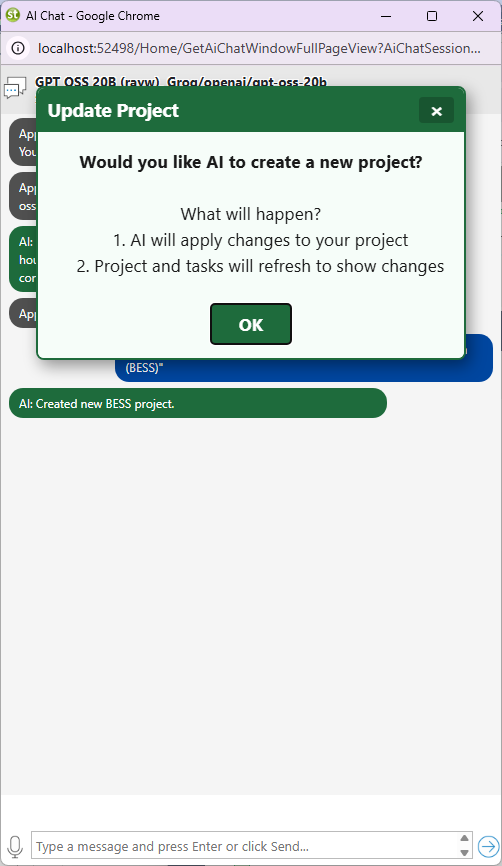
Maverick also lets you assign different AI providers and models per employee — so a power user can work with a premium model while the broader team uses a cost-effective one. This level of configuration has no equivalent in Trello's automation toolset.
Time Tracking and Timesheets
Maverick wins. Trello has no native timesheet.
Maverick includes a full employee timesheet as a built-in feature. Team members log hours against specific tasks and projects directly in the application. Managers can filter timesheets by user, project, and date range to see exactly where time is going. Actual hours feed back into cost calculations automatically, creating a closed loop between the plan and actual performance.
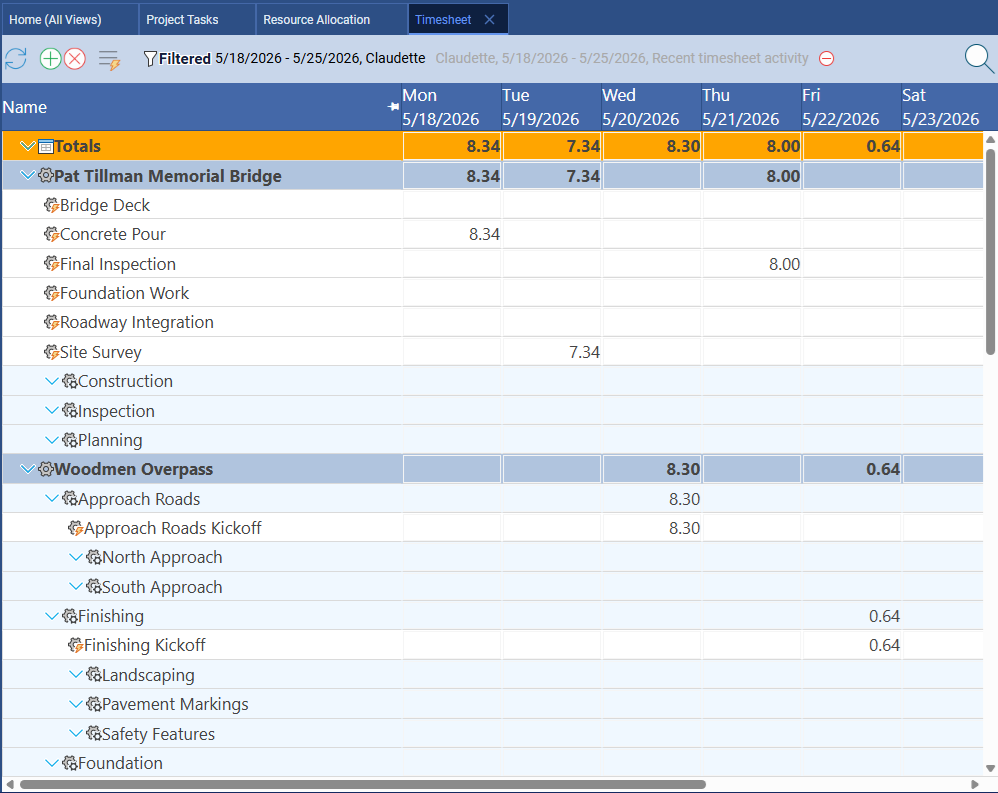
Trello does not include time tracking. Due dates can be set on cards, but there is no mechanism to log actual hours worked. Teams that need to track time against specific tasks must install a third-party Power-Up (Harvest, Toggl, Clockify, and others are available), which adds cost, requires a separate account, and fragments data across two systems. For teams that need to report on billable hours or compare actual effort against estimated effort per task, Trello's native offering falls well short.
Project Baselines and Variance Tracking
Maverick wins. Trello has no baseline concept.
A project baseline is a snapshot of your original plan — dates, durations, and costs — taken at project kickoff. As the project progresses, you compare actual performance against that baseline to understand how far you have drifted and why. Maverick supports baselines natively, displaying ghost bars on the Gantt chart so the original plan is always visible alongside the current schedule.
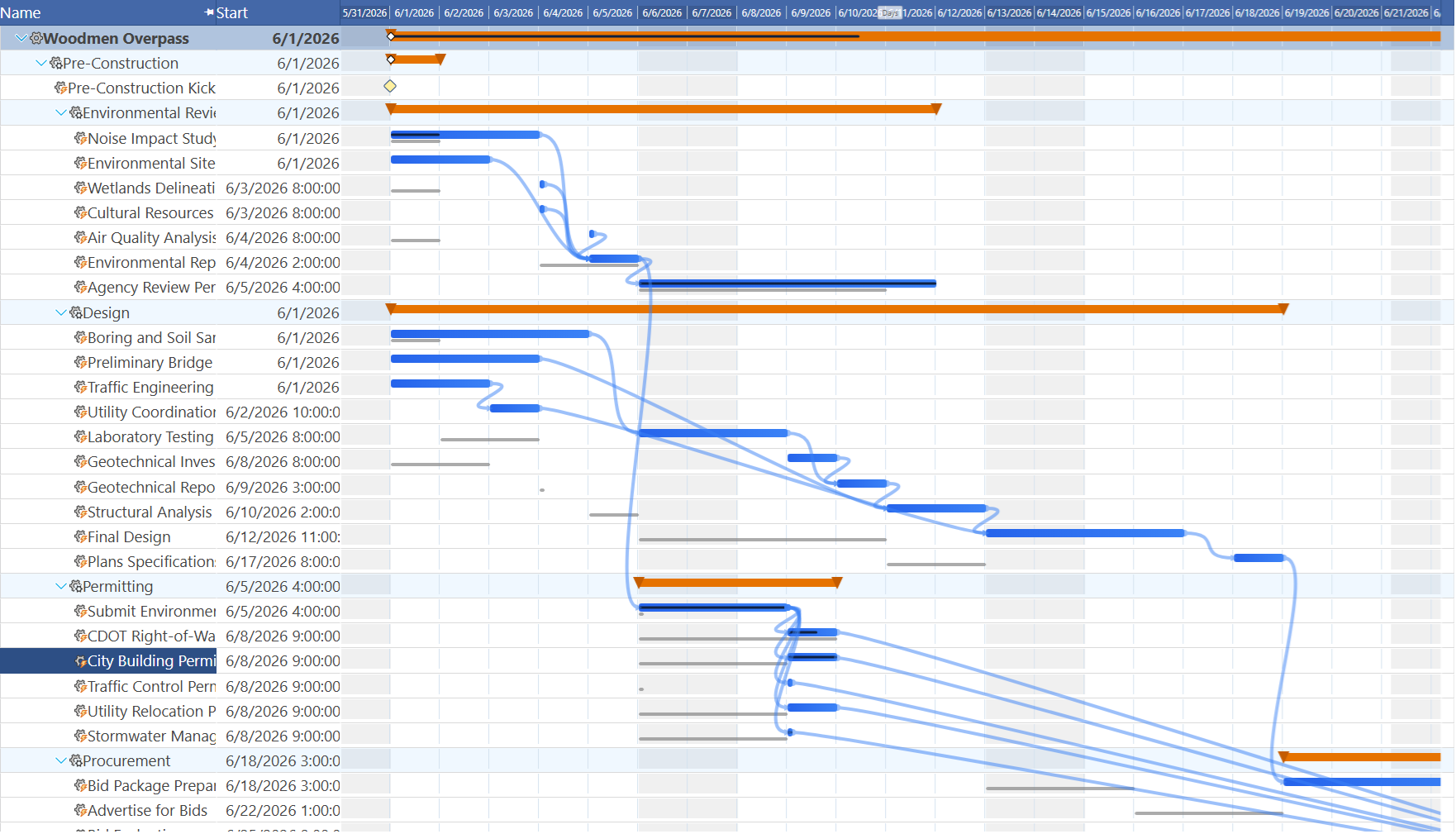
Trello has no baseline feature. Once you update a card's due date, the original planned date is gone. For project managers who report on schedule variance to stakeholders — showing why a project is late and by how much compared to the original plan — this gap is significant. Trello gives you no historical record of what the plan was supposed to be.
Kanban Boards and Card Management
Trello wins this category.
Trello's kanban interface is best-in-class for what it does. The drag-and-drop board, card detail panels, checklists within cards, labels, and column WIP visibility are all polished and immediately usable. For teams whose work flows through a repeatable status pipeline — editorial review, customer support queues, bug triage, onboarding checklists — Trello is a natural fit and genuinely hard to beat on simplicity.
Maverick does not offer a kanban board. Its interface is organized around the scheduling workflow: a task grid, Gantt chart, resource allocation chart, and properties panel. If your team's primary need is visual status tracking through pipeline stages with no dependency or date constraints, Trello delivers a more focused experience. Where Trello falls short is when that work needs to be scheduled against real deadlines with resource accountability.
Power-Ups and Integration Ecosystem
Trello wins this category.
Trello's Power-Up marketplace contains hundreds of integrations — Slack, Google Drive, Jira, Salesforce, time trackers, voting tools, custom fields, and more. For teams that live in a broad technology stack and want a board that connects to everything, Trello's ecosystem is genuinely impressive. Adding capabilities through Power-Ups is low-friction and well-documented.
Maverick focuses on depth over breadth. Its native integrations cover the most common project management data flows — Microsoft Project, Microsoft Office exports, Google Sheets, and Google Drive — alongside its built-in AI provider connections. Teams that need to connect a scheduling tool to dozens of external systems will find Trello's Power-Up library has more options. Teams that need those scheduling capabilities to actually work will find Maverick has the substance.
Pricing
Trello's free tier is more generous — Maverick includes more for project teams.
Trello's free plan is legitimately useful: unlimited cards, up to 10 boards per workspace, and basic Power-Ups. The Standard plan starts around $5 per user per month and adds unlimited boards, advanced checklists, and custom fields. That low entry price makes Trello an easy starting point for small teams that are not yet sure what they need.
Maverick starts at $8.99 per user per month and includes all Pro features — AI scheduling, resource allocation charts, timesheets, custom reporting, and automated exports — as part of every subscription during the current promotional period. When you factor in that Trello at any tier still provides no scheduling engine, no CPM, no resource management, no dependency logic, and no timesheet, the comparison shifts: teams that need real project scheduling get far more capability per dollar from Maverick. The Power-Ups that would be needed to approximate Maverick's built-in features typically cost more than Maverick itself.
Final Verdict: Which Tool Should You Choose?
Trello is an excellent kanban tool and a genuinely fun product to use. For teams managing simple workflows — content pipelines, bug queues, event checklists, personal task lists — its accessibility and free tier make it hard to argue against. If your work flows through status stages with no hard date dependencies, resource constraints, or variance reporting requirements, Trello may be all you need.
But if you are a project manager responsible for delivering projects with real deadlines, interdependent tasks, resource constraints, and stakeholder accountability for schedule variance, Trello leaves critical gaps. No CPM. No dependency scheduling. No resource allocation bar chart. No built-in timesheet. No baselines. No AI that actually builds the schedule. These are not edge cases — they are the core capabilities of professional project scheduling.
Maverick Project Scheduler was built specifically for this discipline. The scheduling engine, resource management, AI integration, and timesheet work together as a coherent system. The result is a tool that genuinely helps you deliver projects — not just move cards to Done and hope they arrive on time.