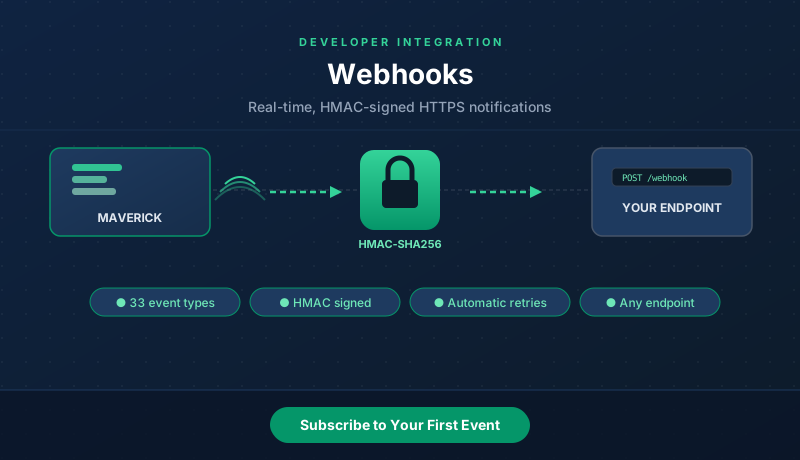
What Are Maverick Webhooks?
Webhooks let Maverick notify your own server the instant something changes — a project created, a task updated, a time log deleted. Instead of polling an API on a schedule, you register an HTTPS endpoint once, and Maverick pushes an HTTP POST to it the moment a matching event happens.
This is Maverick's native webhook system — a separate feature from the Zapier integration (which has its own connection smoke test), with its own dialog, its own event list, and no third-party account required. Every payload is signed with HMAC-SHA256 so your receiver can verify it genuinely came from your Maverick account and was not altered in transit.
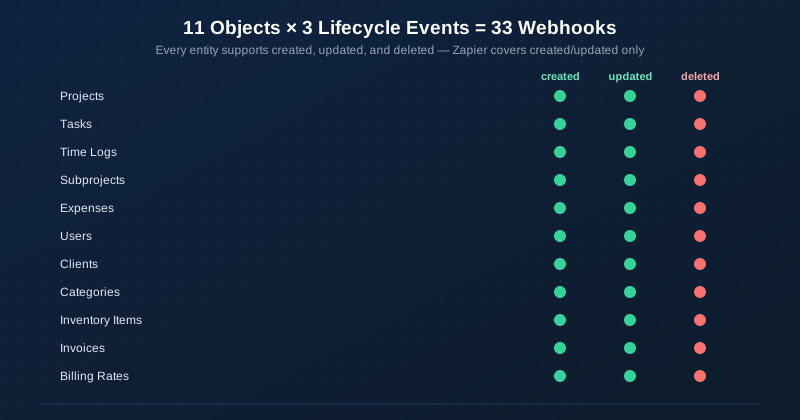
Webhooks cover 33 events — the same 11 core objects used throughout Maverick's data model, each with three lifecycle events: created, updated, and deleted. Field names in the payload match the OData Schema Reference exactly, so if you have already built reporting against the OData feed, the webhook field names will look familiar. For every field in every one of the 33 payloads, see the Webhook Event Reference.
New to webhooks, or just want to confirm delivery and signing work before writing any receiver code? Run the five-minute webhook connection smoke test first — it uses the built-in Test button, so no real project data is touched.
Open the Webhook Subscriptions Dialog
- Open Maverick and click the Tools tab in the ribbon.
- Click the Integration dropdown button.
- Select Webhooks API from the menu.
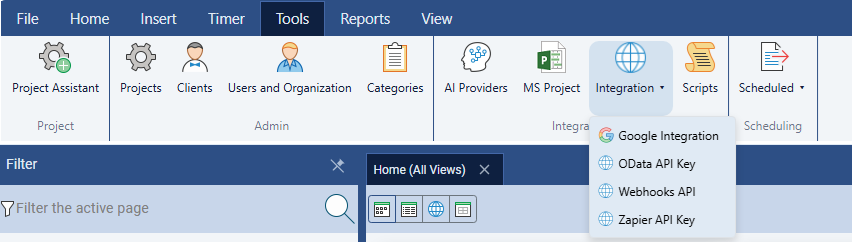
The Webhook Subscriptions dialog opens, showing the subscription form at the top and a list of every subscription you have already created below it.
Create a Subscription
Each subscription pairs one event type with one target URL. Fill in three fields:
- Event type — choose from the 33 supported events, grouped by object (for example,
project.created,task.updated,timelog.deleted). - Target URL — any HTTPS endpoint you control, for example
https://example.com/webhook. - Secret — leave Auto-generate checked to let Maverick create a random 64-character HMAC secret, or uncheck it to supply your own.
Click Add Subscription. Your secret is displayed once in a reveal panel — copy it immediately, because Maverick will only ever show it back to you masked as *** after this point. The screenshot below shows an account with six active subscriptions already created, covering both the Task and Project objects across all three lifecycle events:
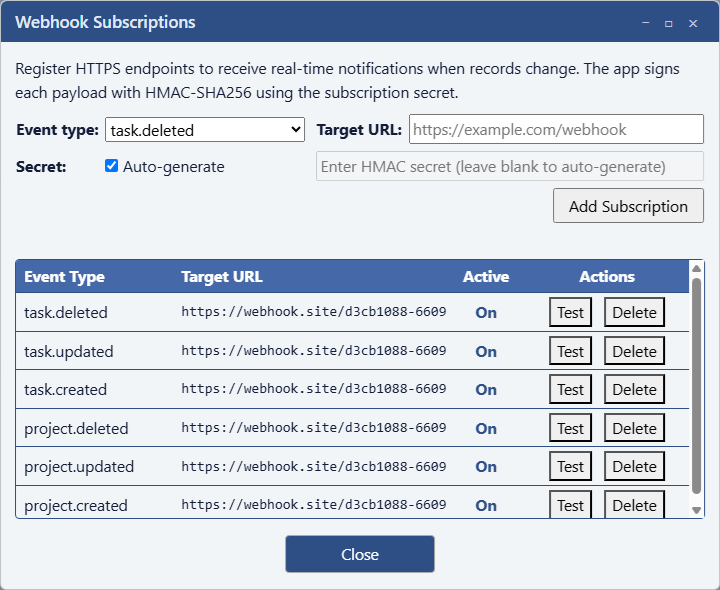
Each row in the list shows its Event Type, Target URL, an Active toggle (On/Off), and Test / Delete buttons — covered in the sections below.
Test Before Going Live with Webhook.site
You do not need a finished receiver to try this out. Webhook.site is a free tool that hands you a unique, disposable URL and shows every request that arrives at it — no account or code required.
- Open webhook.site in a browser tab. It immediately generates a unique URL under Your unique URL.
- Copy that URL.
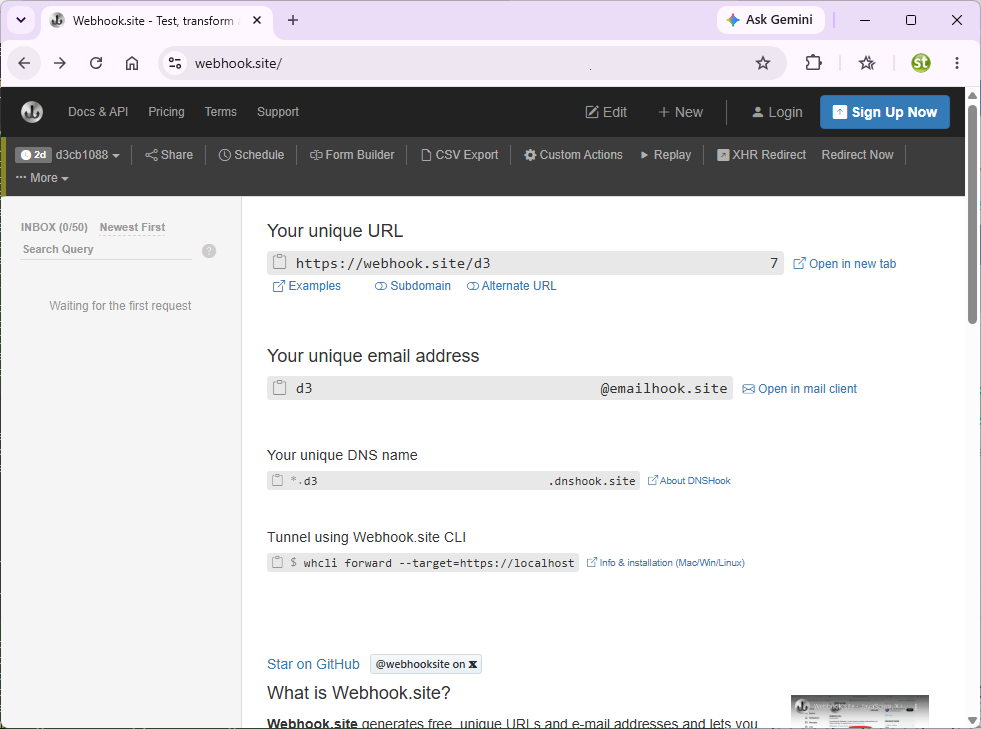
- Paste the webhook.site URL into the Target URL field of a new Maverick subscription and click Add Subscription.
- Click the Test button next to the new subscription in the list, or simply create or edit the matching record in Maverick to trigger a real event.
Inspect a Delivered Webhook
Switch back to the webhook.site tab and click the new entry in the inbox on the left. You will see the full request Maverick sent — method, headers, and JSON body:
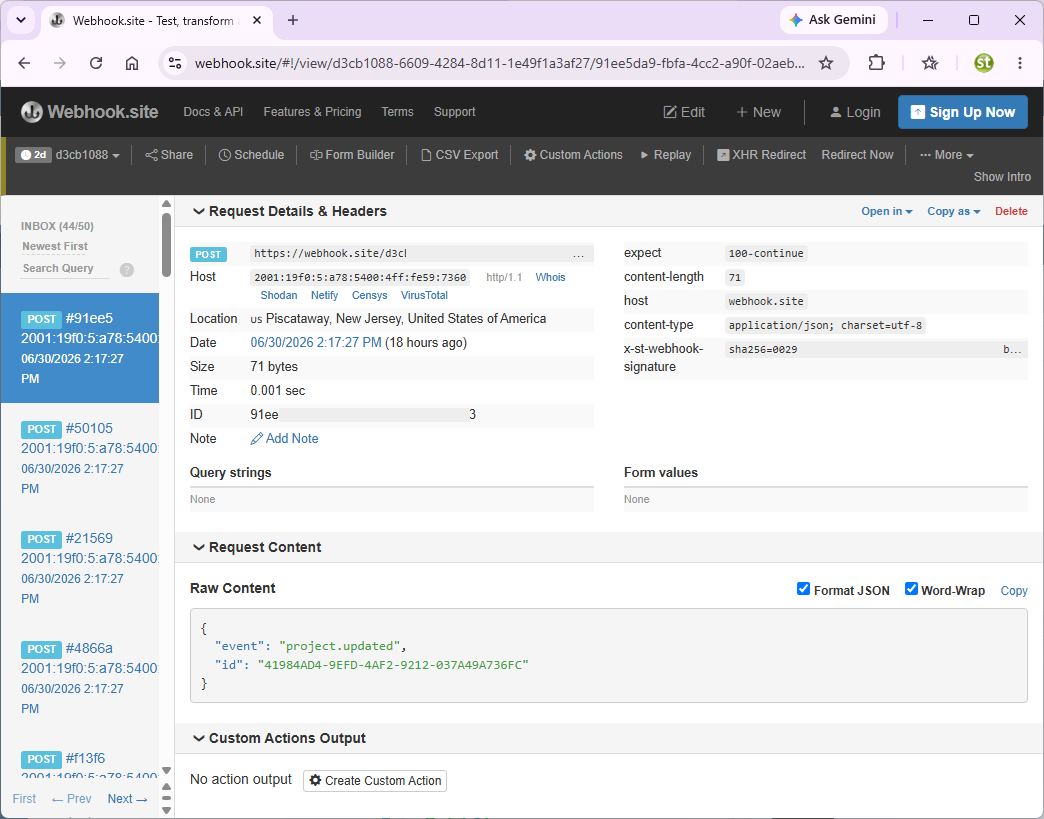
Notice the x-st-webhook-signature header — that is the HMAC-SHA256 signature, in the format sha256=<hex>. Every event includes at least the event type and record ID:
{ "event": "project.updated", "id": "41984ad9-9efd-4af2-9212-037a49a736fc" }
When Maverick can still find the record in the database at delivery time, the payload includes every field for that object rather than just the ID. A project.created or project.updated event normally arrives looking like this:
{ "event": "project.updated", "ProjectID": "b1000002-0000-0000-0000-000000000000", "ProjectName": "Sample Project", "Created": "2026-01-01T08:00:00-05:00", "Modified": "2026-01-15T09:00:00-05:00", "StartDate": "2026-01-01", "FinishDate": "2026-06-30", "Status": "Open", "Priority": "Normal", "Active": true, "ClientID": "d1000004-0000-0000-0000-000000000000", "ClientName": "Acme Corp", "ManagerFullName": "John Smith" }
Every .deleted event always uses the minimal { event, id } shape, since the record no longer exists in the database by the time the notification is sent — there is nothing left to query.
Verify the Signature
Before trusting a webhook payload in production, your receiver should compute its own HMAC-SHA256 over the raw request body using the subscription's secret, then compare it to the X-ST-Webhook-Signature header. A Node.js example:
const crypto = require('crypto'); function isValidSignature(rawBody, signatureHeader, secret) { const expected = 'sha256=' + crypto .createHmac('sha256', secret) .update(rawBody, 'utf8') .digest('hex'); return crypto.timingSafeEqual( Buffer.from(expected), Buffer.from(signatureHeader) ); }
Two details matter here: hash the raw request body bytes — not a re-serialized or pretty-printed copy — and use a constant-time comparison (like crypto.timingSafeEqual) rather than ===, to avoid leaking timing information about the expected signature.
All 33 Event Types
Every one of the 11 core objects in Maverick's data model supports all three lifecycle events — the same 11 objects exposed by the OData feed and the Zapier integration. For the full field list behind each event, see the Webhook Event Reference.
| Object | Event Types |
|---|---|
| Projects | project.created, project.updated, project.deleted |
| Tasks | task.created, task.updated, task.deleted |
| Time Logs | timelog.created, timelog.updated, timelog.deleted |
| Subprojects | subproject.created, subproject.updated, subproject.deleted |
| Expenses | expense.created, expense.updated, expense.deleted |
| Users | user.created, user.updated, user.deleted |
| Clients | client.created, client.updated, client.deleted |
| Categories | category.created, category.updated, category.deleted |
| Inventory Items | inventory.created, inventory.updated, inventory.deleted |
| Invoices | invoice.created, invoice.updated, invoice.deleted |
| Billing Rates | billingrate.created, billingrate.updated, billingrate.deleted |
Delivery, Retries & Subscription Management
Webhook delivery runs on a background task, so a slow or unreachable endpoint never delays the save that triggered it. If your endpoint does not return a successful response, Maverick retries automatically:
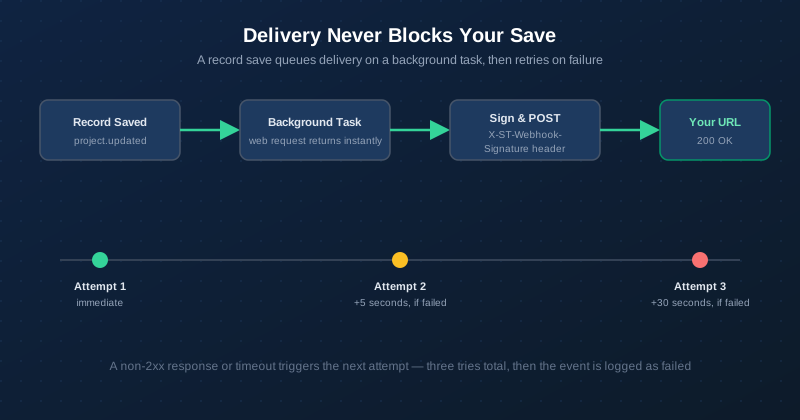
- Attempt 1 — sent immediately after the save.
- Attempt 2 — 5 seconds later, only if attempt 1 failed or timed out.
- Attempt 3 — 30 seconds later, only if attempt 2 also failed.
Each attempt times out after 10 seconds. If all three attempts fail, the event is not queued for later — there is no persistent retry beyond the third attempt, so a receiver that is down for an extended period will miss events sent during that window.
Two controls in the subscription list let you manage delivery without losing your configuration:
- Active toggle — flip a subscription Off to pause delivery temporarily (for example, while your endpoint is down for maintenance) without deleting the URL and secret. Flip it back On to resume.
- Delete — permanently removes the subscription. This is irreversible; recreating it generates a new secret.
Webhooks vs. Zapier vs. OData
All three integrations read from the same 11-object data model, but they solve different problems:
| Webhooks | Zapier | OData | |
|---|---|---|---|
| Delivery style | Push (HTTPS POST) | Push (REST Hooks) | Pull (on demand / scheduled) |
| Events covered | 33 (incl. deletes) | 22 (no deletes) | n/a — queries current data |
| Third-party account needed | No | Yes (Zapier) | No |
| Best for | Your own servers and apps | No-code automation across 5,000+ apps | Power BI, Excel, dashboards |
| Field naming | Matches OData exactly | camelCase | Matches webhooks exactly |
Building your own integration or internal tool? Use webhooks. Want to connect to Slack, Google Sheets, or thousands of other apps without writing code? Use Zapier. Building a reporting dashboard? Use the OData feed with Power BI or Excel. Many teams use more than one.